
Can't install Windows 7 Ultimate x64

Did you see this screen?

View attachment 190959

Yes, I tried installing on Disk 0 and Disk 1. None worked.

Haven't got as far as removing 1 hard drive and I followed theog's guide, it booted from UEFI.

I might try buying a new set of blank disks just incase it is faulty media.
 

My Computer My Computer

Computer type
PC/Desktop
Computer Manufacturer/Model Number
Novatech iRush Pro
OS
Windows 7 Ultimate SP1 - 64 Bit
CPU
Intel Core i5 2500k
Motherboard
Foxconn H67M-S/H67M-V/H67
Memory
2x4GB DDR3 1333Hz
Graphics Card(s)
Ati Radeon 6770
Sound Card
None
Monitor(s) Displays
Samsung S22B150
Screen Resolution
1920x1080
Hard Drives
2x500GB
PSU
500W
Cooling
Fan
Keyboard
HP KU0316
Mouse
Wireless Logitech M185
Internet Speed
20MB/s
Antivirus
Avast Free
Browser
Google Chrome
Other Info
Logitech M185 Mouse
KU-M316 Keyboard
Where did you get Win7? Did you burn the DVD yourself?

Confirm the ISO integrity or download another, burn to DVD using ImgBurn at 4x speed.

You can also write the ISO to flash stick using Universal USB Installer with Win7 in dropdown menu, boot stick using one-time BIOS Boot Menu key given on first screen, under USB, Removable or HD's.
 

My Computer My Computer

Computer type
PC/Desktop
Computer Manufacturer/Model Number
Novatech iRush Pro
OS
Windows 7 Ultimate SP1 - 64 Bit
CPU
Intel Core i5 2500k
Motherboard
Foxconn H67M-S/H67M-V/H67
Memory
2x4GB DDR3 1333Hz
Graphics Card(s)
Ati Radeon 6770
Sound Card
None
Monitor(s) Displays
Samsung S22B150
Screen Resolution
1920x1080
Hard Drives
2x500GB
PSU
500W
Cooling
Fan
Keyboard
HP KU0316
Mouse
Wireless Logitech M185
Internet Speed
20MB/s
Antivirus
Avast Free
Browser
Google Chrome
Other Info
Logitech M185 Mouse
KU-M316 Keyboard
My Computer My Computer

Computer type
PC/Desktop
Computer Manufacturer/Model Number
Novatech iRush Pro
OS
Windows 7 Ultimate SP1 - 64 Bit
CPU
Intel Core i5 2500k
Motherboard
Foxconn H67M-S/H67M-V/H67
Memory
2x4GB DDR3 1333Hz
Graphics Card(s)
Ati Radeon 6770
Sound Card
None
Monitor(s) Displays
Samsung S22B150
Screen Resolution
1920x1080
Hard Drives
2x500GB
PSU
500W
Cooling
Fan
Keyboard
HP KU0316
Mouse
Wireless Logitech M185
Internet Speed
20MB/s
Antivirus
Avast Free
Browser
Google Chrome
Other Info
Logitech M185 Mouse
KU-M316 Keyboard
Do this again and post back a camera snap or type out verbatim the listings on each partition and disk shown.

This sounds like the partitioning given by the correct UEFI install, so perhaps you chose the wrong partition or deleted the needed special MSR partition.

Or if you hadn't booted install using UEFI steps then it may need to have all partitions deleted to create New and Format, or just click Next to have the installer do it for you.

I'd also try the flash stick install to rule out the installer.
 
Last edited:
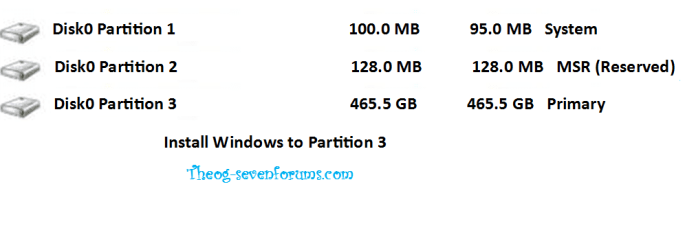
You would want to choose Partition 3 if the partitioning scheme appears as above in Theog's screenshot. This should enable 64 bit install if EFI is functional on your mobo.
 

My Computer My Computer

Computer type
PC/Desktop
Computer Manufacturer/Model Number
Novatech iRush Pro
OS
Windows 7 Ultimate SP1 - 64 Bit
CPU
Intel Core i5 2500k
Motherboard
Foxconn H67M-S/H67M-V/H67
Memory
2x4GB DDR3 1333Hz
Graphics Card(s)
Ati Radeon 6770
Sound Card
None
Monitor(s) Displays
Samsung S22B150
Screen Resolution
1920x1080
Hard Drives
2x500GB
PSU
500W
Cooling
Fan
Keyboard
HP KU0316
Mouse
Wireless Logitech M185
Internet Speed
20MB/s
Antivirus
Avast Free
Browser
Google Chrome
Other Info
Logitech M185 Mouse
KU-M316 Keyboard

My Computer My Computer

Computer type
PC/Desktop
Computer Manufacturer/Model Number
Novatech iRush Pro
OS
Windows 7 Ultimate SP1 - 64 Bit
CPU
Intel Core i5 2500k
Motherboard
Foxconn H67M-S/H67M-V/H67
Memory
2x4GB DDR3 1333Hz
Graphics Card(s)
Ati Radeon 6770
Sound Card
None
Monitor(s) Displays
Samsung S22B150
Screen Resolution
1920x1080
Hard Drives
2x500GB
PSU
500W
Cooling
Fan
Keyboard
HP KU0316
Mouse
Wireless Logitech M185
Internet Speed
20MB/s
Antivirus
Avast Free
Browser
Google Chrome
Other Info
Logitech M185 Mouse
KU-M316 Keyboard
Did you have both HD Drives as Unallocated Space?
Than did you do Step Two in tutorial on Disk0?
http://www.sevenforums.com/tutorial...e-firmware-interface-install-windows-7-a.html
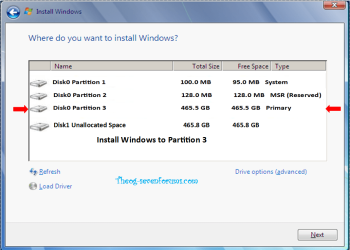
so the partitions look like screenshot below?

View attachment 190969

Yes I got this but I also had disk 1 and chose Partition 3 of Disk 0, then did the same for Disk 1.

1) Click on drive option for Disk0 only. (Leave Disk1 as Unallocated Space)
2) Click on New. (Leave Disk1 as Unallocated Space)
3) Click on Apply. (Leave Disk1 as Unallocated Space)
4) Install Windows to Partition 3. (Leave Disk1 as Unallocated Space)

uEFI004.PNG
 

My Computer My Computer

OS
ME/XP/Vista/Win7
Did you have both HD Drives as Unallocated Space?
Than did you do Step Two in tutorial on Disk0?
http://www.sevenforums.com/tutorial...e-firmware-interface-install-windows-7-a.html
so the partitions look like screenshot below?

View attachment 190969

Yes I got this but I also had disk 1 and chose Partition 3 of Disk 0, then did the same for Disk 1.

1) Click on drive option for Disk0 only. (Leave Disk1 as Unallocated Space)
2) Click on New. (Leave Disk1 as Unallocated Space)
3) Click on Apply. (Leave Disk1 as Unallocated Space)
4) Install Windows to Partition 3. (Leave Disk1 as Unallocated Space)

View attachment 191084

I did to that.
 

My Computer My Computer

Computer type
PC/Desktop
Computer Manufacturer/Model Number
Novatech iRush Pro
OS
Windows 7 Ultimate SP1 - 64 Bit
CPU
Intel Core i5 2500k
Motherboard
Foxconn H67M-S/H67M-V/H67
Memory
2x4GB DDR3 1333Hz
Graphics Card(s)
Ati Radeon 6770
Sound Card
None
Monitor(s) Displays
Samsung S22B150
Screen Resolution
1920x1080
Hard Drives
2x500GB
PSU
500W
Cooling
Fan
Keyboard
HP KU0316
Mouse
Wireless Logitech M185
Internet Speed
20MB/s
Antivirus
Avast Free
Browser
Google Chrome
Other Info
Logitech M185 Mouse
KU-M316 Keyboard
I recently came across this: UEFI Installation of Windows 7 – Video Edition

I think I might order a USB Stick and if that fails - a USB Disk Drive) and install Windows with that and let you know.

Would a 4GB/8GB USB2 USB Drive work, if yes, is 4GB good enough?

I also heard updating the BIOS might help, how would I do that correctly?
 

My Computer My Computer

Computer type
PC/Desktop
Computer Manufacturer/Model Number
Novatech iRush Pro
OS
Windows 7 Ultimate SP1 - 64 Bit
CPU
Intel Core i5 2500k
Motherboard
Foxconn H67M-S/H67M-V/H67
Memory
2x4GB DDR3 1333Hz
Graphics Card(s)
Ati Radeon 6770
Sound Card
None
Monitor(s) Displays
Samsung S22B150
Screen Resolution
1920x1080
Hard Drives
2x500GB
PSU
500W
Cooling
Fan
Keyboard
HP KU0316
Mouse
Wireless Logitech M185
Internet Speed
20MB/s
Antivirus
Avast Free
Browser
Google Chrome
Other Info
Logitech M185 Mouse
KU-M316 Keyboard
Back
Top