Can't Install Windows Updates

Started the scan, and got to 41% before "Windows Reosurce Protection could not perform the requested operation."
 

My Computer

Computer Manufacturer/Model Number
Me, Myself and I
OS
Windows 7 Ultimate x64
Memory
Coarsair 8 GB DDR3
Graphics Card(s)
2 NVIDIA GeForce 560 SC

My Computer

Computer type
PC/Desktop
Computer Manufacturer/Model Number
Custom Asus Build
OS
Microsoft Windows 8.1 Pro 64-bit
CPU
Intel(R) Core(TM) i3-4130 CPU @ 3.40GHz
Motherboard
B85M-E
Memory
8.00 GB
Graphics Card(s)
None
Sound Card
Realtek High Definition Audio
Monitor(s) Displays
Asus 23.6" Monitor
Screen Resolution
1920 x 1080 x 32 bits (4294967296 colors) @ 60 Hz
Hard Drives
INTEL SSDSC2BW180A4
Samsung SSD 840 PRO Series
PSU
Seasonic S12II-380Bronze
Case
Lian Li
Cooling
Fan, Passive
Keyboard
Logitech K120
Mouse
Microsoft Touch Mouse
Internet Speed
4ms Ping, 19.0 Mbps Download, 19.0 Mbps Upload
Antivirus
Eset Endpoint
Browser
Internet Explorer, Chrome
Alright, I'll fiddle with that tomorrow after work.
Thanks for the help folks.
 

My Computer

Computer Manufacturer/Model Number
Me, Myself and I
OS
Windows 7 Ultimate x64
Memory
Coarsair 8 GB DDR3
Graphics Card(s)
2 NVIDIA GeForce 560 SC
Alright, so I returned home from work and found my computer had crashed since I left at 7p and returned at 8a.

Before all this started happening, would leave my computer on all the time, and never had any problems.
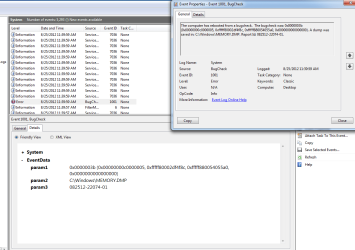
I have attached a screen shot from the even viewer.
I'm not sure how to read these or what they mean. I have googled it and looked up the event idea but I'm still not sure what the fix is.
I will pull the computer apart later this week and reseat the video card and the ram sticks and redo all the connections to make sure that isn't the error. However, if someone with more knowledge of this issue can make some suggestions, I would greatly appreciate it.

Thanks
Raw
 

Attachments

  • crash1.PNG
    crash1.PNG
    117.2 KB · Views: 22

My Computer

Computer Manufacturer/Model Number
Me, Myself and I
OS
Windows 7 Ultimate x64
Memory
Coarsair 8 GB DDR3
Graphics Card(s)
2 NVIDIA GeForce 560 SC
Are you using any 'cleaning' programs, tune-ups, registry cleaners, or 'optimizers'? Are you using zone alarm? If you are, my next response would be to stop. If you're using zone alarm, here is why: PLEASE HELP BSOD - Microsoft Answers

The rest are just tools that do more harm than good. Do not use the aforementioned items and uninstall all such utilities. Do you have a previously installed antivirus that hasn't been fully removed yet?
 

My Computer

Computer type
PC/Desktop
Computer Manufacturer/Model Number
Custom Asus Build
OS
Microsoft Windows 8.1 Pro 64-bit
CPU
Intel(R) Core(TM) i3-4130 CPU @ 3.40GHz
Motherboard
B85M-E
Memory
8.00 GB
Graphics Card(s)
None
Sound Card
Realtek High Definition Audio
Monitor(s) Displays
Asus 23.6" Monitor
Screen Resolution
1920 x 1080 x 32 bits (4294967296 colors) @ 60 Hz
Hard Drives
INTEL SSDSC2BW180A4
Samsung SSD 840 PRO Series
PSU
Seasonic S12II-380Bronze
Case
Lian Li
Cooling
Fan, Passive
Keyboard
Logitech K120
Mouse
Microsoft Touch Mouse
Internet Speed
4ms Ping, 19.0 Mbps Download, 19.0 Mbps Upload
Antivirus
Eset Endpoint
Browser
Internet Explorer, Chrome
Additionally, make sure windows is completely updated, as well as all your drivers. Especially the graphics driver. Let me know if you need help on this front.
 

My Computer

Computer type
PC/Desktop
Computer Manufacturer/Model Number
Custom Asus Build
OS
Microsoft Windows 8.1 Pro 64-bit
CPU
Intel(R) Core(TM) i3-4130 CPU @ 3.40GHz
Motherboard
B85M-E
Memory
8.00 GB
Graphics Card(s)
None
Sound Card
Realtek High Definition Audio
Monitor(s) Displays
Asus 23.6" Monitor
Screen Resolution
1920 x 1080 x 32 bits (4294967296 colors) @ 60 Hz
Hard Drives
INTEL SSDSC2BW180A4
Samsung SSD 840 PRO Series
PSU
Seasonic S12II-380Bronze
Case
Lian Li
Cooling
Fan, Passive
Keyboard
Logitech K120
Mouse
Microsoft Touch Mouse
Internet Speed
4ms Ping, 19.0 Mbps Download, 19.0 Mbps Upload
Antivirus
Eset Endpoint
Browser
Internet Explorer, Chrome
In my opinion, OP has severe hardware issues, most likely a bad motherboard or hard disk, or he's using a frankenbuild/modified windows install disk.
 

My Computer

Computer type
PC/Desktop
OS
Microsoft Windows 10 Professional / Windows 7 Professional
CPU
Intel i5-3570
Motherboard
Lenovo Mahobay
Memory
16GB DDR3
Graphics Card(s)
AMD Radeon HD 7850 2GB
Sound Card
(1) Realtek HD Audio (2) AMD HD Audio
Monitor(s) Displays
LG LS192WS
Screen Resolution
1440 x 900 @ 32bit color
Hard Drives
(1) SUV300S37A/120G (2) ST3500413AS SATA Disk Device AHCI mode enabled.
PSU
Corsair HX620
Case
Thermaltake V4 Black Edition
Cooling
Cooler Master Hyper 212 + Artic Silver 5 on CPU/GPU
Keyboard
Dell SK-8115
Mouse
Razer Copperhead with MAPED mat (awesome!)
Internet Speed
100 Mbps up/down
Browser
Chrome
In my opinion, OP has severe hardware issues, most likely a bad motherboard or hard disk, or he's using a frankenbuild/modified windows install disk.
Any one of these things could indeed be a factor.

Raw was reseating the hardware, but to test it is a little harder. I would wait after a clean install to see if everything checks out before going that route, but it doesn't matter. those tests just take a long time. If someone would like to post Ram and gpu testing tools, that is fine. I do not know how to test motherboards and hdds in this situation as I have never encountered any free software for such tests, or I just don't know about such software.

I gave Raw the benefit of the doubt when it comes to hacked installs. I thought about it just once previously as well.
^Raw, if you have a hacked installation, you are wasting our time. If not, then please continue on, and let me know how you are doing.

 

My Computer

Computer type
PC/Desktop
Computer Manufacturer/Model Number
Custom Asus Build
OS
Microsoft Windows 8.1 Pro 64-bit
CPU
Intel(R) Core(TM) i3-4130 CPU @ 3.40GHz
Motherboard
B85M-E
Memory
8.00 GB
Graphics Card(s)
None
Sound Card
Realtek High Definition Audio
Monitor(s) Displays
Asus 23.6" Monitor
Screen Resolution
1920 x 1080 x 32 bits (4294967296 colors) @ 60 Hz
Hard Drives
INTEL SSDSC2BW180A4
Samsung SSD 840 PRO Series
PSU
Seasonic S12II-380Bronze
Case
Lian Li
Cooling
Fan, Passive
Keyboard
Logitech K120
Mouse
Microsoft Touch Mouse
Internet Speed
4ms Ping, 19.0 Mbps Download, 19.0 Mbps Upload
Antivirus
Eset Endpoint
Browser
Internet Explorer, Chrome
Additionally, make sure windows is completely updated, as well as all your drivers. Especially the graphics driver. Let me know if you need help on this front.

Graphic drives are on Nvidia beta ones currently. After the previous blue screens I switched from their current ones to a beta one.

In my opinion, OP has severe hardware issues, most likely a bad motherboard or hard disk, or he's using a frankenbuild/modified windows install disk.

The HDD I'm currently using is 2 days old. I thought that was the problem so I replaced the old one. I'm pretty positive it's not the ram as I ram Mem test on it for over 3 hours (sufficient time? I'm not sure) and had no problems. If by franken build you mean the PC itself, it's not. The only thing I carried over from my old build is the 850 Watt PSU and the case. Everything else is no older than 2 months.

Edit: Is there a way to test the MoBo without buying a new one? I can't think of any and I do not have one for this socket (1155) around the house.

In my opinion, OP has severe hardware issues, most likely a bad motherboard or hard disk, or he's using a frankenbuild/modified windows install disk.
Any one of these things could indeed be a factor.

Raw was reseating the hardware, but to test it is a little harder. I would wait after a clean install to see if everything checks out before going that route, but it doesn't matter. those tests just take a long time. If someone would like to post Ram and gpu testing tools, that is fine. I do not know how to test motherboards and hdds in this situation as I have never encountered any free software for such tests, or I just don't know about such software.

I gave Raw the benefit of the doubt when it comes to hacked installs. I thought about it just once previously as well.
^Raw, if you have a hacked installation, you are wasting our time. If not, then please continue on, and let me know how you are doing.

If by hack install you mean pirate disk; then no. I bought the OS when I was buying all the other pieces for the new machine.
 

My Computer

Computer Manufacturer/Model Number
Me, Myself and I
OS
Windows 7 Ultimate x64
Memory
Coarsair 8 GB DDR3
Graphics Card(s)
2 NVIDIA GeForce 560 SC
I just tried to do an update and received an error.
WindowsUpdate_800736CC and WindowsUpdate_dt000
I looked into the Windows Help and Support link that came with the error. It had me download the System Update Readiness Tool, as was suggested earlier.
I"m going to redownload it, and rerun it. One last try before I clean install.

Edit: Sorry for so many posts. When I try to run the Readiness tool, it gives me an error saying the data is invalid.
I'm going to start a clean install here shortly.

Any suggestions on how to do things differently? I've never encountered such an issue with a windows installation. Is there a best way to go about this, perhaps something I didn't think of before?
 

My Computer

Computer Manufacturer/Model Number
Me, Myself and I
OS
Windows 7 Ultimate x64
Memory
Coarsair 8 GB DDR3
Graphics Card(s)
2 NVIDIA GeForce 560 SC

My Computer

Computer type
PC/Desktop
Computer Manufacturer/Model Number
Custom Asus Build
OS
Microsoft Windows 8.1 Pro 64-bit
CPU
Intel(R) Core(TM) i3-4130 CPU @ 3.40GHz
Motherboard
B85M-E
Memory
8.00 GB
Graphics Card(s)
None
Sound Card
Realtek High Definition Audio
Monitor(s) Displays
Asus 23.6" Monitor
Screen Resolution
1920 x 1080 x 32 bits (4294967296 colors) @ 60 Hz
Hard Drives
INTEL SSDSC2BW180A4
Samsung SSD 840 PRO Series
PSU
Seasonic S12II-380Bronze
Case
Lian Li
Cooling
Fan, Passive
Keyboard
Logitech K120
Mouse
Microsoft Touch Mouse
Internet Speed
4ms Ping, 19.0 Mbps Download, 19.0 Mbps Upload
Antivirus
Eset Endpoint
Browser
Internet Explorer, Chrome
Should I save my graphics driver on a flash drive so I have it ready right away, no internet connection needed?
Or is that a bad idea?
 

My Computer

Computer Manufacturer/Model Number
Me, Myself and I
OS
Windows 7 Ultimate x64
Memory
Coarsair 8 GB DDR3
Graphics Card(s)
2 NVIDIA GeForce 560 SC
It is up to you. You will need a LAN driver also if you plan to connect to the internet for other drivers. You may have the cd from te motherboard, but the newest driver is usually the best one.
 

My Computer

Computer type
PC/Desktop
Computer Manufacturer/Model Number
Custom Asus Build
OS
Microsoft Windows 8.1 Pro 64-bit
CPU
Intel(R) Core(TM) i3-4130 CPU @ 3.40GHz
Motherboard
B85M-E
Memory
8.00 GB
Graphics Card(s)
None
Sound Card
Realtek High Definition Audio
Monitor(s) Displays
Asus 23.6" Monitor
Screen Resolution
1920 x 1080 x 32 bits (4294967296 colors) @ 60 Hz
Hard Drives
INTEL SSDSC2BW180A4
Samsung SSD 840 PRO Series
PSU
Seasonic S12II-380Bronze
Case
Lian Li
Cooling
Fan, Passive
Keyboard
Logitech K120
Mouse
Microsoft Touch Mouse
Internet Speed
4ms Ping, 19.0 Mbps Download, 19.0 Mbps Upload
Antivirus
Eset Endpoint
Browser
Internet Explorer, Chrome
Alright, I have done a clean install.
The first four updates have downloaded without a hitch. I'm currently downloading my graphics driver and when that is done I will restart and hopefully all the updates are in and the blue sceens stop.
 

My Computer

Computer Manufacturer/Model Number
Me, Myself and I
OS
Windows 7 Ultimate x64
Memory
Coarsair 8 GB DDR3
Graphics Card(s)
2 NVIDIA GeForce 560 SC
raw157, what was your motherboard model? If possible, try loading bios defaults and if you're using SATA3 ports move back to SATA2 and perform a clean install.
 

My Computer

Computer type
PC/Desktop
OS
Microsoft Windows 10 Professional / Windows 7 Professional
CPU
Intel i5-3570
Motherboard
Lenovo Mahobay
Memory
16GB DDR3
Graphics Card(s)
AMD Radeon HD 7850 2GB
Sound Card
(1) Realtek HD Audio (2) AMD HD Audio
Monitor(s) Displays
LG LS192WS
Screen Resolution
1440 x 900 @ 32bit color
Hard Drives
(1) SUV300S37A/120G (2) ST3500413AS SATA Disk Device AHCI mode enabled.
PSU
Corsair HX620
Case
Thermaltake V4 Black Edition
Cooling
Cooler Master Hyper 212 + Artic Silver 5 on CPU/GPU
Keyboard
Dell SK-8115
Mouse
Razer Copperhead with MAPED mat (awesome!)
Internet Speed
100 Mbps up/down
Browser
Chrome
I'm using a gygabit z77-ds3h.
I'm almost positive I am in the SATA2 port, but I will try the bios defaults.
Thansk :)
 

My Computer

Computer Manufacturer/Model Number
Me, Myself and I
OS
Windows 7 Ultimate x64
Memory
Coarsair 8 GB DDR3
Graphics Card(s)
2 NVIDIA GeForce 560 SC
I think the clean install fixed it.
Only one question. When I right click on my computer and hit properties, should it say Win 7 Ulti SP1, after all the updates are done? Or not?
 

My Computer

Computer Manufacturer/Model Number
Me, Myself and I
OS
Windows 7 Ultimate x64
Memory
Coarsair 8 GB DDR3
Graphics Card(s)
2 NVIDIA GeForce 560 SC
I think the clean install fixed it.
Only one question. When I right click on my computer and hit properties, should it say Win 7 Ulti SP1, after all the updates are done? Or not?

Yes.
In case it doesn't you might have to manually check for the most recent updates and download them.
 

My Computer

Computer type
PC/Desktop
Computer Manufacturer/Model Number
Self assembled
OS
Windows 10 Home 64Bit
CPU
Intel Core i5 10400 @ 2.90GHz
Motherboard
Intel Corporation DG41WV (PROCESSOR)
Memory
8.00GB Single-Channel Unknown @ 1329MHz (16-20-20-38)
Sound Card
Realtek High Definition Audio
Monitor(s) Displays
DELL E170S
Screen Resolution
1280x1024 pixels
Hard Drives
931GB TOSHIBA DT01ACA100 (SATA)
238GB TEAM TM8PS7256G (SATA SSD)
Case
Nothing Fancy
Cooling
Fans
Keyboard
A4 Tech Co LTD
Mouse
A4 Tech Co Ltd/Logitech
Internet Speed
25 Mbps
Can a mod or someone close this thread, or if everyone would just let it die.
My problems have gotten worse, I can't even get into Windows now, thus no updates.

I'm going to start a new thread in a different section.

Thanks for your help folks, it is much appreciated.
 

My Computer

Computer Manufacturer/Model Number
Me, Myself and I
OS
Windows 7 Ultimate x64
Memory
Coarsair 8 GB DDR3
Graphics Card(s)
2 NVIDIA GeForce 560 SC

My Computer

Computer type
PC/Desktop
Computer Manufacturer/Model Number
Custom Asus Build
OS
Microsoft Windows 8.1 Pro 64-bit
CPU
Intel(R) Core(TM) i3-4130 CPU @ 3.40GHz
Motherboard
B85M-E
Memory
8.00 GB
Graphics Card(s)
None
Sound Card
Realtek High Definition Audio
Monitor(s) Displays
Asus 23.6" Monitor
Screen Resolution
1920 x 1080 x 32 bits (4294967296 colors) @ 60 Hz
Hard Drives
INTEL SSDSC2BW180A4
Samsung SSD 840 PRO Series
PSU
Seasonic S12II-380Bronze
Case
Lian Li
Cooling
Fan, Passive
Keyboard
Logitech K120
Mouse
Microsoft Touch Mouse
Internet Speed
4ms Ping, 19.0 Mbps Download, 19.0 Mbps Upload
Antivirus
Eset Endpoint
Browser
Internet Explorer, Chrome
Back
Top