Can't Install Windows7 On Vmware 7.14

m1000

New member
Member
Local time
4:21 AM
Messages
43
Hi All ..

I'm Trying to Install Win7 On Virtual Machine Using Vmware 7.14

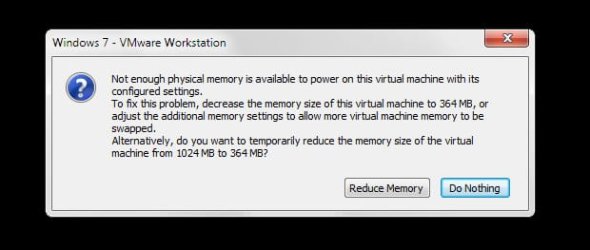
But Every Time The Virtual Machine Boot i Got this Massage :

2011-06-04_154435.jpg

I Have 8GB Of Ram !

:confused:
 

My Computer My Computer

At a glance

Windows7 x64
OS
Windows7 x64
What operating system do you have now? I don't understand why you are trying to install Windows 7 on a virtual machine. Generally the virtual machine is used to install XP or and older operating system on Windows 7 or Vista.
 

My Computer My Computer

At a glance

Desk Top with Win 7 Home Premium 64 bit and L...8Gig
Computer type
Laptop
Computer Manufacturer/Model Number
HP Pavilion g7-1260us Notebook
OS
Desk Top with Win 7 Home Premium 64 bit and Lap Top with Windows 8.1 Pro 64 bit
Memory
8Gig
Screen Resolution
1600x900
What operating system do you have now? I don't understand why you are trying to install Windows 7 on a virtual machine. Generally the virtual machine is used to install XP or and older operating system on Windows 7 or Vista.
Not really. Many install the same OS they are physically using, on a VM. To test out software/scenarios that would be similar on the OS on their physical machines.
 

My Computer My Computer

At a glance

Windows 7 Ultimate x64 SP1Core i7 920 (D0) @ 4Ghz, *26c idle *65c full ...12GB DDR3 Corsair Dominator -CMD12GX3M6A1600C...Zotac Geforce GTX 770
Computer type
PC/Desktop
Computer Manufacturer/Model Number
Airbot 2.0
OS
Windows 7 Ultimate x64 SP1
CPU
Core i7 920 (D0) @ 4Ghz, *26c idle *65c full load on air
Motherboard
Asus P6X58D Premium - Sata 6Gb/s - USB 3.0
Memory
12GB DDR3 Corsair Dominator -CMD12GX3M6A1600C8 at 1600MHz
Graphics Card(s)
Zotac Geforce GTX 770
Sound Card
ASUS Xonar D2X
Monitor(s) Displays
1 LG 24" Flatron W2453V-PF 1 Samsung 24" P2450H both 2ms RT
Screen Resolution
1920x1080@60hz
Hard Drives
1 Samsung 250GB 840 Evo SSD
1 OCZ Vertex2 180GB SSD
1 TB Samsung Spinpoint F1 7200RPM 32MB cache
2 500GB WD Caviar Blacks 7200RPM 32MB cache (WD5001AALS)

Pioneer DVD Burner DVR-S18M
PSU
Corsair HX1000W
Case
Cooler Master HAF 932
Cooling
Case Fans *3 230mm, *1 140mm/CPU - *Tuniq Tower 120 Extreme
Keyboard
Logitech Wireless MK700
Mouse
Logitech Wireless MK700
Internet Speed
DL 15 Mbps UL 0.98 Mbps
Antivirus
None
Browser
Firefox Nightly
Other Info
Processor-7.7 *RAM- 7.9 *Graphics-7.9 *Gaming Graphics- 7.9 *SSD- 7.8 W.E.I final score= 7.7
*Phone- LG Nexus 5
[/QUOTE]Not really. Many install the same OS they are physically using, on a VM. To test out software/scenarios that would be similar on the OS on their physical machines.[/QUOTE]
Well--I learned something. I didn't know that. I believe that the message about not enough RAM is certainly not right. It's strange that you are getting that message. I have Windows 7 and put XP on a virtual machine with no problem. Most of the members on this forum know more than I do. I'm sure one of them will have an answer for you.

 

My Computer My Computer

At a glance

Desk Top with Win 7 Home Premium 64 bit and L...8Gig
Computer type
Laptop
Computer Manufacturer/Model Number
HP Pavilion g7-1260us Notebook
OS
Desk Top with Win 7 Home Premium 64 bit and Lap Top with Windows 8.1 Pro 64 bit
Memory
8Gig
Screen Resolution
1600x900
What operating system do you have now? I don't understand why you are trying to install Windows 7 on a virtual machine. Generally the virtual machine is used to install XP or and older operating system on Windows 7 or Vista.

I'm Using Win7 64x SP1 ...


What operating system do you have now? I don't understand why you are trying to install Windows 7 on a virtual machine. Generally the virtual machine is used to install XP or and older operating system on Windows 7 or Vista.
Not really. Many install the same OS they are physically using, on a VM. To test out software/scenarios that would be similar on the OS on their physical machines.

And that's What i Want ... Thanx Airbot :D
 

My Computer My Computer

At a glance

Windows7 x64
OS
Windows7 x64
Hi there
With 8GB RAM you should be able to run at least 4 or 5 VM's !!!

I've never seen this problem before

Does Windows on the HOST machine recognize you've got 8GB RAM installed.

A Virtual W7 VM will run just fine when allocated 1 GB RAM -- in any case you can't really equate the Virtual RAM requirements for a VM with the RAM requirements for a PHYSICAL machine.

It's not a simple 1:1 relationship.

But to get back to the topic -- check the RAM used by the HOST and RAM RECOGNIZED by the host.

Cheers
jimbo
 

My Computer My Computer

At a glance

Linux CENTOS 7 / various Windows OS'es and se...Intel i7 Intel i58GB, 16GBOn Motherboard
Computer type
PC/Desktop
Computer Manufacturer/Model Number
Custom built, several laptops HP/ASUS
OS
Linux CENTOS 7 / various Windows OS'es and servers
CPU
Intel i7 Intel i5
Memory
8GB, 16GB
Graphics Card(s)
On Motherboard
Sound Card
Realtek HD audio
Monitor(s) Displays
Apple Cinema display, Samsung LCD
Screen Resolution
1920 X 1080
Hard Drives
4 X 1TB SATA
Mouse
Toshiba wireless laser
Internet Speed
> 20MB up
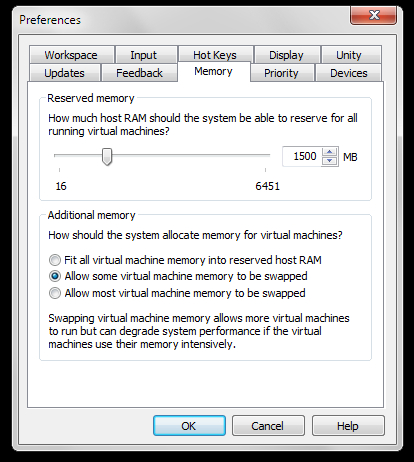
In VMware Workstation, go to Edit --> Preferences and then select the Memory Tab and see how much memory is allowed to be used by the program and also try using the option "Allow some virtual machine memory to be swapped" if it is not already selected.
 

My Computer My Computer

At a glance

Windows 7 Ultimate x64 SP1Intel Core i3 530 2.93 Ghz Clarkdale4 GB OCZ DDR3 1600 (PC12800) Low Voltage Desk...Nvidia GeForce GTX 550 Ti with 1 GB of RAM
OS
Windows 7 Ultimate x64 SP1
CPU
Intel Core i3 530 2.93 Ghz Clarkdale
Motherboard
ASRock P55 PRO/USB3 LGA 1156
Memory
4 GB OCZ DDR3 1600 (PC12800) Low Voltage Desktop Memory
Graphics Card(s)
Nvidia GeForce GTX 550 Ti with 1 GB of RAM
Sound Card
Realtek HD ALC892
Monitor(s) Displays
20'' eMachines E202HDbmd Glare Panel Widescreen
Screen Resolution
1600 x 900
Hard Drives
Western Digital 1 TB Caviar Black Edition (7200 RPM) SATA
Hitachi Deskstar 500 GB (7200 RPM) SATA
Samsung SpinPoint 400 GB (7200 RPM) SATA
PSU
Rosewill Xtreme Series RX750-D-B ATX12V v2.2 & EPS12V (750W)
Case
Cooler Master Centurion 534 RC-534-KKN2-GP Mid-Tower
Cooling
Standard Case Fans and Stock CPU Heatsink
Keyboard
Microsoft Wireless Optical Desktop Elite
Mouse
Microsoft Wireless Optical Desktop Elite
Internet Speed
7.1 Mbps Verizon DSL
hi there ...

I Found the Problem

Edit >> Preferences


xqe9d.jpg


The Number Was 400 I Changed it to 1500 Now it's Working Smoothly

Thanx Everybody ..

:)
 

My Computer My Computer

At a glance

Windows7 x64
OS
Windows7 x64
Back
Top