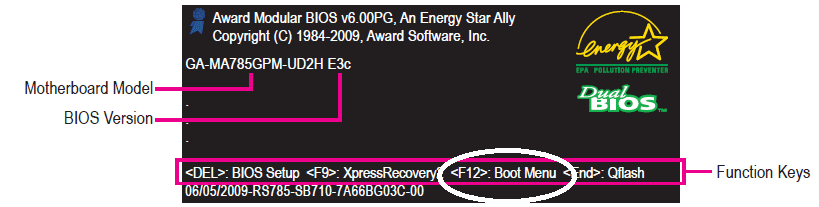
Please rest assured that Windows 7 has nothing to do with a computer booting to this level. This is all motherboard, controlled by the BIOS. The reason you might not see the screen I posted to earlier is if you have enabled some form of "Quick Boot" that bypasses all this stuff and goes strait to the OS to save time. To avoid that you must begin tapping the F12 key as soon as the three lights on the keyboard flash, to enter the boot menu.it doesn't tell me to tap a key, usually it would tell me to tap anykey to continue my boot. but ever since i've installed W7 it doesn't tell me to tap anything it just says "To Boot from CD:..."
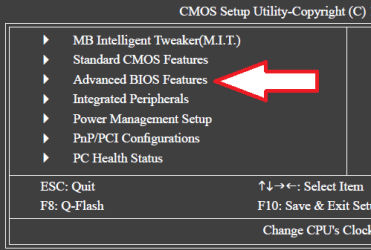
To enter the bios to set the DVD as the first drive in boot order, begin tapping the Delete key as soon as the three lights on the keyboard flash. When the BIOS menu appears, scroll down to Advanced Bios Features and find the First Boot Device and set to the DVD / CD Rom.
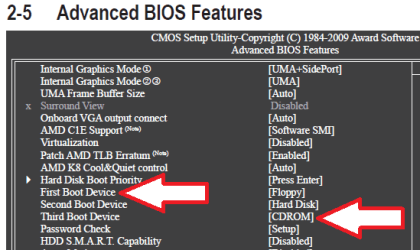
You can even temporarily disable any hard drive from the boot order so you boot to the CD or to nothing. You can go back later and change the boot order back.
Cheers!
Robert
My Computer
- OS
- ...