Cant join homegroup from other computer?

BorutFLis

New member
Local time
7:21 AM
Messages
1
I have created a homegroup on one computer, but on the other computer I cant join it, it says "There is no homegroup on the network". I have tried every suggestion from Why can't I create a homegroup? . What else can I do? Both of the computers are behind a switch. Below is a picture of the network map from network and sharing center.
12229154.jpg
 

My Computer

OS
Windows 7 Ultimate x64
Hello Borut, and welcome to Sevenforums

Go into network and sharing center, and on the far left, click "Change advanced sharing settings".
Make sure Network discovery, file and printer sharing, and "Allow windows to manage homegroup connections" are all turned on (you may want to turn on public folder sharing as well).

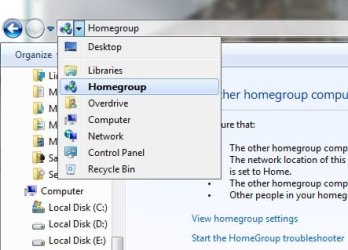
Additionally, go to Control Panel>Network and Internet>Homegroup and make sure you have selected the things you are willing to share. You can also view the password in this page if you are the host, or you can start the homegroup troubleshooter. Now follow this picture to get to the homegroup join page:
save (2).jpg
If you still can't, restart the computer and try again. Failing that, update your computer. Failing that, you have a deeper problem.
 
Last edited:

My Computer

Computer type
PC/Desktop
Computer Manufacturer/Model Number
Custom Asus Build
OS
Microsoft Windows 8.1 Pro 64-bit
CPU
Intel(R) Core(TM) i3-4130 CPU @ 3.40GHz
Motherboard
B85M-E
Memory
8.00 GB
Graphics Card(s)
None
Sound Card
Realtek High Definition Audio
Monitor(s) Displays
Asus 23.6" Monitor
Screen Resolution
1920 x 1080 x 32 bits (4294967296 colors) @ 60 Hz
Hard Drives
INTEL SSDSC2BW180A4
Samsung SSD 840 PRO Series
PSU
Seasonic S12II-380Bronze
Case
Lian Li
Cooling
Fan, Passive
Keyboard
Logitech K120
Mouse
Microsoft Touch Mouse
Internet Speed
4ms Ping, 19.0 Mbps Download, 19.0 Mbps Upload
Antivirus
Eset Endpoint
Browser
Internet Explorer, Chrome
Back
Top