
Can't login to netgear router information WNR1000v2

Josh7

New member
Member
Local time
12:19 PM
Messages
81
So usually I could login into routerlogin.net

Well, now I can't. Any time I try to it redirects me to Netgear home support page. The page I need is where all my settings are for my router (Wireless, connections, etc.)

When I installed the router it gives me a link to the page directly and it would pop right to it, after typing in "admin" and "Password" but now, nothing. I don't think my Modem and Router are sharing information.

Any help would be appreciated, thanks.
 

My Computer My Computer

At a glance

Windows 7 Home Premium x64Quadcore4GBNvidea Gefore 9200
Computer Manufacturer/Model Number
Acer
OS
Windows 7 Home Premium x64
CPU
Quadcore
Motherboard
Nvidea Chipset 9200
Memory
4GB
Graphics Card(s)
Nvidea Gefore 9200
Monitor(s) Displays
Dell LCD Monitor
Screen Resolution
1280 x 1024
Hard Drives
1TB
Keyboard
Hp
Mouse
Acer Wired
Internet Speed
100.0 Mbps
Other Info
Got the Acer keyboard to lazy to plug it in.
What is the private IP of your router?

If you know it then you can login to the router by typing the private IP in the address bar of internet explorer (or any web browser).

For ex: your router's private IP is
10.0.0.1 or
192.168.15.1 or
192.168.0.1 or any such IP address
type

http://10.0.0.1 or simply 10.0.0.1 (type your exact IP in place of 10.0.0.1 shown by me) in browser and enter. You will be greeted with the router's control panel's login page where you can enter the username and password.

If you do not know the private IP of your router,
Open Command prompt from Run command and enter "ipconfig /all"

in the given data look for the IP of default gateway, DHCP server or DNS server.
That is your router's private IP.
 

My Computer My Computer

At a glance

MS Windows 7 Ultimate 64-bit SP1i5-2410M 2.3GHz (2.9GHz Turbo-Boost) Sandy Br...4GB+4GB Samsung DDR3 PC3-10700 (1333 MHz)Video Intel(R) HD Graphics Family, 1696MB ava...
Computer Manufacturer/Model Number
Toshiba Satellite P775-S7232
OS
MS Windows 7 Ultimate 64-bit SP1
CPU
i5-2410M 2.3GHz (2.9GHz Turbo-Boost) Sandy Bridge 32nm
Motherboard
Toshiba PHRAA ver. PSBY1U-00F003
Memory
4GB+4GB Samsung DDR3 PC3-10700 (1333 MHz)
Graphics Card(s)
Video Intel(R) HD Graphics Family, 1696MB available memory
Sound Card
Realtek High Definition Audio version=6.0.1.6323
Monitor(s) Displays
17.3 " Trubrite TFT LCD, LED Backlit
Screen Resolution
1600x900 32 bit, Native support for 720P content
Hard Drives
TOSHIBA MK6476GSXN
580.614 [GB] partitioned C: 80GB and D: 500GB with hidden recovery partitons.

Spare bay for 2nd HDD but no SATA connector :-(
PSU
Toshiba AC/DC Adapter
Case
Notebook
Cooling
Built-in Fan
Keyboard
Premium Raised Tile keyboard
Mouse
Logitech M215 wireless mouse
Internet Speed
Not fast enough
Other Info
Built-in Harman Kardon speakers with Dolby Advanced Audio, Waves MaxxAudio® 3. HDMI, 1xUSB3+3xUSB2 ports, WebCam, Battery life 4hrs 11mins, 4GB Readyboost SDHC card, WD My Book Essential Ext HDDs 2 TB, 2x1TB, My Passport SE 1TB and WDTV 1st Gen for Multimedia playing on a Sony Wega 32" LCD.
Recent addition to my toys are Asus Transformer Pad TF300T with 32GB onboard sd card + 32GB microsd card.
Hello Josh,

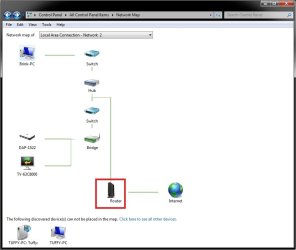
In addition, you may be able to open your router's login page by opening Network and Sharing Center in the Control Panel (icons view), click on See Full Map to see your network map, then click on your router's icon (if there) to open it. If you hover the pointer over you router's icon, it will also give you it's IP address.


network-map.jpg

Hope this helps,
Shawn
 

My Computer My Computer

At a glance

64-bit Windows 11 Pro for WorkstationsIntel i7-8700K OC'd to 5 GHz64 GB (4x16GB) G.SKILL TridentZ RGB DDR4 3600...ASUS ROG-STRIX-GTX1080TI-O11G-GAMING
Computer type
PC/Desktop
Computer Manufacturer/Model Number
Self built custom
OS
64-bit Windows 11 Pro for Workstations
CPU
Intel i7-8700K OC'd to 5 GHz
Motherboard
ASUS ROG Maximus XI Formula Z390
Memory
64 GB (4x16GB) G.SKILL TridentZ RGB DDR4 3600 MHz
Graphics Card(s)
ASUS ROG-STRIX-GTX1080TI-O11G-GAMING
Sound Card
Integrated
Monitor(s) Displays
2 x Samsung Odyssey G7 27"
Screen Resolution
2560x1440
Hard Drives
1TB Samsung 990 PRO M.2,
4TB Samsung 990 PRO PRO M.2,
TerraMaster F8 SSD Plus NAS
PSU
Seasonic Prime Titanium 850W
Case
Thermaltake Core P3
Cooling
Corsair Hydro H115i
Keyboard
Logitech wireless K800
Mouse
Logitech MX Master 4
Internet Speed
2 Gb/s Download and 100 Mb/s Upload
Antivirus
Malwarebyte Anti-Malware Premium
Browser
Google Chrome
Other Info
Logitech Z625 speaker system,
Logitech BRIO 4K Pro webcam,
HP Color LaserJet Pro MFP M477fdn,
APC SMART-UPS RT 1000 XL - SURT1000XLI,
Galaxy S23 Plus phone
So, it figures I didn't even have the router plugged into the modem. Couple days ago really bad storm, power didn't go out but link stopped flashing on the modem, when that happens, that means the internet is down. For some reason when I try to connect the modem to the router and the port to the computer, it doesn't want to work. Yet, for some strange reason it was working with the router a few minutes ago and link wasn't flashing. Really, really odd. I tried resetting the Modem and the router, nothing.
 

My Computer My Computer

At a glance

Windows 7 Home Premium x64Quadcore4GBNvidea Gefore 9200
Computer Manufacturer/Model Number
Acer
OS
Windows 7 Home Premium x64
CPU
Quadcore
Motherboard
Nvidea Chipset 9200
Memory
4GB
Graphics Card(s)
Nvidea Gefore 9200
Monitor(s) Displays
Dell LCD Monitor
Screen Resolution
1280 x 1024
Hard Drives
1TB
Keyboard
Hp
Mouse
Acer Wired
Internet Speed
100.0 Mbps
Other Info
Got the Acer keyboard to lazy to plug it in.
Hello Josh7,

You meant Power cycle correct and not a hard reset?
I tried resetting the Modem and the router, nothing.
Please verify if you have all the network cables and connections plugged in to the proper Ports. From the Modem, the network cable need to be plugged in to the Router's WAN or Internet Port. Your computer needs to be wired to the LAN Port of your router.
Choose a diff LAN Port to see if there's an issue with the Port that you're using.

Power Cycle your devices if above is confirmed. The step-by-step guide shd help you.

Please give us an update if it works or not.
 

My Computer My Computer

At a glance

Win7 & Win8 64bitIntel i5
Computer Manufacturer/Model Number
Lenovo Desktop/Samsung Laptop
OS
Win7 & Win8 64bit
CPU
Intel i5
Internet Speed
Charter-20 Mbps
Antivirus
Avast
Browser
FF, IE9 and Chrome
That still didn't work. For some strange reason instead I put the cable from the computer to the WAN port on the router, and the modem port to the LAN port on the router, and link was still flashing. I know your supposed to have it the other way but it seems like the routers trying to find the DNS and it can't.
 

My Computer My Computer

At a glance

Windows 7 Home Premium x64Quadcore4GBNvidea Gefore 9200
Computer Manufacturer/Model Number
Acer
OS
Windows 7 Home Premium x64
CPU
Quadcore
Motherboard
Nvidea Chipset 9200
Memory
4GB
Graphics Card(s)
Nvidea Gefore 9200
Monitor(s) Displays
Dell LCD Monitor
Screen Resolution
1280 x 1024
Hard Drives
1TB
Keyboard
Hp
Mouse
Acer Wired
Internet Speed
100.0 Mbps
Other Info
Got the Acer keyboard to lazy to plug it in.
My Computer My Computer

At a glance

Windows 8.1 Pro w/Media Center 64bit, Windows...Phenom II X6 1100TCrucial Balistic 8gb DDR3-1866 CL9MSI R6850 Cyclone IGD5 PE
Computer type
PC/Desktop
Computer Manufacturer/Model Number
Home Built
OS
Windows 8.1 Pro w/Media Center 64bit, Windows 7 HP 64bit
CPU
Phenom II X6 1100T
Motherboard
ASUS M5A99X EVO
Memory
Crucial Balistic 8gb DDR3-1866 CL9
Graphics Card(s)
MSI R6850 Cyclone IGD5 PE
Sound Card
On Board
Monitor(s) Displays
ASUS VE258Q 25" LED with DVI-HDMI-DisplayPort
Screen Resolution
1920 x 1080
Hard Drives
Two WD Cavier Black 2TB Sata III, WD My Book Essential 2TB USB 3.0
PSU
Seasonic X650 80 Plus GOLD Modular
Case
Corsair 400R
Cooling
Antec Kuhler H2O 620, Two 120mm and four 140mm
Keyboard
Logitech K120
Mouse
Logitech Marble Mouse USB, Logitech Precision Game Pad
Internet Speed
15MB
Antivirus
Norton IS 2013, Malwarebytes Pro Beta 2
Browser
IE-11, FF-27
Other Info
APC UPS ES 750, Netgear WNR3500L Gigabit & Wireless N Router with SamKnows Test Program, Motorola SB6120 Gigabit Cable Modem. Brother HL-2170W Laser Printer, Epson V300 Scanner
If your Netgear router login default details remain unchanged for a long time, there may be different possible that all users connected in the network will have access to it. It might be sometimes dangerous to get important information out and enter malwares into the Netgear router network. This is why it is highly important to change settings and configure your router device.
 

My Computer My Computer

At a glance

windows 7
Computer type
PC/Desktop
OS
windows 7
Back
Top