Can't mount the fourth partition

elnenebruto

New member
Local time
8:03 AM
Messages
3
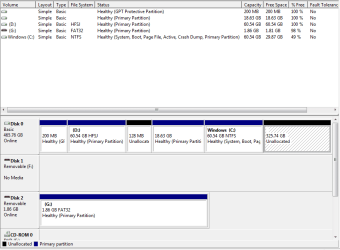
I don't know if I am in the right place but I am going nuts trying to mount an unallocated space in my Windows 7 partition running on my macbook pro. Yes I know this is a Windows forum and I mentioned Mac, but I really want some help. I partitioned my Samsung 500 Gb in this manner:
65 GB - OSX
65 GB - Windows 7
20 GB - Ubuntu
350 GB -Shared through all my Os's.
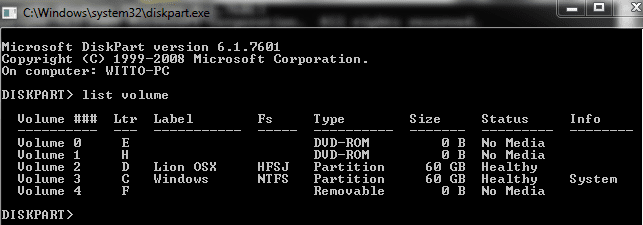
The issue here is that, Windows 7 cannot mount my 350 GB partition, and when I go to disk managment, it shows it as unallocated space. I formatted the 350 GB to ntfs, but still it cannot mount it. Can anyone please help me with this situation. Also when I right click on the 350 Gb partition, it gives me the option to change the partiton to a dynamic disk, and I want to evade that. All I want is the 350 GB partition to come up in My Computer, please help. I provided some pictures to see if anyone can use them to help me out.
 

Attachments
  • cmd.PNG
    cmd.PNG
    8.1 KB · Views: 24
  • Disk.PNG
    Disk.PNG
    14.9 KB · Views: 47
Last edited:

My Computer My Computer

OS
Windows 7 Ultimate x64
You can only have a maximum of 4 primary partitions on a single HDD/RAID array in Windows. I see that you already have 4 (they're the ones coloured in blue).
 

My Computer My Computer

Computer type
PC/Desktop
Computer Manufacturer/Model Number
Dwarf Dwf/11/2012 r09/2013
OS
Windows 8.1 Pro RTM x64
CPU
Intel Core-i5-3570K 4-core @ 3.4GHz (Ivy Bridge) (OC 4.4GHz)
Motherboard
ASRock Z77 Extreme4-M
Memory
4 x 4GB DDR3-1600 Corsair Vengeance CMZ8GX3M2A1600C9B (16GB)
Graphics Card(s)
MSI GeForce GTX770 Gaming OC 2GB
Sound Card
Realtek High Definition on board solution (ALC 898)
Monitor(s) Displays
ViewSonic VA1912w Widescreen (VGA)
Screen Resolution
1440x900
Hard Drives
OCZ Agility 3 SSD 120GB SATA III x2 (RAID 0)
Samsung HD501LJ 500GB SATA II x2
Hitachi HDS721010CLA332 1TB SATA II
Iomega 1.5TB Ext USB 2.0
WD 2.0TB Ext USB 3.0
PSU
XFX Pro Series 850W Semi-Modular
Case
Gigabyte IF233
Cooling
1 x 120mm Front Inlet 1 x 120mm Rear Exhaust
Keyboard
Microsoft Comfort Curve Keyboard 3000 (USB)
Mouse
Microsoft Comfort Mouse 3000 for Business (USB)
Internet Speed
NetGear DG834Gv3 ADSL Modem/Router (Ethernet) ~4.0 Mb/s (O2)
Antivirus
Avast! 8.0.1497
Browser
IE 11
Other Info
Optical Drive: HL-DT-ST BD-RE BH10LS30 SATA Bluray
Lexmark S305 Printer/Scanner/Copier (USB)
WEI Score: 8.1/8.1/8.5/8.5/8.25
Asus Eee PC 1011PX Netbook (Windows 7 x86 Starter)
I had this problem too when I bought my first Apple Mac. What Dwarf said is true.

I see you don't have a genuine Mac but if you did, genuine Macs use a partitioning scheme called GUID which supports up to 128 primary partitions (but not extended partitions). However, although Windows works with the GUID partitioning scheme, it works by pretending that it's a traditional MBR scheme. The MBR scheme supports only 4 primary partitions, any one of which can be an "extended" partition.

The good news is that OS-X works perfectly well with the older MBR style partitioning scheme. So if your scheme is MBR, you should delete Ubuntu and turn all the subsequent free space into an extended partition. You should then be able to re-install Ubuntu and successfully create your shared partition. You'll need to reconfigure your boot loader too, of course. But note that this is ONLY possible with an MBR partitioning scheme. Even though it supports more partitions, you can't achieve what you're trying to achieve with the GUID scheme.
 

My Computer My Computer

Computer Manufacturer/Model Number
Mac Mini
OS
Windows 7
Memory
4GB
Hello elnenebruto, welcome to Seven Forums!


If you do decide to temporarily remove Linux, I would suggest a partition-specific wipe of those partitions to over-write the Grub loader which may still cause serious boot issues; have a look at Method Four of this first tutorial linked below.


Then Method One of this shows how to create an Extended partition where you want one.
 

My Computer My Computer

Computer Manufacturer/Model Number
* BFK Customs *
OS
W 7 64-bit Ultimate
CPU
Intel Q9550 Yorkfield
Motherboard
ASUS P5Q Pro
Memory
8GB Dominator 8500C5D
Graphics Card(s)
ATI : XFX 5870
Sound Card
Realtek HD Audio 7-1
Monitor(s) Displays
1x 47" LCD HDMI & 3x 26" LCD HDMI
Screen Resolution
1920x1080P & 1920x1200
Hard Drives
1x 80GB Intel X25-M G2 SSD : 1x 500GB & 1x 640GB WD Caviar Black(s)
PSU
Corsair 620HX
Case
Cooler Master RC-690
Cooling
Tuniq Tower 120, 2x 140mm and 3x 120mm case fans
Keyboard
Microsoft 500
Mouse
Razer Diamondback 3G
Internet Speed
14 Mb/s
Other Info
1x Koutech 3Gb/s SATA HDD Hot Swap Rack
Thanks guys for all your help, Ima try what ever you guys said to make this work. I'll keep you guys posted on my results
 

My Computer My Computer

OS
Windows 7 Ultimate x64
Do remember to post back here with updates or if you need further assistance.
 

My Computer My Computer

Computer Manufacturer/Model Number
* BFK Customs *
OS
W 7 64-bit Ultimate
CPU
Intel Q9550 Yorkfield
Motherboard
ASUS P5Q Pro
Memory
8GB Dominator 8500C5D
Graphics Card(s)
ATI : XFX 5870
Sound Card
Realtek HD Audio 7-1
Monitor(s) Displays
1x 47" LCD HDMI & 3x 26" LCD HDMI
Screen Resolution
1920x1080P & 1920x1200
Hard Drives
1x 80GB Intel X25-M G2 SSD : 1x 500GB & 1x 640GB WD Caviar Black(s)
PSU
Corsair 620HX
Case
Cooler Master RC-690
Cooling
Tuniq Tower 120, 2x 140mm and 3x 120mm case fans
Keyboard
Microsoft 500
Mouse
Razer Diamondback 3G
Internet Speed
14 Mb/s
Other Info
1x Koutech 3Gb/s SATA HDD Hot Swap Rack
Hello everyone once again!!!!
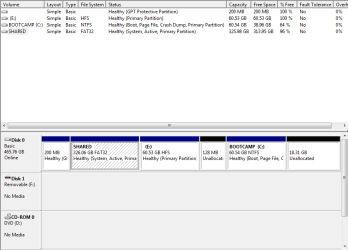
I almost got what I wanted to do work. Still though I cannot see my 350 GB partition in my computer but it says that it is active in my Disk Management. Here is what I did:
First Partition - 350 GB Shared Volume (Where all 3 Os's will share common media files)
Second Partition - Mac OSX
Third - Windows 7
Fourth - Ubuntu
I partitioned all these using Disk Utility in the OSX. If you need more info on what I did please ask me and I'll tell.
 

Attachments

  • Capture.PNG
    Capture.PNG
    13.3 KB · Views: 27
  • where.PNG
    where.PNG
    24.8 KB · Views: 22

My Computer My Computer

OS
Windows 7 Ultimate x64
Back
Top