Can't Extend Volume Partition on HDD

JackALope52x

New member
Power User
Local time
9:06 AM
Messages
259
Location
Los Angeles
Hi All,

I just got a new 60GB SSD and a new 3TB HDD for my computer. I planned on using the SSD as my boot device and the HDD for my storage device. I installed Windows 7 on the SSD with no problems. Once I opened Computer I didn't see the HDD so I went to Disk Management to assign the drive a letter.

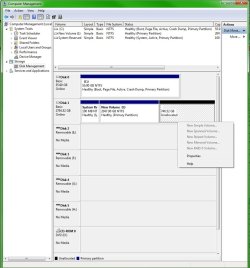
Inside Disk Management I noticed that the HD was separated into 3 partitions:
1. 100 MB System Reserved
2. 2047.90 GB Unallocated
3. 746.52 GB Unallocated

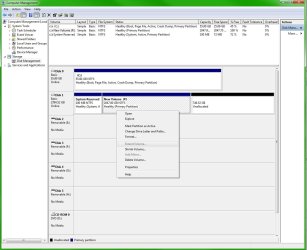
I wanted to combine the two unallocated partitions into one but since they were not formated all my options were grayed out. So I formated the first unallocated partition and then I went to the Extend Volume.. option and it was still grayed out.

For some weird reason I have no control over the second unallocated partition. I cannot format it or change the size of it, it gives me no options. No matter what I do with the first partition it still won't let me do anything with the second one. I have even downloaded third party programs the combine the partitions and they still won't give me control over the second unallocated partition.

Does anyone know what I am doing wrong here? I feel like I am over looking something very simple. Any help at all would be much appreciated.

-Thanks
 

Attachments
  • Disk Management.jpg
    Disk Management.jpg
    110.4 KB · Views: 17
  • Disk Management 2.jpg
    Disk Management 2.jpg
    95.7 KB · Views: 13

My Computer My Computer

Computer type
PC/Desktop
Computer Manufacturer/Model Number
Custom Build
OS
Windows 7 Ultimate x64
CPU
Intel Core i7-2700K Sandy Bridge 3.5GHz
Motherboard
Asus P8Z68-V Pro
Memory
Corsair Vengeance 16GB DDR3 1600Mhz
Graphics Card(s)
Asus GeForce GTX 670 2GB
Sound Card
Creative Sound Blaster X-Fi Xtreme 7.1
Monitor(s) Displays
Samsung 24" LED Monitor
Screen Resolution
1920 x 1080
Hard Drives
Corsair Force GT 240GB SSD
Western Digital 3TB HDD
PSU
Corsair AX860i Fully-Modular
Case
Cooler Master HAF 922 Powder Coated White
Cooling
Noctua NH-U12S
Keyboard
Razer BlackWidow Ultimate Stealth Edition
Mouse
Razer Mamba
Internet Speed
Verizon FiOS 20Mbps
Antivirus
Microsoft Security Essentials
Browser
Internet Explorer
Other Info
Razer Tiamat 7.1 Surround Sound Headset
When you installed Win 7 on your SSD, you did not disconnect the HDD from the motherboard. The System file was written to the HDD. It should be on the SSD. There are two things you can do. Reinstall Windows again on the SSD and this time disconnect the HDD. You can also attempt to transfer the System file to the SSD using this tutorial http://www.sevenforums.com/tutorials/209885-bootmgr-move-c-easybcd.html Let us know how it goes. This is not the answer to the question you asked, but this needs to be done first and then we can tackle any other problems.
 

My Computer My Computer

Computer type
PC/Desktop
Computer Manufacturer/Model Number
Custom Build
OS
Windows 7 Home Premium 32-Bit - Build 7600 SP1
CPU
Intel Core i3-2120 3.30Ghz
Motherboard
Asus P8Z68-V LX Intel Z68 Socket H2 ATX
Memory
Kingston 4 GB DDR3 1333 mhz
Graphics Card(s)
AMD Radeon HD6670
Sound Card
Sound Blaster Audigy SE 24-Bit
Monitor(s) Displays
Asus VE228
Screen Resolution
1440 X 900
Hard Drives
OCZ Vertex 3 120 GB Sata 3 SSD ==
Kingston SH103/S3 120 G Hyper X 120 GB SSD ==
Western Digital 500 GB Caviar Green 7200 RPM ==
PSU
Corsair CX600M == 600 Watt
Case
NZXT Apollo - Silver with Clear Side Panel
Cooling
Three 120 mm Fans
Keyboard
Microsoft Natural 4000
Mouse
Microsoft Custom Optical 3000
Internet Speed
AT&T Fiber Optic Wireless Network
Antivirus
Microsoft Security Essentials
Browser
Chrome
Other Info
120 mm Blue LED Fan -- Three Blue LED Lazer Light Sticks

My Computer My Computer

Computer type
PC/Desktop
Computer Manufacturer/Model Number
Pauly Special
OS
Win7 Ultimate X64
CPU
Intel i5 3570K
Motherboard
Gigabyte Z77X-DS3H
Memory
8GB DDR3 1600
Graphics Card(s)
Onboard
Sound Card
Onboard
Screen Resolution
1280x1024
Hard Drives
Samsung 840 Evo SSD (OS)
1TB Spinner (Data)
PSU
800W Arctic
Case
Cooler Master
Cooling
3x120mm Fans
Keyboard
MS Wireless
Mouse
MS Wireless
Internet Speed
20M
In agreement with Bigmck. You should do ^that^ chore first to get the installation right.

As for your 3TB disk, I will bet money it is currently formatted as a MBR disk. There is a 2.2TB partition limit for Windows on a MBR disk. So the drive manufacturer sets it up that way because...... Who knows why? There is no good reason I can think of!

If you format the drive as a GPT disk then you can see and use all of the drive in Windows. Here's how:
http://www.sevenforums.com/tutorials/26193-convert-mbr-disk-gpt-disk.html

To check to see which format the drive is right now do this:
http://www.sevenforums.com/tutorials/244566-hard-drive-gpt-mbr.html

(Laughing) I gotta learn to type faster!
 

My Computer My Computer

Computer type
PC/Desktop
Computer Manufacturer/Model Number
Home Built - Jan 2013
OS
Windows 7 64 Bit Home Premium SP1
CPU
i7-3820
Motherboard
Asus P9X79-PRO - Bios 4608
Memory
GSkill F3-14900CL9Q - 16GB
Graphics Card(s)
EVGA GeForce GTX660 - Driver 352.86
Sound Card
On board Realtek ALC898
Monitor(s) Displays
Acer S271HL
Screen Resolution
1920 x 1080
Hard Drives
#1- Samsung 840 Pro Series
#2- Western Digital WD1002FAEX Sata3 Black
#3- Western Digital WD1002FAEX Sata3 Black
PSU
Corsair CMPSU-850TX-V2 - 850 watt (by Seasonic)
Case
Corsair Obsidian 550D
Cooling
Standard 3 120mm case fans, Cooler Master Hyper 212 EVO
Keyboard
MS KC-0405
Mouse
Intellimouse 5-button
Internet Speed
56 Mbits/Sec (on a good day)
Antivirus
Avast & Malwarebytes
Browser
Firefox
Other Info
Asus DVD - DRW-24B1ST 24X

My Computer My Computer

Computer type
PC/Desktop
Computer Manufacturer/Model Number
Custom Build
OS
Windows 7 Home Premium 32-Bit - Build 7600 SP1
CPU
Intel Core i3-2120 3.30Ghz
Motherboard
Asus P8Z68-V LX Intel Z68 Socket H2 ATX
Memory
Kingston 4 GB DDR3 1333 mhz
Graphics Card(s)
AMD Radeon HD6670
Sound Card
Sound Blaster Audigy SE 24-Bit
Monitor(s) Displays
Asus VE228
Screen Resolution
1440 X 900
Hard Drives
OCZ Vertex 3 120 GB Sata 3 SSD ==
Kingston SH103/S3 120 G Hyper X 120 GB SSD ==
Western Digital 500 GB Caviar Green 7200 RPM ==
PSU
Corsair CX600M == 600 Watt
Case
NZXT Apollo - Silver with Clear Side Panel
Cooling
Three 120 mm Fans
Keyboard
Microsoft Natural 4000
Mouse
Microsoft Custom Optical 3000
Internet Speed
AT&T Fiber Optic Wireless Network
Antivirus
Microsoft Security Essentials
Browser
Chrome
Other Info
120 mm Blue LED Fan -- Three Blue LED Lazer Light Sticks
... all of the drive in Windows.

Is this like Burger King or McDonald's? :D

Yes, they have replaced the Hobbit toys in their Happy Meals with GPT partitions. The kids love em! :p

I am now fully awake, so I see that I should have said Partitions - not drive(s)!

I checked and found that on older BIOS platform systems the 2.2TB limit exists on the system level, so unless the disk is partitioned GPT then Windows will not be able to see anything beyond that size on a single drive. That might explain why the manufacturer set it up that way (to work on older systems). On modern UEFI systems Windows 64 bit can recognize drives larger than 2.2TB, regardless of format, but still can't deal with MBR Partitions larger than 2.2TB. We need GPT for any partitions largher than 2.2TB.
 

My Computer My Computer

Computer type
PC/Desktop
Computer Manufacturer/Model Number
Home Built - Jan 2013
OS
Windows 7 64 Bit Home Premium SP1
CPU
i7-3820
Motherboard
Asus P9X79-PRO - Bios 4608
Memory
GSkill F3-14900CL9Q - 16GB
Graphics Card(s)
EVGA GeForce GTX660 - Driver 352.86
Sound Card
On board Realtek ALC898
Monitor(s) Displays
Acer S271HL
Screen Resolution
1920 x 1080
Hard Drives
#1- Samsung 840 Pro Series
#2- Western Digital WD1002FAEX Sata3 Black
#3- Western Digital WD1002FAEX Sata3 Black
PSU
Corsair CMPSU-850TX-V2 - 850 watt (by Seasonic)
Case
Corsair Obsidian 550D
Cooling
Standard 3 120mm case fans, Cooler Master Hyper 212 EVO
Keyboard
MS KC-0405
Mouse
Intellimouse 5-button
Internet Speed
56 Mbits/Sec (on a good day)
Antivirus
Avast & Malwarebytes
Browser
Firefox
Other Info
Asus DVD - DRW-24B1ST 24X
It Worked!

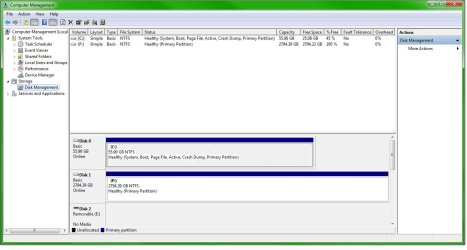
Wow guys! Thanks for all the quick replies. So I took Bigmck's advice and used EasyBCD to move the System Recovery partition over to the boot disk. The program then informed me to go into my BIOS to check if the system is booting from the proper device. I realized that my fist boot device was the HDD which I changed to the SSD.

I was then able to delete the System Recovery partition from the HDD. After that I just converted the disk to a GPT drive like you guys said and both the unallocated partitions formed one giant one and then I could format the drive from there.

Thanks again guys, I was getting pretty worried there for a while. :party:
 

Attachments

  • Disk Management 3.jpg
    Disk Management 3.jpg
    92 KB · Views: 10

My Computer My Computer

Computer type
PC/Desktop
Computer Manufacturer/Model Number
Custom Build
OS
Windows 7 Ultimate x64
CPU
Intel Core i7-2700K Sandy Bridge 3.5GHz
Motherboard
Asus P8Z68-V Pro
Memory
Corsair Vengeance 16GB DDR3 1600Mhz
Graphics Card(s)
Asus GeForce GTX 670 2GB
Sound Card
Creative Sound Blaster X-Fi Xtreme 7.1
Monitor(s) Displays
Samsung 24" LED Monitor
Screen Resolution
1920 x 1080
Hard Drives
Corsair Force GT 240GB SSD
Western Digital 3TB HDD
PSU
Corsair AX860i Fully-Modular
Case
Cooler Master HAF 922 Powder Coated White
Cooling
Noctua NH-U12S
Keyboard
Razer BlackWidow Ultimate Stealth Edition
Mouse
Razer Mamba
Internet Speed
Verizon FiOS 20Mbps
Antivirus
Microsoft Security Essentials
Browser
Internet Explorer
Other Info
Razer Tiamat 7.1 Surround Sound Headset
I realized that my fist boot device was the HDD which I changed to the SSD.

Glad you got it sorted out. Actually your DVD should be the first boot drive and the SSD the second. Change that before you forget and you will be in good shape. Good job on the changes.:thumbsup:
 

My Computer My Computer

Computer type
PC/Desktop
Computer Manufacturer/Model Number
Custom Build
OS
Windows 7 Home Premium 32-Bit - Build 7600 SP1
CPU
Intel Core i3-2120 3.30Ghz
Motherboard
Asus P8Z68-V LX Intel Z68 Socket H2 ATX
Memory
Kingston 4 GB DDR3 1333 mhz
Graphics Card(s)
AMD Radeon HD6670
Sound Card
Sound Blaster Audigy SE 24-Bit
Monitor(s) Displays
Asus VE228
Screen Resolution
1440 X 900
Hard Drives
OCZ Vertex 3 120 GB Sata 3 SSD ==
Kingston SH103/S3 120 G Hyper X 120 GB SSD ==
Western Digital 500 GB Caviar Green 7200 RPM ==
PSU
Corsair CX600M == 600 Watt
Case
NZXT Apollo - Silver with Clear Side Panel
Cooling
Three 120 mm Fans
Keyboard
Microsoft Natural 4000
Mouse
Microsoft Custom Optical 3000
Internet Speed
AT&T Fiber Optic Wireless Network
Antivirus
Microsoft Security Essentials
Browser
Chrome
Other Info
120 mm Blue LED Fan -- Three Blue LED Lazer Light Sticks
Back
Top