Can't re-install printer

absc

New member
Local time
12:12 PM
Messages
35
The scanner in my Canon MP610 multifunction printer suddenly stopped working, giving an error message along the lines that it could not find the driver. To try and fix the problem I uninstalled the printer completely and now I can't re-install it at all. I have tried installing it from CD and on line following the instructions on the Canon support page to the letter, all to no avail.

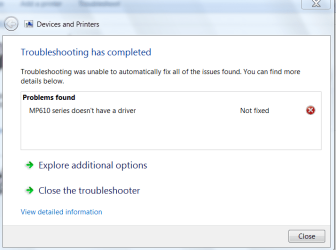
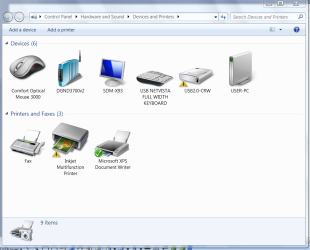
After uninstalling all the Canon components, Devices and Printers shows an Inkjet Multifunction Printer that I cannot remove - see Attachment 1. If I then try and install the printer from CD with the printer off and disconnected everything appears to proceed satisfactorily but when I plug in the printer and turn it on it is not recognised. Right clicking on Inkjet Multifunction Printer in Devices and Printers, then Troubleshoot reports that the driver for the MP610 device is not installed and clicking on Apply this fix reports further unidentified problems. See Attachments 2 and 3.

I have tried doing this from a user login and administrator login, connected to the internet and not connected, all with the same result. The one difference is that when logged in as administrator I don't see the Inkjet Multifunction Printer in Devices and printers.

I have checked the printer by replacing the OS HDD (actually SSD) with another HDD with a bare bones OS and I had no trouble installing the printer from CD.

I can't restore from an earlier restore point as the backup has been corrupted. Luckily I have an early OS image and my user data on separate HDDs but it would take a fair bit of work to rebuild the system.

I'm running Window 7 Pro x64 on Intel i7, 3.4 GHz, 8GB RAM, 250 GB Samsung SSD for the OS, 1 TB HDD for user data.

Any suggestions?

Regards and thanks
 

Attachments
  • Attachment 1.PNG
    Attachment 1.PNG
    64.3 KB · Views: 0
  • Attachment 2.PNG
    Attachment 2.PNG
    21 KB · Views: 1
  • Attachment 3.PNG
    Attachment 3.PNG
    21.9 KB · Views: 1

My Computer

Computer type
PC/Desktop
Computer Manufacturer/Model Number
LENOVO ThinkCentre M92p
OS
Windows 7 Pro 64
CPU
i7-3770
Motherboard
LENOVO MAHOBAY
Memory
8 GB
Graphics Card(s)
on board
Hard Drives
256 GB SSD primary and 1 TB for data
Antivirus
Norton
Browser
IE
Have you rebooted after Removing Device in Devices and Printers?

Are you sure there's no remaining component in Programs and Features?

If you don't need to scan from glass then enable Automatically deliver drivers via Windows Update (Step 3) and install all Important and Optional Windows Updates as there may be multiple performance Updates needed to make it work correctly. Watch for a driver delivered via Updates or auto-loading from System Tray after you enable Hardware auto-updating.

This should give you basic functionality however if you need scanning from printer top to desktop or from desktop to printer then you'll need the full software package from the printer's Support Downloads webpage for your exact model and bit-version.

If this doesn't work I will connect via Teamviewer to do this for you as I've handled hundreds of them and learned all the tricks.
 
Thanks for your reply. I have tried a few more things bearing in mind your comments but with no better result.

I do reboot after uninstalling all printer components and I can't find anything else in Programs and Features that looks remotely related, but I've attached the list here in case you can spot something.

View attachment 324015

View attachment 324016

When I try to install using the latest drivers from Canon support the system doesn't recognize the printer when I plug it in and turn it on. If I install from CD it also fails to recognise the printer but it also gives a choice to select the port manually. When I do the MP610 Printer device appears but no matter which port I select the printer still does not print. I can remove the MP610 Printer device but I can't remove the Inkjet Multifunction Printer device no matter what I try. Do you know what it is?

View attachment 324021

Unfortunately I do need the scanner function. That's what started the problem in the first place.

I have not had any problem installing the printer before when I've upgraded the system and even now the printer installs OK if I replace the OS HDD with an older one from before I replaced it with the SSD.

Thanks
 

My Computer

Computer type
PC/Desktop
Computer Manufacturer/Model Number
LENOVO ThinkCentre M92p
OS
Windows 7 Pro 64
CPU
i7-3770
Motherboard
LENOVO MAHOBAY
Memory
8 GB
Graphics Card(s)
on board
Hard Drives
256 GB SSD primary and 1 TB for data
Antivirus
Norton
Browser
IE
Hello : Did you try and uninstall the printer from the control panel , re-boot then install drivers from HERE .


EDIT ( I should of read more ) Sorry -- I see you tried this above -


can you try another port for the usb and see if the computer detects the printer ?.
 

My Computer

Computer type
PC/Desktop
Computer Manufacturer/Model Number
Custom Build
OS
Windows 10 Pro - 64 bit
CPU
Intel i7 2600K
Motherboard
Asus P8P67
Memory
8 Gig ddr3 1600 mhz - viper extreme (Patriot)
Graphics Card(s)
EVGA 980 TI
Monitor(s) Displays
2 - Lg 21" LED , sony 48 " bravia LED
Hard Drives
one - samsung 840 series 465.76 GB SSD
two - wd 2 tB black
one - wd 1.5 tb black
one - wb 1 tb black
PSU
1000 Watt Coolmaster : Silent Pro Gold
Case
antec 1200
Cooling
watercooled
Mouse
logitech wireless
Antivirus
Norton Security 2015
Other Info
powerware 3.1 KVA FERRUPS with 4 - 1000 Amp Deep cycle batteries ...
Screenshots and Files - Upload and Post in Seven Forums - Windows 7 Forums

Check Device Manager>View>Show Hidden Devices and scour it for the possibly-virtual printer driver to Uninstall.

If that doesn't work try these steps from I want to remove/delete printer/driver from Windows 7, and - Microsoft Community:

Here's how I did it, step-by-step:
1. right-click on desktop, create a new shortcut with target as 'cmd.exe'.
2. right-click on the shortcut, "Run as Administrator"
3. Run the printui tool: printui /s /t2
4. Try deleting the printers. If that doesn't work...
5. CLick Start > Run > Services.msc
6. Locate the Print Spooler service, and right-click > Properties > stop service.
7. Open My Computer and browse to c:\Windows\System32\spool\Printers
(you will need to say "oK" to get access to the folder).
8. DELETE the contents of that folder.
9. Restart the Print Spooler service.
10. Go back into the printui utillity (might need to restart it using same method as above) and try removing printers again. This time it should work. If necessary, check the "Ports" tab and remove any TCP/IP ports that are associated with the old printer.
11. Last but not least, I checked other computers on my home network to see if any of those had mapped to the old printer, and I removed those mappings, as the date of spooled documents suggested it was printed to long after it was physically removed.
 
Thanks for the help guys but no luck so far.

I have tried different USB ports, different software sources, you name it.

I can remove the MP610 Printer device with printui but not the XPS Writer, which I tried just in case. The print spooler is empty. Inkjet Multifunction Printer doesn't appear at all with printui.

What exactly is the Inkjet Multifunction Printer anyway? I installed the printer again with the bare bones OS just to check, and it does not appear there under Devices and Printers. Just the MP610 Printer. Which all makes me think it's the problem.

I thought my system was up to date but I've just checked the update history and there have been a bunch of failed updates starting with:

Security Update for Windows 7 for x64-based Systems (KB2965788)
Installation date: 12/06/2014 3:00 AM
Installation status: Failed
Error details: Code 80070005
Update type: Important

I've just tried to install 6 outstanding updates and that failed too.

I'm fast coming to the conclusion that I have a major problem and unless you can come up with a miracle I might have to do a total rebuild. Ouch!

Cheers
 

My Computer

Computer type
PC/Desktop
Computer Manufacturer/Model Number
LENOVO ThinkCentre M92p
OS
Windows 7 Pro 64
CPU
i7-3770
Motherboard
LENOVO MAHOBAY
Memory
8 GB
Graphics Card(s)
on board
Hard Drives
256 GB SSD primary and 1 TB for data
Antivirus
Norton
Browser
IE
Thanks very much. I'll start working through it but it may take me a while.
 

My Computer

Computer type
PC/Desktop
Computer Manufacturer/Model Number
LENOVO ThinkCentre M92p
OS
Windows 7 Pro 64
CPU
i7-3770
Motherboard
LENOVO MAHOBAY
Memory
8 GB
Graphics Card(s)
on board
Hard Drives
256 GB SSD primary and 1 TB for data
Antivirus
Norton
Browser
IE
Sorry for the long break. I have been out of town a bit so could not devote time to this problem and had to manage with my laptop.

Eventually I had to do a clean re-install as the system just started falling apart. First it got very slow booting, then the cursor stopped responding. Thanks to your excellent tutorials the re-install went smoothly. The system is running well and I'm slowly reinstalling my programs while keeping an eye on performance.

Thanks enormously for your help.
 

My Computer

Computer type
PC/Desktop
Computer Manufacturer/Model Number
LENOVO ThinkCentre M92p
OS
Windows 7 Pro 64
CPU
i7-3770
Motherboard
LENOVO MAHOBAY
Memory
8 GB
Graphics Card(s)
on board
Hard Drives
256 GB SSD primary and 1 TB for data
Antivirus
Norton
Browser
IE
I'm happy to say I've reinstalled everything now and it's all working fine.

Just a couple of questions though.

The 100 MB system Reserved partition is nearly full with 94.9MB used. Is that a problem? What happens when it fills up completely?

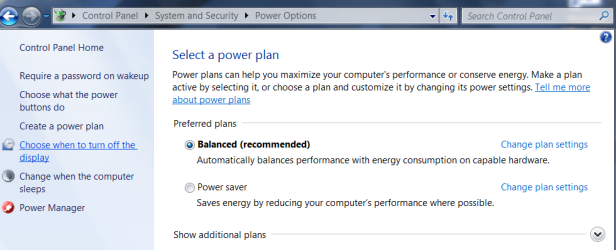
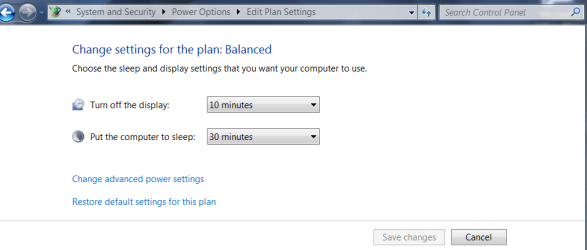
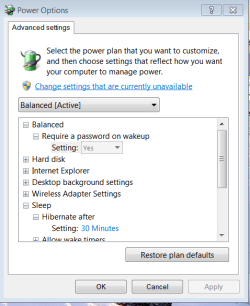
Also the power saving plan schemes are different. This is what I had before
power 1.PNG
power 2.PNG

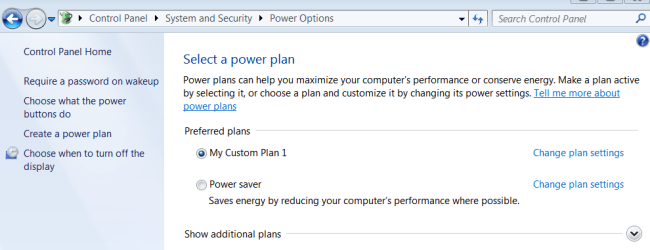
and this is what I have now
power 3.PNG
power 6.PNG

Before, after the PC went to sleep pressing enter would wake it and restore the desktop straight away. Now Enter doesn't do anything. I have to press the power switch and the PC reboots from scratch, though it does restore the pre-hibernate state.

Was that a mod by the manufacturer (Lenovo)? I must admit I preferred it as it was faster, but it's not a big deal.

Also, how can I change it so as not to require a password on wakeup?

Cheers
 

My Computer

Computer type
PC/Desktop
Computer Manufacturer/Model Number
LENOVO ThinkCentre M92p
OS
Windows 7 Pro 64
CPU
i7-3770
Motherboard
LENOVO MAHOBAY
Memory
8 GB
Graphics Card(s)
on board
Hard Drives
256 GB SSD primary and 1 TB for data
Antivirus
Norton
Browser
IE
You would not have a Custom Power plan crapware if you'd followed the steps to http://www.sevenforums.com/tutorials/219487-clean-reinstall-factory-oem-windows-7-a.html#post1839164. You must have instead done Lenovo Factory Recovery which is the opposite of a Clean Reinstall, larded with bloatware and duplicate utiltiies that interfere with better versions built into Win7.

Nor would the System REserved partition be clogged with anything had you followed the steps in the tutorial to delete all partitions during a http://www.sevenforums.com/tutorials/219487-clean-reinstall-factory-oem-windows-7-a.html#post1839164. It should not have anywhere near that much space used as it will interfere.

I'd start over and do it correctly. If you want the Lenovo factory install then I'd at least http://www.sevenforums.com/tutorials/219576-clean-up-factory-bloatware.html

You can choose Balanced Plan from the superior Win7 choices and ignore the Lenovo add-in but there are so many that it's already clogged your registry which amounts to the worst possible install of Win7 one can have.
 
Sorry but no, I did not do a Lenovo recovery. I downloaded the ISO and installed from that following the steps in your tutorial. The only Lenovo add on was the LAN driver, and I don't think I had a choice there anyway, except that it did install some other stuff that I could not block.

Can I download a clean driver from Microsoft?

Anyway, I'll do it over again to a spare disk so I can continue working with this system. This time I'll check the system reserved partition before I install the LAN driver and all the updates.

Thing is I'm leaving for Europe in a couple of days so it will have to wait until I return mid October.

Cheers
 

My Computer

Computer type
PC/Desktop
Computer Manufacturer/Model Number
LENOVO ThinkCentre M92p
OS
Windows 7 Pro 64
CPU
i7-3770
Motherboard
LENOVO MAHOBAY
Memory
8 GB
Graphics Card(s)
on board
Hard Drives
256 GB SSD primary and 1 TB for data
Antivirus
Norton
Browser
IE
Yep, that's what I did except that I went to the PC 's support webpage, as read, not Intel. Didn't expect it to carry a lot of rubbish with it.

I have downloaded the driver from intel now but it will all have to wait until I return from overseas as I don't have time now.

Cheers
 

My Computer

Computer type
PC/Desktop
Computer Manufacturer/Model Number
LENOVO ThinkCentre M92p
OS
Windows 7 Pro 64
CPU
i7-3770
Motherboard
LENOVO MAHOBAY
Memory
8 GB
Graphics Card(s)
on board
Hard Drives
256 GB SSD primary and 1 TB for data
Antivirus
Norton
Browser
IE
Back
Top