Solved Can't Re-start Print Spooler Service - Error 1068

woodbine

New member
Member
VIP
Local time
12:32 PM
Messages
178
Location
Bristol, UK
I had a problem with my Primo PDF creator. When I clicked 'Print' (Primo PDF acts as a printer driver) to convert something into a PDF, nothing was happening. I have tried restores, uninstalling and re-installing the Primo program - nothing worked.

Then a member on here suggested trying an alternative PDF creator (Cute). I did - it wouldn't install - but it gave me the reason which is obviously been causing the problem all along.

Cute's installer had a pop up saying - "Please start the print spooler service". So, I followed CONTROL PANEL> ADMINASTRATIVE TOOLS> SERVICES, and tried to restart Print Spooler.

It wouldn't start, and came up with error message "1068 - The Dependency Service Or Group Failed To Start". I would be really grateful if someone could tell me how to fix this problem. Many thanks.
 

My Computer My Computer

Computer type
PC/Desktop
Computer Manufacturer/Model Number
Acer Aspire Desktop M3910
OS
Windows 7 Home Premium 64 bit SP1
CPU
Intel i3 540
Memory
3GB DDR3SD
Monitor(s) Displays
LG Flatron L1960TR
Screen Resolution
1280x1024
Keyboard
Acer
Mouse
Genius
Antivirus
Avast (Free)
Browser
I E 11

My Computer My Computer

Computer type
Laptop
Computer Manufacturer/Model Number
Fujitsu LIFEBOOK
OS
Win 7 HP SP1 64-bit Vista HB SP2 32-bit Linux Mint 18.3
CPU
Intel(R) Pentium(R) CPU P6200 @ 2.13GHz
Motherboard
FUJITSU FJNBB06
Memory
4.00 GB
Graphics Card(s)
Intel(R) Graphics Media Accelerator HD
Sound Card
[1] Realtek High Definition Audio [2] Intel(R) Display Audio
Screen Resolution
1366 x 768 x 32 bits (4294967296 colors) @ 59 Hz
Hard Drives
TOSHIBA MK5076GSX
Antivirus
AVG FREE
Hi Woodbine,

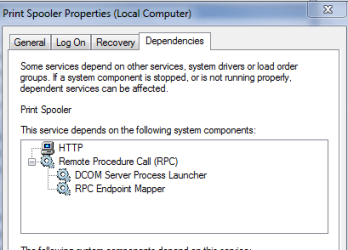
please open the dependencies tab, it should look like this - (see screenshot)
make sure they are running.

note on the logon tab local service should be checked


Roy
 

Attachments

  • pspool.PNG
    pspool.PNG
    8.7 KB · Views: 49

My Computer My Computer

Computer type
PC/Desktop
Computer Manufacturer/Model Number
medionl/Aspire 6930G/acer x55a
OS
W7 home premium 32bit/W7HP 64bit/w10 tp insider ring
CPU
E5300 dual core
Motherboard
medion MS7366
Memory
3gb
Graphics Card(s)
Nvidia Geforce 7100 Nforce 630i
Monitor(s) Displays
avixc
Internet Speed
n (isp resticted to 72)
Antivirus
mse/pands
Browser
palemoon
Other Info
Belkin Fd7050 n USB using Railink RT2870 drivers, more upto date
Print Spooler Problem 3.jpg


Print Spooler Problem 4.jpg


Print Spooler Problem 5.jpg

Thanks to both of you for your replies and apologies for late reply.

Paul Black>>>>> I have replied to Roderunner in the other thread, thanks. Looks like he may have identified another potential problem in being unable to check the 'Print And Document Services' box. C'est la vie. :-)

Please Recommend Best Free PDF Creator (Not Nitro/Primo)

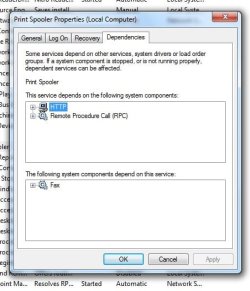
torchwood>>>>> I have looked up the P Spooler dependencies, and attached image. The first one, HTTP, I'm not sure what this is and can't find it on the services list.

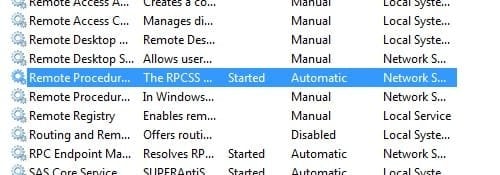
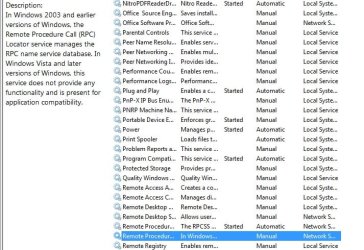
The second dependency, RPC or RPCSS, seems to appear on the services list twice. First one, RPC/RPCSS is listed as started - automatic. The second RPC isn't started. It's description on the left column says it "doesn't provide any functionality in later versions of Windows, and is only there for application compatibility".

Many thanks for your help and advice.
 
Last edited:

My Computer My Computer

Computer type
PC/Desktop
Computer Manufacturer/Model Number
Acer Aspire Desktop M3910
OS
Windows 7 Home Premium 64 bit SP1
CPU
Intel i3 540
Memory
3GB DDR3SD
Monitor(s) Displays
LG Flatron L1960TR
Screen Resolution
1280x1024
Keyboard
Acer
Mouse
Genius
Antivirus
Avast (Free)
Browser
I E 11
It seems the way has been shown (by torchwood Sir) !

Hi All,
Greets,
Sir(s),
woodbine : Sir,
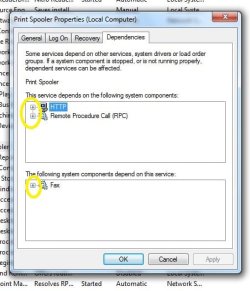
1) You need to just expand all the tree/entries by clicking '+' sign left to the entries ( marked as yellow in the below image ) and attach.
Print Spooler Problem 3.jpg
2) I assume it is win 7 with SP 1. Check the services' state & let us know. The services' state should be as below:
RPC Endpoint Mapper : Automatic & Started & Network Service
DCOM Server Process Launcher : Automatic & Started & Local System
Remote Procedure Call : Automatic & Started & Network Service
Print Spooler : Automatic & Started & Local System
( source : Services - Restore Default Services in Windows 7 - Windows 7 Help Forums )

3) Don't mess with services for now & just report.

Thanks & Regards. ...
 
Last edited:

My Computer My Computer

Computer type
Laptop
Computer Manufacturer/Model Number
hp compaq presario c795VU notebook pc
OS
Windows 7 Ultimate x32 With Sp1 + Vista Ultimate x32 with Sp1 & Sp2 !!
CPU
Intel Mobile Core 2 Duo T5750 @ 2.00GHz Merom 65nm Technolog
Motherboard
Hewlett-Packard 30D9 (CPU)
Memory
2.00GB Dual-Channel DDR2 @ 332MHz (5-5-5-15)
Graphics Card(s)
Mobile Intel(R) 965 Express Chipset Family
Sound Card
High Definition Audio Device
Monitor(s) Displays
LP154WX4-TLCB on Mobile Intel 965 Express Chipset Family
Screen Resolution
1280x800 @ 60Hz
Hard Drives
149GB Western Digital WDC WD1600BEVS-60VAT0 ATA Device (SATA)
Keyboard
Standard 101/102-Key or Microsoft Natural PS/2 Key + HP QLB
Mouse
ALPS pointing device
Antivirus
Kaspersky AV 2017(Win 7) & AVG AntiVirus Free 2016 (VISTA)
Browser
google chrome
Hi,
Sir,
What's the status ?

Thanks & Regards. ...
 

My Computer My Computer

Computer type
Laptop
Computer Manufacturer/Model Number
hp compaq presario c795VU notebook pc
OS
Windows 7 Ultimate x32 With Sp1 + Vista Ultimate x32 with Sp1 & Sp2 !!
CPU
Intel Mobile Core 2 Duo T5750 @ 2.00GHz Merom 65nm Technolog
Motherboard
Hewlett-Packard 30D9 (CPU)
Memory
2.00GB Dual-Channel DDR2 @ 332MHz (5-5-5-15)
Graphics Card(s)
Mobile Intel(R) 965 Express Chipset Family
Sound Card
High Definition Audio Device
Monitor(s) Displays
LP154WX4-TLCB on Mobile Intel 965 Express Chipset Family
Screen Resolution
1280x800 @ 60Hz
Hard Drives
149GB Western Digital WDC WD1600BEVS-60VAT0 ATA Device (SATA)
Keyboard
Standard 101/102-Key or Microsoft Natural PS/2 Key + HP QLB
Mouse
ALPS pointing device
Antivirus
Kaspersky AV 2017(Win 7) & AVG AntiVirus Free 2016 (VISTA)
Browser
google chrome
Hi Vineet Gaarg.

Really sorry for late reply and thanks for your replies. I don't visit this site too often, and had almost given up on fixing my problem. I'm willing to have another go. The info you requested is below. Thanks again.

2) Yes, Windows 7, SP1. The first 3 services on your list are as you have said, but the Print Spooler is not. The Spooler is not started. If I try to start it, I get a message saying that 'Windows cannot start Print Spooler. Error 1068 - the dependency service or group failed to start'. I think this has been part of my problem all along.
 

Attachments

  • Print Spooler Problem 5.jpg
    Print Spooler Problem 5.jpg
    38.4 KB · Views: 33

My Computer My Computer

Computer type
PC/Desktop
Computer Manufacturer/Model Number
Acer Aspire Desktop M3910
OS
Windows 7 Home Premium 64 bit SP1
CPU
Intel i3 540
Memory
3GB DDR3SD
Monitor(s) Displays
LG Flatron L1960TR
Screen Resolution
1280x1024
Keyboard
Acer
Mouse
Genius
Antivirus
Avast (Free)
Browser
I E 11
Hi woodbine,
Greets,
Sir,
1. Please don't mess with the services unless asked & just report. ( Brink sir has made it very easy : Services - Restore Default Services in Windows 7 )
2. To avoid any problems. Expand all '+' signs till there is none. Take a snap & attach.
3. I would like to reconfirm the status of the services as below :
RPC Endpoint Mapper : Automatic & Started & Network Service
DCOM Server Process Launcher : Automatic & Started & Local System
Remote Procedure Call : Automatic & Started & Network Service
Print Spooler : Automatic & Started & Local System
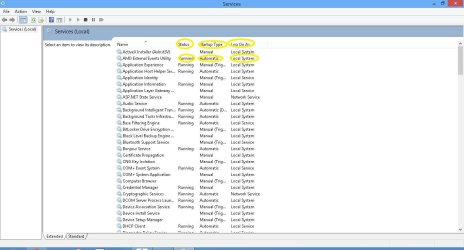
Tell me how the services are configured mentioning the three things i.e. : Startup Type & Status & Log On As
I hope you understand that we have to look into listed services for the required information.
For eg. Services listing on my windows 8 pc & required/marked fields :

services listed .JPG

Let us know,

Thanks & Regards. ...
 
Last edited:

My Computer My Computer

Computer type
Laptop
Computer Manufacturer/Model Number
hp compaq presario c795VU notebook pc
OS
Windows 7 Ultimate x32 With Sp1 + Vista Ultimate x32 with Sp1 & Sp2 !!
CPU
Intel Mobile Core 2 Duo T5750 @ 2.00GHz Merom 65nm Technolog
Motherboard
Hewlett-Packard 30D9 (CPU)
Memory
2.00GB Dual-Channel DDR2 @ 332MHz (5-5-5-15)
Graphics Card(s)
Mobile Intel(R) 965 Express Chipset Family
Sound Card
High Definition Audio Device
Monitor(s) Displays
LP154WX4-TLCB on Mobile Intel 965 Express Chipset Family
Screen Resolution
1280x800 @ 60Hz
Hard Drives
149GB Western Digital WDC WD1600BEVS-60VAT0 ATA Device (SATA)
Keyboard
Standard 101/102-Key or Microsoft Natural PS/2 Key + HP QLB
Mouse
ALPS pointing device
Antivirus
Kaspersky AV 2017(Win 7) & AVG AntiVirus Free 2016 (VISTA)
Browser
google chrome
Hi VG

Thanks again for your reply.

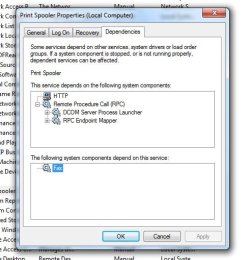
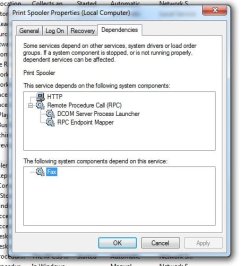
2) I have expanded all the + signs on P S dependencies, please see image below.

3) The status of the first three services are the same as your list - here -
RPC Endpoint Mapper : Automatic & Started & Network Service - correct
DCOM Server Process Launcher : Automatic & Started & Local System - correct
Remote Procedure Call : Automatic & Started & Network System - correct

However, the Print Spooler service is different. It does not say 'started'. It does say 'Automatic' and 'Local System'.

I hope I have understood everything, and given you the information you require.

Regards
 

Attachments

  • Print Spooler Problem 6.jpg
    Print Spooler Problem 6.jpg
    36.4 KB · Views: 28
  • Print Spooler Problem 7.jpg
    Print Spooler Problem 7.jpg
    7.4 KB · Views: 30

My Computer My Computer

Computer type
PC/Desktop
Computer Manufacturer/Model Number
Acer Aspire Desktop M3910
OS
Windows 7 Home Premium 64 bit SP1
CPU
Intel i3 540
Memory
3GB DDR3SD
Monitor(s) Displays
LG Flatron L1960TR
Screen Resolution
1280x1024
Keyboard
Acer
Mouse
Genius
Antivirus
Avast (Free)
Browser
I E 11
woodbine : Sir,
1. Everything is well replied.
2. Do you still have Nitro,etc. pdf editor(s) installed ? Do it/they show in listed services ? What are its/their dependencies if any ?

Let us know,

Thanks & Regards. ...

EDIT : Also tell the three values for the Nitro,etc, pdf editor(s) services.
 
Last edited:

My Computer My Computer

Computer type
Laptop
Computer Manufacturer/Model Number
hp compaq presario c795VU notebook pc
OS
Windows 7 Ultimate x32 With Sp1 + Vista Ultimate x32 with Sp1 & Sp2 !!
CPU
Intel Mobile Core 2 Duo T5750 @ 2.00GHz Merom 65nm Technolog
Motherboard
Hewlett-Packard 30D9 (CPU)
Memory
2.00GB Dual-Channel DDR2 @ 332MHz (5-5-5-15)
Graphics Card(s)
Mobile Intel(R) 965 Express Chipset Family
Sound Card
High Definition Audio Device
Monitor(s) Displays
LP154WX4-TLCB on Mobile Intel 965 Express Chipset Family
Screen Resolution
1280x800 @ 60Hz
Hard Drives
149GB Western Digital WDC WD1600BEVS-60VAT0 ATA Device (SATA)
Keyboard
Standard 101/102-Key or Microsoft Natural PS/2 Key + HP QLB
Mouse
ALPS pointing device
Antivirus
Kaspersky AV 2017(Win 7) & AVG AntiVirus Free 2016 (VISTA)
Browser
google chrome
2) It's actually Primo PDF Creator that is the problem. It is not listed in services.

My Nitro PDF reader is ok and works correctly. It has no dependencies in services (local). Nitro's three values are 'started' 'automatic' and 'local system'.

Many thanks.
 

My Computer My Computer

Computer type
PC/Desktop
Computer Manufacturer/Model Number
Acer Aspire Desktop M3910
OS
Windows 7 Home Premium 64 bit SP1
CPU
Intel i3 540
Memory
3GB DDR3SD
Monitor(s) Displays
LG Flatron L1960TR
Screen Resolution
1280x1024
Keyboard
Acer
Mouse
Genius
Antivirus
Avast (Free)
Browser
I E 11
Hi woodbine,
Sir,
1. Sorry for providing slightly careless/wrong information. Log On As are 3 types : Network Service, Local Service & Local System. I mentioned one more term i.e. Network System. I meant to say Network Service. I have edited my previous posts.
2. Back up the registry for precaution, better to make a system restore point.
Registry - Backup and Restore
3. Services - Restore Default Services in Windows 7
Go to the above link. Go through the tutorial and note down the steps. Any confusion(s)/Queries ?
Make the downloads for all the four DCOM Server Process Launcher,Print Spooler, RPC & RPC Endpoint Mapper & place them on desktop.
Take out/Eject all the External media & devices. Restart your system, login as admin & let it settle/stabilise. Don't open/start any application/window/program. Do the process for/with Print Spooler & Restart. Let it stabilise & check the Print Spooler service values. Check the rest three services values as well.
Anything else ?
Let us know,

Thanks & Regards. ...
 
Last edited:

My Computer My Computer

Computer type
Laptop
Computer Manufacturer/Model Number
hp compaq presario c795VU notebook pc
OS
Windows 7 Ultimate x32 With Sp1 + Vista Ultimate x32 with Sp1 & Sp2 !!
CPU
Intel Mobile Core 2 Duo T5750 @ 2.00GHz Merom 65nm Technolog
Motherboard
Hewlett-Packard 30D9 (CPU)
Memory
2.00GB Dual-Channel DDR2 @ 332MHz (5-5-5-15)
Graphics Card(s)
Mobile Intel(R) 965 Express Chipset Family
Sound Card
High Definition Audio Device
Monitor(s) Displays
LP154WX4-TLCB on Mobile Intel 965 Express Chipset Family
Screen Resolution
1280x800 @ 60Hz
Hard Drives
149GB Western Digital WDC WD1600BEVS-60VAT0 ATA Device (SATA)
Keyboard
Standard 101/102-Key or Microsoft Natural PS/2 Key + HP QLB
Mouse
ALPS pointing device
Antivirus
Kaspersky AV 2017(Win 7) & AVG AntiVirus Free 2016 (VISTA)
Browser
google chrome
Hi VG

Thanks for taking the time to put together a plan for me. I will take a look at the services restore tutorial and report back how I get on.

Regards

Woodbine
 

My Computer My Computer

Computer type
PC/Desktop
Computer Manufacturer/Model Number
Acer Aspire Desktop M3910
OS
Windows 7 Home Premium 64 bit SP1
CPU
Intel i3 540
Memory
3GB DDR3SD
Monitor(s) Displays
LG Flatron L1960TR
Screen Resolution
1280x1024
Keyboard
Acer
Mouse
Genius
Antivirus
Avast (Free)
Browser
I E 11
Hi Sir,
Greets,
Anything else ?

Thanks & Regards. ...
 

My Computer My Computer

Computer type
Laptop
Computer Manufacturer/Model Number
hp compaq presario c795VU notebook pc
OS
Windows 7 Ultimate x32 With Sp1 + Vista Ultimate x32 with Sp1 & Sp2 !!
CPU
Intel Mobile Core 2 Duo T5750 @ 2.00GHz Merom 65nm Technolog
Motherboard
Hewlett-Packard 30D9 (CPU)
Memory
2.00GB Dual-Channel DDR2 @ 332MHz (5-5-5-15)
Graphics Card(s)
Mobile Intel(R) 965 Express Chipset Family
Sound Card
High Definition Audio Device
Monitor(s) Displays
LP154WX4-TLCB on Mobile Intel 965 Express Chipset Family
Screen Resolution
1280x800 @ 60Hz
Hard Drives
149GB Western Digital WDC WD1600BEVS-60VAT0 ATA Device (SATA)
Keyboard
Standard 101/102-Key or Microsoft Natural PS/2 Key + HP QLB
Mouse
ALPS pointing device
Antivirus
Kaspersky AV 2017(Win 7) & AVG AntiVirus Free 2016 (VISTA)
Browser
google chrome
Hi VG

Sorry for the long delay, I hope you are still there. I had a family crisis and pc problems had to take a back seat. I'm ready to do the steps you detailed above - are you ok to answer a couple of questions first?

Apologies for disappearing.

Regards

Ian
 

My Computer My Computer

Computer type
PC/Desktop
Computer Manufacturer/Model Number
Acer Aspire Desktop M3910
OS
Windows 7 Home Premium 64 bit SP1
CPU
Intel i3 540
Memory
3GB DDR3SD
Monitor(s) Displays
LG Flatron L1960TR
Screen Resolution
1280x1024
Keyboard
Acer
Mouse
Genius
Antivirus
Avast (Free)
Browser
I E 11
Hi woodbine,
Greets,
Sir,
Everybody has good & bad times. Good to see you back. Please let us know how we can help you.

Thanks & Regards. ...
 

My Computer My Computer

Computer type
Laptop
Computer Manufacturer/Model Number
hp compaq presario c795VU notebook pc
OS
Windows 7 Ultimate x32 With Sp1 + Vista Ultimate x32 with Sp1 & Sp2 !!
CPU
Intel Mobile Core 2 Duo T5750 @ 2.00GHz Merom 65nm Technolog
Motherboard
Hewlett-Packard 30D9 (CPU)
Memory
2.00GB Dual-Channel DDR2 @ 332MHz (5-5-5-15)
Graphics Card(s)
Mobile Intel(R) 965 Express Chipset Family
Sound Card
High Definition Audio Device
Monitor(s) Displays
LP154WX4-TLCB on Mobile Intel 965 Express Chipset Family
Screen Resolution
1280x800 @ 60Hz
Hard Drives
149GB Western Digital WDC WD1600BEVS-60VAT0 ATA Device (SATA)
Keyboard
Standard 101/102-Key or Microsoft Natural PS/2 Key + HP QLB
Mouse
ALPS pointing device
Antivirus
Kaspersky AV 2017(Win 7) & AVG AntiVirus Free 2016 (VISTA)
Browser
google chrome
Hi VG

Thanks for your reply. I am glad to see you are still here, and able to give advice.

I understand everything in your post telling me how to solve my problem, except a few things in number 3. You say to "Make the downloads for all the four - DCOM Server Process Launcher,Print Spooler, RPC & RPC Endpoint Mapper & place them on desktop." Do you want me to run the Print Spooler download first, restart, then see if my problem is fixed? Or will I need to run all four downloads (Spooler, DCOM, RPC, RPC Endpoint)? Will the Print Spooler download fix the problem on it's own, or will I need to use all four downloads to be sure it's fixed? If I need to use all four downloads, do I need to restart after each one is used?

Regards

Woodbine
 

My Computer My Computer

Computer type
PC/Desktop
Computer Manufacturer/Model Number
Acer Aspire Desktop M3910
OS
Windows 7 Home Premium 64 bit SP1
CPU
Intel i3 540
Memory
3GB DDR3SD
Monitor(s) Displays
LG Flatron L1960TR
Screen Resolution
1280x1024
Keyboard
Acer
Mouse
Genius
Antivirus
Avast (Free)
Browser
I E 11
Hi woodbine,
Sir,
You have answered everything yourself.
1. First thing would be to do it with Print Spooler reg file only. Then restart the pc. Once the pc become stable, check all the four services' status. Are they the way as desired ?
2. If that does not solve the problem, there are chances that the good looking services are not all good & Brink sir has taken care of it! So, we would start with the roots. We would start with RPC Endpoint Mapper, then DCOM Server Process Launcher, then Remote Procedure Call & finally Print Spooler. Every time we would do only with one service file, restart the pc & check whether the service is good enough & then proceed for the next one.

Step 1 can do the thing. If not, Step 2 should do the thing. Still not, then there are a few other steps.
The thing to be taken care of is : After restart, check the status of the services only once the pc has stabilized. Some services take time to start after a restart/start.

Let us know.

Thanks & Regards. ...
 

My Computer My Computer

Computer type
Laptop
Computer Manufacturer/Model Number
hp compaq presario c795VU notebook pc
OS
Windows 7 Ultimate x32 With Sp1 + Vista Ultimate x32 with Sp1 & Sp2 !!
CPU
Intel Mobile Core 2 Duo T5750 @ 2.00GHz Merom 65nm Technolog
Motherboard
Hewlett-Packard 30D9 (CPU)
Memory
2.00GB Dual-Channel DDR2 @ 332MHz (5-5-5-15)
Graphics Card(s)
Mobile Intel(R) 965 Express Chipset Family
Sound Card
High Definition Audio Device
Monitor(s) Displays
LP154WX4-TLCB on Mobile Intel 965 Express Chipset Family
Screen Resolution
1280x800 @ 60Hz
Hard Drives
149GB Western Digital WDC WD1600BEVS-60VAT0 ATA Device (SATA)
Keyboard
Standard 101/102-Key or Microsoft Natural PS/2 Key + HP QLB
Mouse
ALPS pointing device
Antivirus
Kaspersky AV 2017(Win 7) & AVG AntiVirus Free 2016 (VISTA)
Browser
google chrome
Hi VG

That's great advice. It's completely clear what I need to do now. Will follow your instructions now, and get back to you when finished.

Thanks again - really appreciated.
 

My Computer My Computer

Computer type
PC/Desktop
Computer Manufacturer/Model Number
Acer Aspire Desktop M3910
OS
Windows 7 Home Premium 64 bit SP1
CPU
Intel i3 540
Memory
3GB DDR3SD
Monitor(s) Displays
LG Flatron L1960TR
Screen Resolution
1280x1024
Keyboard
Acer
Mouse
Genius
Antivirus
Avast (Free)
Browser
I E 11
Hi VG

I have had problems. Two of the .reg files that I successfully downloaded to desktop wouldn't merge/run.

This is what I've done -

1) Downloaded all 4 .reg files to desktop.

2) Run/merged Print Spooler .reg file, then restarted and allowed pc to stabilise.

3) Checked services value for Print Spooler - no change - not started. Tried to start - came up with same error 1068 message.

4) Run/merged RPC Endpoint Mapper .reg file, then restarted pc.

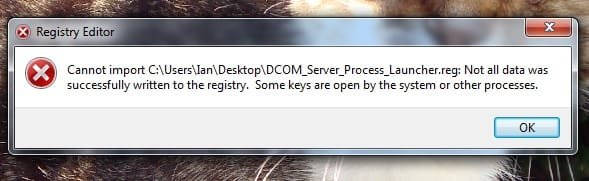
5) Tried to run/merge DCOM Server Process Launcher - right click>Merge>Run>Yes>Yes then get message in image below

6) Tried to run/merge RPC - right click>Merge>Run>Yes>Yes then get message in image below

I'm afraid it hasn't been successful. I don't know why the last two .reg files wouldn't work as I don't understand the message in the box that appeared on screen. My problem is still the same.
 

Attachments

  • Print Spooler 10.jpg
    Print Spooler 10.jpg
    20.9 KB · Views: 10

My Computer My Computer

Computer type
PC/Desktop
Computer Manufacturer/Model Number
Acer Aspire Desktop M3910
OS
Windows 7 Home Premium 64 bit SP1
CPU
Intel i3 540
Memory
3GB DDR3SD
Monitor(s) Displays
LG Flatron L1960TR
Screen Resolution
1280x1024
Keyboard
Acer
Mouse
Genius
Antivirus
Avast (Free)
Browser
I E 11
Back
Top