sfc unable to fix, possibly linked to user profile service failure

Clairvaux

New member
Pro User
VIP
Local time
7:58 AM
Messages
247
I ran sfc /scannow on my system drive, and got the following result :

Windows Resource Protection found corrupt files but was unable to fix some of them. Details are included in the CBS.Log windir \Logs\CBS\CBS.log. For example C:\Windows\Logs\CBS\CBS.log

Unfortunately, the CBS.log file cannot be read. I get an Access Denied message, despite the permissions being (I think) appropriate.

How to correct this ? And could it possibly be the cause of the problems I experienced before ? In chronological order :

1.- Attempts to launch programs requiring admin rights started triggering the message Windows cannot find '[name of program].exe'. Make sure you typed the name correctly, and then try again.

2.- A restauration of the system disk through a Macrium Reflect image temporarily corrected the problem.

3.- However, a while later, when starting the computer, I was unable to log into either of my two Windows user accounts, one admin, the other non-admin. Error message was The User Profile Service service failed. The logon User profile cannot be loaded. The only way to do anything at all was to start in safe mode and attempt log into my admin account. This would (as I understand it) give access not to my admin account, but to the default, hidden admin account of Windows. No programs or files could be seen there, except the non-admin part of the Control Panel. The only way to do anything at all was to restart in safe mode with command prompt.

4.- I went into regedit and attempted the repairs explained in User Profile Service failed the logon. User profile cannot be loaded. However, my situation was different from the ones described : both my SID keys with long numbers, relative to my user profiles, had the .bak termination. I tried to adapt the recommended registry changes to my situation, but nothing worked.

5.- A second restauration corrected the problem again.

6.- A few days later, though, I was unable to log into Windows again, with both my user accounts triggering the error message The User Profile Service service failed. The logon User profile cannot be loaded. That's when I decided to run sfc /scannow, which produced the above result.

7.- So I restored a third time, which worked again. sfc /scannow produces the same error message after restore. I'm taking care not to restart the computer, because I believe that's when it may break because of what has been detected by sfc. For the time being, my registry seems correct, with none of the two SID keys having .bak terminations anymore. While restoring from the special Macrium partition at boot, I applied the Macrium command Fix Windows Boot Problems, but this did not make sfc return a clean result.

I have a system disk and a data disk, and all my User folders are on my data disk. The system disk is an SSD.

I'd really like to avoid reinstall, or even repair install, which I understand would not be very different. Thank you for any advice.
 

My Computer My Computer

At a glance

Windows 7 Home Premium 64-bit (OEM)AMD Athlon II X4 640 (3 GHz, 4 cores)Patriot 16Gb DDR3 1600 (2 kits of 2)ATI Radeon HD 4290 (integrated)
Computer type
PC/Desktop
Computer Manufacturer/Model Number
Custom build
OS
Windows 7 Home Premium 64-bit (OEM)
CPU
AMD Athlon II X4 640 (3 GHz, 4 cores)
Motherboard
Asus M4A 89 GTD Pro/USB3
Memory
Patriot 16Gb DDR3 1600 (2 kits of 2)
Graphics Card(s)
ATI Radeon HD 4290 (integrated)
Sound Card
AMD + Realtek HD Audio (integrated)
Monitor(s) Displays
Hewlett-Packard ZR2440w (24")
Screen Resolution
1920 x 1200
Hard Drives
Internal : Samsung SSD 860 EVO 250 Gb (system), Seagate Barrcuda 1 Tb (data), Western Digital Caviar Blue 500 Gb (archives).
External (USB) : 2 x 1 Tb 2,5" Seagate Barracuda (backups).
PSU
Corsair VX 450 W
Case
Antec Solo
Cooling
Cooler Master Hyper 212 Plus, 2 Nexus Real Silent Case fans
Keyboard
Cherry KC 1000
Mouse
Logitech M 90
Internet Speed
Fiber, 300 Mbit/s down, 200 Mbit/s up
Antivirus
Microsoft Security Essentials
Browser
Vivaldi, Tor
Other Info
BIOS Date: 07/18/11 Ver: 08.00.15.
Modem-router : provided by ISP

My Computers My Computers

  • At a glance

    Windows 7 HP 64i5 6600K - 800MHz to 4200MHz4+4G GSkill DDR4 3000IG - Intel 530
    Computer type
    PC/Desktop
    Computer Manufacturer/Model Number
    custom build
    OS
    Windows 7 HP 64
    CPU
    i5 6600K - 800MHz to 4200MHz
    Motherboard
    GA-Z170-HD3P
    Memory
    4+4G GSkill DDR4 3000
    Graphics Card(s)
    IG - Intel 530
    Monitor(s) Displays
    Samsung 226BW
    Screen Resolution
    1680x1050
    Hard Drives
    (1) -1 SM951 – 128GB M.2 AHCI PCIe SSD drive for Windows 7 and Lubuntu
    (2) -1 WD SATA 3 - 1T for Data
    (3) -1 WD SATA 3 - 1T for backup
    PSU
    Thermaltake 450W TR2 gold
    Keyboard
    Old and good Chicony mechanical keyboard
    Mouse
    Logitech mX performance - 9 buttons (had to disable some)
    Internet Speed
    500Mb/s
    Browser
    Firefox 64
    Other Info
    TinyWall firewall
  • At a glance

    Windows 7 Proi7-4500U 800MHz to 3.0GHz(4+4)G DDR3 1600IG intel 4400 + NVIDIA GeForce GT 745M
    Computer type
    Laptop
    System Manufacturer/Model Number
    Asus Q550LF
    OS
    Windows 7 Pro
    CPU
    i7-4500U 800MHz to 3.0GHz
    Motherboard
    Asus Q550LF
    Memory
    (4+4)G DDR3 1600
    Graphics Card(s)
    IG intel 4400 + NVIDIA GeForce GT 745M
    Sound Card
    Realtek
    Monitor(s) Displays
    LG Display LP156WF4-SPH1
    Screen Resolution
    1920 x 1080
    Hard Drives
    BX500 120G SSD for Windows and programs +
    1T HDD for data
    Internet Speed
    500 Mb/s
    Browser
    Firefox
    Other Info
    TinyWall firewall
Thanks for the links. I'm not sure to have enough room on my 256 GB SSD.

You must have at least 8.87 GB + what is currently being used of free space (more if you have a larger installation) on the hard drive/partition Windows 7 is installed on to do a repair install.

What does this mean ? Does the author mean that, if you have 100 GB of used space on your system partition, you need 108 GB of free space ? If so, I don't have enough room, unless I manage to make some. I have 123 GB used and 97 GB free. Moreover...

If you changed the default location of a user account's profile folder, then you will need to change it back to the default C:\Users location first. If you moved the default location of a user folder, then you will need to change it back to the default C:\Users\(user-name) location first.

That's my case. All my user folders are on my data disk. They take 176 GB. Does this mean that, for a repair install, all documents must be, at least temporarily, brought back into C: ? People who have huge media libraries (not my case), and might have stored them on D:, must put them back into C before doing a repair install ?

I have 143 GB in Users\Public. All my documents, and some of the active databases used by my programs, are there. It's not a standard setup.
 

My Computer My Computer

At a glance

Windows 7 Home Premium 64-bit (OEM)AMD Athlon II X4 640 (3 GHz, 4 cores)Patriot 16Gb DDR3 1600 (2 kits of 2)ATI Radeon HD 4290 (integrated)
Computer type
PC/Desktop
Computer Manufacturer/Model Number
Custom build
OS
Windows 7 Home Premium 64-bit (OEM)
CPU
AMD Athlon II X4 640 (3 GHz, 4 cores)
Motherboard
Asus M4A 89 GTD Pro/USB3
Memory
Patriot 16Gb DDR3 1600 (2 kits of 2)
Graphics Card(s)
ATI Radeon HD 4290 (integrated)
Sound Card
AMD + Realtek HD Audio (integrated)
Monitor(s) Displays
Hewlett-Packard ZR2440w (24")
Screen Resolution
1920 x 1200
Hard Drives
Internal : Samsung SSD 860 EVO 250 Gb (system), Seagate Barrcuda 1 Tb (data), Western Digital Caviar Blue 500 Gb (archives).
External (USB) : 2 x 1 Tb 2,5" Seagate Barracuda (backups).
PSU
Corsair VX 450 W
Case
Antec Solo
Cooling
Cooler Master Hyper 212 Plus, 2 Nexus Real Silent Case fans
Keyboard
Cherry KC 1000
Mouse
Logitech M 90
Internet Speed
Fiber, 300 Mbit/s down, 200 Mbit/s up
Antivirus
Microsoft Security Essentials
Browser
Vivaldi, Tor
Other Info
BIOS Date: 07/18/11 Ver: 08.00.15.
Modem-router : provided by ISP
I have 123 GB used and 97 GB free. Moreover...

97 GB free is enough to a repair install


All my user folders are on my data disk. They take 176 GB. Does this mean that, for a repair install, all documents must be, at least temporarily, brought back into C: ? must put them back into C before doing a repair install ?
I have 143 GB in Users\Public. All my documents, and some of the active databases used by my programs, are there. It's not a standard setup.

I also have \Users on D:
You can move all your data from D:\Users\Name and D:\Users\Public to a D: folder so that D:\Users\ is only a few MB. After the repair install, move \Users back to D:

I created a drive image backup just after Win 7 and Office installation and all updates applied (with \users on D:).
If Windows is screwed, I just reload the Windows drive image and reinstall all other software. The D: data drive I don't need to do anything (I also have a backup).
 

My Computers My Computers

  • At a glance

    Windows 7 HP 64i5 6600K - 800MHz to 4200MHz4+4G GSkill DDR4 3000IG - Intel 530
    Computer type
    PC/Desktop
    Computer Manufacturer/Model Number
    custom build
    OS
    Windows 7 HP 64
    CPU
    i5 6600K - 800MHz to 4200MHz
    Motherboard
    GA-Z170-HD3P
    Memory
    4+4G GSkill DDR4 3000
    Graphics Card(s)
    IG - Intel 530
    Monitor(s) Displays
    Samsung 226BW
    Screen Resolution
    1680x1050
    Hard Drives
    (1) -1 SM951 – 128GB M.2 AHCI PCIe SSD drive for Windows 7 and Lubuntu
    (2) -1 WD SATA 3 - 1T for Data
    (3) -1 WD SATA 3 - 1T for backup
    PSU
    Thermaltake 450W TR2 gold
    Keyboard
    Old and good Chicony mechanical keyboard
    Mouse
    Logitech mX performance - 9 buttons (had to disable some)
    Internet Speed
    500Mb/s
    Browser
    Firefox 64
    Other Info
    TinyWall firewall
  • At a glance

    Windows 7 Proi7-4500U 800MHz to 3.0GHz(4+4)G DDR3 1600IG intel 4400 + NVIDIA GeForce GT 745M
    Computer type
    Laptop
    System Manufacturer/Model Number
    Asus Q550LF
    OS
    Windows 7 Pro
    CPU
    i7-4500U 800MHz to 3.0GHz
    Motherboard
    Asus Q550LF
    Memory
    (4+4)G DDR3 1600
    Graphics Card(s)
    IG intel 4400 + NVIDIA GeForce GT 745M
    Sound Card
    Realtek
    Monitor(s) Displays
    LG Display LP156WF4-SPH1
    Screen Resolution
    1920 x 1080
    Hard Drives
    BX500 120G SSD for Windows and programs +
    1T HDD for data
    Internet Speed
    500 Mb/s
    Browser
    Firefox
    Other Info
    TinyWall firewall
I also have \Users on D:You can move all your data from D:\Users\Name and D:\Users\Public to a D: folder so that D:\Users\ is only a few MB. After the repair install, move \Users back to D:
.
What sort of "moving" is this ? Cut and paste, or telling Windows it's now in another place by some special way ?

This tutorial about repair install says :
If you changed the default location of a user account's profile folder, then you will need to change it back to the default C:\Users location first.

This seems different from what you advise. It involves a lot of messing around in the registry.

Also, I have some active databases of my programs in a custom location in User\Public. If I move this, the programs won't work anymore.

I created a drive image backup just after Win 7 and Office installation and all updates applied (with \users on D:).If Windows is screwed, I just reload the Windows drive image and reinstall all other software. The D: data drive I don't need to do anything (I also have a backup).
I have this too. But this is different from a repair install, isn't it ? Also, I have 7 different zero-day images with the successive states, but the partitions are different from what I have now.

Image 1 only has Windows 7 in audit mode. Image 2 has the partitions added (different setup, different hardware drives, won't work I suppose). Image 3 has the network driver and an obsolete Internet connection I don't use anymore. Image 4 has Sysprep and the drivers. Image 5 has Windows updates. Is that of any use ?

I'm very uncomfortable with drivers. I don't understand at all how they work. I remember it was hell the last time I reinstalled. My mother board is very old.
 

My Computer My Computer

At a glance

Windows 7 Home Premium 64-bit (OEM)AMD Athlon II X4 640 (3 GHz, 4 cores)Patriot 16Gb DDR3 1600 (2 kits of 2)ATI Radeon HD 4290 (integrated)
Computer type
PC/Desktop
Computer Manufacturer/Model Number
Custom build
OS
Windows 7 Home Premium 64-bit (OEM)
CPU
AMD Athlon II X4 640 (3 GHz, 4 cores)
Motherboard
Asus M4A 89 GTD Pro/USB3
Memory
Patriot 16Gb DDR3 1600 (2 kits of 2)
Graphics Card(s)
ATI Radeon HD 4290 (integrated)
Sound Card
AMD + Realtek HD Audio (integrated)
Monitor(s) Displays
Hewlett-Packard ZR2440w (24")
Screen Resolution
1920 x 1200
Hard Drives
Internal : Samsung SSD 860 EVO 250 Gb (system), Seagate Barrcuda 1 Tb (data), Western Digital Caviar Blue 500 Gb (archives).
External (USB) : 2 x 1 Tb 2,5" Seagate Barracuda (backups).
PSU
Corsair VX 450 W
Case
Antec Solo
Cooling
Cooler Master Hyper 212 Plus, 2 Nexus Real Silent Case fans
Keyboard
Cherry KC 1000
Mouse
Logitech M 90
Internet Speed
Fiber, 300 Mbit/s down, 200 Mbit/s up
Antivirus
Microsoft Security Essentials
Browser
Vivaldi, Tor
Other Info
BIOS Date: 07/18/11 Ver: 08.00.15.
Modem-router : provided by ISP
What sort of "moving" is this ? Cut and paste, or telling Windows it's now in another place by some special way ?

This tutorial about repair install says :
[FONT=&]
[/FONT]
This seems different from what you advise. It involves a lot of messing around in the registry.

Also, I have some active databases of my programs in a custom location in User\Public. If I move this, the programs won't work anymore.


I have this too. But this is different from a repair install, isn't it ? Also, I have 7 different zero-day images with the successive states, but the partitions are different from what I have now.

Image 1 only has Windows 7 in audit mode. Image 2 has the partitions added (different setup, different hardware drives, won't work I suppose). Image 3 has the network driver and an obsolete Internet connection I don't use anymore. Image 4 has Sysprep and the drivers. Image 5 has Windows updates. Is that of any use ?

I'm very uncomfortable with drivers. I don't understand at all how they work. I remember it was hell the last time I reinstalled. My mother board is very old.

To do a Repair install on Win 7 you have to move the D:\users folder back to C:\users.
As you have a large amount of data on D:\users"name" and D:\users\public you move (Ctrl+x and Ctrl+V) your data files and folders to a folder out of D:\users to make D:\users "light" in space (Your data isn't transferred to C:, will remain in D:). Then you enter audit mode and move D:\users back to C:\users, do the repair install and then move C:\users back to D:\users.

Who has moved C:\users to D:\users, you or someone else?
Did you follow Kari's tutorial?

Please post a whole window Disk Manager image of ALL your drives. Don't forget to expand the columns so we can read them. How to Post a Screenshot of Disk Management
If you have a MiniTool or AOMEI Partition use it instead or Windows disk manager.
 

My Computers My Computers

  • At a glance

    Windows 7 HP 64i5 6600K - 800MHz to 4200MHz4+4G GSkill DDR4 3000IG - Intel 530
    Computer type
    PC/Desktop
    Computer Manufacturer/Model Number
    custom build
    OS
    Windows 7 HP 64
    CPU
    i5 6600K - 800MHz to 4200MHz
    Motherboard
    GA-Z170-HD3P
    Memory
    4+4G GSkill DDR4 3000
    Graphics Card(s)
    IG - Intel 530
    Monitor(s) Displays
    Samsung 226BW
    Screen Resolution
    1680x1050
    Hard Drives
    (1) -1 SM951 – 128GB M.2 AHCI PCIe SSD drive for Windows 7 and Lubuntu
    (2) -1 WD SATA 3 - 1T for Data
    (3) -1 WD SATA 3 - 1T for backup
    PSU
    Thermaltake 450W TR2 gold
    Keyboard
    Old and good Chicony mechanical keyboard
    Mouse
    Logitech mX performance - 9 buttons (had to disable some)
    Internet Speed
    500Mb/s
    Browser
    Firefox 64
    Other Info
    TinyWall firewall
  • At a glance

    Windows 7 Proi7-4500U 800MHz to 3.0GHz(4+4)G DDR3 1600IG intel 4400 + NVIDIA GeForce GT 745M
    Computer type
    Laptop
    System Manufacturer/Model Number
    Asus Q550LF
    OS
    Windows 7 Pro
    CPU
    i7-4500U 800MHz to 3.0GHz
    Motherboard
    Asus Q550LF
    Memory
    (4+4)G DDR3 1600
    Graphics Card(s)
    IG intel 4400 + NVIDIA GeForce GT 745M
    Sound Card
    Realtek
    Monitor(s) Displays
    LG Display LP156WF4-SPH1
    Screen Resolution
    1920 x 1080
    Hard Drives
    BX500 120G SSD for Windows and programs +
    1T HDD for data
    Internet Speed
    500 Mb/s
    Browser
    Firefox
    Other Info
    TinyWall firewall
Who has moved C:\users to D:\users, you or someone else?
Me, when doing the original install, then reinstall, long ago.

Did you follow Kari's tutorial?
Yes, all comes from this, and especially the moving of all data on D:

To do a Repair install on Win 7 you have to move the D:\users folder back to C:\users.
As you have a large amount of data on D:\users"name" and D:\users\public you move (Ctrl+x and Ctrl+V) your data files and folders to a folder out of D:\users to make D:\users "light" in space (Your data isn't transferred to C:, will remain in D:).
This much I understand.

Then you enter audit mode and move D:\users back to C:\users, do the repair install and then move C:\users back to D:\users.
That's new to me. In order to move users to C:, I was about to simply follow this, then do the reverse after repair install :

User Profile - Change Default Location

That's not audit mode, is it ? If I do have to enter audit mode, could you please point me to a tutorial, as I have forgotten all about it ?

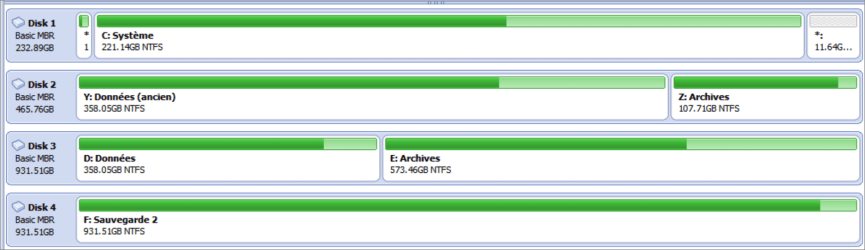
Two screenshots of my disks are below. First the graphical overview, then the table with the details and my comments. Sorry, high DPI problem with AOMEI, the screenshots are a bit fuzzy.
 

Attachments

  • Disks - Graphics - 13 juin 23.png
    Disks - Graphics - 13 juin 23.png
    24 KB · Views: 0
  • Disks - Table - 13 juin 23.png
    Disks - Table - 13 juin 23.png
    41.9 KB · Views: 2

My Computer My Computer

At a glance

Windows 7 Home Premium 64-bit (OEM)AMD Athlon II X4 640 (3 GHz, 4 cores)Patriot 16Gb DDR3 1600 (2 kits of 2)ATI Radeon HD 4290 (integrated)
Computer type
PC/Desktop
Computer Manufacturer/Model Number
Custom build
OS
Windows 7 Home Premium 64-bit (OEM)
CPU
AMD Athlon II X4 640 (3 GHz, 4 cores)
Motherboard
Asus M4A 89 GTD Pro/USB3
Memory
Patriot 16Gb DDR3 1600 (2 kits of 2)
Graphics Card(s)
ATI Radeon HD 4290 (integrated)
Sound Card
AMD + Realtek HD Audio (integrated)
Monitor(s) Displays
Hewlett-Packard ZR2440w (24")
Screen Resolution
1920 x 1200
Hard Drives
Internal : Samsung SSD 860 EVO 250 Gb (system), Seagate Barrcuda 1 Tb (data), Western Digital Caviar Blue 500 Gb (archives).
External (USB) : 2 x 1 Tb 2,5" Seagate Barracuda (backups).
PSU
Corsair VX 450 W
Case
Antec Solo
Cooling
Cooler Master Hyper 212 Plus, 2 Nexus Real Silent Case fans
Keyboard
Cherry KC 1000
Mouse
Logitech M 90
Internet Speed
Fiber, 300 Mbit/s down, 200 Mbit/s up
Antivirus
Microsoft Security Essentials
Browser
Vivaldi, Tor
Other Info
BIOS Date: 07/18/11 Ver: 08.00.15.
Modem-router : provided by ISP
Then you enter audit mode and move D:\users back to C:\users, do the repair install and then move C:\users back to D:\users.


That's new to me. In order to move users to C:, I was about to simply follow this, then do the reverse after repair install :

User Profile - Change Default Location

That's not audit mode, is it ? If I do have to enter audit mode, could you please point me to a tutorial, as I have forgotten all about it ?

On the tutorial you move only the user profile folder. D:\Users\ will remain in D:

Follow this guide:
- Open a CMD window as administrator and type:
chkdsk C: /f
It will say your disk is in use and ask if you want to schedule to next start = yes
chkdsk D: /f
It will say your disk is in use and ask if you want to un mount =no or schedule to next start = yes
Restart
Pay attention on the results, specially bad blocks, bad clusters, bad sectors etc


- Create a drive image backup and save it on another drive. Better be safe than sorry.
- Move your data out of D:\users (data only) as already explained.

On Relocate Users.zip you will find many files. Extract them to a folder.

- Rename Audit.cmd.txt to Audit.cmd and execute. It will take you to Audit mode.
- Modify the Relocate.xml.txt to send D:\Users to C:\Users (<ProfilesDirectory>C:\Users</ProfilesDirectory>)
- Rename the modified Relocate.xml.txt to Relocate.xml and place it on D:\
- Rename Sysprep.cmd.txt to Sysprep.cmd and execute. It will move D:\Users\ to C:\Users\

Exit audit mode. You will be back to OOBE. You need to create a new user (you can delete it after you move back to D:)

- Log in to your user name and do the repair install. Don't connect to the internet and don't update.

- Execute Audit.cmd. It will take you to Audit mode.
- Modify the D:\Relocate.xml to send C:\Users to D:\Users (<ProfilesDirectory>D:\Users</ProfilesDirectory>)
- Executee Sysprep.cmd . It will move C:\Users\ to D:\Users\

Exit audit mode. You will be back to OOBE. You need to create a new user.

Log in and delete the two users created. Move your data back to the D:\users"name" and D:\users\public

Follow the instructions to use Simplix to update Win 7
 
Last edited:

My Computers My Computers

  • At a glance

    Windows 7 HP 64i5 6600K - 800MHz to 4200MHz4+4G GSkill DDR4 3000IG - Intel 530
    Computer type
    PC/Desktop
    Computer Manufacturer/Model Number
    custom build
    OS
    Windows 7 HP 64
    CPU
    i5 6600K - 800MHz to 4200MHz
    Motherboard
    GA-Z170-HD3P
    Memory
    4+4G GSkill DDR4 3000
    Graphics Card(s)
    IG - Intel 530
    Monitor(s) Displays
    Samsung 226BW
    Screen Resolution
    1680x1050
    Hard Drives
    (1) -1 SM951 – 128GB M.2 AHCI PCIe SSD drive for Windows 7 and Lubuntu
    (2) -1 WD SATA 3 - 1T for Data
    (3) -1 WD SATA 3 - 1T for backup
    PSU
    Thermaltake 450W TR2 gold
    Keyboard
    Old and good Chicony mechanical keyboard
    Mouse
    Logitech mX performance - 9 buttons (had to disable some)
    Internet Speed
    500Mb/s
    Browser
    Firefox 64
    Other Info
    TinyWall firewall
  • At a glance

    Windows 7 Proi7-4500U 800MHz to 3.0GHz(4+4)G DDR3 1600IG intel 4400 + NVIDIA GeForce GT 745M
    Computer type
    Laptop
    System Manufacturer/Model Number
    Asus Q550LF
    OS
    Windows 7 Pro
    CPU
    i7-4500U 800MHz to 3.0GHz
    Motherboard
    Asus Q550LF
    Memory
    (4+4)G DDR3 1600
    Graphics Card(s)
    IG intel 4400 + NVIDIA GeForce GT 745M
    Sound Card
    Realtek
    Monitor(s) Displays
    LG Display LP156WF4-SPH1
    Screen Resolution
    1920 x 1080
    Hard Drives
    BX500 120G SSD for Windows and programs +
    1T HDD for data
    Internet Speed
    500 Mb/s
    Browser
    Firefox
    Other Info
    TinyWall firewall
Thank you very much for the detailed instructions. I will try to see if I understand them later.

I will not do a check disk. The reason I'm envisioning this repair install is my system is very corrupted, so much so that very bad things happen every time I restart. I almost cannot use the computer at all when I do (see my initial post). So I have left my computer on for several days now, only putting it to sleep, but never logging off.
 

My Computer My Computer

At a glance

Windows 7 Home Premium 64-bit (OEM)AMD Athlon II X4 640 (3 GHz, 4 cores)Patriot 16Gb DDR3 1600 (2 kits of 2)ATI Radeon HD 4290 (integrated)
Computer type
PC/Desktop
Computer Manufacturer/Model Number
Custom build
OS
Windows 7 Home Premium 64-bit (OEM)
CPU
AMD Athlon II X4 640 (3 GHz, 4 cores)
Motherboard
Asus M4A 89 GTD Pro/USB3
Memory
Patriot 16Gb DDR3 1600 (2 kits of 2)
Graphics Card(s)
ATI Radeon HD 4290 (integrated)
Sound Card
AMD + Realtek HD Audio (integrated)
Monitor(s) Displays
Hewlett-Packard ZR2440w (24")
Screen Resolution
1920 x 1200
Hard Drives
Internal : Samsung SSD 860 EVO 250 Gb (system), Seagate Barrcuda 1 Tb (data), Western Digital Caviar Blue 500 Gb (archives).
External (USB) : 2 x 1 Tb 2,5" Seagate Barracuda (backups).
PSU
Corsair VX 450 W
Case
Antec Solo
Cooling
Cooler Master Hyper 212 Plus, 2 Nexus Real Silent Case fans
Keyboard
Cherry KC 1000
Mouse
Logitech M 90
Internet Speed
Fiber, 300 Mbit/s down, 200 Mbit/s up
Antivirus
Microsoft Security Essentials
Browser
Vivaldi, Tor
Other Info
BIOS Date: 07/18/11 Ver: 08.00.15.
Modem-router : provided by ISP
Follow this guide

Hi,

Have studied your instructions. I have a question about the repair install. The tutorial gives several options for the Windows disc to be used.

My installation obviously includes SP1. I have my original Windows disk (OEM for builders), and I know the key number, but as far as I can tell it does not include SP1. Does it mean I cannot use it ? Cannot that Simplix thing be used instead to install SP1 ?

If so, there are various links given to get Windows 7 with SP1, but the only one which seems to work is to the Heidi Doc site. Again, most of the links there seem not to work anymore. I have only been able to download something called Windows ISO Downloader v.8.46. Is that what I must use ?

My understanding is, it's only a program which fetches Windows 7 from Microsoft servers. Is that correct ?

I haven't used it yet, but it seems very complicated. I see hints that Windows 7 is not available anymore, others that you need to wait for several days because there are download slots, and so on. Anything I should know before trying it, in order not to waste time ?
 

My Computer My Computer

At a glance

Windows 7 Home Premium 64-bit (OEM)AMD Athlon II X4 640 (3 GHz, 4 cores)Patriot 16Gb DDR3 1600 (2 kits of 2)ATI Radeon HD 4290 (integrated)
Computer type
PC/Desktop
Computer Manufacturer/Model Number
Custom build
OS
Windows 7 Home Premium 64-bit (OEM)
CPU
AMD Athlon II X4 640 (3 GHz, 4 cores)
Motherboard
Asus M4A 89 GTD Pro/USB3
Memory
Patriot 16Gb DDR3 1600 (2 kits of 2)
Graphics Card(s)
ATI Radeon HD 4290 (integrated)
Sound Card
AMD + Realtek HD Audio (integrated)
Monitor(s) Displays
Hewlett-Packard ZR2440w (24")
Screen Resolution
1920 x 1200
Hard Drives
Internal : Samsung SSD 860 EVO 250 Gb (system), Seagate Barrcuda 1 Tb (data), Western Digital Caviar Blue 500 Gb (archives).
External (USB) : 2 x 1 Tb 2,5" Seagate Barracuda (backups).
PSU
Corsair VX 450 W
Case
Antec Solo
Cooling
Cooler Master Hyper 212 Plus, 2 Nexus Real Silent Case fans
Keyboard
Cherry KC 1000
Mouse
Logitech M 90
Internet Speed
Fiber, 300 Mbit/s down, 200 Mbit/s up
Antivirus
Microsoft Security Essentials
Browser
Vivaldi, Tor
Other Info
BIOS Date: 07/18/11 Ver: 08.00.15.
Modem-router : provided by ISP
Hi,

Have studied your instructions. I have a question about the repair install. The tutorial gives several options for the Windows disc to be used.

My installation obviously includes SP1. I have my original Windows disk (OEM for builders), and I know the key number, but as far as I can tell it does not include SP1. Does it mean I cannot use it ? Cannot that Simplix thing be used instead to install SP1 ?

Look the date on \Sources\install.wim at the Windows disk. Windows 7 sp1 was released to the public on February 22, 2011.
Simplix require that the installation is SP1

If so, there are various links given to get Windows 7 with SP1, but the only one which seems to work is to the Heidi Doc site. Again, most of the links there seem not to work anymore. I have only been able to download something called Windows ISO Downloader v.8.46. Is that what I must use ?
My understanding is, it's only a program which fetches Windows 7 from Microsoft servers. Is that correct ?

I haven't used it yet, but it seems very complicated. I see hints that Windows 7 is not available anymore, others that you need to wait for several days because there are download slots, and so on. Anything I should know before trying it, in order not to waste time ?
Yes, Windows ISO Downloader is just a tool to download Iso files from Microsoft servers. Unfortunately, Win 7 isn't available any more.

There are some sites that has Win 7 SP1 for download and SIW2 can help you on that.
I only have Win 7 SP1 iso in English and Portuguese but no French.

This seems a good site and it has Win 7 SP1French
Windows 7 Home Premium SP1 French x86 and x64 : Microsoft : Free Download, Borrow, and Streaming : Internet Archive
 

My Computers My Computers

  • At a glance

    Windows 7 HP 64i5 6600K - 800MHz to 4200MHz4+4G GSkill DDR4 3000IG - Intel 530
    Computer type
    PC/Desktop
    Computer Manufacturer/Model Number
    custom build
    OS
    Windows 7 HP 64
    CPU
    i5 6600K - 800MHz to 4200MHz
    Motherboard
    GA-Z170-HD3P
    Memory
    4+4G GSkill DDR4 3000
    Graphics Card(s)
    IG - Intel 530
    Monitor(s) Displays
    Samsung 226BW
    Screen Resolution
    1680x1050
    Hard Drives
    (1) -1 SM951 – 128GB M.2 AHCI PCIe SSD drive for Windows 7 and Lubuntu
    (2) -1 WD SATA 3 - 1T for Data
    (3) -1 WD SATA 3 - 1T for backup
    PSU
    Thermaltake 450W TR2 gold
    Keyboard
    Old and good Chicony mechanical keyboard
    Mouse
    Logitech mX performance - 9 buttons (had to disable some)
    Internet Speed
    500Mb/s
    Browser
    Firefox 64
    Other Info
    TinyWall firewall
  • At a glance

    Windows 7 Proi7-4500U 800MHz to 3.0GHz(4+4)G DDR3 1600IG intel 4400 + NVIDIA GeForce GT 745M
    Computer type
    Laptop
    System Manufacturer/Model Number
    Asus Q550LF
    OS
    Windows 7 Pro
    CPU
    i7-4500U 800MHz to 3.0GHz
    Motherboard
    Asus Q550LF
    Memory
    (4+4)G DDR3 1600
    Graphics Card(s)
    IG intel 4400 + NVIDIA GeForce GT 745M
    Sound Card
    Realtek
    Monitor(s) Displays
    LG Display LP156WF4-SPH1
    Screen Resolution
    1920 x 1080
    Hard Drives
    BX500 120G SSD for Windows and programs +
    1T HDD for data
    Internet Speed
    500 Mb/s
    Browser
    Firefox
    Other Info
    TinyWall firewall
There are some sites that has Win 7 SP1 for download and @SIW2 can help you on that.
I only have Win 7 SP1 iso in English and Portuguese but no French.
This seems a good site and it has Win 7 SP1French
Windows 7 Home Premium SP1 French x86 and x64 : Microsoft : Free Download, Borrow, and Streaming : Internet Archive

It's very kind of you to provide this information. I did not know Archive.org offered old software. In fact, I use an English-language version of Windows. Since all the help I use is in English, it's easier for me.

Look the date on \Sources\install.wim at the Windows disk. Windows 7 sp1 was released to the public on February 22, 2011.Simplix require that the installation is SP1
Can you help me clarify this SP1 / not SP1 issue ?

Is the problem only that Simplix does not include SP1 ? In which case, SP1 could still be downloaded from Microsoft servers, couldn't it ? My understanding is that Simplix only facilitates the updates, but they are still officially available online. Is that correct ?

Are there constraints relative to the repair install and SP1 ? I cannot understand this from the tutorials.

My present installation certainly has SP1, since it has been updated right to the point when updates stopped.

I'm not sure about my copy of Windows 7, because I can't check the files at the moment. I just discovered that my DVD reader was half-broken. It can read CDs, but not DVDs anymore.

I do have a copy of that Windows disc on a bootable USB key, but the dates of the files are probably those I made the copy, not the original ones.

Since I built my PC in 2010, it's likely my Windows does not have SP1, but I have no proof of it.

Does the repair install have any constraint relative to that ? Is it the case that you can only repair install a setup which has SP1 with a Windows disk which has SP1 ? This would be surprising, because it would have excluded most users long ago.

I also do not understand the warnings about "slipstream" installations or disks in the tutorials. Is that relevant to my case ? What is "slipstream" ? Is any Windows 7 disk with SP1 on it already "slipstream" ?
 

My Computer My Computer

At a glance

Windows 7 Home Premium 64-bit (OEM)AMD Athlon II X4 640 (3 GHz, 4 cores)Patriot 16Gb DDR3 1600 (2 kits of 2)ATI Radeon HD 4290 (integrated)
Computer type
PC/Desktop
Computer Manufacturer/Model Number
Custom build
OS
Windows 7 Home Premium 64-bit (OEM)
CPU
AMD Athlon II X4 640 (3 GHz, 4 cores)
Motherboard
Asus M4A 89 GTD Pro/USB3
Memory
Patriot 16Gb DDR3 1600 (2 kits of 2)
Graphics Card(s)
ATI Radeon HD 4290 (integrated)
Sound Card
AMD + Realtek HD Audio (integrated)
Monitor(s) Displays
Hewlett-Packard ZR2440w (24")
Screen Resolution
1920 x 1200
Hard Drives
Internal : Samsung SSD 860 EVO 250 Gb (system), Seagate Barrcuda 1 Tb (data), Western Digital Caviar Blue 500 Gb (archives).
External (USB) : 2 x 1 Tb 2,5" Seagate Barracuda (backups).
PSU
Corsair VX 450 W
Case
Antec Solo
Cooling
Cooler Master Hyper 212 Plus, 2 Nexus Real Silent Case fans
Keyboard
Cherry KC 1000
Mouse
Logitech M 90
Internet Speed
Fiber, 300 Mbit/s down, 200 Mbit/s up
Antivirus
Microsoft Security Essentials
Browser
Vivaldi, Tor
Other Info
BIOS Date: 07/18/11 Ver: 08.00.15.
Modem-router : provided by ISP
Hi

as a final shot before you attempt the repair install please run KB947821 available from MS catalogue
this will attempt to repair your OS....
it will place a log, titled CheckSur in your cbs folder
please try and post a copy of it
if you again get Access denied
copy the SURT log to your destop, zip it and post, you could also try these commands to get the cbs/sfc log,, allthough its likely to have been overwritten.... rerun sfc and post


considering the Macrium image OS worked for a couple of days and then failed, do you use any Cleaner type programs, note some AV's auto include them as a "tune-up" UGGGGGGHHHHHH
 
Last edited:

My Computer My Computer

At a glance

W7 home premium 32bit/W7HP 64bit/w10 tp insid...E5300 dual core3gbNvidia Geforce 7100 Nforce 630i
Computer type
PC/Desktop
Computer Manufacturer/Model Number
medionl/Aspire 6930G/acer x55a
OS
W7 home premium 32bit/W7HP 64bit/w10 tp insider ring
CPU
E5300 dual core
Motherboard
medion MS7366
Memory
3gb
Graphics Card(s)
Nvidia Geforce 7100 Nforce 630i
Monitor(s) Displays
avixc
Internet Speed
n (isp resticted to 72)
Antivirus
mse/pands
Browser
palemoon
Other Info
Belkin Fd7050 n USB using Railink RT2870 drivers, more upto date
torchwood is a Win 7 top guru. Follow his advice. It may fix your current installation.

Can you help me clarify this SP1 / not SP1 issue ?
SP1 was the second (and last) Win 7 generation. It was released to improve Win 7. It is a different OS.

Is the problem only that Simplix does not include SP1 ? In which case, SP1 could still be downloaded from Microsoft servers, couldn't it ? My understanding is that Simplix only facilitates the updates, but they are still officially available online. Is that correct ?
You're correct. SP1 can be download from MS (1G B) as the updates.
The problem with the MS updates is that it install all update versions of a subject and Simplix will install only the last one making it much faster. Also Simplix don't install the tracking and spy.

Are there constraints relative to the repair install and SP1 ? I cannot understand this from the tutorials.
As Win 7 and Win 7 SP1 are different OS, Simplix only works on SP1.

My present installation certainly has SP1, since it has been updated right to the point when updates stopped.

I'm not sure about my copy of Windows 7, because I can't check the files at the moment. I just discovered that my DVD reader was half-broken. It can read CDs, but not DVDs anymore.

I do have a copy of that Windows disc on a bootable USB key, but the dates of the files are probably those I made the copy, not the original ones.
No, copy will keep original creation dates.

Since I built my PC in 2010, it's likely my Windows does not have SP1, but I have no proof of it.

Does the repair install have any constraint relative to thit install a at ? Is it the case that you can only repair install a setup which has SP1 with a Windows disk which has SP1 ? This would be surprising, because it would have excluded most users long ago.
A repair install will keep all your files and programs. As Win 7 and Win 7 SP1 are different OS I would do a repair install with Win 7 SP1

I also do not understand the warnings about "slipstream" installations or disks in the tutorials. Is that relevant to my case ? What is "slipstream" ? Is any Windows 7 disk with SP1 on it already "slipstream" ?
"slipstream" is when you merge a driver or an update to an installation files.
You can "slipstream" SP1 into a Win 7 but it's much easier to download Win 7 SP1 from the internet.

Have a look at this post
Downgrade from Windows 11 at an old machine. | Page 5 | Windows 11 Forum

It has a link to Win 7 SP1 English and instructions to make a Win 7 USB boot able drive, although you don't need one to make a Repair install (just expand all files and folders to a folder and run setup).
 

My Computers My Computers

  • At a glance

    Windows 7 HP 64i5 6600K - 800MHz to 4200MHz4+4G GSkill DDR4 3000IG - Intel 530
    Computer type
    PC/Desktop
    Computer Manufacturer/Model Number
    custom build
    OS
    Windows 7 HP 64
    CPU
    i5 6600K - 800MHz to 4200MHz
    Motherboard
    GA-Z170-HD3P
    Memory
    4+4G GSkill DDR4 3000
    Graphics Card(s)
    IG - Intel 530
    Monitor(s) Displays
    Samsung 226BW
    Screen Resolution
    1680x1050
    Hard Drives
    (1) -1 SM951 – 128GB M.2 AHCI PCIe SSD drive for Windows 7 and Lubuntu
    (2) -1 WD SATA 3 - 1T for Data
    (3) -1 WD SATA 3 - 1T for backup
    PSU
    Thermaltake 450W TR2 gold
    Keyboard
    Old and good Chicony mechanical keyboard
    Mouse
    Logitech mX performance - 9 buttons (had to disable some)
    Internet Speed
    500Mb/s
    Browser
    Firefox 64
    Other Info
    TinyWall firewall
  • At a glance

    Windows 7 Proi7-4500U 800MHz to 3.0GHz(4+4)G DDR3 1600IG intel 4400 + NVIDIA GeForce GT 745M
    Computer type
    Laptop
    System Manufacturer/Model Number
    Asus Q550LF
    OS
    Windows 7 Pro
    CPU
    i7-4500U 800MHz to 3.0GHz
    Motherboard
    Asus Q550LF
    Memory
    (4+4)G DDR3 1600
    Graphics Card(s)
    IG intel 4400 + NVIDIA GeForce GT 745M
    Sound Card
    Realtek
    Monitor(s) Displays
    LG Display LP156WF4-SPH1
    Screen Resolution
    1920 x 1080
    Hard Drives
    BX500 120G SSD for Windows and programs +
    1T HDD for data
    Internet Speed
    500 Mb/s
    Browser
    Firefox
    Other Info
    TinyWall firewall
Hi you could also try these commands to get the cbs/sfc log, allthough its likely to have been overwritten.... rerun sfc and post
Thank you for looking into this.

I reran sfc (not having run KB947821 yet, see below). I was now able to read CBS.log. Please find the zip below.

Hi
As a final shot before you attempt the repair install please run KB947821 available from MS catalogue

Could you please guide me on this ? I have blocked all updates long ago and I'm not familiar with the process anymore.

I went there and searched for KB947821 :

Microsoft Update Catalog

Is this the right place to look for ? My search found many KB947821's, including several ones for Windows 7, and two for W7 64-bit. Which is the good one ? I have Windows 7 Home Premium 64-bit, English language, OEM for builders.

Furthermore, when I click on Download on any of those KB's, I get a list of dozens of .exe's to choose from. I'm lost.

Do I have to unblock updates before downloading / running ?

Considering the Macrium image OS worked for a couple of days and then failed, do you use any Cleaner type programs, note some AV's auto include them as a "tune-up"

No. I only use Microsoft Security Essentials as an AV, and no cleaning programs.

Here is a list of additional things I did in the meantime and their consequences, in case it offers extra clues.

I took the risk to run Check Disk with /f on C: and D:

This temporarily solved the problem, since I was able to power the computer down and restart, while accessing normally my two user accounts. Previously, shutting down the computer would lead, at restart, to the message The User Profile Service service failed. The logon User profile cannot be loaded.

However, a weird thing happened. In normal times, when starting the computer, it displays a page asking me if I want to boot from Windows, or from the special pre-Windows version of Macrium Reflect, installed precisely for such occasions when Windows would not start. Now this page has disappeared. The PC goes straight from POST to Starting Windows.

Check Disk made a small number of repairs (as far as I can judge), but I've seen much worse diagnostics. Logs included below.

Then I re-ran sfc. A weird thing is that the sfc /scannow command would not work. Only when I typed sfc.exe /scannow did the scan run.

As usual, the result was : Windows Resource Protection found corrupt files but was unable to fix some of them. Details are included in the CBS.Log windir\Logs\CBS\CBS.log. For example C:\Windows\Logs\CBS\CBS.log.

Running sfc in Safe Mode produced the same result.

However, when I shut down the PC after this, I ran again, at sartup, into The User Profile Service service failed. The logon User profile cannot be loaded.

I had to restore C: once more from a recent Macrium image, taken just after Check Disk temporarily solved the problem.

For several days now, it seems that as long as I don't power down the computer, it goes on working. Also, I avoid logging off, just in case it's enough to break things.

My present troubles began as described on that previous thread more than one month ago : "Windows cannot find '*.exe'. Make sure you typed the name correctly"

Please note that the CBS log I uploaded is the result of one more sfc scan I have just made, per your instructions (the end message was the same : corrupt files found, unable to fix some of them).

- - - Updated - - -

@torchwood is a Win 7 top guru. Follow his advice. It may fix your current installation.

Have a look at this post
Downgrade from Windows 11 at an old machine. | Page 5 | Windows 11 Forum

It has a link to Win 7 SP1 English and instructions to make a Win 7 USB boot able drive, although you don't need one to make a Repair install (just expand all files and folders to a folder and run setup).

Thank you for your explanations. Your link to Archive.org is to a an Ultimate W7 iso, while I have Home Premium.

How does one check that such links are to a genuine and correct iso ? Are there hashes around to use as a reference ?

I had a look around, and the most reliable links for my version seem to be the following :

Windows 7 Home Premium SP1 English x86 x64 (HeiDoc) : Microsoft : Free Download, Borrow, and Streaming : Internet Archive
Windows 7 SP1 Home Premium English x86 and x64 : Microsoft : Free Download, Borrow, and Streaming : Internet Archive

Would you have an opinion on them ?
 

Attachments

My Computer My Computer

At a glance

Windows 7 Home Premium 64-bit (OEM)AMD Athlon II X4 640 (3 GHz, 4 cores)Patriot 16Gb DDR3 1600 (2 kits of 2)ATI Radeon HD 4290 (integrated)
Computer type
PC/Desktop
Computer Manufacturer/Model Number
Custom build
OS
Windows 7 Home Premium 64-bit (OEM)
CPU
AMD Athlon II X4 640 (3 GHz, 4 cores)
Motherboard
Asus M4A 89 GTD Pro/USB3
Memory
Patriot 16Gb DDR3 1600 (2 kits of 2)
Graphics Card(s)
ATI Radeon HD 4290 (integrated)
Sound Card
AMD + Realtek HD Audio (integrated)
Monitor(s) Displays
Hewlett-Packard ZR2440w (24")
Screen Resolution
1920 x 1200
Hard Drives
Internal : Samsung SSD 860 EVO 250 Gb (system), Seagate Barrcuda 1 Tb (data), Western Digital Caviar Blue 500 Gb (archives).
External (USB) : 2 x 1 Tb 2,5" Seagate Barracuda (backups).
PSU
Corsair VX 450 W
Case
Antec Solo
Cooling
Cooler Master Hyper 212 Plus, 2 Nexus Real Silent Case fans
Keyboard
Cherry KC 1000
Mouse
Logitech M 90
Internet Speed
Fiber, 300 Mbit/s down, 200 Mbit/s up
Antivirus
Microsoft Security Essentials
Browser
Vivaldi, Tor
Other Info
BIOS Date: 07/18/11 Ver: 08.00.15.
Modem-router : provided by ISP
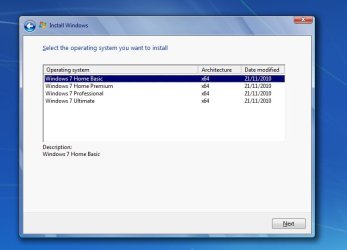
an Ultimate W7 iso, while I have Home Premium.

all the official ms iso files contain all editions.

after creating bootable usb stick, just delete the little file called ei.cfg from the sources folder on the usb stick.

delete-eicfg.jpg

Then when you start the installation, you will be asked to choose which edition you want

editions.jpg
 

My Computers My Computers

  • At a glance

    7 X64i5 84002x8gb 3200mhz
    Computer type
    PC/Desktop
    OS
    7 X64
    CPU
    i5 8400
    Motherboard
    gigabyte b365m ds3h
    Memory
    2x8gb 3200mhz
    Hard Drives
    various
    PSU
    pure power 11 400w cm
    Case
    Coolermaster
    Cooling
    cryorig m9i
  • At a glance

    7x64g54008gb ddr4 2400
    Computer type
    PC/Desktop
    OS
    7x64
    CPU
    g5400
    Motherboard
    ga b365m ds3h
    Memory
    8gb ddr4 2400
    PSU
    xfx pro 450w
Hi

good and bad news

SURT link
http://download.windowsupdate.com/d..._cc4a605bcda8288af75983312e8fb25367e98fdd.msu

this is a One-Off non standard "update" and can be run as and when required not impacted by your update settings, does not require unlocking


Log results, see attached
Your C has some Bad Sectors, please read this thread

"Bad Sector" False Positives: Bad blocks caused by write errors?

please run the dedicated manufacturer disk checker, it may remap the errors....
not my area- but I believe the User profile original data entries are in these sectors and when its re-mapped the profile then fails
Settings Macrium -- ignore bad sectors ..... ON or OFF ????

Now the other errors are also very problematic, they are in Major component area's SVhost and Intel
KB947821 may repair the Svchost errors but not to sure about the Intel ones

if i was you i would do the following --- unplug/remove your D drive then
1) run the manufacturers disk checker
depending on the results
a) successfull remapping -- run KB947821
b) unsuccessfull time for a new SSD and clean install


Roy
 

Attachments

Last edited:

My Computer My Computer

At a glance

W7 home premium 32bit/W7HP 64bit/w10 tp insid...E5300 dual core3gbNvidia Geforce 7100 Nforce 630i
Computer type
PC/Desktop
Computer Manufacturer/Model Number
medionl/Aspire 6930G/acer x55a
OS
W7 home premium 32bit/W7HP 64bit/w10 tp insider ring
CPU
E5300 dual core
Motherboard
medion MS7366
Memory
3gb
Graphics Card(s)
Nvidia Geforce 7100 Nforce 630i
Monitor(s) Displays
avixc
Internet Speed
n (isp resticted to 72)
Antivirus
mse/pands
Browser
palemoon
Other Info
Belkin Fd7050 n USB using Railink RT2870 drivers, more upto date
Clairvaux, is the Samsung SSD 860 EVO the main drive?
Never seen bad sectors on a SSD drive. The drive may be dying.
That is why I asked to do a check disk on post #8.
 
Last edited:

My Computers My Computers

  • At a glance

    Windows 7 HP 64i5 6600K - 800MHz to 4200MHz4+4G GSkill DDR4 3000IG - Intel 530
    Computer type
    PC/Desktop
    Computer Manufacturer/Model Number
    custom build
    OS
    Windows 7 HP 64
    CPU
    i5 6600K - 800MHz to 4200MHz
    Motherboard
    GA-Z170-HD3P
    Memory
    4+4G GSkill DDR4 3000
    Graphics Card(s)
    IG - Intel 530
    Monitor(s) Displays
    Samsung 226BW
    Screen Resolution
    1680x1050
    Hard Drives
    (1) -1 SM951 – 128GB M.2 AHCI PCIe SSD drive for Windows 7 and Lubuntu
    (2) -1 WD SATA 3 - 1T for Data
    (3) -1 WD SATA 3 - 1T for backup
    PSU
    Thermaltake 450W TR2 gold
    Keyboard
    Old and good Chicony mechanical keyboard
    Mouse
    Logitech mX performance - 9 buttons (had to disable some)
    Internet Speed
    500Mb/s
    Browser
    Firefox 64
    Other Info
    TinyWall firewall
  • At a glance

    Windows 7 Proi7-4500U 800MHz to 3.0GHz(4+4)G DDR3 1600IG intel 4400 + NVIDIA GeForce GT 745M
    Computer type
    Laptop
    System Manufacturer/Model Number
    Asus Q550LF
    OS
    Windows 7 Pro
    CPU
    i7-4500U 800MHz to 3.0GHz
    Motherboard
    Asus Q550LF
    Memory
    (4+4)G DDR3 1600
    Graphics Card(s)
    IG intel 4400 + NVIDIA GeForce GT 745M
    Sound Card
    Realtek
    Monitor(s) Displays
    LG Display LP156WF4-SPH1
    Screen Resolution
    1920 x 1080
    Hard Drives
    BX500 120G SSD for Windows and programs +
    1T HDD for data
    Internet Speed
    500 Mb/s
    Browser
    Firefox
    Other Info
    TinyWall firewall
Back
Top