
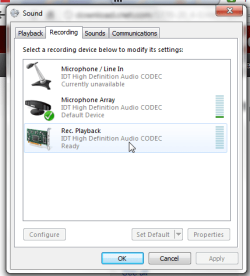
I can no longer record any sound coming through my sound card - only from microphone input. The option 'Rec. playback. IDT high definition audio codec' has simply vanished. I'm baffled and have tried everything. Drivers appear to be OK and up to date.
I've included snips of the dialog box as it used to be (left), and the way it is now (right). (I've right-clicked and checked 'show disabled devices' and 'show disconnected devices'. )
What may have caused the problem? Hard to say as I haven't tried to use this function for a few days. but possibly... Audio software which i have installed, then uninstalled, or new version of Skype, might have changed settings? Or I've 'cleaned up' too aggressively and have deleted something important?
If this is a 'silly' problem, apologies; but as I say, I've tried everything. please help.
I've included snips of the dialog box as it used to be (left), and the way it is now (right). (I've right-clicked and checked 'show disabled devices' and 'show disconnected devices'. )
What may have caused the problem? Hard to say as I haven't tried to use this function for a few days. but possibly... Audio software which i have installed, then uninstalled, or new version of Skype, might have changed settings? Or I've 'cleaned up' too aggressively and have deleted something important?
If this is a 'silly' problem, apologies; but as I say, I've tried everything. please help.
Attachments

My Computer
At a glance
windows 7
- OS
- windows 7

 Looking at the screen shots above, it occured to me I might have accidentally uninstalled 'IDT high definition audio codec' (from my original install disc) as now it says i have a MICROSOFT hi def audio codec. (Is it even possible that microsoft in one of its automatic updates took the liberty of replacing IDT's product with its own??). Anyway, found the IDT codec on cnet, ignoring user warnings that it doesn't work on 64-bit W7. Result was NO SOUND whatever!! so did system restore... Next step? it could be because i didn't install in the right folder 'programs', or could be i need a more reliable source for the codec. will try again.
 Lots of ways, but essentially remove the IDT folder from my 'Programs' folder; then put the new IDT folder in its place (which i got from cnet - still not sure it is the right one as it is not very similar to the one i removed; but the zip file i got from dell appears to be the same as it); the ran the set up file inside. it waits, then gives the message 'ExitError: error device = object not present. restart the system and try again'. of course i have done so, but with no joy.
