
Solved Can't reinstall Win 7 from partition or disc?

njmac

New member
Local time
7:23 AM
Messages
14
Location
Kajaani, Finland
Hi from Finland. I'm new to the forum but have referred to the posts here many times before. Only now I have exhausted myself searching through previous posts before registering to ask for help. So I hope some of you, who are smarter than me, can assist :)

My issue started with the cycbot.b virus. I managed to boot into safe mode to move my photos and essential files over to an external HDD but I can't get back into safe mode again now (shame, as I forgot to copy my firefox bookmarks). When I try to boot into safe mode now I get a blue screen of death flashing for a second or two with and ICQ error I think it said. And we're back to the laptop rebooting. It has tried to send me through system restore and various recovery options but always I get to the desktop in normal mode and it restarts itself again.

I've tried various boot discs including Dr Web LiveCD but no luck so far (none of the USB boot options have worked, even when I change the boot order in the BIOS). Dr Web's main interface wouldn't load so in the Advanced mode I set it to scan and left it for around 12 hours to churn through. The end result was apparently 49 infections, which were renamed. I then tried to reboot but nothing has changed.
I started to wonder if there could be a problem with the laptop's memory so I tried DR Web's memory check option on the Live CD (advanced menu) but it went a bit mad. I then checked with MemTest86 and it reported back that there are no issues.

I also tried searching for files manually and deleting registry entries as per http://answers.microsoft.com/en-us/...b-trojan/3ddcce16-0d2b-4bdd-97b5-82e55f7ffc72 but I found that my paths aren't the same in my registry or folder structure when attempting this (on that occasion I got into safe mode). Oh yes, I tried running various tools like Malware bytes from safe mode but they would't run (even when I renamed the files before running).

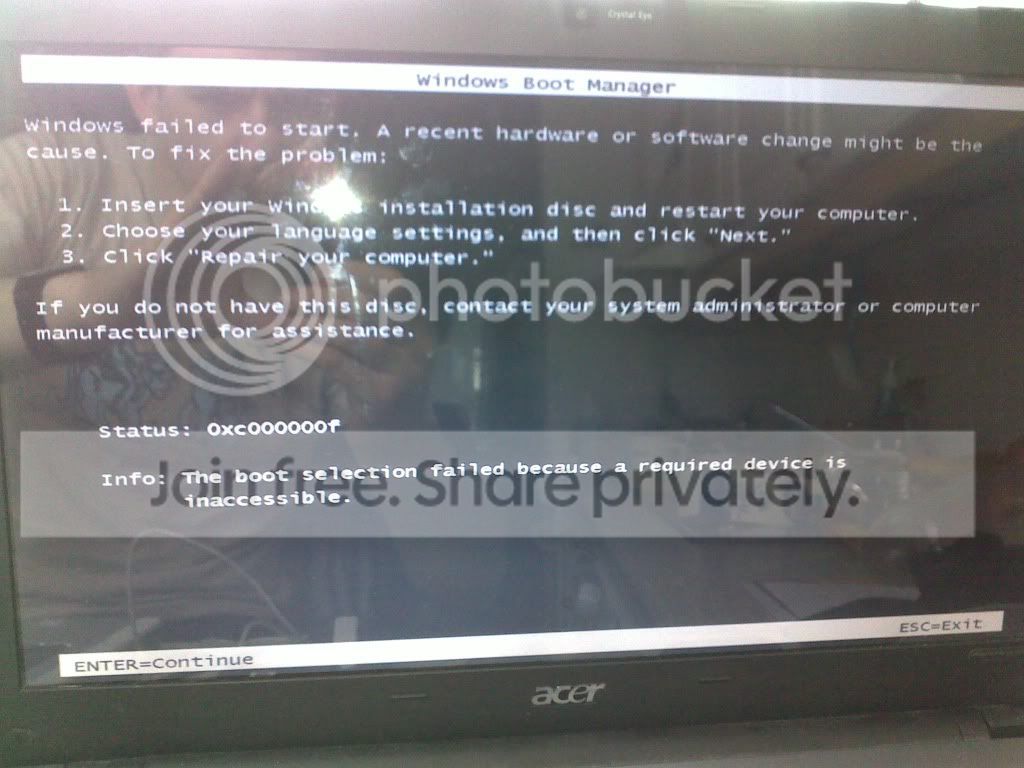
So... I decided to do a clean installation of the OS, which I was expecting to be simple. sadly not though. I started up, hit F8, went into the recover options and chose to reinstall windows. it basically froze before it even began and several hours later I was forced to turn it off and on again. Now, I get this demand for a windows disc:

I managed to get my hands on an installation disc and followed it through to reinstall my OS as per below
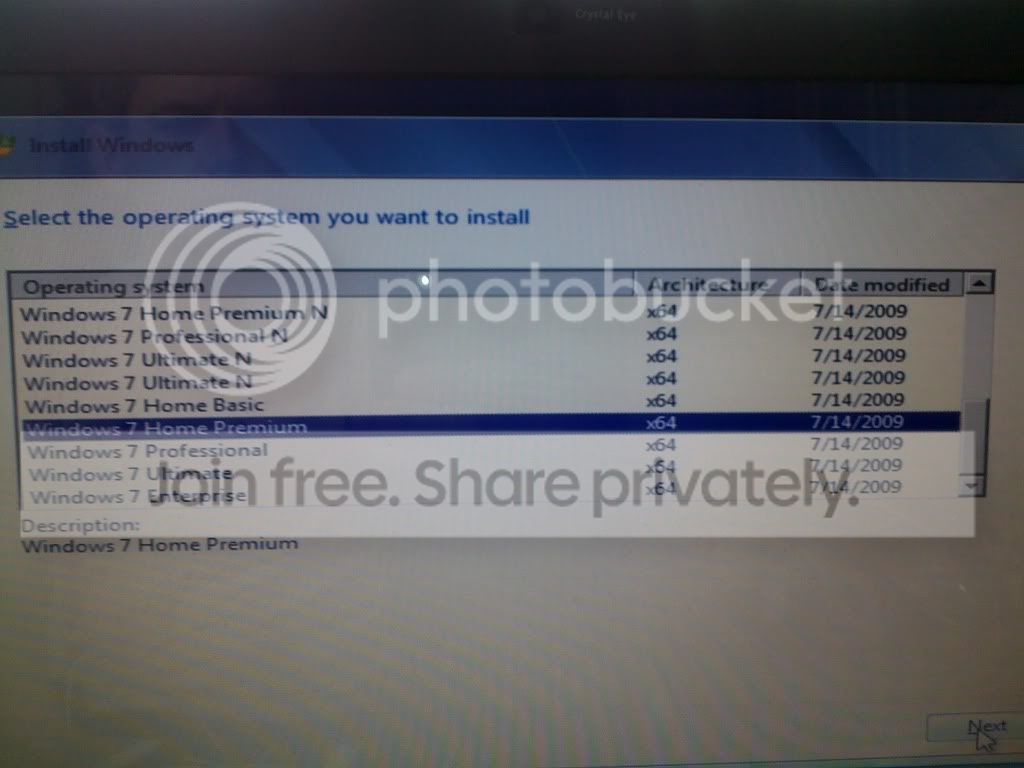

And I'm now at this point.
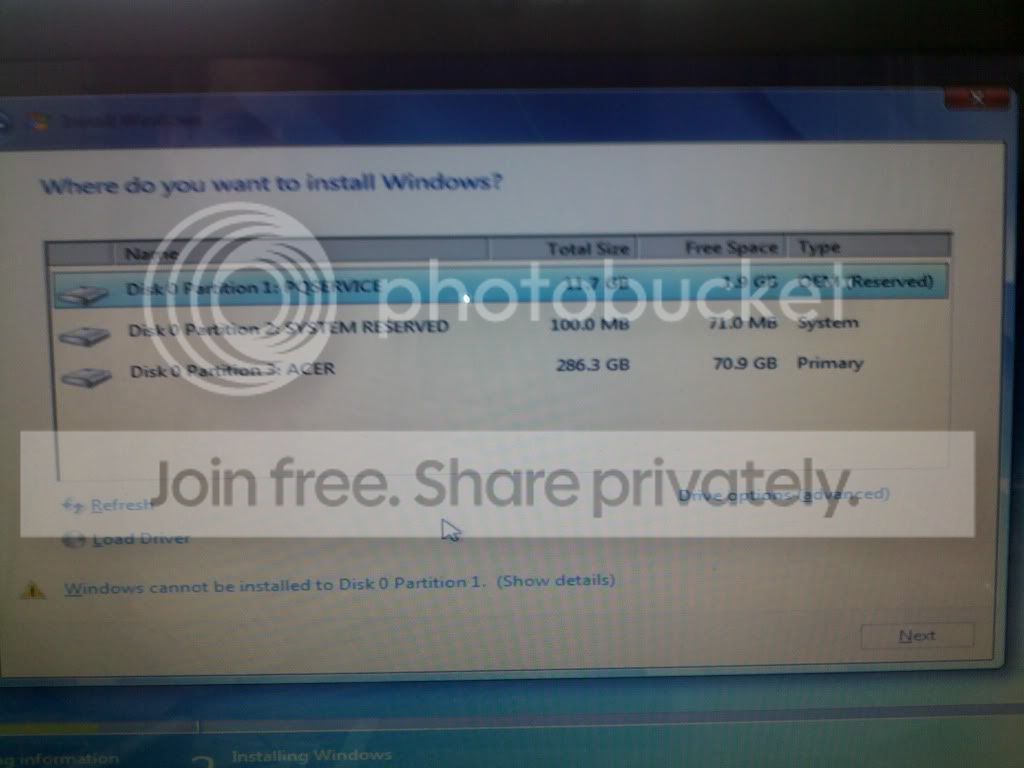
If my installation files are in partition 1 reserved then do I install windows to partition 3? Or will that effectively take another 20 gigs uneccesarily? I can't quite get my head around whether I need to remove that partition 1 or do I just leave it and proceed with installing the OS to Partition 3?

I tried to run sfc/scannow from the command prompt in the recovery module by the way and received the error message "There is a system repair pending which requires reboot to complete. Restart windows and run sfc again." Unfortunately after reboot it still gives me the same message.

Any help would be greatfully received, especially if you have some idea how I might rescue my firefox bookmarks before doing a fresh installation.

thanks
Nj
 

My Computer My Computer

At a glance

Windows 7 Home Premium 64 bit
Computer Manufacturer/Model Number
Acer Aspire 5810TZG
OS
Windows 7 Home Premium 64 bit

My Computer My Computer

At a glance

ME/XP/Vista/Win7
OS
ME/XP/Vista/Win7
Hi NJMAC and welcome to the forum. I see you have an ACER laptop. Does this model not have an ability to perform a FACTORY RESTORE from an oem partition?
Not sure how to access that option, all brands are different. Perhaps the user manual refers to what keys to press on bootup. Please let us know.
Cheers
JohnnyA
 

My Computer My Computer

At a glance

Windows Home Premium 64bitT61-- 2.0ghz4 GBOn board
Computer Manufacturer/Model Number
Toshiba C650
OS
Windows Home Premium 64bit
CPU
T61-- 2.0ghz
Motherboard
Toshiba
Memory
4 GB
Graphics Card(s)
On board
Sound Card
On board
Monitor(s) Displays
15.6"
Hard Drives
500 GB
The PQservice (partition 1) is the Acer factory restore partition, it doesnt hold your boot files. The boot files are located in the system reserved (partition 2). Since you have chosen to clean install, I suggest you leave the PQservice partition untouched, delete partitions 2 and 3 and create a single primary partition out of the space created. Install win7 on this partition.

The system reserved is handy because it lets you run recovery options from the hard disk itself, but system reserved can be created later also. Heres how.

http://www.sevenforums.com/tutorials/119151-system-reserved-create-using-disk-management.html

Your other options are to abort the clean install and run Acer factory restore. You can do this by tapping ALT+F10 repeatedly at boot, if the PQservice partition is working, this will straightaway restore the computer to its original condition. If you have made recovery disks, you can boot from them and achieve the same thing as well.
 

My Computer My Computer

At a glance

Windows 7 x64 pro/ Windows 7 x86 Pro/ XP SP3 x86
Computer Manufacturer/Model Number
Too many to describe...
OS
Windows 7 x64 pro/ Windows 7 x86 Pro/ XP SP3 x86
Beat me to it Theo. Good advice Bill.
Cheers
JohnnyA
 

My Computer My Computer

At a glance

Windows Home Premium 64bitT61-- 2.0ghz4 GBOn board
Computer Manufacturer/Model Number
Toshiba C650
OS
Windows Home Premium 64bit
CPU
T61-- 2.0ghz
Motherboard
Toshiba
Memory
4 GB
Graphics Card(s)
On board
Sound Card
On board
Monitor(s) Displays
15.6"
Hard Drives
500 GB
Hello njmac, welcome to Seven Forums!


As it seems you have installation media, why don't you wipe the entire Hard Disk Drive and start fresh with a clean install, be sure to use the version that matches the activation key on the COA sticker attached to the PC; have a thorough look through this information below and be sure to post back with any further questions you may have and to keep us informed.


After you have copied out or made back-ups of the data you need to save to external media, use Step One of this tutorial at the link below to do a wipe (secure erase) to the entire Hard Disk Drive / Solid State Drive.
  • Then if you do not want to create the new Windows 7 "System Reserved" partition use the outline in Step Two #2 to create, format and mark Active a single 100GB partition to do the installation to.
  • If you do want to create the "System Reserved" partition use the outline in Step Two #3 to create, format and mark Active the System Reserved partition and then create and format the 100GB partition to do the installation to.
Either way, running the "clean all" then creating and formatting the partition(s) using diskpart will get you the best possible space to do a clean install of Windows 7 to; you can always extend the Windows partition to include the remaining unallocated space on the HDD / SSD or create additional Primary partitions or an Extended partition after the installation completes if you choose.

SSD / HDD : Optimize for Windows Reinstallation

DISKPART : At PC Startup

Do a Clean Install with a Upgrade Windows 7 Version
 

My Computer My Computer

At a glance

W 7 64-bit UltimateIntel Q9550 Yorkfield8GB Dominator 8500C5DATI : XFX 5870
Computer Manufacturer/Model Number
* BFK Customs *
OS
W 7 64-bit Ultimate
CPU
Intel Q9550 Yorkfield
Motherboard
ASUS P5Q Pro
Memory
8GB Dominator 8500C5D
Graphics Card(s)
ATI : XFX 5870
Sound Card
Realtek HD Audio 7-1
Monitor(s) Displays
1x 47" LCD HDMI & 3x 26" LCD HDMI
Screen Resolution
1920x1080P & 1920x1200
Hard Drives
1x 80GB Intel X25-M G2 SSD : 1x 500GB & 1x 640GB WD Caviar Black(s)
PSU
Corsair 620HX
Case
Cooler Master RC-690
Cooling
Tuniq Tower 120, 2x 140mm and 3x 120mm case fans
Keyboard
Microsoft 500
Mouse
Razer Diamondback 3G
Internet Speed
14 Mb/s
Other Info
1x Koutech 3Gb/s SATA HDD Hot Swap Rack
aghhhhhhhhhhhhhhhh... I just typed an epic reply, hit "submit reply" and it disappeared. :cry:

So anyway... I'll try to remember what I typed previously.

A massive thanks to theog. I saved some more data by copy & pasting through the recovery console.
making acer recovery disks is sadly up there with 'not buying a house in 1995' and 'not selling my house in 2005' in my list of top regrets. doh!

johnnya - yes i attempted the factory restore from partition but tried the "restore operating system and retain user data" and it just hung for hours. after rebooting i had that "windows failed to start.." message with request to input a windows installation disc.

bill2 - brilliant advice, thanks. I went for the alt & f10 approach first, tried the "restore operating system and retain user data" option again but got a message to say there is no user data on the system, so have gone for a totally fresh install from the partition, which seems to be going ok.

bare foot kid - again a huge thanks. I didn't actually see your comments until I tried to submit my response a few minutes ago. If it all goes horriby wrong with this attempt at reinstalling then I'll follow your instructions to a secure erase and system reserved partition.

I bow to your collective wisdom. I was dreading the call to acer support, starting with "is your computer plugged in?" and lasting for some crazy length of time, going via several tiers of expert until perhaps reaching someone who may have some idea of what the hell I was talking about.

I'll report back to tell you if all went ok or whether something exploded (most likely my patience)

cheers
Nj
 

My Computer My Computer

At a glance

Windows 7 Home Premium 64 bit
Computer Manufacturer/Model Number
Acer Aspire 5810TZG
OS
Windows 7 Home Premium 64 bit
Hello Nj, be sure to post back here with an update.
 

My Computer My Computer

At a glance

W 7 64-bit UltimateIntel Q9550 Yorkfield8GB Dominator 8500C5DATI : XFX 5870
Computer Manufacturer/Model Number
* BFK Customs *
OS
W 7 64-bit Ultimate
CPU
Intel Q9550 Yorkfield
Motherboard
ASUS P5Q Pro
Memory
8GB Dominator 8500C5D
Graphics Card(s)
ATI : XFX 5870
Sound Card
Realtek HD Audio 7-1
Monitor(s) Displays
1x 47" LCD HDMI & 3x 26" LCD HDMI
Screen Resolution
1920x1080P & 1920x1200
Hard Drives
1x 80GB Intel X25-M G2 SSD : 1x 500GB & 1x 640GB WD Caviar Black(s)
PSU
Corsair 620HX
Case
Cooler Master RC-690
Cooling
Tuniq Tower 120, 2x 140mm and 3x 120mm case fans
Keyboard
Microsoft 500
Mouse
Razer Diamondback 3G
Internet Speed
14 Mb/s
Other Info
1x Koutech 3Gb/s SATA HDD Hot Swap Rack
If you are frustrated with your options from Acer Tech Support which is abysmal, use the installation DVD you borrowed to wipe the HD of all infection and clean reinstall Win7 following these tips to get a purrfect install: http://www.sevenforums.com/installation-setup/125874-re-install-windows-7-a.html#post1086729

This will free Win7 up for better performance without the factory bloatware and useless Acer utilities which have much better versions built into Win7.
 
explosion imminent...
got through all the setting of time zone, wifi password and home network etc.. waiting for desktop to be created (or something along those lines) and.....


aghhhhh!
any suggestions? secure wipe and totally fresh install or am I looking at a hardware failure?
cheers
nj
 

My Computer My Computer

At a glance

Windows 7 Home Premium 64 bit
Computer Manufacturer/Model Number
Acer Aspire 5810TZG
OS
Windows 7 Home Premium 64 bit
no I went for the reinstallation from the partition as a first attempt. Before I try the steps in your link I was hoping for advice on whether that BSOD suggests a hardware issue, in case I'm wasting my time. what do you think?
 

My Computer My Computer

At a glance

Windows 7 Home Premium 64 bit
Computer Manufacturer/Model Number
Acer Aspire 5810TZG
OS
Windows 7 Home Premium 64 bit
See if you can access the Device Manager via Safe Mode using the steps at the end of this tutorial (skip installation steps) to uninstall any Devices showing in error: http://www.sevenforums.com/tutorials/15856-device-manager-access-during-windows-7-installation.html

If this fails wiping the HD before clean reinstall may help since the driver erroring Intel Storage Manager should already be in the installer and used during install anyway - it's likely bluescreening due to boot sector corruption remedied by zeroing the HD.

If you can get into Safe Mode, you can upload the bluescreen bugcheck file to Crashes forum for more exact causes: http://www.sevenforums.com/crashes-debugging/96879-blue-screen-death-bsod-posting-instructions.html
 
You have nothing to lose with a wipe first, don't add any unnecessary peripherals during the install, just see if it will complete with a vanilla wipe / clean install first and be sure to use diskpart to create and format a partition to install to.
 

My Computer My Computer

At a glance

W 7 64-bit UltimateIntel Q9550 Yorkfield8GB Dominator 8500C5DATI : XFX 5870
Computer Manufacturer/Model Number
* BFK Customs *
OS
W 7 64-bit Ultimate
CPU
Intel Q9550 Yorkfield
Motherboard
ASUS P5Q Pro
Memory
8GB Dominator 8500C5D
Graphics Card(s)
ATI : XFX 5870
Sound Card
Realtek HD Audio 7-1
Monitor(s) Displays
1x 47" LCD HDMI & 3x 26" LCD HDMI
Screen Resolution
1920x1080P & 1920x1200
Hard Drives
1x 80GB Intel X25-M G2 SSD : 1x 500GB & 1x 640GB WD Caviar Black(s)
PSU
Corsair 620HX
Case
Cooler Master RC-690
Cooling
Tuniq Tower 120, 2x 140mm and 3x 120mm case fans
Keyboard
Microsoft 500
Mouse
Razer Diamondback 3G
Internet Speed
14 Mb/s
Other Info
1x Koutech 3Gb/s SATA HDD Hot Swap Rack
tried device manager and nothing is showing as problematic so I'll try the wipe and fresh installation. It's late here just now and I have clients visiting all day tomorrow so probably Tuesday by the time I can give it a bash. I'll report back as soon as I have an update

thanks again for the assistance
 

My Computer My Computer

At a glance

Windows 7 Home Premium 64 bit
Computer Manufacturer/Model Number
Acer Aspire 5810TZG
OS
Windows 7 Home Premium 64 bit
It's our pleasure mate, we'll be here.
 

My Computer My Computer

At a glance

W 7 64-bit UltimateIntel Q9550 Yorkfield8GB Dominator 8500C5DATI : XFX 5870
Computer Manufacturer/Model Number
* BFK Customs *
OS
W 7 64-bit Ultimate
CPU
Intel Q9550 Yorkfield
Motherboard
ASUS P5Q Pro
Memory
8GB Dominator 8500C5D
Graphics Card(s)
ATI : XFX 5870
Sound Card
Realtek HD Audio 7-1
Monitor(s) Displays
1x 47" LCD HDMI & 3x 26" LCD HDMI
Screen Resolution
1920x1080P & 1920x1200
Hard Drives
1x 80GB Intel X25-M G2 SSD : 1x 500GB & 1x 640GB WD Caviar Black(s)
PSU
Corsair 620HX
Case
Cooler Master RC-690
Cooling
Tuniq Tower 120, 2x 140mm and 3x 120mm case fans
Keyboard
Microsoft 500
Mouse
Razer Diamondback 3G
Internet Speed
14 Mb/s
Other Info
1x Koutech 3Gb/s SATA HDD Hot Swap Rack

My Computer My Computer

At a glance

ME/XP/Vista/Win7
OS
ME/XP/Vista/Win7
Yes, I downloaded the hitachi tool (hard drive is model HTS545032B9A300 going by device manager) but wasn't sure what options to choose and let it go ahead with the default, which was SCSi and ATA Support. gave me:
....
unable to find any AIC-78XX/AIC-75XX
ASPI8DOS.SYS Installation failed
unable to find any AIC-7890/91
ASPI8DOS.SYS Installation failed
...
No DC-390W/U PCI SCSI controller can be found
....
Microsoft mouse driver version 8.20
copyright blah blah
Mouse driver installed
Loading DFT...
and then nothing.

Tried again with option 2 - ATA support only
and I just get the mouse driver bit and then Loading DFT...
again nothing is happening.

I'm guessing the tool isn't right.. or I am, in fact, a tool. More likely the latter :o
 

My Computer My Computer

At a glance

Windows 7 Home Premium 64 bit
Computer Manufacturer/Model Number
Acer Aspire 5810TZG
OS
Windows 7 Home Premium 64 bit
You may have a failing Motherboard, Sata cable, or HD.
Will the HD show in BIOS?
 

My Computer My Computer

At a glance

ME/XP/Vista/Win7
OS
ME/XP/Vista/Win7
yes, still shows OK in bios and if i try to install from partition it gets almost to the desktop and then throws a wobby. I'll need to check with acer just in case it's still under warranty, in which case I don't want to attempt a clean wipe of the HD and installation from disc in case in invalidates the warranty.

thanks for your continued help.
Nj
 

My Computer My Computer

At a glance

Windows 7 Home Premium 64 bit
Computer Manufacturer/Model Number
Acer Aspire 5810TZG
OS
Windows 7 Home Premium 64 bit
Back
Top