Can't rename, move or delete apparently closed folders

WSFer1

New member
Local time
1:33 PM
Messages
6
Hi there.

> It often happens that I try to rename, move or delete a CLOSED folder and get an error message saying that the folder is open or in use by some program. Yet no file from this folder is apparently open.
> In Task Manager/Applications, Windows Explorer does not show, but Task Manager/Processes does show a process named explorer.exe.
> It is true (as posted by others before) that somtimes, but not always, having a long coffee break may help. (Tea and vodka help just as well.) But I have to get some work done.
> Restart or logout-login always fixes the problem, but for just once. Bad solution.
> Attempting to close the explorer.exe process, ignoring the warning, leads to The Blue Screen of Death. This can be recovered from by ALT-CTRL-DEL and logging in as a different user (same username.)

This has not always been the case. I remember times when this issue was unknown to me.

Apart for general advices and fixes, which are welcomed, does anyone have an idea which background process might keep busy an apparently closed folder?

My system is Windows 7 Home Premium, Version 6.1 (Build 7601, Service Pack 1), on a desktop PC.

[I'm aware this topic has been posted many times before, but I couldn't find any coherent advice in this forum. So here it is again.]
 

My Computer My Computer

At a glance

Windows 7 Home Premium 64bitIntel Core i5-2300, 2.8-3.1Ghz, 6MB Cache, 95...Kingston DDR3 2048MB 1333MHz CL9N/A
Computer Manufacturer/Model Number
N/A
OS
Windows 7 Home Premium 64bit
CPU
Intel Core i5-2300, 2.8-3.1Ghz, 6MB Cache, 95W LGA1155
Motherboard
ASUS P8H61-M LE Intel H61 LGA1155 B3
Memory
Kingston DDR3 2048MB 1333MHz CL9
Graphics Card(s)
N/A
Sound Card
N/A
Monitor(s) Displays
MAG H2201L 22" LED Black LCD FHD 2ms
Hard Drives
WD 500GB 16MB 7200RPM BLUE SATA III
PSU
Unknown
Case
TZAG
Cooling
Arctic Cooling Freezer 13 - ...
Hi and welcome to SevenForums,
Use Clean boot,
http://www.sevenforums.com/tutorials/179159-troubleshoot-application-conflicts-performing-clean-startup.html
Click Start and type in the search box,
msconfig
Click on the suggestion on top or hit the Enter key,
Go to the Startup section and take some screen shots for a complete list,
Go to the Services section and on the bottom left Check the box to Hide All Microsoft services,
Repeat the screen shots,
See the links above my signature on how to take and upload screen shots here,
Cheers.
 

My Computer My Computer

At a glance

Win-7-Pro64bit 7-H-Prem-64biti7-5930K 2nd i9-9940x both water blocked VRM'...Trident-z 3200C14 2nd Trident-z 3600C16EVGA 1080ti ftw3 2nd Titan Xp both water blocked
Computer type
PC/Desktop
Computer Manufacturer/Model Number
Custom assembled by me :}
OS
Win-7-Pro64bit 7-H-Prem-64bit
CPU
i7-5930K 2nd i9-9940x both water blocked VRM's too
Motherboard
ASUS SABERTOOTH X99 2nd ASUS x299 Apex
Memory
Trident-z 3200C14 2nd Trident-z 3600C16
Graphics Card(s)
EVGA 1080ti ftw3 2nd Titan Xp both water blocked
Sound Card
Built-in Realtek
Monitor(s) Displays
1-AOC G2460PG 24"G-Sync 144Hz/ 2nd 1-ASUS VG248QE 24" 144Hz
Screen Resolution
1920 x 1080 144Hz
Hard Drives
2-Samsung M.2 Evo & Evo Plus
2-Samsung 850 EVO 500GB SSD's/ 3-2.5 W.D. Black 1tb-&3-1tb/3-3.5 WD Black 1tb hdd's
PSU
EVGA SuperNOVA 1000-P2 2nd 1200-P2
Case
2-Corsair Obsidian Series 450D Black ATX Mid Tower
Cooling
Custom water loops
Keyboard
Logitech G710+/ 2nd Logitech G910
Mouse
2-RedDragon M901 Perdition 16400 dpi Gaming mouse = wired
Internet Speed
Comcast Ping 19ms 89.31mbps download speed 6.12mbps upload
Antivirus
Malwarebytes Pro/ Superantispyware Pro
Browser
FireFox & Pale moon
Other Info
2nd ASUS X299 Apex/Intel i9-9940x with Custom water loop/7H-Prem-x64/Corsair 450D case/Ram Trident-z 3600C16 4x8gb / Samsung970Evo plus 500gb SSD/Dual ssd EZ swap evo/PSU EVGA SuperNova 1200w-P2 80+Platinum/GPU Titan Xp /8-ML-140 on push-pull on 2-280GTX rads
My guess would be AV or some other security software not releasing the files in a timely fashion after an on-access scan (while closing). Hence, corrects itself after a coffee break.

Also, you can't recover from a Blue Screen of Death with CTRL+ALT+DEL (?). When explorer.exe is terminated you get an empty screen (no taskbar/icons/background image) - though I get a black one, not blue - this is normal and we all have that process running. Usually, as to my knowledge, it should auto-start a few seconds after being ended. If not, you can CTRL+ALT+DEL and click new task and enter: explorer.exe to start the process again. (If what you are talking about is different, I would like to learn about it)

I guess you may be able to check my theory by copy/pasting a problematic folder and adding that one to the exclusion list of your AV and possible other security software. Manipulate a file or two some. Close files/folder and try deleting.

Just a thought, hope this helps.
 

My Computer My Computer

At a glance

Windows 7 Ultimate x64 SP1AMD Phenom 2 1090T2x8GB Kingston HyperX Fury Black 1600Mhz Unga...MSI GTX 970 Gaming 4G
Computer type
PC/Desktop
Computer Manufacturer/Model Number
Custom Build
OS
Windows 7 Ultimate x64 SP1
CPU
AMD Phenom 2 1090T
Motherboard
Gigabyte GA-890FXA-UD5
Memory
2x8GB Kingston HyperX Fury Black 1600Mhz Unganged
Graphics Card(s)
MSI GTX 970 Gaming 4G
Sound Card
Realtek On-Board HD 7.1 Audio / Logitech G35
Monitor(s) Displays
3xAcer GD245HQ
Screen Resolution
1920x1080
Hard Drives
Samsung 850 Pro 512GB SSD - OS /
WD Caviar Black SATA 3 - 1 TBx2 - Dynamic RAID 0 /
WD Caviar Green SATA 2 - 640GBx2 - Dynamic RAID 0 /
WD Caviar Green SATA 2 - 640GB - Internal Backup /
Seagate Barracude SATA 3 - 3TB - External Backup/ Sync
PSU
HighPower 1000W
Case
Cooler Master HAF 932
Cooling
Noctua NH-D14
Keyboard
Logitech G19
Mouse
Logitech G500
Internet Speed
100/4 Mbit Cable (100GB quota)
Antivirus
ZoneAlarm Extreme Security / MBAM Pro / MBAE Free / SAS Free
Browser
IE 11 - Firefox - Chrome
Other Info
Logitech F710/ G27/ G940/ Z5500 // TrackIR 5 // Nvidia 3D Surround Vision
I had the same problem several times on my machine. In addition to file / folder unlocking software it can be worth checking for updates for any software that installed a shell extension that integrates with Explorer. (Anything that creates a right click context menu entry) although for some software the entries exist but you don't always see them if the software isn't running. Would also suggest removing any software that you don't actually use with a program uninstaller like Geek Uninstaller or similar -just as long as it has 64bit support. Some of them are only good for removing 32bit programs. Then run a full disk check.

chkdsk /f /r
 

My Computer My Computer

At a glance

Microsoft Windows 7 Home Premium 64-bit 7601 ...AMD C-60 APU with Radeon(tm) HD Graphics4.00 GBAMD Radeon HD 6290 Graphics
Computer type
Laptop
Computer Manufacturer/Model Number
ASUS
OS
Microsoft Windows 7 Home Premium 64-bit 7601 Multiprocessor Free Service Pack 1
CPU
AMD C-60 APU with Radeon(tm) HD Graphics
Motherboard
ASUSTeK COMPUTER INC. X501U
Memory
4.00 GB
Graphics Card(s)
AMD Radeon HD 6290 Graphics
Sound Card
(1) AMD High Definition Audio Device (2) Realtek High Defi
Screen Resolution
1366 x 768 x 32 bits (4294967296 colors) @ 60 Hz
Hard Drives
Hitachi HTS545050A7E380 SATA Disk Device
Antivirus
Comodo CIS & FW, SecureAplus App Whitelisting, Threatfire
Browser
Cyberfox 64bit, Opera 64bit, Airfox
Other Info
Spy-The-Spy, HitmanPro.Alert, Norton Connect Safe, MJRegWatcher, BitDefender TrafficLight, Voodoo Shield, Zemana AntiMalware
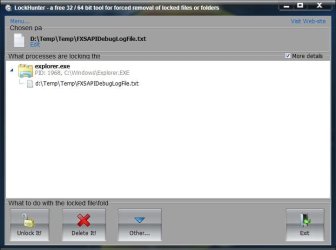
Download Lockhunter (they have a portable as well). If you install it, you get a context menu choice of What is locking this file?. Right clicking on one of your folders, and choosing that will open a dialog:

Clipboard01.jpg

It will show what is locking the folder. Click the More details box upper right to get the PID as well.

LockHunter is a free 64/32 bit tool to delete files blocked by any processes

A Guy
 

My Computer My Computer

At a glance

Windows 10 Home x64INTEL Core i5-750 Quad-Core 3.37GHzHyperX Fury Black Series 8GB (2 x 4GB) 1866MhzEVGA GeForce GTX 750 Superclocked 1GB 128-Bit...
Computer type
PC/Desktop
OS
Windows 10 Home x64
CPU
INTEL Core i5-750 Quad-Core 3.37GHz
Motherboard
ASUS P7P55D
Memory
HyperX Fury Black Series 8GB (2 x 4GB) 1866Mhz
Graphics Card(s)
EVGA GeForce GTX 750 Superclocked 1GB 128-Bit GDDR5
Monitor(s) Displays
LG 32MA68HY 32" IPS
Screen Resolution
1920 x 1080
Hard Drives
Samsung 840 Evo 120GB, SEAGATE 500GB Barracuda® 7200.12, SATA 3 Gb/s, 7200 RPM, 16MB cache
PSU
ANTEC TruePower New TP-550, 80 PLUS, 550W
Case
ANTEC Three Hundred Illusion
Cooling
COOLER MASTER Hyper 212 Plus, 4 x 120mm 1 x 140mm Noctua's
Internet Speed
85 + Mbps
Antivirus
Avast
Browser
Vivaldi
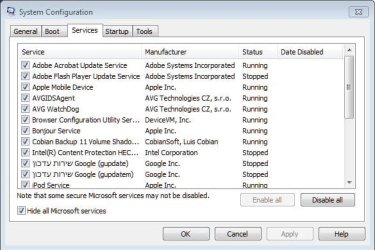
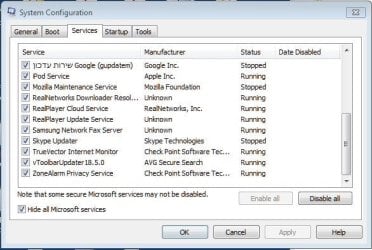
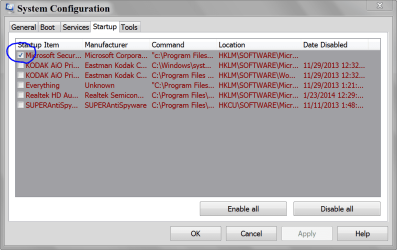
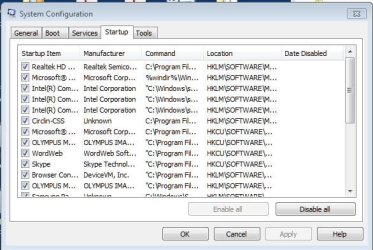
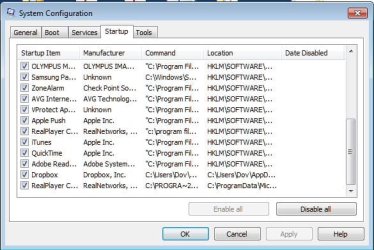
Thrash Zone, attached are the said screenshots.
WSFer1
 

Attachments

  • Services-1.JPG
    Services-1.JPG
    50.6 KB · Views: 19
  • Services-2.JPG
    Services-2.JPG
    48.4 KB · Views: 19
  • Startup-1.JPG
    Startup-1.JPG
    53.3 KB · Views: 19
  • Startup-2.JPG
    Startup-2.JPG
    52.3 KB · Views: 20

My Computer My Computer

At a glance

Windows 7 Home Premium 64bitIntel Core i5-2300, 2.8-3.1Ghz, 6MB Cache, 95...Kingston DDR3 2048MB 1333MHz CL9N/A
Computer Manufacturer/Model Number
N/A
OS
Windows 7 Home Premium 64bit
CPU
Intel Core i5-2300, 2.8-3.1Ghz, 6MB Cache, 95W LGA1155
Motherboard
ASUS P8H61-M LE Intel H61 LGA1155 B3
Memory
Kingston DDR3 2048MB 1333MHz CL9
Graphics Card(s)
N/A
Sound Card
N/A
Monitor(s) Displays
MAG H2201L 22" LED Black LCD FHD 2ms
Hard Drives
WD 500GB 16MB 7200RPM BLUE SATA III
PSU
Unknown
Case
TZAG
Cooling
Arctic Cooling Freezer 13 - ...
Hi and thanks for the update and attachments
A Guy posted a nice way to show which service is tying up your files/ folders... have you tried it ?

Did disabling all Startup items except your security which looks like AVG have any positive effects about the issue ?

vprotect looks like a interesting startup item wonder who that one belongs too ?
Review Jacee’s instructions to run Adwcleaner here post #7,
Ignore the title of the thread,
http://www.sevenforums.com/system-security/316404-instant-savings-app.html
On the BleepingComputer site use the button that looks like this,
adwcleaner-button.JPG


Also see what Superantispyware comes up with,
http://www.superantispyware.com/?tag=SUPERANTISPYWARE
 

My Computer My Computer

At a glance

Win-7-Pro64bit 7-H-Prem-64biti7-5930K 2nd i9-9940x both water blocked VRM'...Trident-z 3200C14 2nd Trident-z 3600C16EVGA 1080ti ftw3 2nd Titan Xp both water blocked
Computer type
PC/Desktop
Computer Manufacturer/Model Number
Custom assembled by me :}
OS
Win-7-Pro64bit 7-H-Prem-64bit
CPU
i7-5930K 2nd i9-9940x both water blocked VRM's too
Motherboard
ASUS SABERTOOTH X99 2nd ASUS x299 Apex
Memory
Trident-z 3200C14 2nd Trident-z 3600C16
Graphics Card(s)
EVGA 1080ti ftw3 2nd Titan Xp both water blocked
Sound Card
Built-in Realtek
Monitor(s) Displays
1-AOC G2460PG 24"G-Sync 144Hz/ 2nd 1-ASUS VG248QE 24" 144Hz
Screen Resolution
1920 x 1080 144Hz
Hard Drives
2-Samsung M.2 Evo & Evo Plus
2-Samsung 850 EVO 500GB SSD's/ 3-2.5 W.D. Black 1tb-&3-1tb/3-3.5 WD Black 1tb hdd's
PSU
EVGA SuperNOVA 1000-P2 2nd 1200-P2
Case
2-Corsair Obsidian Series 450D Black ATX Mid Tower
Cooling
Custom water loops
Keyboard
Logitech G710+/ 2nd Logitech G910
Mouse
2-RedDragon M901 Perdition 16400 dpi Gaming mouse = wired
Internet Speed
Comcast Ping 19ms 89.31mbps download speed 6.12mbps upload
Antivirus
Malwarebytes Pro/ Superantispyware Pro
Browser
FireFox & Pale moon
Other Info
2nd ASUS X299 Apex/Intel i9-9940x with Custom water loop/7H-Prem-x64/Corsair 450D case/Ram Trident-z 3600C16 4x8gb / Samsung970Evo plus 500gb SSD/Dual ssd EZ swap evo/PSU EVGA SuperNova 1200w-P2 80+Platinum/GPU Titan Xp /8-ML-140 on push-pull on 2-280GTX rads

My Computer My Computer

At a glance

Windows 7 Ultimate x64 SP1AMD Phenom 2 1090T2x8GB Kingston HyperX Fury Black 1600Mhz Unga...MSI GTX 970 Gaming 4G
Computer type
PC/Desktop
Computer Manufacturer/Model Number
Custom Build
OS
Windows 7 Ultimate x64 SP1
CPU
AMD Phenom 2 1090T
Motherboard
Gigabyte GA-890FXA-UD5
Memory
2x8GB Kingston HyperX Fury Black 1600Mhz Unganged
Graphics Card(s)
MSI GTX 970 Gaming 4G
Sound Card
Realtek On-Board HD 7.1 Audio / Logitech G35
Monitor(s) Displays
3xAcer GD245HQ
Screen Resolution
1920x1080
Hard Drives
Samsung 850 Pro 512GB SSD - OS /
WD Caviar Black SATA 3 - 1 TBx2 - Dynamic RAID 0 /
WD Caviar Green SATA 2 - 640GBx2 - Dynamic RAID 0 /
WD Caviar Green SATA 2 - 640GB - Internal Backup /
Seagate Barracude SATA 3 - 3TB - External Backup/ Sync
PSU
HighPower 1000W
Case
Cooler Master HAF 932
Cooling
Noctua NH-D14
Keyboard
Logitech G19
Mouse
Logitech G500
Internet Speed
100/4 Mbit Cable (100GB quota)
Antivirus
ZoneAlarm Extreme Security / MBAM Pro / MBAE Free / SAS Free
Browser
IE 11 - Firefox - Chrome
Other Info
Logitech F710/ G27/ G940/ Z5500 // TrackIR 5 // Nvidia 3D Surround Vision
Way to many Non Microsoft Start ups. Your only need your security programs checked.

I also noticed you have AVG and Zone Alarm installed at the same time in Start ups.

Personally I would not use more than one anti virus program at one time on one computer. Using more than one will do nothing but cause problems.

I recommend removing both AVG and Zone Alarm using their online tools.
Then install MSE and Malwarebytes.

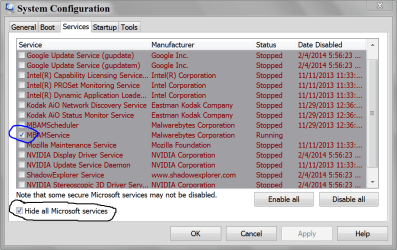
Take a look at my Start ups and Non Microsoft Services.

MSCONFIG STARTUP.PNG

MSCONFIG SERVICES.PNG
 

My Computer My Computer

At a glance

Windows 10 Pro. 64/ version 1709 Windows 7 Pr...Intel i7-6800K @ 4.3Corsair Platinum 16 gig @2400EVGA GTX 1070 OC
Computer type
PC/Desktop
Computer Manufacturer/Model Number
Home made Desktop
OS
Windows 10 Pro. 64/ version 1709 Windows 7 Pro/64
CPU
Intel i7-6800K @ 4.3
Motherboard
ASUS X-99 Deluxe II
Memory
Corsair Platinum 16 gig @2400
Graphics Card(s)
EVGA GTX 1070 OC
Monitor(s) Displays
Asus 27" LED LCD/VE278Q
Screen Resolution
1920-1080 or 1280-720 HDMI
Hard Drives
INTEL SSD 730-240 Gb Sata 3.0/
PSU
EVGA Platium 1200W
Case
Phanteks Luxe Tempered Glass 8 fans/ one radiator
Cooling
XSPC/ Water Cooled CPU
Keyboard
Das 4 Professional
Mouse
Logitech M705/MX Anywhere 2-S
Internet Speed
100 mbits
Antivirus
Microsoft Security Essentials/ Malwarebytes Premium 3.0/ SAS
Browser
I.E. 11 default/Firefox/ ISP Time Warner Cable/Spectrum
Other Info
LG BluRay Burner/
Sound system-KLipsch-THX/
Icy Dock ssd Hot Swap bays.
Thanks, ThrashZone, Layback Bear.

I'm averse to installing all kinds of software tools the whole purpose of which is to remedy Microsoft ills that shouldn't have been there in the first place, considering their 30-something years of experience. So, Lockhunter will have wait its turn.

I'll start by culling startup items and services to the best of my understanding, and see what happens.

Do you recommend that I replace my AVG Free (antivirus only) and ZoneAlarm (firewall only) by MSE and/or Malwarebytes and/or Superantispyware? (Note that I do not have two co-running AV-s.) Do these recommendations have to do with the sticky folder problem, or they're just your security software preferences? I appreciate your advice anyway, but I'd like to know.

Thank you
WSFer1

What about Clean boot? Still relevant?
 

My Computer My Computer

At a glance

Windows 7 Home Premium 64bitIntel Core i5-2300, 2.8-3.1Ghz, 6MB Cache, 95...Kingston DDR3 2048MB 1333MHz CL9N/A
Computer Manufacturer/Model Number
N/A
OS
Windows 7 Home Premium 64bit
CPU
Intel Core i5-2300, 2.8-3.1Ghz, 6MB Cache, 95W LGA1155
Motherboard
ASUS P8H61-M LE Intel H61 LGA1155 B3
Memory
Kingston DDR3 2048MB 1333MHz CL9
Graphics Card(s)
N/A
Sound Card
N/A
Monitor(s) Displays
MAG H2201L 22" LED Black LCD FHD 2ms
Hard Drives
WD 500GB 16MB 7200RPM BLUE SATA III
PSU
Unknown
Case
TZAG
Cooling
Arctic Cooling Freezer 13 - ...
I understand your concern, however the unlocker programs mentioned in the thread may help in diagnosing the problem. Then you can uninstall.

I used to use AVG (AV)/ ZoneAlarm(Firewall) - both free - combo and they were alright. Started using ZoneAlarm exclusively some 4 years ago, so not sure how they behave together these days.

The usual recommendation here is that MSE is enough if you have MBAM paid. It shouldn't have any relevance to your issue (at least that's what I would think).
 

My Computer My Computer

At a glance

Windows 7 Ultimate x64 SP1AMD Phenom 2 1090T2x8GB Kingston HyperX Fury Black 1600Mhz Unga...MSI GTX 970 Gaming 4G
Computer type
PC/Desktop
Computer Manufacturer/Model Number
Custom Build
OS
Windows 7 Ultimate x64 SP1
CPU
AMD Phenom 2 1090T
Motherboard
Gigabyte GA-890FXA-UD5
Memory
2x8GB Kingston HyperX Fury Black 1600Mhz Unganged
Graphics Card(s)
MSI GTX 970 Gaming 4G
Sound Card
Realtek On-Board HD 7.1 Audio / Logitech G35
Monitor(s) Displays
3xAcer GD245HQ
Screen Resolution
1920x1080
Hard Drives
Samsung 850 Pro 512GB SSD - OS /
WD Caviar Black SATA 3 - 1 TBx2 - Dynamic RAID 0 /
WD Caviar Green SATA 2 - 640GBx2 - Dynamic RAID 0 /
WD Caviar Green SATA 2 - 640GB - Internal Backup /
Seagate Barracude SATA 3 - 3TB - External Backup/ Sync
PSU
HighPower 1000W
Case
Cooler Master HAF 932
Cooling
Noctua NH-D14
Keyboard
Logitech G19
Mouse
Logitech G500
Internet Speed
100/4 Mbit Cable (100GB quota)
Antivirus
ZoneAlarm Extreme Security / MBAM Pro / MBAE Free / SAS Free
Browser
IE 11 - Firefox - Chrome
Other Info
Logitech F710/ G27/ G940/ Z5500 // TrackIR 5 // Nvidia 3D Surround Vision
I personally would not use Zone Alarm or AVG. The Windows 7 built in firewall works just fine on my two systems.

I also use Super Anti Spyware stand alone (on demand) (Free).

I can only state what I use that works for me. No other anti virus or anti malware programs are on my systems.
When you have two anti virus or anti malware programs installed they could could argue with each other because they might see the definitions from the other programs and go goofy.

What I use active are:
Microsoft Security Essentials
Malwarebytes Premium
Windows 7 built in firewall.

When I think it is necessary I do use other programs for security scans but when I done with them I remove them.
 

My Computer My Computer

At a glance

Windows 10 Pro. 64/ version 1709 Windows 7 Pr...Intel i7-6800K @ 4.3Corsair Platinum 16 gig @2400EVGA GTX 1070 OC
Computer type
PC/Desktop
Computer Manufacturer/Model Number
Home made Desktop
OS
Windows 10 Pro. 64/ version 1709 Windows 7 Pro/64
CPU
Intel i7-6800K @ 4.3
Motherboard
ASUS X-99 Deluxe II
Memory
Corsair Platinum 16 gig @2400
Graphics Card(s)
EVGA GTX 1070 OC
Monitor(s) Displays
Asus 27" LED LCD/VE278Q
Screen Resolution
1920-1080 or 1280-720 HDMI
Hard Drives
INTEL SSD 730-240 Gb Sata 3.0/
PSU
EVGA Platium 1200W
Case
Phanteks Luxe Tempered Glass 8 fans/ one radiator
Cooling
XSPC/ Water Cooled CPU
Keyboard
Das 4 Professional
Mouse
Logitech M705/MX Anywhere 2-S
Internet Speed
100 mbits
Antivirus
Microsoft Security Essentials/ Malwarebytes Premium 3.0/ SAS
Browser
I.E. 11 default/Firefox/ ISP Time Warner Cable/Spectrum
Other Info
LG BluRay Burner/
Sound system-KLipsch-THX/
Icy Dock ssd Hot Swap bays.
Back
Top