Solved Can't run .bat files

Peter57r

New member
Local time
7:31 AM
Messages
11
I know a similar topic has come up before but the solutions aren't working for me.
I got to this site as a result of googling my problem and getting to here:

http://www.sevenforums.com/attachme...d-running-help-associate-batfileexecution.reg

I was in the situation where Windows7 would not recognise a .bat file at all (I would get 'file cannot be found' when right clicking on the bat file and selecting 'Open').

Having established that there was no file association for .bat I tried to fix it in the File Assocation manager by browsing to cmd.exe and selecting it.
This gave the appearance of being associated but still nothing worked.

Eventually I found the registry edit file above and tried to use that to fix the problem.

This got me a step further, in that double clicking a .bat file now opens the command processor, but the file still does not run. This might be because when running the .reg file I get messages that some keys cannot be imported because they are in use. However, I don't know how to get past this problem, because from my perspective I'm not running anything at the time. There are no apps running in task manager. I've tried running regedit in Safe mode but it produces the same messages.

I am Admin on my machine which is 64 bit Win7.

Just as background and not very relevant, this problem emerged when trying to set up an environment for an Android Studio course. Android studio appears to make lots of .bat calls to start up different features.
And of course none of them work for me. I can't change the calls that Android Studio is making. Lots of other people are using the same source material, apparently without this problem as no-one has any idea what I'm talking about.

The .bat calls are all very simple...and there are no spaces or odd characters in the path.
For example..
D:\androidsdk\build-tools\21.1.2\dx.bat

If anyone can suggest how I can complete the registry edit successfully, or has any other suggestions, I'd be grateful. I'm at a complete dead-end at the moment.

Regards

Peter
 

My Computer

Computer type
PC/Desktop
OS
windows 7 64
CTL-PNL --> Default Programs --> Set Associations, mine shows .bat associated with unknown application.
Registrar Registry Manager returns TMI. Trying W7Pro's regedit; Regedit's 1st .bat showing: .bat with PersistantHandler underneath; that's it; I guess the others hopefully can help you.
One program that might help: Tweaking.com's Windows Repair (All in One), download, install, run with defaults and add items 26 & 27; best run in Safe Mode w/Network; can be run in normal mode if your anti-viri/spy&mal-ware programs are off during the run.
 

My Computer

Computer type
PC/Desktop
Computer Manufacturer/Model Number
Antec desktop; Acer Aspire laptops
OS
Windows 7 Professional 64-bit
CPU
Desktop i5; Acers i5 & i7
Memory
desktop 16GB; 1 Acer 8GB & 1 Acer 16GB
Hard Drives
1TB split into 2 equal partitions [OS and data] usable by RJS
Internet Speed
AT&T DSL
Browser
FF, GChrome, msIE
Other Info
Windows 7 Firewall, Emsisoft AM/AV, MSE [scan-only], SpywareBlaster, Ruiware/BillP combine
Try this... Open notepad. Then enter this following script and save as .reg file. But before you do this, go to regedit.exe, locate to HKEY_CURRENT_USER\Software\Microsoft\Windows\CurrentVersion\Explorer\FileExts\.BAT\UserChoice and delete the key user choice. Then copy this script and save as .reg file. Example bat.reg and open file. If that doesn't work open the .zip file. It will fix the .bat association file. Run the file and it will fix the .bat. If you get an error with using the .zip file, enter into safe mode and try running the file again. I personally think you should use Fixexec because it is not a pain in the butt!;)


Windows Registry Editor Version 5.00

[HKEY_CLASSES_ROOT\.bat]
@="batfile"

[HKEY_CLASSES_ROOT\.bat\PersistentHandler]
@="{5e941d80-bf96-11cd-b579-08002b30bfeb}"

[HKEY_CLASSES_ROOT\batfile\shell\open\command]
@="\"%1\" %*"
 

Attachments

Last edited:

My Computer

Computer type
PC/Desktop
Computer Manufacturer/Model Number
Dell
OS
Windows 7 Ultimate x64/Windows xp Media center edition x64(Dual boot)/Windows10,Windows7,Ubuntu(64)
CPU
AMD FX-4350 @ 4.9GHZ
Motherboard
ASUS M5A97 R2.0
Memory
32GB
Graphics Card(s)
Nvidia Geforce 210
Sound Card
ASUS MIO
Monitor(s) Displays
2
Hard Drives
Seagate 1TB
WD 3TB
Sandisk SSD 500gb
PSU
EVGA 500W
Case
Dell
Cooling
Artic
Keyboard
Dell
Mouse
Head gear
Internet Speed
65 megabits
Antivirus
Malwarebytes Anti-malware and Super Anti-Spyware
Browser
Mozilla Firefox

My Computer

Computer type
PC/Desktop
Computer Manufacturer/Model Number
Self built custom
OS
64-bit Windows 11 Pro for Workstations
CPU
Intel i7-8700K OC'd to 5 GHz
Motherboard
ASUS ROG Maximus XI Formula Z390
Memory
64 GB (4x16GB) G.SKILL TridentZ RGB DDR4 3600 MHz
Graphics Card(s)
ASUS ROG-STRIX-GTX1080TI-O11G-GAMING
Sound Card
Integrated
Monitor(s) Displays
2 x Samsung Odyssey G7 27"
Screen Resolution
2560x1440
Hard Drives
1TB Samsung 990 PRO M.2,
4TB Samsung 990 PRO PRO M.2,
TerraMaster F8 SSD Plus NAS
PSU
Seasonic Prime Titanium 850W
Case
Thermaltake Core P3
Cooling
Corsair Hydro H115i
Keyboard
Logitech wireless K800
Mouse
Logitech MX Master 4
Internet Speed
2 Gb/s Download and 100 Mb/s Upload
Antivirus
Malwarebyte Anti-Malware Premium
Browser
Google Chrome
Other Info
Logitech Z625 speaker system,
Logitech BRIO 4K Pro webcam,
HP Color LaserJet Pro MFP M477fdn,
APC SMART-UPS RT 1000 XL - SURT1000XLI,
Galaxy S23 Plus phone
Thanks to all who have replied above; I appreciate your efforts to help.
Clearly my problem is non-standard.
I'm afraid none of the suggested edits fix the issue. I'm back to the position of bat files not being recognised.
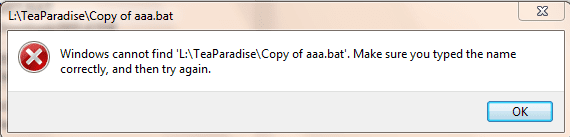
The attachment shows what I get when I right-click a bat file and choose Open, or I just double-click the .bat file.
I have looked at the reg edits that have been posted ( and tried them all) and I'm pretty sure that every key in the registry is set to the values indicated in the suggested .reg files. Even so the problem remains.
I have since discovered that if I rightclick a .bat file and 'Run As Administrator' the file runs. However, my research suggest that it is impossible to set cmd.exe to run as admin automatically.
 

Attachments

  • bat1.PNG
    bat1.PNG
    7.6 KB · Views: 62

My Computer

Computer type
PC/Desktop
OS
windows 7 64
Ok, so it's just not finding the .bat file instead.

Is this a shortcut of the .bat file you are trying to run? If so, are you able to directly run the .bat file?
 

My Computer

Computer type
PC/Desktop
Computer Manufacturer/Model Number
Self built custom
OS
64-bit Windows 11 Pro for Workstations
CPU
Intel i7-8700K OC'd to 5 GHz
Motherboard
ASUS ROG Maximus XI Formula Z390
Memory
64 GB (4x16GB) G.SKILL TridentZ RGB DDR4 3600 MHz
Graphics Card(s)
ASUS ROG-STRIX-GTX1080TI-O11G-GAMING
Sound Card
Integrated
Monitor(s) Displays
2 x Samsung Odyssey G7 27"
Screen Resolution
2560x1440
Hard Drives
1TB Samsung 990 PRO M.2,
4TB Samsung 990 PRO PRO M.2,
TerraMaster F8 SSD Plus NAS
PSU
Seasonic Prime Titanium 850W
Case
Thermaltake Core P3
Cooling
Corsair Hydro H115i
Keyboard
Logitech wireless K800
Mouse
Logitech MX Master 4
Internet Speed
2 Gb/s Download and 100 Mb/s Upload
Antivirus
Malwarebyte Anti-Malware Premium
Browser
Google Chrome
Other Info
Logitech Z625 speaker system,
Logitech BRIO 4K Pro webcam,
HP Color LaserJet Pro MFP M477fdn,
APC SMART-UPS RT 1000 XL - SURT1000XLI,
Galaxy S23 Plus phone

My Computer

Computer type
PC/Desktop
Computer Manufacturer/Model Number
Antec desktop; Acer Aspire laptops
OS
Windows 7 Professional 64-bit
CPU
Desktop i5; Acers i5 & i7
Memory
desktop 16GB; 1 Acer 8GB & 1 Acer 16GB
Hard Drives
1TB split into 2 equal partitions [OS and data] usable by RJS
Internet Speed
AT&T DSL
Browser
FF, GChrome, msIE
Other Info
Windows 7 Firewall, Emsisoft AM/AV, MSE [scan-only], SpywareBlaster, Ruiware/BillP combine
I'm not using any shortcuts. I'm trying to run the .bat files directly by double-clicking or Using Open.
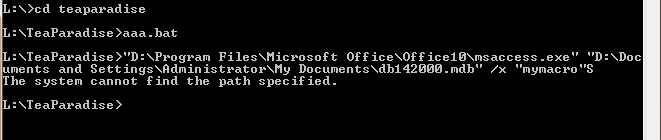
If I use the command processor and navigate to the folder, i can run the bat file from there. (see below)
 

Attachments

  • bat2.PNG
    bat2.PNG
    2.1 KB · Views: 60

My Computer

Computer type
PC/Desktop
OS
windows 7 64
Thanks RolandJS
I'm afraid I've already applied that 'fix' - I deleted the UserChoice key.
 

My Computer

Computer type
PC/Desktop
OS
windows 7 64
Are you having this issue with all .bat files, or just this specific one?

As a test, copy the .bat file to your desktop, and see if you are able to run it.

If not, then rename the .bat file, and try again.
 

My Computer

Computer type
PC/Desktop
Computer Manufacturer/Model Number
Self built custom
OS
64-bit Windows 11 Pro for Workstations
CPU
Intel i7-8700K OC'd to 5 GHz
Motherboard
ASUS ROG Maximus XI Formula Z390
Memory
64 GB (4x16GB) G.SKILL TridentZ RGB DDR4 3600 MHz
Graphics Card(s)
ASUS ROG-STRIX-GTX1080TI-O11G-GAMING
Sound Card
Integrated
Monitor(s) Displays
2 x Samsung Odyssey G7 27"
Screen Resolution
2560x1440
Hard Drives
1TB Samsung 990 PRO M.2,
4TB Samsung 990 PRO PRO M.2,
TerraMaster F8 SSD Plus NAS
PSU
Seasonic Prime Titanium 850W
Case
Thermaltake Core P3
Cooling
Corsair Hydro H115i
Keyboard
Logitech wireless K800
Mouse
Logitech MX Master 4
Internet Speed
2 Gb/s Download and 100 Mb/s Upload
Antivirus
Malwarebyte Anti-Malware Premium
Browser
Google Chrome
Other Info
Logitech Z625 speaker system,
Logitech BRIO 4K Pro webcam,
HP Color LaserJet Pro MFP M477fdn,
APC SMART-UPS RT 1000 XL - SURT1000XLI,
Galaxy S23 Plus phone
Post the contents of the batch file.

Double clicking a .bat file now opens the command processor, but the file still does not run. This might be because when running the .reg file I get messages that some keys cannot be imported because they are in use. However, I don't know how to get past this problem, because from my perspective I'm not running anything at the time. There are no apps running in task manager. I've tried running regedit in Safe mode but it produces the same messages.

Did you ever get round that problem? If not try RegOwnershipEx:

http://www.sevenforums.com/general-discussion/322930-help-installing-lines-register.html

Navigate to and take ownership of HKEY_CLASSES_ROOT\batfile\

Leave the program running and merge your reg file. Then restore ownership.
 
Last edited:

My Computer

Computer type
Laptop
Computer Manufacturer/Model Number
ASUS
OS
Microsoft Windows 7 Home Premium 64-bit 7601 Multiprocessor Free Service Pack 1
CPU
AMD C-60 APU with Radeon(tm) HD Graphics
Motherboard
ASUSTeK COMPUTER INC. X501U
Memory
4.00 GB
Graphics Card(s)
AMD Radeon HD 6290 Graphics
Sound Card
(1) AMD High Definition Audio Device (2) Realtek High Defi
Screen Resolution
1366 x 768 x 32 bits (4294967296 colors) @ 60 Hz
Hard Drives
Hitachi HTS545050A7E380 SATA Disk Device
Antivirus
Comodo CIS & FW, SecureAplus App Whitelisting, Threatfire
Browser
Cyberfox 64bit, Opera 64bit, Airfox
Other Info
Spy-The-Spy, HitmanPro.Alert, Norton Connect Safe, MJRegWatcher, BitDefender TrafficLight, Voodoo Shield, Zemana AntiMalware
It's every .bat file.
Moving to the desktop does not change anything.
 

My Computer

Computer type
PC/Desktop
OS
windows 7 64
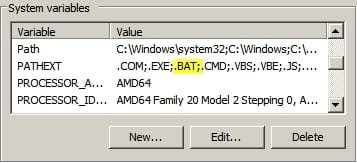
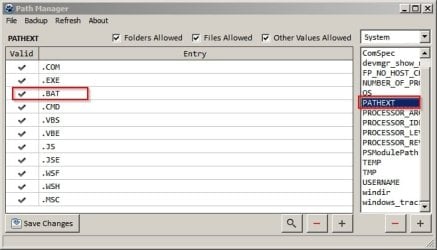
Also do you have this shown in Environment Variables?

EV2.jpg

EV.jpg
 

My Computer

Computer type
Laptop
Computer Manufacturer/Model Number
ASUS
OS
Microsoft Windows 7 Home Premium 64-bit 7601 Multiprocessor Free Service Pack 1
CPU
AMD C-60 APU with Radeon(tm) HD Graphics
Motherboard
ASUSTeK COMPUTER INC. X501U
Memory
4.00 GB
Graphics Card(s)
AMD Radeon HD 6290 Graphics
Sound Card
(1) AMD High Definition Audio Device (2) Realtek High Defi
Screen Resolution
1366 x 768 x 32 bits (4294967296 colors) @ 60 Hz
Hard Drives
Hitachi HTS545050A7E380 SATA Disk Device
Antivirus
Comodo CIS & FW, SecureAplus App Whitelisting, Threatfire
Browser
Cyberfox 64bit, Opera 64bit, Airfox
Other Info
Spy-The-Spy, HitmanPro.Alert, Norton Connect Safe, MJRegWatcher, BitDefender TrafficLight, Voodoo Shield, Zemana AntiMalware
Yes, I have .BAT in my PATHEXT.

Just to summarise where I am....
No .bat files will run when double-clicked or "Open"-ed.
A .bat file can be run by right-clicking and using "Run As Administrator".
A .bat file will run in the command processor (standard or elevated) using the full path to the file.

I have googled this extensively over 3 days and can find similar problems. But suggestions stop once it reaches the same point as I am now.
 

My Computer

Computer type
PC/Desktop
OS
windows 7 64
Peter,

If you haven't already, you might see if doing a system restore using a restore point dated before this started happening may be able undo and fix it.
 

My Computer

Computer type
PC/Desktop
Computer Manufacturer/Model Number
Self built custom
OS
64-bit Windows 11 Pro for Workstations
CPU
Intel i7-8700K OC'd to 5 GHz
Motherboard
ASUS ROG Maximus XI Formula Z390
Memory
64 GB (4x16GB) G.SKILL TridentZ RGB DDR4 3600 MHz
Graphics Card(s)
ASUS ROG-STRIX-GTX1080TI-O11G-GAMING
Sound Card
Integrated
Monitor(s) Displays
2 x Samsung Odyssey G7 27"
Screen Resolution
2560x1440
Hard Drives
1TB Samsung 990 PRO M.2,
4TB Samsung 990 PRO PRO M.2,
TerraMaster F8 SSD Plus NAS
PSU
Seasonic Prime Titanium 850W
Case
Thermaltake Core P3
Cooling
Corsair Hydro H115i
Keyboard
Logitech wireless K800
Mouse
Logitech MX Master 4
Internet Speed
2 Gb/s Download and 100 Mb/s Upload
Antivirus
Malwarebyte Anti-Malware Premium
Browser
Google Chrome
Other Info
Logitech Z625 speaker system,
Logitech BRIO 4K Pro webcam,
HP Color LaserJet Pro MFP M477fdn,
APC SMART-UPS RT 1000 XL - SURT1000XLI,
Galaxy S23 Plus phone
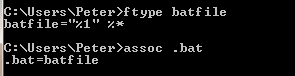
Hi Peter,

Check your batch files' open command string.

In a command prompt type the following,
Code:
ftype batfile
Post back the result.
 

My Computer

Computer type
PC/Desktop
OS
Windows 10, Windows 8.1 Pro, Windows 7 Professional, OS X El Capitan
I'm no expert on .bat files but because of this I think you have a privilege problem not a .bat problem.

From post #5

I have since discovered that if I rightclick a .bat file and 'Run As Administrator' the file runs. However, my research suggest that it is impossible to set cmd.exe to run as admin automatically.

I will go back to watching and leave my thoughts to the experts.
 

My Computer

Computer type
PC/Desktop
Computer Manufacturer/Model Number
Home made Desktop
OS
Windows 10 Pro. 64/ version 1709 Windows 7 Pro/64
CPU
Intel i7-6800K @ 4.3
Motherboard
ASUS X-99 Deluxe II
Memory
Corsair Platinum 16 gig @2400
Graphics Card(s)
EVGA GTX 1070 OC
Monitor(s) Displays
Asus 27" LED LCD/VE278Q
Screen Resolution
1920-1080 or 1280-720 HDMI
Hard Drives
INTEL SSD 730-240 Gb Sata 3.0/
PSU
EVGA Platium 1200W
Case
Phanteks Luxe Tempered Glass 8 fans/ one radiator
Cooling
XSPC/ Water Cooled CPU
Keyboard
Das 4 Professional
Mouse
Logitech M705/MX Anywhere 2-S
Internet Speed
100 mbits
Antivirus
Microsoft Security Essentials/ Malwarebytes Premium 3.0/ SAS
Browser
I.E. 11 default/Firefox/ ISP Time Warner Cable/Spectrum
Other Info
LG BluRay Burner/
Sound system-KLipsch-THX/
Icy Dock ssd Hot Swap bays.
Layback Bear
I am slowly coming to the same conclusion. Unfortunately it doesn't move me on at all as the only things I know about are UAC control settings and Run as Admin. I have set UAC to the lowest level and Run As Admin can't be set on cmd.exe. I even tried to copy cmd.exe out of system32 , set Run as Admin on the copy (which I could do) and then copy it back in. But Of course I can't paste anything INTO system32.
 

My Computer

Computer type
PC/Desktop
OS
windows 7 64
pyprohly Thanks for the suggestion. Already been there though.
 

Attachments

  • bat4.PNG
    bat4.PNG
    823 bytes · Views: 25

My Computer

Computer type
PC/Desktop
OS
windows 7 64
Okay. Those look good.

Now lets check the %ComSpec% variable...
Code:
echo %COMSPEC%
 

My Computer

Computer type
PC/Desktop
OS
Windows 10, Windows 8.1 Pro, Windows 7 Professional, OS X El Capitan
Back
Top