Solved Can't run .exe file. 403 error

Eutychia

New member
Local time
5:26 AM
Messages
2
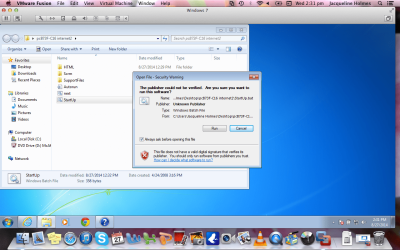
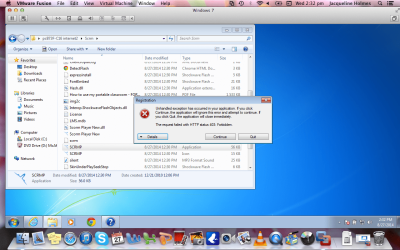
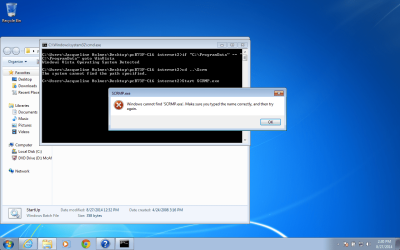
I have VMware fusion 5.0.1 and I had an old virtual machine with windows xp on it which was very out of date. I deleted that virtual machine and added a new one which I booted with windows 7. I have purchased a computer based training program that will run only on PC. So I downloaded it and unzipped it, which made a new file on my desktop. There is a startup.bat file which when I run it, comes up with a 'can't find SCRMP.exe' file. It is in another subfolder included in the main program folder. I was told by the tech support for the program to locate the .exe file and run it individually. When I run it, it comes up with HTTP status error 403:forbidden. If I click continue it comes up with the registration page of the program where I can put in my registration code and if I click ok, it thinks for a while then says 'can't connect to the server'. I was told to turn off firewalls and virus protection so I have uninstalled the mcafee virus protection and turned off anything related to fire walls and windows defender. I am still having all the errors and was wondering if anyone would be able to steer me in the right direction as to how I could fix the problem. The company that I purchased it from was Avsoft and their tech support are giving me instructions that I have already done and explained in all of my emails to them and seems they are not even reading what I have done and the outcomes. I hope someone can help me. If you need screen shots or any other information, please let me know. Thank you in advance.
 

Attachments
  • Screen Shot 2014-08-27 at 2.30.51 pm.png
    Screen Shot 2014-08-27 at 2.30.51 pm.png
    146.8 KB · Views: 3
  • Screen Shot 2014-08-27 at 2.31.25 pm.png
    Screen Shot 2014-08-27 at 2.31.25 pm.png
    178.7 KB · Views: 0
  • Screen Shot 2014-08-27 at 2.31.41 pm.png
    Screen Shot 2014-08-27 at 2.31.41 pm.png
    197.9 KB · Views: 1
  • Screen Shot 2014-08-27 at 2.32.18 pm.png
    Screen Shot 2014-08-27 at 2.32.18 pm.png
    209.8 KB · Views: 0

My Computer

Computer type
Laptop
Computer Manufacturer/Model Number
Macbook Pro
OS
windows 7 ultimate X32
Browser
internet explorer 8
Windows 7 VM

Windows 7 in a VM probably won't be patched and up to date unless you patched and updated it.

I have a very limited knowledge of VM's. I use a VM only on rare occassions however I suspect that the error you're getting is down to a missing Visual C++ package.

32bit version

Download Microsoft Visual C++ 2010 Redistributable Package (x86) from Official Microsoft Download Center

64bit version

Download Microsoft Visual C++ 2010 Redistributable Package (x64) from Official Microsoft Download Center

Which one you need depends upon the program that you're tying to install - if it's 32 or 64 bit.

You might want to wait for confirmation or advice from other members as I'm not entirely sure if this is the correct solution!
 
Last edited:

My Computer

Computer type
Laptop
Computer Manufacturer/Model Number
ASUS
OS
Microsoft Windows 7 Home Premium 64-bit 7601 Multiprocessor Free Service Pack 1
CPU
AMD C-60 APU with Radeon(tm) HD Graphics
Motherboard
ASUSTeK COMPUTER INC. X501U
Memory
4.00 GB
Graphics Card(s)
AMD Radeon HD 6290 Graphics
Sound Card
(1) AMD High Definition Audio Device (2) Realtek High Defi
Screen Resolution
1366 x 768 x 32 bits (4294967296 colors) @ 60 Hz
Hard Drives
Hitachi HTS545050A7E380 SATA Disk Device
Antivirus
Comodo CIS & FW, SecureAplus App Whitelisting, Threatfire
Browser
Cyberfox 64bit, Opera 64bit, Airfox
Other Info
Spy-The-Spy, HitmanPro.Alert, Norton Connect Safe, MJRegWatcher, BitDefender TrafficLight, Voodoo Shield, Zemana AntiMalware
I did as you suggested and also changed my internet connection from public to home and it is all working now. Thank you so much for you me help! I was going crazy trying to fix it. Thank you again.
 

My Computer

Computer type
Laptop
Computer Manufacturer/Model Number
Macbook Pro
OS
windows 7 ultimate X32
Browser
internet explorer 8
Back
Top