
Can't run virtualization

terrorist96

New member
Member
VIP
Local time
10:17 AM
Messages
221
First off, I have a Dell Photo All-In-One Printer 922 which runs on XP - not Vista or 7.

I went here: Download Windows XP Mode

Step 2 said to go here: Download details: HAV Detection Tool
..so I did.

I opened up the HAV Detection Tool - User Guide.mht and havdetectiontool.exe

I got the "This computer does not have hardware-assisted virtualization" message from havdetectiontool.exe and according to the HAV Detection Tool - User Guide.mht, it means I can't have virtualization or whatever.

Umm.. I have a fairly decent computer. You can check my specs (on the bottom left of this post). What gives? Should I just say F-that and download the XP mode and Virtual PC?

Also, my copy of Windows is activated and all that good stuff.
 

My Computer

Computer type
Laptop
Computer Manufacturer/Model Number
Sager NP2650 (Clevo W650SZ) - Custom Built
OS
Windows 7 Ultimate 64 bit (6.1, Build 7601) Service Pack 1
CPU
Intel Core i7 (4700MQ, 2.4Ghz-3.4Ghz, 6MB Cache - Haswell)
Memory
16GB (DDR3 1600MHz Dual Channel Memory - 2 SODIMMS)
Graphics Card(s)
Intel HD 4600 Graphics
Sound Card
Sound Blaster Compatible 3D Audio
Monitor(s) Displays
15.6” LED IPS, Super Clear Matte
Screen Resolution
1920x1080p
Hard Drives
Crucial m4 128GB SSD [mSATA - 128MB L2 Cache] (CT128M4SSD3) | Samsung 860 EVO 1TB SSD [SATA 6Gb/s] (MZ-76E1T0B/AM) | Seagate Momentus 750GB HDD [SATA 3Gb/s, 7200RPM, 16MB Cache] | Western Digital Caviar Black 1TB HDD [SATA 3Gb/s, 7200RPM, 32MB Cache]
Cooling
Stock OEM Thermal Compound
Keyboard
Standard Sager/Clevo Non Chiclet Keyboard
Mouse
Microsoft Wireless Mobile Mouse 4000
Antivirus
Microsoft Security Essentials
Browser
Google Chrome | Firefox/Waterfox | Opera
Other Info
Built-in 802.11 Wireless B/G/N - Stock Wireless Card + Bluetooth™ 4.0 | Internal 9-in-1 Card Reader (MMC/RSMMC/SD/Mini SD/SDHC/SDXC/MS/MS Pro/MS Duo) | Built in 2.0 Megapixel Camera | Rosewill RX-358-S BLACK 3.5" SATA to eSATA External Enclosure with Internal 80mm fan
1. When you install the drivers, did you try installing in compatibility mode?
right click driver installerv -> troubleshoot compatibility -> troubleshoot program -> this program worked in earlier versions of windows... -> windows xp (SP2) -> start program?

3. Also, virtulizing may be disabled by the BIOS.
 
Last edited:

My Computer

Computer type
PC/Desktop
Computer Manufacturer/Model Number
Apple 17" iMac MA199LL (Early 2006)
OS
Windows 8 Pro (32-bit)
CPU
1.83GHz Intel Core Duo
Memory
2GB 667MHz DDR2 SDRAM (PC2-5300) (upgrade)
Graphics Card(s)
ATI Radeon X1600 with 128MB GDDR3 memory
Monitor(s) Displays
17-inch TFT active-matrix LCD, millions of colors
Screen Resolution
1440 x 900
Hard Drives
Hitachi 320GB HDT721032SLA360 7200RPM SATA II (upgrade)
Keyboard
Microsoft Wired Keyboard 600
Mouse
Microsoft Basic Optical Mouse v2.0
Internet Speed
4 Mbps
Antivirus
Microsoft Security Essentials
Browser
Google Chrome
Other Info
WEI:
Base Score: 3.9 Processor: 4.4 Memory 4.7
Graphics: 3.9 Gaming Graphics: 4.1 Primary HD: 5.9
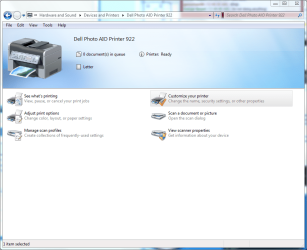
Hi. Thanks for responding. I did that. I got the printer to "set up" and print a test page but when I try to print something in Microsoft Word 2007, for example, I go to print and it shows my printer and I press print but it says there's a problem. I tried in Notepad too. I pressed print and it shows that my printer is selected, but nothing happens. And when I look at the printer screen, it says there's nothing in the queue. I think I'm just gonna get a new printer in the near future. I'm due for one but I wish I could still use this one to its full potential. The Dell printer stuff aren't in the Programs menu either. Usually from there I could go to the scanner and scan stuff and preview it and such, etc.
 

Attachments

  • gaergerg asfawefwef.PNG
    gaergerg asfawefwef.PNG
    84.2 KB · Views: 25

My Computer

Computer type
Laptop
Computer Manufacturer/Model Number
Sager NP2650 (Clevo W650SZ) - Custom Built
OS
Windows 7 Ultimate 64 bit (6.1, Build 7601) Service Pack 1
CPU
Intel Core i7 (4700MQ, 2.4Ghz-3.4Ghz, 6MB Cache - Haswell)
Memory
16GB (DDR3 1600MHz Dual Channel Memory - 2 SODIMMS)
Graphics Card(s)
Intel HD 4600 Graphics
Sound Card
Sound Blaster Compatible 3D Audio
Monitor(s) Displays
15.6” LED IPS, Super Clear Matte
Screen Resolution
1920x1080p
Hard Drives
Crucial m4 128GB SSD [mSATA - 128MB L2 Cache] (CT128M4SSD3) | Samsung 860 EVO 1TB SSD [SATA 6Gb/s] (MZ-76E1T0B/AM) | Seagate Momentus 750GB HDD [SATA 3Gb/s, 7200RPM, 16MB Cache] | Western Digital Caviar Black 1TB HDD [SATA 3Gb/s, 7200RPM, 32MB Cache]
Cooling
Stock OEM Thermal Compound
Keyboard
Standard Sager/Clevo Non Chiclet Keyboard
Mouse
Microsoft Wireless Mobile Mouse 4000
Antivirus
Microsoft Security Essentials
Browser
Google Chrome | Firefox/Waterfox | Opera
Other Info
Built-in 802.11 Wireless B/G/N - Stock Wireless Card + Bluetooth™ 4.0 | Internal 9-in-1 Card Reader (MMC/RSMMC/SD/Mini SD/SDHC/SDXC/MS/MS Pro/MS Duo) | Built in 2.0 Megapixel Camera | Rosewill RX-358-S BLACK 3.5" SATA to eSATA External Enclosure with Internal 80mm fan
Try doing a repair.
at the very minimum you should see the software in the start menu.
 

My Computer

Computer type
PC/Desktop
Computer Manufacturer/Model Number
Apple 17" iMac MA199LL (Early 2006)
OS
Windows 8 Pro (32-bit)
CPU
1.83GHz Intel Core Duo
Memory
2GB 667MHz DDR2 SDRAM (PC2-5300) (upgrade)
Graphics Card(s)
ATI Radeon X1600 with 128MB GDDR3 memory
Monitor(s) Displays
17-inch TFT active-matrix LCD, millions of colors
Screen Resolution
1440 x 900
Hard Drives
Hitachi 320GB HDT721032SLA360 7200RPM SATA II (upgrade)
Keyboard
Microsoft Wired Keyboard 600
Mouse
Microsoft Basic Optical Mouse v2.0
Internet Speed
4 Mbps
Antivirus
Microsoft Security Essentials
Browser
Google Chrome
Other Info
WEI:
Base Score: 3.9 Processor: 4.4 Memory 4.7
Graphics: 3.9 Gaming Graphics: 4.1 Primary HD: 5.9

My Computer

Computer type
PC/Desktop
Computer Manufacturer/Model Number
Apple 17" iMac MA199LL (Early 2006)
OS
Windows 8 Pro (32-bit)
CPU
1.83GHz Intel Core Duo
Memory
2GB 667MHz DDR2 SDRAM (PC2-5300) (upgrade)
Graphics Card(s)
ATI Radeon X1600 with 128MB GDDR3 memory
Monitor(s) Displays
17-inch TFT active-matrix LCD, millions of colors
Screen Resolution
1440 x 900
Hard Drives
Hitachi 320GB HDT721032SLA360 7200RPM SATA II (upgrade)
Keyboard
Microsoft Wired Keyboard 600
Mouse
Microsoft Basic Optical Mouse v2.0
Internet Speed
4 Mbps
Antivirus
Microsoft Security Essentials
Browser
Google Chrome
Other Info
WEI:
Base Score: 3.9 Processor: 4.4 Memory 4.7
Graphics: 3.9 Gaming Graphics: 4.1 Primary HD: 5.9
First off, I have a Dell Photo All-
I got the "This computer does not have hardware-assisted virtualization" message from havdetectiontool.exe and according to the HAV Detection Tool - User Guide.mht, it means I can't have virtualization or whatever.

Just for your info, if your pc does not have hardware virtualization, you may want to try our VMLite XP Mode, it does very similar thing as Microsoft XP Mode, but much faster. It's also free.

http://www.vmlite.com
 

My Computer

OS
windows 7
Sweet. I got it working. I couldn't do "troubleshoot compatibility" with the link you provided me, but I downloaded the drivers from here: Download Dell Photo All-In-One Printer 922 A04 Driver for Windows XP - Softpedia and I got a folder named Dell922 in C: but when I also plug in the printer, it says installing drivers and such and it makes a folder in C:\Program Files (x86) called Dell Photo AIO Printer 922. Both those folders have drivers in it. I don't wanna mess with any of it cuz I just got it working perfectly. What do you think?

But I still don't see the "All-In-One Center" where I can preview scanned images and stuff.
 

My Computer

Computer type
Laptop
Computer Manufacturer/Model Number
Sager NP2650 (Clevo W650SZ) - Custom Built
OS
Windows 7 Ultimate 64 bit (6.1, Build 7601) Service Pack 1
CPU
Intel Core i7 (4700MQ, 2.4Ghz-3.4Ghz, 6MB Cache - Haswell)
Memory
16GB (DDR3 1600MHz Dual Channel Memory - 2 SODIMMS)
Graphics Card(s)
Intel HD 4600 Graphics
Sound Card
Sound Blaster Compatible 3D Audio
Monitor(s) Displays
15.6” LED IPS, Super Clear Matte
Screen Resolution
1920x1080p
Hard Drives
Crucial m4 128GB SSD [mSATA - 128MB L2 Cache] (CT128M4SSD3) | Samsung 860 EVO 1TB SSD [SATA 6Gb/s] (MZ-76E1T0B/AM) | Seagate Momentus 750GB HDD [SATA 3Gb/s, 7200RPM, 16MB Cache] | Western Digital Caviar Black 1TB HDD [SATA 3Gb/s, 7200RPM, 32MB Cache]
Cooling
Stock OEM Thermal Compound
Keyboard
Standard Sager/Clevo Non Chiclet Keyboard
Mouse
Microsoft Wireless Mobile Mouse 4000
Antivirus
Microsoft Security Essentials
Browser
Google Chrome | Firefox/Waterfox | Opera
Other Info
Built-in 802.11 Wireless B/G/N - Stock Wireless Card + Bluetooth™ 4.0 | Internal 9-in-1 Card Reader (MMC/RSMMC/SD/Mini SD/SDHC/SDXC/MS/MS Pro/MS Duo) | Built in 2.0 Megapixel Camera | Rosewill RX-358-S BLACK 3.5" SATA to eSATA External Enclosure with Internal 80mm fan
Actually, scratch all that. I f*cked it up. It was starting to mess with my spooler and I had to do a system restore cuz it kept turning off even after manually turning it on. I just removed everything (after trying multiple times to get it right) and went to MMC and removed it completely. I could try again from scratch and it might work, but eh, not worth all the trouble. I'm just gonna get a new one that's made for Windows 7 and that's wireless so my sister and dad can print wirelessly.
 

My Computer

Computer type
Laptop
Computer Manufacturer/Model Number
Sager NP2650 (Clevo W650SZ) - Custom Built
OS
Windows 7 Ultimate 64 bit (6.1, Build 7601) Service Pack 1
CPU
Intel Core i7 (4700MQ, 2.4Ghz-3.4Ghz, 6MB Cache - Haswell)
Memory
16GB (DDR3 1600MHz Dual Channel Memory - 2 SODIMMS)
Graphics Card(s)
Intel HD 4600 Graphics
Sound Card
Sound Blaster Compatible 3D Audio
Monitor(s) Displays
15.6” LED IPS, Super Clear Matte
Screen Resolution
1920x1080p
Hard Drives
Crucial m4 128GB SSD [mSATA - 128MB L2 Cache] (CT128M4SSD3) | Samsung 860 EVO 1TB SSD [SATA 6Gb/s] (MZ-76E1T0B/AM) | Seagate Momentus 750GB HDD [SATA 3Gb/s, 7200RPM, 16MB Cache] | Western Digital Caviar Black 1TB HDD [SATA 3Gb/s, 7200RPM, 32MB Cache]
Cooling
Stock OEM Thermal Compound
Keyboard
Standard Sager/Clevo Non Chiclet Keyboard
Mouse
Microsoft Wireless Mobile Mouse 4000
Antivirus
Microsoft Security Essentials
Browser
Google Chrome | Firefox/Waterfox | Opera
Other Info
Built-in 802.11 Wireless B/G/N - Stock Wireless Card + Bluetooth™ 4.0 | Internal 9-in-1 Card Reader (MMC/RSMMC/SD/Mini SD/SDHC/SDXC/MS/MS Pro/MS Duo) | Built in 2.0 Megapixel Camera | Rosewill RX-358-S BLACK 3.5" SATA to eSATA External Enclosure with Internal 80mm fan
the driver and the application are two different downloads.

that being said, the wireless multifunction printers are awesome and I'm looking to get one.
from what I can tell wireless scanning only requires the web browser on some models, and otherwise you don't need to dig out the computer cable all the time.
 

My Computer

Computer type
PC/Desktop
Computer Manufacturer/Model Number
Apple 17" iMac MA199LL (Early 2006)
OS
Windows 8 Pro (32-bit)
CPU
1.83GHz Intel Core Duo
Memory
2GB 667MHz DDR2 SDRAM (PC2-5300) (upgrade)
Graphics Card(s)
ATI Radeon X1600 with 128MB GDDR3 memory
Monitor(s) Displays
17-inch TFT active-matrix LCD, millions of colors
Screen Resolution
1440 x 900
Hard Drives
Hitachi 320GB HDT721032SLA360 7200RPM SATA II (upgrade)
Keyboard
Microsoft Wired Keyboard 600
Mouse
Microsoft Basic Optical Mouse v2.0
Internet Speed
4 Mbps
Antivirus
Microsoft Security Essentials
Browser
Google Chrome
Other Info
WEI:
Base Score: 3.9 Processor: 4.4 Memory 4.7
Graphics: 3.9 Gaming Graphics: 4.1 Primary HD: 5.9
Do you have any recommendations for what to get? Brand? Model? Features? Etc.
 

My Computer

Computer type
Laptop
Computer Manufacturer/Model Number
Sager NP2650 (Clevo W650SZ) - Custom Built
OS
Windows 7 Ultimate 64 bit (6.1, Build 7601) Service Pack 1
CPU
Intel Core i7 (4700MQ, 2.4Ghz-3.4Ghz, 6MB Cache - Haswell)
Memory
16GB (DDR3 1600MHz Dual Channel Memory - 2 SODIMMS)
Graphics Card(s)
Intel HD 4600 Graphics
Sound Card
Sound Blaster Compatible 3D Audio
Monitor(s) Displays
15.6” LED IPS, Super Clear Matte
Screen Resolution
1920x1080p
Hard Drives
Crucial m4 128GB SSD [mSATA - 128MB L2 Cache] (CT128M4SSD3) | Samsung 860 EVO 1TB SSD [SATA 6Gb/s] (MZ-76E1T0B/AM) | Seagate Momentus 750GB HDD [SATA 3Gb/s, 7200RPM, 16MB Cache] | Western Digital Caviar Black 1TB HDD [SATA 3Gb/s, 7200RPM, 32MB Cache]
Cooling
Stock OEM Thermal Compound
Keyboard
Standard Sager/Clevo Non Chiclet Keyboard
Mouse
Microsoft Wireless Mobile Mouse 4000
Antivirus
Microsoft Security Essentials
Browser
Google Chrome | Firefox/Waterfox | Opera
Other Info
Built-in 802.11 Wireless B/G/N - Stock Wireless Card + Bluetooth™ 4.0 | Internal 9-in-1 Card Reader (MMC/RSMMC/SD/Mini SD/SDHC/SDXC/MS/MS Pro/MS Duo) | Built in 2.0 Megapixel Camera | Rosewill RX-358-S BLACK 3.5" SATA to eSATA External Enclosure with Internal 80mm fan
From a mac background I've preferred Epson or Brother, but the ink is a bit more expensive.on the Cnet review the top twenti are almost all HP with some pixmas thrown in.
Here's Cnet's list of wireless desktop printers, ordered by Editor's rating.
the two multifunctions on the list, both HPs and highest rated, are as follows:

HP Photosmart Premium TouchSmart Web, $275.00 - $399.99
Also the highest rated on zdnet
33770777-2-440-OVR-1.gif

comprehensive driver features; separate photo and paper trays automatically pick the right size for the job.

THE BAD: Onscreen apps take a long time to access and feel gimmicky; lacks autodocument feeder; slow response from touch screen; applications have a tendency to freeze up; small scanner bed.

THE BOTTOM LINE: Aside from the never-ending name, the HP Photosmart Premium TouchSmart Web All-in-One Printer looks good and prints high-quality photos at competitive speeds. We also appreciate the effort put into the downloadable applications for the interactive touch screen, but the innovation is offset by a hefty price tag. Unless Web connectivity and touch screens are a top priority, we recommend checking out HP's other multifunction printers, which still offer high performance but at a much lower cost.

HP Photosmart D7460 $128
32595218-2-440-OVR-1.gif

THE GOOD: Touch screen is large and easy to use; comes network-ready with both wired and wireless options; fast text prints; built-in memory card slots and PictBridge USB port; dedicated and automated photo paper tray; generous support package.

THE BAD: Very slow photo prints; print quality needs a bit of improvement.

THE BOTTOM LINE: The HP Photosmart D7460 offers compelling features--including a touch screen--for home users, but the competition offers better print quality.

I'd recommend walking into the nearest FutureShop or whatever, seeing what they have that meets your criteria, then google for reviews so you know if it suits your purposes.
 
Last edited:

My Computer

Computer type
PC/Desktop
Computer Manufacturer/Model Number
Apple 17" iMac MA199LL (Early 2006)
OS
Windows 8 Pro (32-bit)
CPU
1.83GHz Intel Core Duo
Memory
2GB 667MHz DDR2 SDRAM (PC2-5300) (upgrade)
Graphics Card(s)
ATI Radeon X1600 with 128MB GDDR3 memory
Monitor(s) Displays
17-inch TFT active-matrix LCD, millions of colors
Screen Resolution
1440 x 900
Hard Drives
Hitachi 320GB HDT721032SLA360 7200RPM SATA II (upgrade)
Keyboard
Microsoft Wired Keyboard 600
Mouse
Microsoft Basic Optical Mouse v2.0
Internet Speed
4 Mbps
Antivirus
Microsoft Security Essentials
Browser
Google Chrome
Other Info
WEI:
Base Score: 3.9 Processor: 4.4 Memory 4.7
Graphics: 3.9 Gaming Graphics: 4.1 Primary HD: 5.9
Thanks for all the info. I've never heard of FutureShop but I'd guess it's probably like MicroCenter or Best Buy. I don't need a super fancy printer that can print glossy really high quality digital pictures from a camera. Just one that does normal print jobs, has wireless connectivity, around $100, and of course Windows 7 compatible. I'll do some research. Thanks!

Also, wouldn't networking a printer be the same as having a wireless one, essentially? Are there any drawbacks in doing that?
 
Last edited:

My Computer

Computer type
Laptop
Computer Manufacturer/Model Number
Sager NP2650 (Clevo W650SZ) - Custom Built
OS
Windows 7 Ultimate 64 bit (6.1, Build 7601) Service Pack 1
CPU
Intel Core i7 (4700MQ, 2.4Ghz-3.4Ghz, 6MB Cache - Haswell)
Memory
16GB (DDR3 1600MHz Dual Channel Memory - 2 SODIMMS)
Graphics Card(s)
Intel HD 4600 Graphics
Sound Card
Sound Blaster Compatible 3D Audio
Monitor(s) Displays
15.6” LED IPS, Super Clear Matte
Screen Resolution
1920x1080p
Hard Drives
Crucial m4 128GB SSD [mSATA - 128MB L2 Cache] (CT128M4SSD3) | Samsung 860 EVO 1TB SSD [SATA 6Gb/s] (MZ-76E1T0B/AM) | Seagate Momentus 750GB HDD [SATA 3Gb/s, 7200RPM, 16MB Cache] | Western Digital Caviar Black 1TB HDD [SATA 3Gb/s, 7200RPM, 32MB Cache]
Cooling
Stock OEM Thermal Compound
Keyboard
Standard Sager/Clevo Non Chiclet Keyboard
Mouse
Microsoft Wireless Mobile Mouse 4000
Antivirus
Microsoft Security Essentials
Browser
Google Chrome | Firefox/Waterfox | Opera
Other Info
Built-in 802.11 Wireless B/G/N - Stock Wireless Card + Bluetooth™ 4.0 | Internal 9-in-1 Card Reader (MMC/RSMMC/SD/Mini SD/SDHC/SDXC/MS/MS Pro/MS Duo) | Built in 2.0 Megapixel Camera | Rosewill RX-358-S BLACK 3.5" SATA to eSATA External Enclosure with Internal 80mm fan
Hi there

If your printer will only run on XP and now W7 drivers are available you can still use W7 to print.

Install the printer on your XP machine (You'll probably neeed a full VM not XP Mode).

On W7 when you want to print ensure the data is shared with your XP machine and then print from the XP machine.

You won't be able to add unsigned 32 bit drivers on to a W7 X-64 system.

Cheers
jimbo
 

My Computer

Computer type
PC/Desktop
Computer Manufacturer/Model Number
Custom built, several laptops HP/ASUS
OS
Linux CENTOS 7 / various Windows OS'es and servers
CPU
Intel i7 Intel i5
Memory
8GB, 16GB
Graphics Card(s)
On Motherboard
Sound Card
Realtek HD audio
Monitor(s) Displays
Apple Cinema display, Samsung LCD
Screen Resolution
1920 X 1080
Hard Drives
4 X 1TB SATA
Mouse
Toshiba wireless laser
Internet Speed
> 20MB up
Thanks for all the info. I've never heard of FutureShop but I'd guess it's probably like MicroCenter or Best Buy. I don't need a super fancy printer that can print glossy really high quality digital pictures from a camera. Just one that does normal print jobs, has wireless connectivity, around $100, and of course Windows 7 compatible. I'll do some research. Thanks!

Also, wouldn't networking a printer be the same as having a wireless one, essentially? Are there any drawbacks in doing that?

Yeah sorry wasn't thinking. FutureShop was originally Best buy Canada.I also forgot to type in the price of the D7460 ($128).

truth be told I have never seen a wireless multifunction printer for under $120, although if you take out the multifunction part they are a little easier to find.

If by "networking a printer," you mean one that connects to the router directly then yes, the only drawback that I can think of is that it has to be directly connected to the router with a cable, limiting to where you can place it. You can also use Windows to share the computer to anybody on your homegroup, but don't think the scanning part will work.
 

My Computer

Computer type
PC/Desktop
Computer Manufacturer/Model Number
Apple 17" iMac MA199LL (Early 2006)
OS
Windows 8 Pro (32-bit)
CPU
1.83GHz Intel Core Duo
Memory
2GB 667MHz DDR2 SDRAM (PC2-5300) (upgrade)
Graphics Card(s)
ATI Radeon X1600 with 128MB GDDR3 memory
Monitor(s) Displays
17-inch TFT active-matrix LCD, millions of colors
Screen Resolution
1440 x 900
Hard Drives
Hitachi 320GB HDT721032SLA360 7200RPM SATA II (upgrade)
Keyboard
Microsoft Wired Keyboard 600
Mouse
Microsoft Basic Optical Mouse v2.0
Internet Speed
4 Mbps
Antivirus
Microsoft Security Essentials
Browser
Google Chrome
Other Info
WEI:
Base Score: 3.9 Processor: 4.4 Memory 4.7
Graphics: 3.9 Gaming Graphics: 4.1 Primary HD: 5.9
Back
Top