cant save files to system folder

surfexplorer

New member
hello,

I have a problem with the security features of win7 and vista.

I have tried googling for answer but none found but I found this forum to which I would like to ask help.

I have this program that I made. It is suppose to extract vb6 resources to sub custom folder in windows system32 folder.

the problem is that I cannot extract the files there. With other security feature like UAC, I have found a registry function that will disable UAC.

Is there a registry entry also that will enable me to save file in windows system folder? Or how should I do that?

I need to extract my config files in a subfolder under system folder.

Please kindly help. Badly needed to finish my project.

I know that those are security features of windows but I would like to bypass that so that I can successfully install my program.
 

My Computer

OS
Windows 7 Home Basic 32bit
Hi there surfexplorer and welcome to SF!
A short question beforehand:
Why does it have to be a sub folder of Systems32 ? For accessibility?
Why don't you just use a different folder and add that one to the path variable?

If you really put your stuff under system32 (where it doesn't belong) you will constantly have to deal with problems due to windows UAC plus you would have to take ownership over a core systems folder which can and will give you grieve later on.
Plus if you ever think about giving/selling your program to somebody else they will run into a heap of problems as well.

-DG
 

My Computer

Computer Manufacturer/Model Number
HP m8000n
OS
Windows 7 Ultimate x86
CPU
DualCore AMD Athlon 64 X2, 2600 MHz 5200+
Motherboard
Asus M2N68-LA (Narra)
Memory
Samsung 2GB DDR2
Graphics Card(s)
Onboard NVIDIA GeForce 6150SE nForce 430
Sound Card
Onboard nVIDIA nForce 6100-430 (MCP61P)
Monitor(s) Displays
Westinghouse 19" LED
Screen Resolution
1280x1024
Hard Drives
SATA II Seagate Barracuda 500GB
USB II WD Elements 500GB
USB II WD My Book 1TB
USB II WD My Book 2TB
PSU
Stock (HP)
Case
Stock (HP)
Cooling
Stock
Keyboard
Logitech Classic KB 200
Mouse
Standard HP opticle USB mouse
well the purpose of creating the subfolder under system32 folder is to hide the configuration files extracted from the prying eyes of the user because it is confidential informations there.

if I cannot put/extract my configurations in system folder, where is the best place to extract my config files that can be hidden from users. and without me having problem with all the write access permission etc...?
 

My Computer

OS
Windows 7 Home Basic 32bit
....Hide configuration details from the user?! Impossible Impossible. You might as well just embed that stuff in your executable file. But I'm don't think I will help any further. This all seems like shady business going on here. There is no logical or legitimate reason I can think of to do this.
 

My Computer

Computer type
PC/Desktop
Computer Manufacturer/Model Number
Alienware Aurora ALX R4
OS
Windows 10 Pro (x64)
CPU
Intel Core i7-3930K (3.2GHz - 4.5GHz)
Motherboard
Alienware Aurora-R4 x79
Memory
4x Samsung 4GB PC3-12800 DDR3 (16GB 1600MHz)
Graphics Card(s)
Nvidia Geforce GTX 690
Sound Card
SteelSeries Siberia Elite
Monitor(s) Displays
Dell UltraSharp U3011
Screen Resolution
2560x1600
Hard Drives
Samsung 850 Pro 256 GB, Seagate 1TB Desktop Hybrid HDD, 2x Western Digital 4TB Green HDD
PSU
875W Some Dell PSU <.<
Case
Alienware Aurora ALX
Cooling
Custom Liquid Cooling (EK CPU & GPU blocks) dual EK 480RAD
Keyboard
Logitech G710+ Mechanical
Mouse
Logitech G700s
Internet Speed
Verizon Fios (50 mbps average)
Other Info
Server: Intel NUC D54250WYK: i5-4250U, 16GB, 256 GB mSATA, Windows Server 2012 R2
i guess nobody wants to help. :cry:
It's not like nobody wants to help, really.
I think that by disabling UAC you'll be able to create/modify files directly in the C:\Windows\System32 folder, even if I wouldn't ever do it.

For what regards your software:
If you want to be sure that the final user doesn't tinker with the configuration, just hard-code the paremeters you need directly in the executable (even if I don't advise you to do so).
Otherwise, I'd suggest you to store configuration files in a user-specific folder, so different users can configure the app the way it best suits their needs (and you wouldn't run into UAC blocking the user anytime he/she tries to make a change to the configuration files) without interfering each other.
 

My Computer

Computer type
PC/Desktop
Computer Manufacturer/Model Number
I've made it myself :)
OS
Windows 10 1703
CPU
intel Core i7 920
Motherboard
ASUS P6T
Memory
12GB DDR3 Corsair XMS3
Graphics Card(s)
Sapphire AMD R9 270X
Sound Card
onboard
Monitor(s) Displays
My living room TV
Screen Resolution
Too high for that card
Hard Drives
If they're that hard, why do they break so often?
PSU
LC Power GP3 650W
Case
CoolerMaster Centurion
Cooling
Still lots of fans :(
Keyboard
Logitech K400r
Mouse
Mice are overrated
Internet Speed
I'd rather use travelling pigeons
I agree with the other poster who said that it appears you are attempting to pull something shady on the users of your software. Either that or you are not a very experienced programmer. You shouldn't be doing anything to the system32 folder or below.
 

My Computer

Computer Manufacturer/Model Number
Custom
OS
Windows 7 Ultimate RTM (Technet)
CPU
3.00 gigahertz Intel Core2 Duo E8400
Motherboard
ASUSTeK Computer INC. P5K/EPU Rev 1.xx
Memory
4GB
Graphics Card(s)
ATI Radeon X1950 Pro
Sound Card
Built in HD Audio
Monitor(s) Displays
22" Gateway LCD
Screen Resolution
1920 x 1200
Hard Drives
ST3160023A [Hard drive] (160.04 GB) -- drive 0, rev 8.01, ST3500630AS [Hard drive] (500.11 GB) -- drive 2, rev 3.AAK
ST3500630AS [Hard drive] (500.11 GB) -- drive 1, rev 3.AAK
Keyboard
Logitech G11
Mouse
Microsoft Wireless Laser Mouse 5000
Internet Speed
13.44 Mbps
where to save files in win7/vista

where can i save/extract my files from my program so that i have right permission there coz I cant extract files to system folder?

need reply asap
 

My Computer

OS
Windows 7 Home Basic 32bit
Your User directory. C:\Users\[USERNAME]
 

My Computer

Computer type
PC/Desktop
Computer Manufacturer/Model Number
Alienware Aurora ALX R4
OS
Windows 10 Pro (x64)
CPU
Intel Core i7-3930K (3.2GHz - 4.5GHz)
Motherboard
Alienware Aurora-R4 x79
Memory
4x Samsung 4GB PC3-12800 DDR3 (16GB 1600MHz)
Graphics Card(s)
Nvidia Geforce GTX 690
Sound Card
SteelSeries Siberia Elite
Monitor(s) Displays
Dell UltraSharp U3011
Screen Resolution
2560x1600
Hard Drives
Samsung 850 Pro 256 GB, Seagate 1TB Desktop Hybrid HDD, 2x Western Digital 4TB Green HDD
PSU
875W Some Dell PSU <.<
Case
Alienware Aurora ALX
Cooling
Custom Liquid Cooling (EK CPU & GPU blocks) dual EK 480RAD
Keyboard
Logitech G710+ Mechanical
Mouse
Logitech G700s
Internet Speed
Verizon Fios (50 mbps average)
Other Info
Server: Intel NUC D54250WYK: i5-4250U, 16GB, 256 GB mSATA, Windows Server 2012 R2
Hello Surfexplorer,

In Windows 7, since Vista, anything from an external source (ex: internet, USB, etc...) must be saved and/or extracted to any user folder (ex: Desktop, Downloads, etc...) in the C:\Users\(user-name) folder first. Afterwards, if you are an administrator, you will be able to move it to a system location.

System locations, anything other than C:\Users\(user-name) folders, are protected and will not let any outside source save to them directly. It's a security feature to protect your system.

Hope this helps,
Shawn
 

My Computer

Computer type
PC/Desktop
Computer Manufacturer/Model Number
Self built custom
OS
64-bit Windows 11 Pro for Workstations
CPU
Intel i7-8700K OC'd to 5 GHz
Motherboard
ASUS ROG Maximus XI Formula Z390
Memory
64 GB (4x16GB) G.SKILL TridentZ RGB DDR4 3600 MHz
Graphics Card(s)
ASUS ROG-STRIX-GTX1080TI-O11G-GAMING
Sound Card
Integrated
Monitor(s) Displays
2 x Samsung Odyssey G7 27"
Screen Resolution
2560x1440
Hard Drives
1TB Samsung 990 PRO M.2,
4TB Samsung 990 PRO PRO M.2,
TerraMaster F8 SSD Plus NAS
PSU
Seasonic Prime Titanium 850W
Case
Thermaltake Core P3
Cooling
Corsair Hydro H115i
Keyboard
Logitech wireless K800
Mouse
Logitech MX Master 4
Internet Speed
2 Gb/s Download and 100 Mb/s Upload
Antivirus
Malwarebyte Anti-Malware Premium
Browser
Google Chrome
Other Info
Logitech Z625 speaker system,
Logitech BRIO 4K Pro webcam,
HP Color LaserJet Pro MFP M477fdn,
APC SMART-UPS RT 1000 XL - SURT1000XLI,
Galaxy S23 Plus phone
Hi Brink, thanks for replying.

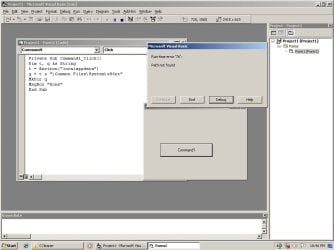
I am trying to make a program that will automatically create a directory. I have attached picture for reference.

But I cant make a directory because it cannot create a directory.

Anyway, I can see on my c:\Users\User folder where User is the name of the folder, it has a Shield picture on the folder.

Kindly help. I dont understand 7.
 

Attachments

  • Untitled.jpg
    Untitled.jpg
    127.9 KB · Views: 15

My Computer

OS
Windows 7 Home Basic 32bit
See if using the location below will work. Both are the same location, but different way.

C:\Users\(User-Name)\Documents

or

%userprofile%\My Documents
 

My Computer

Computer type
PC/Desktop
Computer Manufacturer/Model Number
Self built custom
OS
64-bit Windows 11 Pro for Workstations
CPU
Intel i7-8700K OC'd to 5 GHz
Motherboard
ASUS ROG Maximus XI Formula Z390
Memory
64 GB (4x16GB) G.SKILL TridentZ RGB DDR4 3600 MHz
Graphics Card(s)
ASUS ROG-STRIX-GTX1080TI-O11G-GAMING
Sound Card
Integrated
Monitor(s) Displays
2 x Samsung Odyssey G7 27"
Screen Resolution
2560x1440
Hard Drives
1TB Samsung 990 PRO M.2,
4TB Samsung 990 PRO PRO M.2,
TerraMaster F8 SSD Plus NAS
PSU
Seasonic Prime Titanium 850W
Case
Thermaltake Core P3
Cooling
Corsair Hydro H115i
Keyboard
Logitech wireless K800
Mouse
Logitech MX Master 4
Internet Speed
2 Gb/s Download and 100 Mb/s Upload
Antivirus
Malwarebyte Anti-Malware Premium
Browser
Google Chrome
Other Info
Logitech Z625 speaker system,
Logitech BRIO 4K Pro webcam,
HP Color LaserJet Pro MFP M477fdn,
APC SMART-UPS RT 1000 XL - SURT1000XLI,
Galaxy S23 Plus phone
I agree with logicearth, the user directory is where you are going to want to store information regarding that perticular user. If you are wanting to hide information from the user so they cannot just open the file and read it, then may i recommend storing your information to a file in binary mode?
 

My Computer

Computer Manufacturer/Model Number
HP Pavilion DV4
OS
Windows 7 Professional 64Bit
CPU
Intel I5
Memory
4.00GB
Graphics Card(s)
INTEL HD
ok. I guess I found the problem.

if this is the local app data path (c:\users\user) and I want to create directory c:\users\user\test\password

then I need to create c:\users\user\test before I can create c:\users\user\test\password directory.

the question now, why is the behavior of windows7 and vista unlike in xp?
 

My Computer

OS
Windows 7 Home Basic 32bit
ok. I guess I found the problem.

if this is the local app data path (c:\users\user) and I want to create directory c:\users\user\test\password

then I need to create c:\users\user\test before I can create c:\users\user\test\password directory.

the question now, why is the behavior of windows7 and vista unlike in xp?

VB6 mkdir does not make paths, can only make one subdirectory at a time. Nothing to do with Win7 or Vista. Maybe there is someone on this board that still uses VB6 to program but I doubt it. So I don't think you will find much help concerning that.

http://www.devx.com/vb2themax/Tip/18706
 

My Computer

Computer type
PC/Desktop
Computer Manufacturer/Model Number
Alienware Aurora ALX R4
OS
Windows 10 Pro (x64)
CPU
Intel Core i7-3930K (3.2GHz - 4.5GHz)
Motherboard
Alienware Aurora-R4 x79
Memory
4x Samsung 4GB PC3-12800 DDR3 (16GB 1600MHz)
Graphics Card(s)
Nvidia Geforce GTX 690
Sound Card
SteelSeries Siberia Elite
Monitor(s) Displays
Dell UltraSharp U3011
Screen Resolution
2560x1600
Hard Drives
Samsung 850 Pro 256 GB, Seagate 1TB Desktop Hybrid HDD, 2x Western Digital 4TB Green HDD
PSU
875W Some Dell PSU <.<
Case
Alienware Aurora ALX
Cooling
Custom Liquid Cooling (EK CPU & GPU blocks) dual EK 480RAD
Keyboard
Logitech G710+ Mechanical
Mouse
Logitech G700s
Internet Speed
Verizon Fios (50 mbps average)
Other Info
Server: Intel NUC D54250WYK: i5-4250U, 16GB, 256 GB mSATA, Windows Server 2012 R2
thanks for the info logicearth. actually using mkdir is an advice from me from vbforums. previously i was using fso.createfolder.
 

My Computer

OS
Windows 7 Home Basic 32bit
Back
Top