Can't Select mutiple folders in Windows Explorer

millhouse123

New member
Local time
8:04 AM
Messages
5
So I transfered a bunch of files from my external hard drive to my primary drive and now I can't select multiple folders using the CTL or Shift keys. I need to move a bunch of files and don't want to do it one by one. I can select multiple individual documents or pictures just not folders.
 

My Computer My Computer

Computer type
PC/Desktop
OS
Windows 7 x32
Welcome millhouse123.

Have you rebooted since moving the files from your external drive? Can you select even one folder?
 

My Computer My Computer

Computer type
PC/Desktop
Computer Manufacturer/Model Number
Mellon Labs (custom build)
OS
Win 7 Pro x64/Win 10 Pro x64 dual boot
CPU
AMD FX 8350 Vishera @ 4200
Motherboard
ASUS M5A97 R2.0
Memory
16 GB Mushkin Blackline DDR3-2400 @ 1866 (9-10-10-10-31)
Graphics Card(s)
XFX Radeon R9 280 Double D Black Edition
Sound Card
Realtek HD Audio on MB. Sounds great.
Monitor(s) Displays
Acer 24", Acer 22"
Screen Resolution
3840 x 1080
Hard Drives
1 x Mushkin Chronos 120 GB SSD (Win 10)
1 x Samsung 850 EVO 250 GB SSD (Win 7)
1 x WD 1TB SATA Blue
1 x WD 1TB SATA Green
PSU
Corsair TX-750
Case
CoolerMaster HAF 912+
Cooling
Coolermaster Seidon 240M Liquid AIO. 6 case fans
Keyboard
Logitech G710+
Mouse
Logitech G500s
Internet Speed
Much better since I got fiber, but still way overpriced.
Antivirus
MSE, Malware Bytes for scanning
Browser
Firefox
Other Info
Corsair VOID USB headphones.

A Mellon Labs X-1 - LCD Smartie driven system status display.

Brought to you by the letter E
Yes I have rebooted and I can select 1 folder at a tme
 

My Computer My Computer

Computer type
PC/Desktop
OS
Windows 7 x32
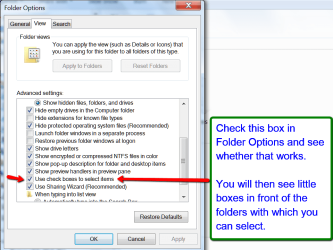
See whether this works.
 

Attachments

  • 2013-11-12_2119.png
    2013-11-12_2119.png
    48.6 KB · Views: 1

My Computer My Computer

Computer Manufacturer/Model Number
HP, Dell, Gateway, Toshiba - 4 laptops and 2 desktops
OS
Vista, Windows7, Mint Mate, Zorin, Windows 8
CPU
from 1.6GHz Duo to i7
Monitor(s) Displays
2x HP w2207
Hard Drives
5x HDD, 7x SSD, 12x Externals
Keyboard
with trackball - no mices
Mouse
Trackball mice
Internet Speed
DSL 6000
Right click a couple of them,
Click on Properties,
General section see if there's a Unblock button on the bottom ?
 

My Computer My Computer

Computer type
PC/Desktop
Computer Manufacturer/Model Number
Custom assembled by me :}
OS
Win-7-Pro64bit 7-H-Prem-64bit
CPU
i7-5930K 2nd i9-9940x both water blocked VRM's too
Motherboard
ASUS SABERTOOTH X99 2nd ASUS x299 Apex
Memory
Trident-z 3200C14 2nd Trident-z 3600C16
Graphics Card(s)
EVGA 1080ti ftw3 2nd Titan Xp both water blocked
Sound Card
Built-in Realtek
Monitor(s) Displays
1-AOC G2460PG 24"G-Sync 144Hz/ 2nd 1-ASUS VG248QE 24" 144Hz
Screen Resolution
1920 x 1080 144Hz
Hard Drives
2-Samsung M.2 Evo & Evo Plus
2-Samsung 850 EVO 500GB SSD's/ 3-2.5 W.D. Black 1tb-&3-1tb/3-3.5 WD Black 1tb hdd's
PSU
EVGA SuperNOVA 1000-P2 2nd 1200-P2
Case
2-Corsair Obsidian Series 450D Black ATX Mid Tower
Cooling
Custom water loops
Keyboard
Logitech G710+/ 2nd Logitech G910
Mouse
2-RedDragon M901 Perdition 16400 dpi Gaming mouse = wired
Internet Speed
Comcast Ping 19ms 89.31mbps download speed 6.12mbps upload
Antivirus
Malwarebytes Pro/ Superantispyware Pro
Browser
FireFox & Pale moon
Other Info
2nd ASUS X299 Apex/Intel i9-9940x with Custom water loop/7H-Prem-x64/Corsair 450D case/Ram Trident-z 3600C16 4x8gb / Samsung970Evo plus 500gb SSD/Dual ssd EZ swap evo/PSU EVGA SuperNova 1200w-P2 80+Platinum/GPU Titan Xp /8-ML-140 on push-pull on 2-280GTX rads
WHS: The only place it added the check box was at the file level not the folder level.

ThrashZone: So such option was available.

I did notice that the files were marked as read only - and when I uncheck and apply each one and close and open they are back to read only. Not sure if that is relevant or not.
 

My Computer My Computer

Computer type
PC/Desktop
OS
Windows 7 x32
WHS: The only place it added the check box was at the file level not the folder level.
That is strange indeed. I don't know what to say. On all my systems, folders have checkboxes.
 

My Computer My Computer

Computer Manufacturer/Model Number
HP, Dell, Gateway, Toshiba - 4 laptops and 2 desktops
OS
Vista, Windows7, Mint Mate, Zorin, Windows 8
CPU
from 1.6GHz Duo to i7
Monitor(s) Displays
2x HP w2207
Hard Drives
5x HDD, 7x SSD, 12x Externals
Keyboard
with trackball - no mices
Mouse
Trackball mice
Internet Speed
DSL 6000

My Computer My Computer

Computer type
PC/Desktop
Computer Manufacturer/Model Number
n/a
OS
W7 Ultimate SP1, LM19.2 MATE, W10 Home 1703, W10 Pro 1703 VM, #All 64 bit
CPU
AMD Phenom II x6 1100T, 3.3 GHz
Motherboard
ASUS M4A88T-M/USB3 (AM3)
Memory
12GB DDR3 1333 G-Skill (4GB x 2), G-Skill (2GB x 2)
Graphics Card(s)
NVIDIA GeForce GTX 660
Sound Card
Realtek?
Monitor(s) Displays
Samsung S23B350
Screen Resolution
1920x1080
Hard Drives
WD Green 2TB (SATA), WD Green 3TB (SATA), WD Blue 4TB (SATA), WD Blue 6TB (SATA)
PSU
Cooler Master
Case
Antec GX300 Tower
Cooling
3x Antec TRICOOL 120mm Fans
Mouse
Wired Optical
Internet Speed
DSL
Antivirus
Avast
Browser
Pale Moon (64 bit)
Other Info
2018-12-27 Upgraded HDDs
2015-12-10 Upgraded case, graphics card, storage
2015-08-15 Upgraded motherboard & RAM
2015-07-15 Upgraded LM17.1 to LM17.2
I gave up on this but now i need to move a bunch of files around and I don't want to do it one by one. I did try running the sfc and it found no violations.

Any other ideas - I am on my knees begging at this point
 

My Computer My Computer

Computer type
PC/Desktop
OS
Windows 7 x32
You do realize that you can only select multiple folders on the right-side of the Windows Explorer panel and not on the left-side which is referred to as the Navigator pane, right?
 

My Computer My Computer

Computer type
PC/Desktop
Computer Manufacturer/Model Number
Home Built desktop, Dell G15 5511 Gaming laptop,MS Surface Pro 7 tablet
OS
W10 Pro desktop, W11 laptop, W11 Pro tablet (all 64-bit)
CPU
3.7Ghz 8700K i7, i7-11800H, i7-1065G7
Motherboard
ASUS TUF Z370-Pro Gaming in desktop
Memory
16G desktop, 16G laptop, 4G tablet
Graphics Card(s)
AMD Radeon RX580, RTX 3060, Intel Iris Plus
Sound Card
High Definition Audio (Built-in to mobo)
Monitor(s) Displays
Samsung U32J59 32" (2x), 15.6", 12"
Screen Resolution
3840x2160, 3840x2160, 1920x1080, 2160x1440
Hard Drives
500G SSD for OS; 2T, 10T & 15T HDDs for Data on Desktop, 1TB SSD laptop, 128G SSD tablet.
PSU
Corsair CX 750M
Case
Antec 100
Cooling
CM 212+
Keyboard
IBM Model M - used continuously since 1986
Mouse
Microsoft Pro IntelliMouse
Internet Speed
400M down 8M up
Antivirus
Windows Defender
Browser
FireFox
Other Info
Built my first computer (8Mhz 8088cpu, 640K RAM, 20MB HDD, 2 360K floppy drives) in 1985 and have been building them for myself, relatives and friends ever since.
LOL - I am very aware of that limitation. Thanks
 

My Computer My Computer

Computer type
PC/Desktop
OS
Windows 7 x32
Sorry to have asked such a basic question but sometimes these things turn out to be as simple as that.
 

My Computer My Computer

Computer type
PC/Desktop
Computer Manufacturer/Model Number
Home Built desktop, Dell G15 5511 Gaming laptop,MS Surface Pro 7 tablet
OS
W10 Pro desktop, W11 laptop, W11 Pro tablet (all 64-bit)
CPU
3.7Ghz 8700K i7, i7-11800H, i7-1065G7
Motherboard
ASUS TUF Z370-Pro Gaming in desktop
Memory
16G desktop, 16G laptop, 4G tablet
Graphics Card(s)
AMD Radeon RX580, RTX 3060, Intel Iris Plus
Sound Card
High Definition Audio (Built-in to mobo)
Monitor(s) Displays
Samsung U32J59 32" (2x), 15.6", 12"
Screen Resolution
3840x2160, 3840x2160, 1920x1080, 2160x1440
Hard Drives
500G SSD for OS; 2T, 10T & 15T HDDs for Data on Desktop, 1TB SSD laptop, 128G SSD tablet.
PSU
Corsair CX 750M
Case
Antec 100
Cooling
CM 212+
Keyboard
IBM Model M - used continuously since 1986
Mouse
Microsoft Pro IntelliMouse
Internet Speed
400M down 8M up
Antivirus
Windows Defender
Browser
FireFox
Other Info
Built my first computer (8Mhz 8088cpu, 640K RAM, 20MB HDD, 2 360K floppy drives) in 1985 and have been building them for myself, relatives and friends ever since.
And for me it was as simple as that. Been a computer nerd for 40 years but did not know you cannot select multiple files in the navigator pane... obviously I've still got lots to learn.
Thanks Al
 

My Computer My Computer

Computer type
PC/Desktop
Computer Manufacturer/Model Number
dell
OS
windows 7 32 bit
Hi there


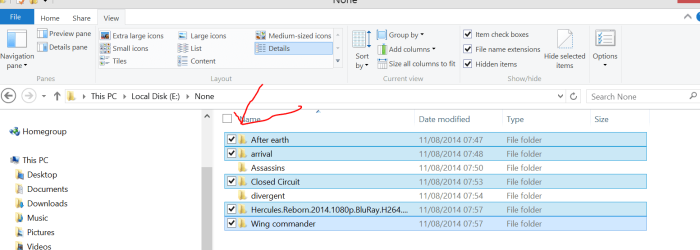
I think this method is actually easier !!! and you are less likely to make a mistake when selecting multiple (folders) but not a contiguous block - i.e selections throughout the entire list with gaps.

I can't check on W7 at the moment as I'm on a Windows 8.1 VM but W8 works (I think) the same.

there should be a little square box - just click the ones you want to process.

(Sorry in advance if this doesn't work on W7 - but AFAIK there haven't been any changes in Windows explorer in Windows 8 / 8.1 - other than it's now called File explorer !!). Ensure the item check box is clicked in Folder view.

Cheers
jimbo
 

Attachments

  • folder1 .png
    folder1 .png
    22.1 KB · Views: 1
  • folder2.png
    folder2.png
    40.1 KB · Views: 1

My Computer My Computer

Computer type
PC/Desktop
Computer Manufacturer/Model Number
Custom built, several laptops HP/ASUS
OS
Linux CENTOS 7 / various Windows OS'es and servers
CPU
Intel i7 Intel i5
Memory
8GB, 16GB
Graphics Card(s)
On Motherboard
Sound Card
Realtek HD audio
Monitor(s) Displays
Apple Cinema display, Samsung LCD
Screen Resolution
1920 X 1080
Hard Drives
4 X 1TB SATA
Mouse
Toshiba wireless laser
Internet Speed
> 20MB up
Thanks for this, yes its the same for w7. My problem was deleting lots of photographic folders which I had duplicates of or did not need any longer. I've never tried to do multiple deletes from the navigation panel previously, now I know why, so I was on a loser from the start. You'd have thought that in the last 40 years I would have tried this but no. I'm from a system programming mainframe background so these pesky little things should not cause me much of a problem..but hey you live and learn. Thanks again
 

My Computer My Computer

Computer type
PC/Desktop
Computer Manufacturer/Model Number
dell
OS
windows 7 32 bit
zombiex1 Glad you found an interesting tweak on here. You should check out the 100's of tutorials to make life easier and get your system set up the way you want it not the way it arrived from the manufacturer. There is something for everyone.
Tutorials - Windows 7 Help Forums
 

My Computer My Computer

Computer type
PC/Desktop
Computer Manufacturer/Model Number
Bluethunder II
OS
Windows 7 x64 Ultimate and numerous virtual machines
CPU
AMD FX-8350 Vishera 32nm Technology @ 4.2 GHz default
Motherboard
ASUSTeK COMPUTER INC. SABERTOOTH 990FX R2.0 (Socket 942)
Memory
G Skill 32.0GB Dual-Channel DDR3 @ 1204MHz (11-13-13-31)
Graphics Card(s)
EVGA GeForce GTX 960 4GB Super SC ACX 2.0+ with Back Plate
Sound Card
Creative X-Fi Titanium HD Audiophile PCIe
Monitor(s) Displays
LG L227WTG x 3
Screen Resolution
1680 x 1050 16:10
Hard Drives
238GB Samsung850 PRO SATA Disk Device (SSD)
1863GB Seagate ST2000DM 001-1CH164 (SATA)
1397GB Seagate ST1500DL 003-9VT16L(SATA)
466GB Western Digital WDC WD50 03AZEX-00K1GA0 (SATA) x 2
932GB Seagate ST310005 28AS SATA Disk Device (SATA)
PSU
Enermax Revolution87+ 1000 Watts Gold Certified Power Supply
Case
Rocketfish Full Tower
Cooling
Cooler Master Hyper 212 EVO Push Pull 120mm Fans
Keyboard
Logitech K740
Mouse
Logitech G100S Laser LED + Logitech Gamepad F310
Internet Speed
500 mbs down and 30mbs up
Antivirus
Malwarebytes Pro & Avast and MSE on certain Virtual Machines
Browser
Firefox (Main) Chrome, Internet Explorer (Back Up)
Other Info
Logitech X 230 2.1 Stereo System and 5.1 Yamaha RX V2090
B&W DM6 Monitor Speakers + Center and Surround Speakers
Using Mouse Without Borders (Google it)
Thanks for this I'll have a read through.
 

My Computer My Computer

Computer type
PC/Desktop
Computer Manufacturer/Model Number
dell
OS
windows 7 32 bit
In the interest of others who have read this, as old as it is, a possible workaround would be to put the files you want to select in bulk into a single folder you select and open in the browser where you can select multiple files.

Worked for me! it's just an extra step that can be easily undone.
 

My Computer My Computer

Computer type
PC/Desktop
OS
Windows 7 Home Premium
Millhouse123: Did you ever get this figured out? I believe I can help.
 

My Computer My Computer

Computer type
Laptop
Computer Manufacturer/Model Number
Dell
OS
Windows 7 Professional, x64-based PC
Memory
Installed RAM 4.0 GB; "Total Virtual Memory" 6.95 GB
Antivirus
Norton
Browser
IE
Back
Top