Hi, I just had WLM installed (remotely by Telstra, on their advice). I can get mail but not send. Any help would be good. I'm as dumb as brick with PC stuff. "The message could not be sent because the server rejected the sender's email address. The sender's email address was [email protected].
Subject 'Why xxxxxxxxxxx
Server Error: 550
Server Response: 550 5.1.0 Authentication Required
Server: 'mail.bigpond.com'
Windows Live Mail Error ID: 0x800CCC78
Protocol: SMTP
Port: 25
Secure(SSL): No
Hello and welcome treb now I don't know why Telstra had to install WLM on your machine as it is quite easy though take a while to install yourself. You only had to download Live Essentials and pick out the applications ie WLM from the list that is presented to you.
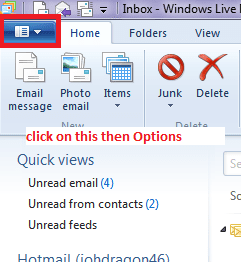
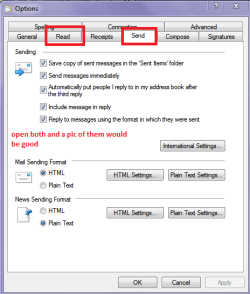
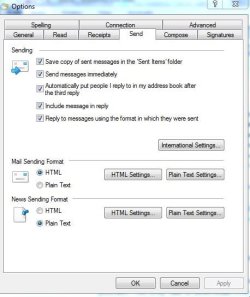
So can you please navigate to that blue tab top left hand side of the WLM screen > click on it > click on Option > Mail and a small window should open and in that click on the Send tab see pic and post back what you see - a snip pic would be good
Attachments
WLM 2.PNG
9.7 KB
· Views: 18
WLM.PNG
14.5 KB
· Views: 19
My Computer
Computer type
PC/Desktop
Computer Manufacturer/Model Number
Own build (new) Desk1 / Asus ROG Win 7 / Desk2 1st build
OS
Desk1 7 Home Prem / Desk2 10 Pro / Main lap Asus ROG 10 Pro 2 laptop Toshiba 7 Pro Asus P2520 7 & 10
One other Desktop (tester) and spare Toshba laptop both with SSD's
Running Kaspersky 2016 ISS on all machines config'd identically
Logitec audio stereo systems on each machine (x3)
Canon MG5250MFC
Router/modem TP-Link running WPA2SK
Yep that is right mate now you can see the difference in my screen and yours and I am wondering why the difference?
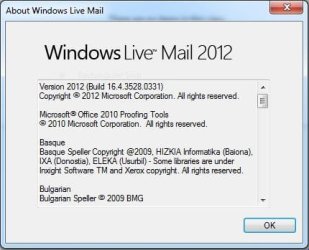
Can you just click on About in that drop down list and see what is there please - it should look like mine.
I am just curious as to what was put on your machine:huh:
Attachments
WLM 3.PNG
11.9 KB
· Views: 18
My Computer
Computer type
PC/Desktop
Computer Manufacturer/Model Number
Own build (new) Desk1 / Asus ROG Win 7 / Desk2 1st build
OS
Desk1 7 Home Prem / Desk2 10 Pro / Main lap Asus ROG 10 Pro 2 laptop Toshiba 7 Pro Asus P2520 7 & 10
One other Desktop (tester) and spare Toshba laptop both with SSD's
Running Kaspersky 2016 ISS on all machines config'd identically
Logitec audio stereo systems on each machine (x3)
Canon MG5250MFC
Router/modem TP-Link running WPA2SK
Now that is very odd because the screen I saw before was quite a bit different for your Send screen and mine - as you say they are now the same
Now what I don't get is why Telstar wanted to install WLM for you as it not a complicated procedure as I said one only needs that Microsoft account (unless I have it terribly wrong) to sign into the email feature.
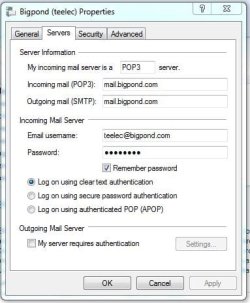
Now I think we had better check the in and out settings see this and let me know what is in that Server tab for outgoing mail it should be the same as your incoming but don't do anything yet until we se what is there Check or change email settings: Windows Live Mail 2011 don't worry re the version yet lets us just find the cause of the problem.
My Computer
Computer type
PC/Desktop
Computer Manufacturer/Model Number
Own build (new) Desk1 / Asus ROG Win 7 / Desk2 1st build
OS
Desk1 7 Home Prem / Desk2 10 Pro / Main lap Asus ROG 10 Pro 2 laptop Toshiba 7 Pro Asus P2520 7 & 10
One other Desktop (tester) and spare Toshba laptop both with SSD's
Running Kaspersky 2016 ISS on all machines config'd identically
Logitec audio stereo systems on each machine (x3)
Canon MG5250MFC
Router/modem TP-Link running WPA2SK
Yes mate that is the screen I have too in my bigpond account my mail being a Hotmail and a Gmail back up for recovering the Microsoft account password - otherwise I never use it so Google isn't always the money hungry giant it is and has it's purposes eh?.
I am assuming it is fixed ?? If it is then so that you know this ahs happened to me on many occasions with the bigpond account in WLM
My Computer
Computer type
PC/Desktop
Computer Manufacturer/Model Number
Own build (new) Desk1 / Asus ROG Win 7 / Desk2 1st build
OS
Desk1 7 Home Prem / Desk2 10 Pro / Main lap Asus ROG 10 Pro 2 laptop Toshiba 7 Pro Asus P2520 7 & 10
One other Desktop (tester) and spare Toshba laptop both with SSD's
Running Kaspersky 2016 ISS on all machines config'd identically
Logitec audio stereo systems on each machine (x3)
Canon MG5250MFC
Router/modem TP-Link running WPA2SK
One other Desktop (tester) and spare Toshba laptop both with SSD's
Running Kaspersky 2016 ISS on all machines config'd identically
Logitec audio stereo systems on each machine (x3)
Canon MG5250MFC
Router/modem TP-Link running WPA2SK