Solved Can't set any resolution betwen 1600x900 and 1024x768 on my laptop

jrodola

New member
Local time
10:52 PM
Messages
8
Hi,
I have a HP EliteBook 8470p laptop (14", core i5-3320M [email protected] GHz, 4Gb of RAM, 64-bit system) with Windows 7 Enterprise Sevice Pack 1.
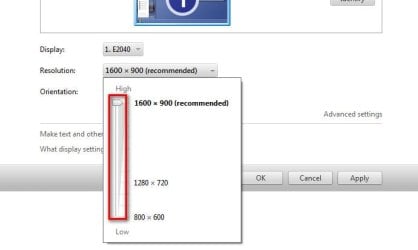
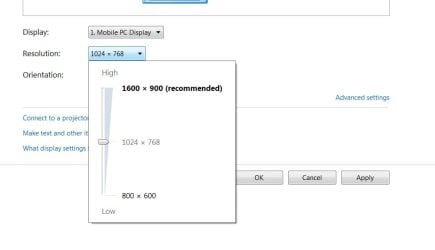
I can only select three resolutions.
1600x900 (too small for me)
1024x760 (too big for me)
800x600
In advance options > List all Modes, I cannot select nothing between 1024x760 and 1600x900 :(
I have tried to update the driver, but windows says I have the most updated one --> Driver is Intel(R) HD Graphics 4000.
My monitor driver is "Generic PnP Monitor" and Windows says I have the most updated driver.
And my Display is named "Mobile PC Display".
With windows vista, I was able to select resolutions between 1024x760 and 1600x900.
I have tried to look the solution by editing monitor.inf from C:\Windows\inf\ folder, but I am not sure how to edit.
Could you please help me?
Thanks!
Regards,
Javier
 
Last edited:

My Computer My Computer

At a glance

Windows 7 Enterprise 64-bitcore i5-3320M4 Gb RAM
Computer type
Laptop
Computer Manufacturer/Model Number
HP EliteBook 8470p
OS
Windows 7 Enterprise 64-bit
CPU
core i5-3320M
Memory
4 Gb RAM
Monitor(s) Displays
Intel(R) HD Graphics 4000 (14'')
Screen Resolution
1600x900

My Computer My Computer

At a glance

Microsoft Windows 10 Pro Insider Preview 64-bitIntel(R) Core(TM) i3-4130 CPU @ 3.40GHzCorsair Vengence 4GB x2 (8.00GB Dual-Channel ...2047MB GeForce GTS 450 (ZOTAC International)
Computer type
PC/Desktop
Computer Manufacturer/Model Number
Self Assembled
OS
Microsoft Windows 10 Pro Insider Preview 64-bit
CPU
Intel(R) Core(TM) i3-4130 CPU @ 3.40GHz
Motherboard
Gigabyte Technology Co., Ltd. B85M-D3H
Memory
Corsair Vengence 4GB x2 (8.00GB Dual-Channel DDR3 @ 798MHz)
Graphics Card(s)
2047MB GeForce GTS 450 (ZOTAC International)
Sound Card
Onboard (Realtek High Definition Audio)
Monitor(s) Displays
LG Flatron E2040T
Screen Resolution
1600x900
Hard Drives
Western Digital 1 TB
Seagate 500 GB
PSU
Corsair VS550
Case
Cooler Master K380
Cooling
Cooler Master Seidon 120V Plus
Keyboard
Logitech MK260r
Mouse
Logitech MK260r
Internet Speed
PMPL Broadband
Antivirus
Windows Defender + MBAM
Browser
Firefox
Other Info
Dell Studio 15" Laptop

Attachments

  • Untitled.jpg
    Untitled.jpg
    22.5 KB · Views: 7

My Computer My Computer

At a glance

Windows 7 Enterprise 64-bitcore i5-3320M4 Gb RAM
Computer type
Laptop
Computer Manufacturer/Model Number
HP EliteBook 8470p
OS
Windows 7 Enterprise 64-bit
CPU
core i5-3320M
Memory
4 Gb RAM
Monitor(s) Displays
Intel(R) HD Graphics 4000 (14'')
Screen Resolution
1600x900

My Computer My Computer

At a glance

Win 7 Ultimate x64FX-8350 @ 4.6 GHz so farADATA XPG V1 Series Black 8GB DDR3 1600Sapphire R9 270x Dual-X
Computer type
PC/Desktop
Computer Manufacturer/Model Number
Me
OS
Win 7 Ultimate x64
CPU
FX-8350 @ 4.6 GHz so far
Motherboard
Asus M5A97 EVO
Memory
ADATA XPG V1 Series Black 8GB DDR3 1600
Graphics Card(s)
Sapphire R9 270x Dual-X
Sound Card
Xonar DGX w/ Corsair Vengence 1300
Monitor(s) Displays
Acer S232HL Abid
Screen Resolution
1920x1080
Hard Drives
120 GB OCZ Vertex 3
500 GB Seagate 7200.12
PSU
Antec Earthwatts 650W Green
Case
Antec Three Hundred
Cooling
Cooler Master 212 EVO
Keyboard
Logitech G510
Mouse
Logitech G500s
Internet Speed
35000/3000
Have you tried leaving it at the recommended resolution (which is also the default resolution for that display), and bumping up the DPI settings?

http://www.sevenforums.com/tutorials/443-dpi-display-size-settings-change.html

Yes, I put it to 150% but still some things appear very small, like menus, etc...

I have just installed latest intel HD graphics and more resolutions appeared between 1600x900 and 1024x768, but they are not correct for my screen size :(

Thanks!
 

My Computer My Computer

At a glance

Windows 7 Enterprise 64-bitcore i5-3320M4 Gb RAM
Computer type
Laptop
Computer Manufacturer/Model Number
HP EliteBook 8470p
OS
Windows 7 Enterprise 64-bit
CPU
core i5-3320M
Memory
4 Gb RAM
Monitor(s) Displays
Intel(R) HD Graphics 4000 (14'')
Screen Resolution
1600x900
Now it looks better

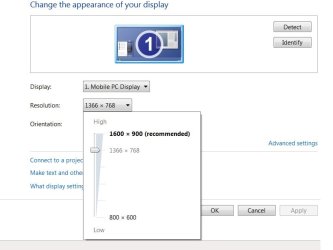
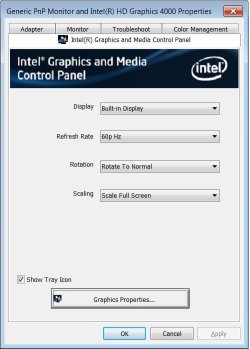
I was able to scale to fit full screen and I think things look much better with 1366x768 (although windows keeps saying I should use 1200x900)
Thanks!
 

Attachments

  • Untitled.jpg
    Untitled.jpg
    30.1 KB · Views: 7
  • Untitled2.jpg
    Untitled2.jpg
    37.3 KB · Views: 24

My Computer My Computer

At a glance

Windows 7 Enterprise 64-bitcore i5-3320M4 Gb RAM
Computer type
Laptop
Computer Manufacturer/Model Number
HP EliteBook 8470p
OS
Windows 7 Enterprise 64-bit
CPU
core i5-3320M
Memory
4 Gb RAM
Monitor(s) Displays
Intel(R) HD Graphics 4000 (14'')
Screen Resolution
1600x900
That's the perfect resolution I think.
It was just a misfit display driver that made the intermediate resolutions hidden.

BTW, In need you can creat custom resolutions too, keeping the aspect ratio intact.
 

My Computer My Computer

At a glance

Microsoft Windows 10 Pro Insider Preview 64-bitIntel(R) Core(TM) i3-4130 CPU @ 3.40GHzCorsair Vengence 4GB x2 (8.00GB Dual-Channel ...2047MB GeForce GTS 450 (ZOTAC International)
Computer type
PC/Desktop
Computer Manufacturer/Model Number
Self Assembled
OS
Microsoft Windows 10 Pro Insider Preview 64-bit
CPU
Intel(R) Core(TM) i3-4130 CPU @ 3.40GHz
Motherboard
Gigabyte Technology Co., Ltd. B85M-D3H
Memory
Corsair Vengence 4GB x2 (8.00GB Dual-Channel DDR3 @ 798MHz)
Graphics Card(s)
2047MB GeForce GTS 450 (ZOTAC International)
Sound Card
Onboard (Realtek High Definition Audio)
Monitor(s) Displays
LG Flatron E2040T
Screen Resolution
1600x900
Hard Drives
Western Digital 1 TB
Seagate 500 GB
PSU
Corsair VS550
Case
Cooler Master K380
Cooling
Cooler Master Seidon 120V Plus
Keyboard
Logitech MK260r
Mouse
Logitech MK260r
Internet Speed
PMPL Broadband
Antivirus
Windows Defender + MBAM
Browser
Firefox
Other Info
Dell Studio 15" Laptop
That's the perfect resolution I think.
It was just a misfit display driver that made the intermediate resolutions hidden.

BTW, In need you can creat custom resolutions too, keeping the aspect ratio intact.

Yes, with 1200x900 things were too much small, and not everything was increased by setting DPI to 150%

Regarding your sentence: "In need you can creat custom resolutions too, keeping the aspect ratio intact" How can I create custom resolutions? By editting monitor.inf file?Thanks again!
 

My Computer My Computer

At a glance

Windows 7 Enterprise 64-bitcore i5-3320M4 Gb RAM
Computer type
Laptop
Computer Manufacturer/Model Number
HP EliteBook 8470p
OS
Windows 7 Enterprise 64-bit
CPU
core i5-3320M
Memory
4 Gb RAM
Monitor(s) Displays
Intel(R) HD Graphics 4000 (14'')
Screen Resolution
1600x900
I have same problem

"I have just installed latest intel HD graphics"
Where did you get the update...?
I have an HP Probook 6470b and same problem..cannot select between 1600x900 and 1024x768..
 

My Computer My Computer

At a glance

Windows 7 64 bit
Computer type
Laptop
Computer Manufacturer/Model Number
HP
OS
Windows 7 64 bit
Antivirus
United States
Update the Intel HD Graphics Driver, either from our forum link, http://www.sevenforums.com/graphic-...-graphics-driver-windows-7-a.html#post2166304, or You may get it from Intel Download Center.
Moreover, you may run the Intel (R) Driver Update Utility to auto detect the appropriate driver for your computer.

Edit: Sorry I forgot to answer jrodola .... to create custom resolution, you may follow http://www.sevenforums.com/tutorials/33641-screen-refresh-rate-custom-nvidia-brand.html ... just dont select Timing after step 3 and put your custom values there.
 

My Computer My Computer

At a glance

Microsoft Windows 10 Pro Insider Preview 64-bitIntel(R) Core(TM) i3-4130 CPU @ 3.40GHzCorsair Vengence 4GB x2 (8.00GB Dual-Channel ...2047MB GeForce GTS 450 (ZOTAC International)
Computer type
PC/Desktop
Computer Manufacturer/Model Number
Self Assembled
OS
Microsoft Windows 10 Pro Insider Preview 64-bit
CPU
Intel(R) Core(TM) i3-4130 CPU @ 3.40GHz
Motherboard
Gigabyte Technology Co., Ltd. B85M-D3H
Memory
Corsair Vengence 4GB x2 (8.00GB Dual-Channel DDR3 @ 798MHz)
Graphics Card(s)
2047MB GeForce GTS 450 (ZOTAC International)
Sound Card
Onboard (Realtek High Definition Audio)
Monitor(s) Displays
LG Flatron E2040T
Screen Resolution
1600x900
Hard Drives
Western Digital 1 TB
Seagate 500 GB
PSU
Corsair VS550
Case
Cooler Master K380
Cooling
Cooler Master Seidon 120V Plus
Keyboard
Logitech MK260r
Mouse
Logitech MK260r
Internet Speed
PMPL Broadband
Antivirus
Windows Defender + MBAM
Browser
Firefox
Other Info
Dell Studio 15" Laptop
Thanks..I did the install of latest Intel Graphics Driver...but the problem persists...can only see and select from three resolutions: 1600x900, 1024x768, and 800x600.
Any idea if I can get something above 1024x768, but below 1600x900 ?
Thanks
 

My Computer My Computer

At a glance

Windows 7 64 bit
Computer type
Laptop
Computer Manufacturer/Model Number
HP
OS
Windows 7 64 bit
Antivirus
United States

My Computer My Computer

At a glance

Windows 7 Enterprise 64-bitcore i5-3320M4 Gb RAM
Computer type
Laptop
Computer Manufacturer/Model Number
HP EliteBook 8470p
OS
Windows 7 Enterprise 64-bit
CPU
core i5-3320M
Memory
4 Gb RAM
Monitor(s) Displays
Intel(R) HD Graphics 4000 (14'')
Screen Resolution
1600x900
I was able to scale to fit full screen and I think things look much better with 1366x768 (although windows keeps saying I should use 1200x900)
Thanks!

Hi jrodola, I have the same issue with my laptop. How did you manage to change the resolution size to 1366 x 768? Thank you :-)
 

My Computer My Computer

At a glance

Windows 7 Enterprise 64 BitIntel (R) Core (TM) i5-3437U CPU @ 1.90Ghz 2....8.GBIntel (R) HD Graphics 4000
Computer type
Laptop
Computer Manufacturer/Model Number
HP EliteBook 9470m
OS
Windows 7 Enterprise 64 Bit
CPU
Intel (R) Core (TM) i5-3437U CPU @ 1.90Ghz 2.40 Ghz
Memory
8.GB
Graphics Card(s)
Intel (R) HD Graphics 4000
I am having the same problem on a Dell Optiplex 780 Desktop which Windows 7 is native to. But for me, no option above 1024x768 even shows up. 1024x768 is as high as it will Go. I tried going to the dell website and downloading the IntelHD drivers it listed after it ran a System Check but it made no difference. My monitor can go up to 1600x900. The Intel Driver update utility still won't bump it up any higher. All the advice offered in the thread didn't work for me, unfortunately. What else can I try?
 

My Computer My Computer

At a glance

Windows 7 Ultimate 64-bit SP1Intel Core 2 Duo E8400 @ 3.00GHz8.00GB Single-Channel DDR3 @ 531MHz (7-7-7-20)Intel Q45/Q43 Express Chipset (Dell)
Computer type
PC/Desktop
Computer Manufacturer/Model Number
Dell Optiplex 780
OS
Windows 7 Ultimate 64-bit SP1
CPU
Intel Core 2 Duo E8400 @ 3.00GHz
Motherboard
Dell Inc. 03NVJ6 (CPU)
Memory
8.00GB Single-Channel DDR3 @ 531MHz (7-7-7-20)
Graphics Card(s)
Intel Q45/Q43 Express Chipset (Dell)
Sound Card
SoundMAX Integrated Digital High Definition Audio
Monitor(s) Displays
Viore
Screen Resolution
1920x1080
Hard Drives
149GB Seagate ST3160318AS (SATA)
Keyboard
Dell
Mouse
Dell
Internet Speed
up to 7 Mbps (average 3.2 Mbps)
Antivirus
AVG IS
Browser
Firefox, Chrome
Back
Top