Can't set my native resolution back to 1920x1080

Matt2488

New member
Local time
6:53 PM
Messages
79
Location
Kentucky
Upgraded to Windows 7, also switched out my DVI to VGA adapter because my other one was about gone, I get everything up to date yet I can't set my resolution to 1920x1080 with out my refresh rate going below 30mhz...

I've got two HIS ATI Radeon HD 5770 cards in crossfire, Windows 7 Pro, Gigabyte GA-MA785GT-UD3H AM3 soc, AMD Phenom X4 925 at 3.0ghz, 4GB DDR3 RAM, and my monitor is a Samsung SyncMaster Ex2200, 21.5 inches. So it supports this resolution.

I'm not sure what it is, there are so many things I might have to test... Is it possible that my DVI to VGA adapter doesn't support such high data and high resolution? I'm using a Atvia adapter, and Ativa isn't exactly top notch I don't think and before I was using a HIS DVI to VGA adapter...

I also switched my video cards around, I thought maybe my video card was damaged... Still the same thing though... I hoping my PCI-Expansion bay isn't damage though.. I haven't connected my monitor to the 2nd bay to see if it works that way yet...

I also installed my Monitor drivers and it still says Display Device on VGA, instead of saying Samsung.

Help please.

EDIT : I've also tried TWO different VGA connectors.
 

My Computer My Computer

Computer Manufacturer/Model Number
Custom
OS
Windows 7 Professional 64 bit
CPU
AMD Phenom X4 925 @ 2.8ghz
Motherboard
Gigabyte GA-MA785GT-UD3H AM3
Memory
4GB DDR3 1600mhz A-DATA gaming series
Graphics Card(s)
Dual HIS Radeon HD 5770
Sound Card
Asus Xonar D1
Monitor(s) Displays
Samsung Syncmaster EX2220
Screen Resolution
1920x1080
Hard Drives
Dual Hitatchi 500GB Sata
PSU
Thermaltake Toughpower Grand 1200w A+ certified Gold.
Case
Thermaltake V3 Black
Cooling
Watercooler with Radiator on CPU, with 4 120mm case fans.
Keyboard
Thermaltake Challenger Pro
Mouse
Death Adder
Internet Speed
10mbps/1mbps
Bump?
 

My Computer My Computer

Computer Manufacturer/Model Number
Custom
OS
Windows 7 Professional 64 bit
CPU
AMD Phenom X4 925 @ 2.8ghz
Motherboard
Gigabyte GA-MA785GT-UD3H AM3
Memory
4GB DDR3 1600mhz A-DATA gaming series
Graphics Card(s)
Dual HIS Radeon HD 5770
Sound Card
Asus Xonar D1
Monitor(s) Displays
Samsung Syncmaster EX2220
Screen Resolution
1920x1080
Hard Drives
Dual Hitatchi 500GB Sata
PSU
Thermaltake Toughpower Grand 1200w A+ certified Gold.
Case
Thermaltake V3 Black
Cooling
Watercooler with Radiator on CPU, with 4 120mm case fans.
Keyboard
Thermaltake Challenger Pro
Mouse
Death Adder
Internet Speed
10mbps/1mbps
The best would be to go with a DVI connection on both ends. Then you would be getting a digital signal for sure.

Since no one else has jumped in to help I'll see what I can do.
Nvidia user here so bare with me.

You should have or need to install the ATI Catalyst Control Panel. I beleive it is abbreviated ATI CCC.
You may have it already.

Right click an open area of the desktop. In the list should be ATI Control Panel or similar ATI listing. If there is left click to open.
The resolution settings will be in there somewhere just not sure where or which tab will show.

I'll see if I can find more info to post while you check.
Mike

Here is where to find the latest driver and Control Panel software. Enter the card type etc. or click the auto detect buttons.
http://support.amd.com/us/gpudownload/Pages/index.aspx

This may help. About how to set resolution. ATI website.
http://support.amd.com/us/kbarticles/Pages/GPU-10-SupportedResolutionsUnavailableforMonitor.aspx
 

My Computer My Computer

Computer Manufacturer/Model Number
Hopalong/ Godzilla
OS
Windows7 Pro 64bit SP-1; Windows XP Pro 32bit
CPU
Intel Core i7-870 Lynnfield 2.93GHz LGA 1156 95W Quad-Core
Motherboard
ASUS P7P55D-E PRO
Memory
8GB@1400MHz Crucial Ballistix DDR3-1600 4x2GB
Graphics Card(s)
ASUS ENGTX460 DirectCU/2DI/1GD5 1GB 256-bit GDDR5
Sound Card
VIA Onboard
Monitor(s) Displays
Asus VS248H-P 24"; Samsung SyncMaster 941BW 19"ws
Screen Resolution
1920x1080; 1440x900
Hard Drives
Samsung 830 120GB SSD
Intel 320 120GB SSD
Western Digital Caviar Black WD7501AALS 750GB 7200 RPM SATA 3.0Gb/s
Western Digital Caviar Black WD6401AALS 640GB 7200 RPM SATA 3.0Gb/s
PSU
COOLER MASTER Silent Pro RS850-AMBAJ3-US 850W Modular
Case
COOLER MASTER HAF 932 RC-932-KKN5-GP Black
Cooling
Scythe "Mugen-2 Rev.B" (2 ScytheKaze-Jyuni PWM fans)
Keyboard
Logitech K-320
Mouse
Kensington
Antivirus
Avast Inernet Suite
Browser
IE 9 ; Chrome
The best would be to go with a DVI connection on both ends. Then you would be getting a digital signal for sure.

Since no one else has jumped in to help I'll see what I can do.
Nvidia user here so bare with me.

You should have or need to install the ATI Catalyst Control Panel. I beleive it is abbreviated ATI CCC.
You may have it already.

Right click an open area of the desktop. In the list should be ATI Control Panel or similar ATI listing. If there is left click to open.
The resolution settings will be in there somewhere just not sure where or which tab will show.

I'll see if I can find more info to post while you check.
Mike

Here is where to find the latest driver and Control Panel software. Enter the card type etc. or click the auto detect buttons.
AMD Graphics Drivers & Software

This may help. About how to set resolution. ATI website.
GPU10UnableToSelectSupportedResolution

Hi, yeah I did that already - I had to go into my Catalyst control and force the resolution. But that still isn't solving my monitor issue, since I did a clean install of Windows 7, I can't get W7 to detect my Samsung Monitor in the control panel display. If I don't force the resolution via my CCC and use let windows change my resolution back, my refresh rate cannot be raised above 30mhz.

Also in my ATI CCC, in my VGA settings it says my Monitor isn't supported, when it use to have all the information on it listed (Before I upgraded and before I swapped DVI adapters.) and I didn't need force my resolution.

Two things have changed since I installed Windows 7, My OS obviously I upgraded from Vista and had to replace my DVI to VGA adapter becuase my other one was broke, the male VGA part on the adapter literally came completely out and I couldn't get it to work again. However I'm using a Ativa DVI to VGA adapter, I'm not sure how good those are but I am going to be using another adapter later on today that someone is letting me borrow.

I've got all the right and latest drivers.
 

My Computer My Computer

Computer Manufacturer/Model Number
Custom
OS
Windows 7 Professional 64 bit
CPU
AMD Phenom X4 925 @ 2.8ghz
Motherboard
Gigabyte GA-MA785GT-UD3H AM3
Memory
4GB DDR3 1600mhz A-DATA gaming series
Graphics Card(s)
Dual HIS Radeon HD 5770
Sound Card
Asus Xonar D1
Monitor(s) Displays
Samsung Syncmaster EX2220
Screen Resolution
1920x1080
Hard Drives
Dual Hitatchi 500GB Sata
PSU
Thermaltake Toughpower Grand 1200w A+ certified Gold.
Case
Thermaltake V3 Black
Cooling
Watercooler with Radiator on CPU, with 4 120mm case fans.
Keyboard
Thermaltake Challenger Pro
Mouse
Death Adder
Internet Speed
10mbps/1mbps
Use driver sweeper to remove older versions of CCC from the previous installation
Phyxion.net - Driver Sweeper

Then reinstall the driver again, older driver files are know to cause conflicts with new drivers
 

My Computer My Computer

Computer type
PC/Desktop
Computer Manufacturer/Model Number
Custom Build
OS
Windows 10 Pro x64, Arch Linux
CPU
Intel Core 2 Quad Q8200 OC'd 3.08GHz
Motherboard
Asus Rampage formula LGA775
Memory
8GB DDR2 900Mhz
Graphics Card(s)
MSI GT730 2GB GDDR5 (Kepler)
Sound Card
Supreme FX2
Monitor(s) Displays
Samsung LS22F350 LED
Screen Resolution
1080P
Hard Drives
Kingston SSDNow UV400 120GB, 500GB Hitachi, 2TB Samsung, 500GB Seagate FreeAgent, 640GB Samsung, 160GB Toshiba (Arch)
PSU
AeroCool 500W Bronze
Cooling
Cooler Master V6 + 3X fans
Keyboard
Prolink keyboard
Mouse
Logitech M705
Internet Speed
1MiB/s
Browser
Chrome Beta
Try what Yowanvista posted.

Well like I stated I'm not a wiz on ATI. You learn what you use.

I did post for more help so maybe one of the people with ATI experience will show up soon.
Check back and let me know if the other adapter works.

Did you try a different cable? If the third adapter doesn't work that might be a consideration.

Good luck.
Mike


Yowan

Nice of you to stop by.
 

My Computer My Computer

Computer Manufacturer/Model Number
Hopalong/ Godzilla
OS
Windows7 Pro 64bit SP-1; Windows XP Pro 32bit
CPU
Intel Core i7-870 Lynnfield 2.93GHz LGA 1156 95W Quad-Core
Motherboard
ASUS P7P55D-E PRO
Memory
8GB@1400MHz Crucial Ballistix DDR3-1600 4x2GB
Graphics Card(s)
ASUS ENGTX460 DirectCU/2DI/1GD5 1GB 256-bit GDDR5
Sound Card
VIA Onboard
Monitor(s) Displays
Asus VS248H-P 24"; Samsung SyncMaster 941BW 19"ws
Screen Resolution
1920x1080; 1440x900
Hard Drives
Samsung 830 120GB SSD
Intel 320 120GB SSD
Western Digital Caviar Black WD7501AALS 750GB 7200 RPM SATA 3.0Gb/s
Western Digital Caviar Black WD6401AALS 640GB 7200 RPM SATA 3.0Gb/s
PSU
COOLER MASTER Silent Pro RS850-AMBAJ3-US 850W Modular
Case
COOLER MASTER HAF 932 RC-932-KKN5-GP Black
Cooling
Scythe "Mugen-2 Rev.B" (2 ScytheKaze-Jyuni PWM fans)
Keyboard
Logitech K-320
Mouse
Kensington
Antivirus
Avast Inernet Suite
Browser
IE 9 ; Chrome
Use driver sweeper to remove older versions of CCC from the previous installation
Phyxion.net - Driver Sweeper

Then reinstall the driver again, older driver files are know to cause conflicts with new drivers

Hey, I did a fresh install and installed the latest ATI/AMD driver.


Try what Yowanvista posted.

Well like I stated I'm not a wiz on ATI. You learn what you use.

I did post for more help so maybe one of the people with ATI experience will show up soon.
Check back and let me know if the other adapter works.

Did you try a different cable? If the third adapter doesn't work that might be a consideration.

Good luck.
Mike


Yowan

Nice of you to stop by.

Tried two cables. Right now I'm using a brand spanking new Belkin cable, and I tried this other cable I've had stored away for awhile last time I used it, it worked, I swapped them out last night to see if it WAS indeed my cable but it wasn't. Same thing.

It's got to be this DVI adapter, or my monitor driver... Which there is ONLY ONE that I can find and it supports all forms of Vista and Windows 7.
 

My Computer My Computer

Computer Manufacturer/Model Number
Custom
OS
Windows 7 Professional 64 bit
CPU
AMD Phenom X4 925 @ 2.8ghz
Motherboard
Gigabyte GA-MA785GT-UD3H AM3
Memory
4GB DDR3 1600mhz A-DATA gaming series
Graphics Card(s)
Dual HIS Radeon HD 5770
Sound Card
Asus Xonar D1
Monitor(s) Displays
Samsung Syncmaster EX2220
Screen Resolution
1920x1080
Hard Drives
Dual Hitatchi 500GB Sata
PSU
Thermaltake Toughpower Grand 1200w A+ certified Gold.
Case
Thermaltake V3 Black
Cooling
Watercooler with Radiator on CPU, with 4 120mm case fans.
Keyboard
Thermaltake Challenger Pro
Mouse
Death Adder
Internet Speed
10mbps/1mbps
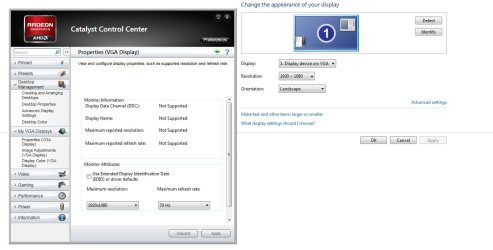
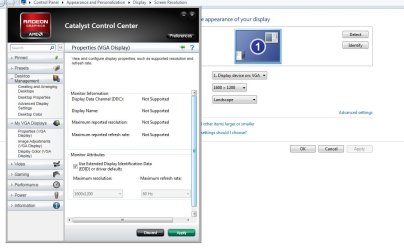
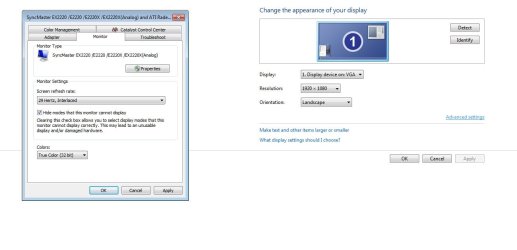
Here's some pics to help explain my situation.

This is what it looks like now, with forced resolution. Notice my monitor info says NOT supported.

The second picture shows me restoring my display to driver defaults, which should be at 1920x1080 but instead it's 1600x1200.

The last one is me turning off my forced display settings in my CCC panel, and restoring defaults I am changing my settings in Windows Control Panel, and as you can see if I set the reso at 1920x1080 my refresh rate goes WAY down. I can't raise it higher than 30.
 

Attachments

  • AMD first.jpg
    AMD first.jpg
    74.4 KB · Views: 838
  • AMD second.jpg
    AMD second.jpg
    75.5 KB · Views: 578
  • AMD three.jpg
    AMD three.jpg
    53.4 KB · Views: 477

My Computer My Computer

Computer Manufacturer/Model Number
Custom
OS
Windows 7 Professional 64 bit
CPU
AMD Phenom X4 925 @ 2.8ghz
Motherboard
Gigabyte GA-MA785GT-UD3H AM3
Memory
4GB DDR3 1600mhz A-DATA gaming series
Graphics Card(s)
Dual HIS Radeon HD 5770
Sound Card
Asus Xonar D1
Monitor(s) Displays
Samsung Syncmaster EX2220
Screen Resolution
1920x1080
Hard Drives
Dual Hitatchi 500GB Sata
PSU
Thermaltake Toughpower Grand 1200w A+ certified Gold.
Case
Thermaltake V3 Black
Cooling
Watercooler with Radiator on CPU, with 4 120mm case fans.
Keyboard
Thermaltake Challenger Pro
Mouse
Death Adder
Internet Speed
10mbps/1mbps
I think you need to switch to a DVI cable so you can use the digital signal.
That will give you resolution capabilities up to 2400 though you only need 1900.

VGA max's out about 1600-1900 resolution.

At least that is what I have run into on Nvidia video cards.
Mike
 

My Computer My Computer

Computer Manufacturer/Model Number
Hopalong/ Godzilla
OS
Windows7 Pro 64bit SP-1; Windows XP Pro 32bit
CPU
Intel Core i7-870 Lynnfield 2.93GHz LGA 1156 95W Quad-Core
Motherboard
ASUS P7P55D-E PRO
Memory
8GB@1400MHz Crucial Ballistix DDR3-1600 4x2GB
Graphics Card(s)
ASUS ENGTX460 DirectCU/2DI/1GD5 1GB 256-bit GDDR5
Sound Card
VIA Onboard
Monitor(s) Displays
Asus VS248H-P 24"; Samsung SyncMaster 941BW 19"ws
Screen Resolution
1920x1080; 1440x900
Hard Drives
Samsung 830 120GB SSD
Intel 320 120GB SSD
Western Digital Caviar Black WD7501AALS 750GB 7200 RPM SATA 3.0Gb/s
Western Digital Caviar Black WD6401AALS 640GB 7200 RPM SATA 3.0Gb/s
PSU
COOLER MASTER Silent Pro RS850-AMBAJ3-US 850W Modular
Case
COOLER MASTER HAF 932 RC-932-KKN5-GP Black
Cooling
Scythe "Mugen-2 Rev.B" (2 ScytheKaze-Jyuni PWM fans)
Keyboard
Logitech K-320
Mouse
Kensington
Antivirus
Avast Inernet Suite
Browser
IE 9 ; Chrome
I think you need to switch to a DVI cable so you can use the digital signal.
That will give you resolution capabilities up to 2400 though you only need 1900.

VGA max's out about 1600-1900 resolution.

At least that is what I have run into on Nvidia video cards.
Mike

I might have too, but the thing is it worked before. I'm going to try another DVI VGA adapter before I try that. I don't think this Ativa DVI VGA adapter supports high data.
 

My Computer My Computer

Computer Manufacturer/Model Number
Custom
OS
Windows 7 Professional 64 bit
CPU
AMD Phenom X4 925 @ 2.8ghz
Motherboard
Gigabyte GA-MA785GT-UD3H AM3
Memory
4GB DDR3 1600mhz A-DATA gaming series
Graphics Card(s)
Dual HIS Radeon HD 5770
Sound Card
Asus Xonar D1
Monitor(s) Displays
Samsung Syncmaster EX2220
Screen Resolution
1920x1080
Hard Drives
Dual Hitatchi 500GB Sata
PSU
Thermaltake Toughpower Grand 1200w A+ certified Gold.
Case
Thermaltake V3 Black
Cooling
Watercooler with Radiator on CPU, with 4 120mm case fans.
Keyboard
Thermaltake Challenger Pro
Mouse
Death Adder
Internet Speed
10mbps/1mbps
Worth trying a different adapter since you will have one.

Let us know.
Mike
 

My Computer My Computer

Computer Manufacturer/Model Number
Hopalong/ Godzilla
OS
Windows7 Pro 64bit SP-1; Windows XP Pro 32bit
CPU
Intel Core i7-870 Lynnfield 2.93GHz LGA 1156 95W Quad-Core
Motherboard
ASUS P7P55D-E PRO
Memory
8GB@1400MHz Crucial Ballistix DDR3-1600 4x2GB
Graphics Card(s)
ASUS ENGTX460 DirectCU/2DI/1GD5 1GB 256-bit GDDR5
Sound Card
VIA Onboard
Monitor(s) Displays
Asus VS248H-P 24"; Samsung SyncMaster 941BW 19"ws
Screen Resolution
1920x1080; 1440x900
Hard Drives
Samsung 830 120GB SSD
Intel 320 120GB SSD
Western Digital Caviar Black WD7501AALS 750GB 7200 RPM SATA 3.0Gb/s
Western Digital Caviar Black WD6401AALS 640GB 7200 RPM SATA 3.0Gb/s
PSU
COOLER MASTER Silent Pro RS850-AMBAJ3-US 850W Modular
Case
COOLER MASTER HAF 932 RC-932-KKN5-GP Black
Cooling
Scythe "Mugen-2 Rev.B" (2 ScytheKaze-Jyuni PWM fans)
Keyboard
Logitech K-320
Mouse
Kensington
Antivirus
Avast Inernet Suite
Browser
IE 9 ; Chrome

My Computer My Computer

Computer type
PC/Desktop
Computer Manufacturer/Model Number
Me
OS
Win 7 Ultimate x64
CPU
FX-8350 @ 4.6 GHz so far
Motherboard
Asus M5A97 EVO
Memory
ADATA XPG V1 Series Black 8GB DDR3 1600
Graphics Card(s)
Sapphire R9 270x Dual-X
Sound Card
Xonar DGX w/ Corsair Vengence 1300
Monitor(s) Displays
Acer S232HL Abid
Screen Resolution
1920x1080
Hard Drives
120 GB OCZ Vertex 3
500 GB Seagate 7200.12
PSU
Antec Earthwatts 650W Green
Case
Antec Three Hundred
Cooling
Cooler Master 212 EVO
Keyboard
Logitech G510
Mouse
Logitech G500s
Internet Speed
35000/3000
Why are you using an VGA adapter when the monitor has a DVI port?

Newegg.com - SAMSUNG EX2220X Glossy Black 21.5" 5ms LED Backlight LCD Monitor 250 cd/m2 DC 1,000,000:1(1000:1)

Also if you haven't yet it might help to install the driver for it,

Samsung

I have the driver, a friend of mine is coming over soon with a good EVGA DVI to VGA adapter which came with his video card. If it doesn't work then I will buy a DVI cable, that SHOULD work, if not I guess it could be my monitor hopefully it's not, I haven't had for even a year yet.

I have been having problems like crazy ever since I upgraded to Windows 7. Now I'm having problems with my ATI driver, I crash to a black screen on almost every single game I run. The only drivers that don't crash is the 10.8 or lower. Discuss that at a later date, right now I'm trying to get my monitor issue resolved.
 

My Computer My Computer

Computer Manufacturer/Model Number
Custom
OS
Windows 7 Professional 64 bit
CPU
AMD Phenom X4 925 @ 2.8ghz
Motherboard
Gigabyte GA-MA785GT-UD3H AM3
Memory
4GB DDR3 1600mhz A-DATA gaming series
Graphics Card(s)
Dual HIS Radeon HD 5770
Sound Card
Asus Xonar D1
Monitor(s) Displays
Samsung Syncmaster EX2220
Screen Resolution
1920x1080
Hard Drives
Dual Hitatchi 500GB Sata
PSU
Thermaltake Toughpower Grand 1200w A+ certified Gold.
Case
Thermaltake V3 Black
Cooling
Watercooler with Radiator on CPU, with 4 120mm case fans.
Keyboard
Thermaltake Challenger Pro
Mouse
Death Adder
Internet Speed
10mbps/1mbps
Sorry for the late response, tried the VGA adapter and it didn't work.

In the local stores here DVI cables are overpriced like 50 bucks, and I wasn't about to spend 50 bucks, so I ordered some off Amazon that were 20, but half off and connected everything and now I'm good.

I guess my VGA port on my monitor is bad, because I never had problems detecting my monitor and getting max resolution before with a DVI to VGA adapter, and I tried 2 cables and 2 adapters.

I appreciate the feed back though, it was my stupid cables all along.
 

My Computer My Computer

Computer Manufacturer/Model Number
Custom
OS
Windows 7 Professional 64 bit
CPU
AMD Phenom X4 925 @ 2.8ghz
Motherboard
Gigabyte GA-MA785GT-UD3H AM3
Memory
4GB DDR3 1600mhz A-DATA gaming series
Graphics Card(s)
Dual HIS Radeon HD 5770
Sound Card
Asus Xonar D1
Monitor(s) Displays
Samsung Syncmaster EX2220
Screen Resolution
1920x1080
Hard Drives
Dual Hitatchi 500GB Sata
PSU
Thermaltake Toughpower Grand 1200w A+ certified Gold.
Case
Thermaltake V3 Black
Cooling
Watercooler with Radiator on CPU, with 4 120mm case fans.
Keyboard
Thermaltake Challenger Pro
Mouse
Death Adder
Internet Speed
10mbps/1mbps
Monitor issue

Matt,
I am having the same exact problem as you, down to the letter!

This has absolutely NOTHING to do with your monitor, your monitor cable / input or anything of that nature. I am almost 100% convinced the issue is ATI and Win7. My OS needed to be reinstalled and I had no problem with my previous installation and native resolution, but with a new installation, it just simply will not work. I have spent HOURS on the phone with Alienware tech support and scratching my head over this. I am actually wondering if it's a windows update that may have caused this, but who the hell knows which one did it.. I am a pretty good IT tech and still have not found a proper solution. I have also tried multiple monitors with no luck. The OS simply WILL NOT go in its native resolution. 1600x1200 is as far as I can get it. I am using a 1900x1200 24' Dell p2405FPW monitor (all drivers for the monitor installed) and I have black bars on each side of the screen using a standard VGA cable. There are no DVI ports on the laptop (strange since it's a brand new model), but the cable truly has nothing to do with it as my previous installation of win 7 x64 had NO issues. I am 100% positive of this.

In the CCC, I have disabled EDID and switched to many different resolutions with the same stupid black bars on the side of the screen squishing my landscape view to portrait. Dell has no answer to this..and I have updated to the latest drivers and also scaled back drivers to no luck. I have went in safe mode and removed everything and a driver sweeper with no results. This is driving me CRAZY! If anyone has an idea of what is causing this, please share.. I guess it's a good thing that other people are having this issue so I'm not alone, but also it sucks that we even have to experience this. Windows XP had no issue with this.

Please please! If anyone knows the fix, I would love to hear it.

Thanks!
 

My Computer My Computer

OS
Win 7 64
Back
Top