Solved can't set screen resolution

dorothyr

New member
Member
Local time
2:55 AM
Messages
47
I just got a new computer with windows 7.
I am using my old monitor, a generic PnP, Nec that worked fine with XP.
I cannot get good resolution. With XP, once set at the highest setting, the icons got smaller and everything was sharper.
That will not happen with W.7. The device manager says it is fine. It doesn't find a better driver. Windows says everything is set optimally. But icons are too big, at 100% and things are slightly out of focus.
 

My Computer

Computer type
PC/Desktop
Computer Manufacturer/Model Number
custom, HP case
OS
windows 7
CPU
Pintium 4 CPU 2,8 GHz
Memory
2.00 GB RAM
Antivirus
none
What is the highest resolution Windows 7 shows in the resolution properties box?
VGA connection I assume?
 

My Computer

Computer type
PC/Desktop
Computer Manufacturer/Model Number
Custom Build MPCBS AMII
OS
Windows 7 Professional x64
CPU
AMD Athlon II x4 3.00 GHz
Motherboard
MSI GF615M-p33
Memory
16GB Kingston DDR3
Graphics Card(s)
Nvidia 8600 (dual DVI out for 2 monitors)
Sound Card
Onboard
Monitor(s) Displays
Acer H233H 23", ASUS 23"
Screen Resolution
1366 x 768
Hard Drives
(2) WD Blue 1 TB 3 partitions, (1) Seagate 7200 500GB with 2 partitions for useless and frequently deleted data Looking forward do an ssd for os soon.
PSU
Corsair 1100Watt
Case
Apevia HAF
Cooling
HAF AMD High Profile Heat sink and fan
Keyboard
wireless Logitech
Mouse
wireless Logitech
Internet Speed
16 mbps
Antivirus
eSet, AVG, Clam and Clamwin (depends on machine)
Browser
Firefox
Other Info
(9) Win 7 machines all x64 (POS Updated to Windows 7 pro YEA), (4) Linux machines x64 and x86 including a v3000 compaq lappy brought back to life with Mint 9 used to scan drives, (1) Linux Machine dual boot XP Pro (for testing and destroying), (1) Win 7 pro x64/Win 8.1 Lenovo Laptop Dual Boot.
1024x768. That is what I used on the old XP computer.
Yes, VGA
 

My Computer

Computer type
PC/Desktop
Computer Manufacturer/Model Number
custom, HP case
OS
windows 7
CPU
Pintium 4 CPU 2,8 GHz
Memory
2.00 GB RAM
Antivirus
none
Ok so I am assuming it tells you that it is set to that resolution?

One thing to try is adjust the resolution to one lower that recommended to see what it looks like. If it Looks fuzzy and large then it sounds like it is loading the video output at 800x600 instead of recommended.

I know you probably already have done this but loosen and reconnect Both ends of the VGA cable and check for bent pins. Windows seven can recognize the monitor by the feedback loop on a vga interface if it is not seeing it then that can cause it to display in base vga mode only.

If possible barrow a monitor and cable to make sure it is not a compatibility issue.

Your NEC is a flat panel correct? I ask because some CRT monitors cannot display at the HRtz that Windows 7 uses even if it Was working on XP.
 

My Computer

Computer type
PC/Desktop
Computer Manufacturer/Model Number
Custom Build MPCBS AMII
OS
Windows 7 Professional x64
CPU
AMD Athlon II x4 3.00 GHz
Motherboard
MSI GF615M-p33
Memory
16GB Kingston DDR3
Graphics Card(s)
Nvidia 8600 (dual DVI out for 2 monitors)
Sound Card
Onboard
Monitor(s) Displays
Acer H233H 23", ASUS 23"
Screen Resolution
1366 x 768
Hard Drives
(2) WD Blue 1 TB 3 partitions, (1) Seagate 7200 500GB with 2 partitions for useless and frequently deleted data Looking forward do an ssd for os soon.
PSU
Corsair 1100Watt
Case
Apevia HAF
Cooling
HAF AMD High Profile Heat sink and fan
Keyboard
wireless Logitech
Mouse
wireless Logitech
Internet Speed
16 mbps
Antivirus
eSet, AVG, Clam and Clamwin (depends on machine)
Browser
Firefox
Other Info
(9) Win 7 machines all x64 (POS Updated to Windows 7 pro YEA), (4) Linux machines x64 and x86 including a v3000 compaq lappy brought back to life with Mint 9 used to scan drives, (1) Linux Machine dual boot XP Pro (for testing and destroying), (1) Win 7 pro x64/Win 8.1 Lenovo Laptop Dual Boot.
But icons are too big, at 100% and things are slightly out of focus.

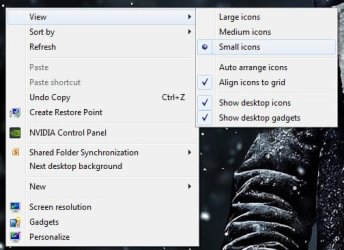
Have you tried right clicking on the desktop and choosing small icons?

Capture.JPG
 

My Computer

Computer type
PC/Desktop
Computer Manufacturer/Model Number
Custom Build
OS
W7 Pro x64 SP1 | W10 Pro IP x64 | W8.1 Pro x64 VM | Linux Mint VM
CPU
i7-4790k @ 4GHz (4.4GHz Boost)
Motherboard
ASUS Sabertooth Z87 (BIOS Rev 2004)
Memory
16GB DDR3 Kingston HyperX Fury @ 1600MHz CL 9-9-9-27
Graphics Card(s)
EVGA GTX 980 Classified
Sound Card
Realtek Onboard
Monitor(s) Displays
Samsung S27D390
Screen Resolution
1920 x 1080
Hard Drives
240GB Intel 520 Series SSD |
Samsung 850 EVO 120GB SSD |
2TB WD Caviar Black |
2TB WD Caviar Green
PSU
Corsair HX850-80 Gold Modular
Case
Cooler Master Silencio 650
Cooling
Corsair H80i w/2 x Corsair SP120 | 2 x 120mm Noctua NF-S12B
Keyboard
Microsoft Sidewinder X4
Mouse
Gigabyte M6900 optical
Internet Speed
152mb
Antivirus
F-Secure
Browser
Firefox 38.0
Other Info
Backup Rig: Win 7 Pro 64-bit | AMD A10-5800k | ASUS F2A85-V Pro | 8GB Samsung DDR3 @1600MHz | 120GB Toshiba SDD | 2TB Seagate HDD | Cooler Master Silencio 550
Yes it is flat panel. Says it is set at 1024x768.
I changed the resolution to 800x600 as you suggested everything got bigger and fuzzier.
I checked the computer end of the cable and it looks fine. One pin might have been very slightly out of line so I bent it into line with the others. The other end has never been moved since I got the monitor. I have a different cable I can try, I guess, in a bit.
 

My Computer

Computer type
PC/Desktop
Computer Manufacturer/Model Number
custom, HP case
OS
windows 7
CPU
Pintium 4 CPU 2,8 GHz
Memory
2.00 GB RAM
Antivirus
none
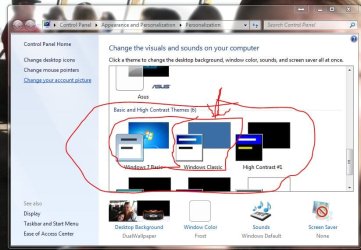
I would suggest trying the other cable first and see, It sounds like the NEC monitor you have is not compatible with windows 7. I have seen this issue a time or two before and it can be tested by selecting a windows basic theme in the customize window. If things clear up then it is the monitor not able to handle the refresh rate or intensity of the aero theme.

if you have or can barrow a laptop or another computer with 7 or 8 on them to try the monitor on then you would be able to determine if it is the PC or monitor. Call around and see if any PC shops will test the monitor for free. Some will, we do. If you were in LHC I would tell you to bring in the monitor and test it on another machine.
 

Attachments

  • Capture.JPG
    Capture.JPG
    68.9 KB · Views: 1
Last edited:

My Computer

Computer type
PC/Desktop
Computer Manufacturer/Model Number
Custom Build MPCBS AMII
OS
Windows 7 Professional x64
CPU
AMD Athlon II x4 3.00 GHz
Motherboard
MSI GF615M-p33
Memory
16GB Kingston DDR3
Graphics Card(s)
Nvidia 8600 (dual DVI out for 2 monitors)
Sound Card
Onboard
Monitor(s) Displays
Acer H233H 23", ASUS 23"
Screen Resolution
1366 x 768
Hard Drives
(2) WD Blue 1 TB 3 partitions, (1) Seagate 7200 500GB with 2 partitions for useless and frequently deleted data Looking forward do an ssd for os soon.
PSU
Corsair 1100Watt
Case
Apevia HAF
Cooling
HAF AMD High Profile Heat sink and fan
Keyboard
wireless Logitech
Mouse
wireless Logitech
Internet Speed
16 mbps
Antivirus
eSet, AVG, Clam and Clamwin (depends on machine)
Browser
Firefox
Other Info
(9) Win 7 machines all x64 (POS Updated to Windows 7 pro YEA), (4) Linux machines x64 and x86 including a v3000 compaq lappy brought back to life with Mint 9 used to scan drives, (1) Linux Machine dual boot XP Pro (for testing and destroying), (1) Win 7 pro x64/Win 8.1 Lenovo Laptop Dual Boot.
It looks the same with the windows backgrounds.
I can take it to the guy that built the computer and see what it does on another machine, but that will probably be the same components.
 

My Computer

Computer type
PC/Desktop
Computer Manufacturer/Model Number
custom, HP case
OS
windows 7
CPU
Pintium 4 CPU 2,8 GHz
Memory
2.00 GB RAM
Antivirus
none
I also got a new WIN 7 driver from NEC but that didn't help
 

My Computer

Computer type
PC/Desktop
Computer Manufacturer/Model Number
custom, HP case
OS
windows 7
CPU
Pintium 4 CPU 2,8 GHz
Memory
2.00 GB RAM
Antivirus
none
NEC tech support said to to try reset and also unplug, shutdown, reboot and replug.
Didn't work.
They said it was probably the graphics card.
 

My Computer

Computer type
PC/Desktop
Computer Manufacturer/Model Number
custom, HP case
OS
windows 7
CPU
Pintium 4 CPU 2,8 GHz
Memory
2.00 GB RAM
Antivirus
none
That's why I would suggest another monitor to test. If it is ok on a different monitor the NEC may just be incompatible. It seems you have tried everything I could offer as I don't know precisely what is in this custom build in an HP case. If a video card is installed I would need to know what model. if it is integrated graphics (built into motherboard) I would need Motherboard Model. We could try updating the graphics drivers but again it would be best if we knew what type and model numbers we are talking about here. Any warranty on the custom build? Might be a good idea to contact that shop and see what they can offer.
 

My Computer

Computer type
PC/Desktop
Computer Manufacturer/Model Number
Custom Build MPCBS AMII
OS
Windows 7 Professional x64
CPU
AMD Athlon II x4 3.00 GHz
Motherboard
MSI GF615M-p33
Memory
16GB Kingston DDR3
Graphics Card(s)
Nvidia 8600 (dual DVI out for 2 monitors)
Sound Card
Onboard
Monitor(s) Displays
Acer H233H 23", ASUS 23"
Screen Resolution
1366 x 768
Hard Drives
(2) WD Blue 1 TB 3 partitions, (1) Seagate 7200 500GB with 2 partitions for useless and frequently deleted data Looking forward do an ssd for os soon.
PSU
Corsair 1100Watt
Case
Apevia HAF
Cooling
HAF AMD High Profile Heat sink and fan
Keyboard
wireless Logitech
Mouse
wireless Logitech
Internet Speed
16 mbps
Antivirus
eSet, AVG, Clam and Clamwin (depends on machine)
Browser
Firefox
Other Info
(9) Win 7 machines all x64 (POS Updated to Windows 7 pro YEA), (4) Linux machines x64 and x86 including a v3000 compaq lappy brought back to life with Mint 9 used to scan drives, (1) Linux Machine dual boot XP Pro (for testing and destroying), (1) Win 7 pro x64/Win 8.1 Lenovo Laptop Dual Boot.
It's an old driver which is no longer supported and The Intel® Driver Update Utility says it is up to date.
Evidently I would need to replace it.
 

My Computer

Computer type
PC/Desktop
Computer Manufacturer/Model Number
custom, HP case
OS
windows 7
CPU
Pintium 4 CPU 2,8 GHz
Memory
2.00 GB RAM
Antivirus
none
It's an intel 82945g express chipset
which seems to have been made for XP.
I wonder if it is even supposed to work with Win 7.
If you can verify that is true before I go back to the guy who put the computer together I would appreciate it.
 

My Computer

Computer type
PC/Desktop
Computer Manufacturer/Model Number
custom, HP case
OS
windows 7
CPU
Pintium 4 CPU 2,8 GHz
Memory
2.00 GB RAM
Antivirus
none
Here is a link to the Intel download page for that chipset. It shows support for up to windows 7 64bit.
I would download the correct driver for your version of windows. 64 or 32 bit then
Uninstall the current graphics card via the management console and be sure to check the box that says remove driver. install the new driver before rebooting to keep windows from automatically installing their own driver.
 

My Computer

Computer type
PC/Desktop
Computer Manufacturer/Model Number
Custom Build MPCBS AMII
OS
Windows 7 Professional x64
CPU
AMD Athlon II x4 3.00 GHz
Motherboard
MSI GF615M-p33
Memory
16GB Kingston DDR3
Graphics Card(s)
Nvidia 8600 (dual DVI out for 2 monitors)
Sound Card
Onboard
Monitor(s) Displays
Acer H233H 23", ASUS 23"
Screen Resolution
1366 x 768
Hard Drives
(2) WD Blue 1 TB 3 partitions, (1) Seagate 7200 500GB with 2 partitions for useless and frequently deleted data Looking forward do an ssd for os soon.
PSU
Corsair 1100Watt
Case
Apevia HAF
Cooling
HAF AMD High Profile Heat sink and fan
Keyboard
wireless Logitech
Mouse
wireless Logitech
Internet Speed
16 mbps
Antivirus
eSet, AVG, Clam and Clamwin (depends on machine)
Browser
Firefox
Other Info
(9) Win 7 machines all x64 (POS Updated to Windows 7 pro YEA), (4) Linux machines x64 and x86 including a v3000 compaq lappy brought back to life with Mint 9 used to scan drives, (1) Linux Machine dual boot XP Pro (for testing and destroying), (1) Win 7 pro x64/Win 8.1 Lenovo Laptop Dual Boot.
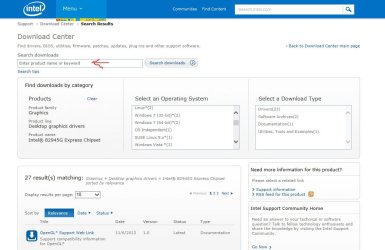
When I go to that page I see a red line that says "No downloads available."
I already went there and tried their scanner and got nothing.
 

My Computer

Computer type
PC/Desktop
Computer Manufacturer/Model Number
custom, HP case
OS
windows 7
CPU
Pintium 4 CPU 2,8 GHz
Memory
2.00 GB RAM
Antivirus
none
Ok you can try reentering the chipset model where indicated. I found windows seven 64bit on that page. It might be because you used their diagnostic tool. you can try clearing cookies before proceeding to that page. If these drivers don't work I would suggest contacting the builder and taking in the monitor as well to show them what is happening. It sounds like they did a Frankenstein build and hopefully have a warranty.
 

Attachments

  • intel.JPG
    intel.JPG
    77.5 KB · Views: 0
Last edited:

My Computer

Computer type
PC/Desktop
Computer Manufacturer/Model Number
Custom Build MPCBS AMII
OS
Windows 7 Professional x64
CPU
AMD Athlon II x4 3.00 GHz
Motherboard
MSI GF615M-p33
Memory
16GB Kingston DDR3
Graphics Card(s)
Nvidia 8600 (dual DVI out for 2 monitors)
Sound Card
Onboard
Monitor(s) Displays
Acer H233H 23", ASUS 23"
Screen Resolution
1366 x 768
Hard Drives
(2) WD Blue 1 TB 3 partitions, (1) Seagate 7200 500GB with 2 partitions for useless and frequently deleted data Looking forward do an ssd for os soon.
PSU
Corsair 1100Watt
Case
Apevia HAF
Cooling
HAF AMD High Profile Heat sink and fan
Keyboard
wireless Logitech
Mouse
wireless Logitech
Internet Speed
16 mbps
Antivirus
eSet, AVG, Clam and Clamwin (depends on machine)
Browser
Firefox
Other Info
(9) Win 7 machines all x64 (POS Updated to Windows 7 pro YEA), (4) Linux machines x64 and x86 including a v3000 compaq lappy brought back to life with Mint 9 used to scan drives, (1) Linux Machine dual boot XP Pro (for testing and destroying), (1) Win 7 pro x64/Win 8.1 Lenovo Laptop Dual Boot.
OK. I got the download and installed it.
But my screen looks the same.
 

My Computer

Computer type
PC/Desktop
Computer Manufacturer/Model Number
custom, HP case
OS
windows 7
CPU
Pintium 4 CPU 2,8 GHz
Memory
2.00 GB RAM
Antivirus
none
There is no option for higher resolution on the screen resolution page.
 

My Computer

Computer type
PC/Desktop
Computer Manufacturer/Model Number
custom, HP case
OS
windows 7
CPU
Pintium 4 CPU 2,8 GHz
Memory
2.00 GB RAM
Antivirus
none
That driver is the oldest version of a no longer supported product. It is built in.
So I just have to uninstall that and add a new PCI card, right?

Interesting, the graphics upgrade increased my performance by .4 but did nothing for screen resolution.
Thank you for your help.
 

My Computer

Computer type
PC/Desktop
Computer Manufacturer/Model Number
custom, HP case
OS
windows 7
CPU
Pintium 4 CPU 2,8 GHz
Memory
2.00 GB RAM
Antivirus
none
Sorry for the delay. It has been a busy day already. If you are going to install a PCI card then the only thing you truly need to remove is any program associated with the current graphics adapter. your bios should automatically disable the on board graphics and send its data to the new PCI card. Once booted in VGA mode If online the OS will look for drivers via the internet. If you prefer to use specific drivers then unplug the internet connection prior to booting with the new card. Be sure to have either the dvd/cd or download ready.
 

My Computer

Computer type
PC/Desktop
Computer Manufacturer/Model Number
Custom Build MPCBS AMII
OS
Windows 7 Professional x64
CPU
AMD Athlon II x4 3.00 GHz
Motherboard
MSI GF615M-p33
Memory
16GB Kingston DDR3
Graphics Card(s)
Nvidia 8600 (dual DVI out for 2 monitors)
Sound Card
Onboard
Monitor(s) Displays
Acer H233H 23", ASUS 23"
Screen Resolution
1366 x 768
Hard Drives
(2) WD Blue 1 TB 3 partitions, (1) Seagate 7200 500GB with 2 partitions for useless and frequently deleted data Looking forward do an ssd for os soon.
PSU
Corsair 1100Watt
Case
Apevia HAF
Cooling
HAF AMD High Profile Heat sink and fan
Keyboard
wireless Logitech
Mouse
wireless Logitech
Internet Speed
16 mbps
Antivirus
eSet, AVG, Clam and Clamwin (depends on machine)
Browser
Firefox
Other Info
(9) Win 7 machines all x64 (POS Updated to Windows 7 pro YEA), (4) Linux machines x64 and x86 including a v3000 compaq lappy brought back to life with Mint 9 used to scan drives, (1) Linux Machine dual boot XP Pro (for testing and destroying), (1) Win 7 pro x64/Win 8.1 Lenovo Laptop Dual Boot.
Back
Top