Can't turn on WLAN

MichaelNewmann

New member
Local time
4:59 AM
Messages
10
I have a Fujitsu Siemens Amilo XA 3530 laptop (Windows 7 x64 Ultimate), the WLAN card is Atheros AR5008X

The way you should enable both WLAN and the Bluetooth connection is to press fn + F1, but somewhere down the road I've managed to uninstall the HotKey driver. Fujitsu doesn't offer driver support for old laptops like this anymore.

I've tried the following things,

- Enable WLAN in bios
- Enable WLAN in device manager
- Uninstall and install the driver from device manager
- Tried 3-5 different HotKey drivers without success


I have no outer switch on the laptop for enabling WLAN, the only way to turn it on seems to be through the fn + F1 keyboard command, there is also a light which indicates if the WLAN is on, and it hasn't been shining even though the control panel and bios claims its enabled.

And no, bluetooth doesn't work either :(
 
Last edited:

My Computer

OS
Windows Ultimate x64
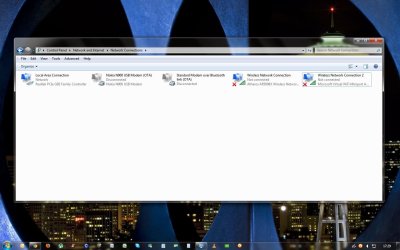
what does network connections show?
 

My Computer

Computer Manufacturer/Model Number
Windows 7 Ultimate 64-bit
OS
Windows 7 Ultimate N 64-bit
CPU
AMD Black Edition - AMD Phenom X4 2.5 GHz Processor
Motherboard
Bio Star
Memory
8GB DDR2 800MHZ BRANDED
Graphics Card(s)
Palti NVIDIA GeForce GTX 460
Monitor(s) Displays
3D 23.6" & 22"
Screen Resolution
1920x1080@120Hz
Hard Drives
313GB SAMSUNG SAMSUNG HD321KJ
PSU
OCZ 600W StealthXStream PSU, PowerWhisper, Active PFC
Internet Speed
22793
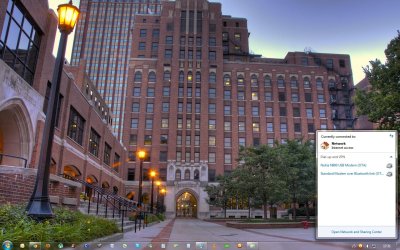
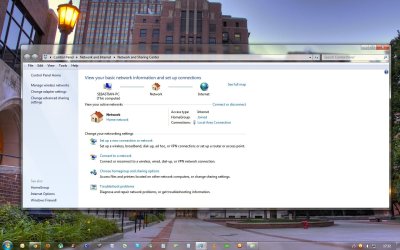
I attached a few screenshots, and I have no idea where the second wireless internet connection came from?
 

Attachments

  • screenshot1.jpg
    screenshot1.jpg
    204.8 KB · Views: 123
  • screenshot2.jpg
    screenshot2.jpg
    97.2 KB · Views: 161
  • screenshot3.jpg
    screenshot3.jpg
    142.7 KB · Views: 115

My Computer

OS
Windows Ultimate x64
i googled it, and came with

Windows 7 download HotKey/Keyboard driver help-? - Yahoo! UK & Ireland Answers

have u tried the above driver from bioticaindia?

also ur laptop doesnt seem that old, i wouldnt be accepting that from them, i'd be demanding a refund as the item is not for for purpose or speaking with highest level tech u can, there will be somebody that will be able to direct u correctly.

3 things.

1. try and use the hotkey in bios/postscreen and during and before windows boot to turn on and off
2. wont a fresh instlall replace the driver you have deleted?
3. maybe find a person with this laptop(i.e. ebay) see if u can persuade anybody with the OEM partion intact to do u a clone of there HDD and rip the drivers off after putting it back on to ur system,

only things i can think of mate.
 

My Computer

Computer Manufacturer/Model Number
Windows 7 Ultimate 64-bit
OS
Windows 7 Ultimate N 64-bit
CPU
AMD Black Edition - AMD Phenom X4 2.5 GHz Processor
Motherboard
Bio Star
Memory
8GB DDR2 800MHZ BRANDED
Graphics Card(s)
Palti NVIDIA GeForce GTX 460
Monitor(s) Displays
3D 23.6" & 22"
Screen Resolution
1920x1080@120Hz
Hard Drives
313GB SAMSUNG SAMSUNG HD321KJ
PSU
OCZ 600W StealthXStream PSU, PowerWhisper, Active PFC
Internet Speed
22793
Thanks for your help man, I finally managed myself to find the deleted start up entry with a software. Now the bluetooth and the wireless is working.

Case closed.
 

My Computer

OS
Windows Ultimate x64
ok good to hear, just for anybody else it may be worth posting how u resolved this issue
 

My Computer

Computer Manufacturer/Model Number
Windows 7 Ultimate 64-bit
OS
Windows 7 Ultimate N 64-bit
CPU
AMD Black Edition - AMD Phenom X4 2.5 GHz Processor
Motherboard
Bio Star
Memory
8GB DDR2 800MHZ BRANDED
Graphics Card(s)
Palti NVIDIA GeForce GTX 460
Monitor(s) Displays
3D 23.6" & 22"
Screen Resolution
1920x1080@120Hz
Hard Drives
313GB SAMSUNG SAMSUNG HD321KJ
PSU
OCZ 600W StealthXStream PSU, PowerWhisper, Active PFC
Internet Speed
22793
Back
Top