Hallo ljlavaseur, i am only having a guess here. I know my own keyboard needs an extra driver (Hewlett Packard Quick Launch Buttons) to get full functionallity View attachment 44078
IF you could fill out your System Specs in User CP in the top left corner it would greatly help for someone to better assist you
My Computer
Computer Manufacturer/Model Number
Hewlett Packard Compaq Presario CQ60-305au
OS
Windows Seven Home Premium 32bit SP1
CPU
AMD Athlon QI46 2.1Ghz
Motherboard
Wistron 303c
Memory
2048 Mb DDR2 SD RAM
Graphics Card(s)
NVidea GE GoForce 8200M G/256mb dedicated graphics memory
Stumbled upon this thread when I encountered the same issue on my daughter's pc (Windows 7 upgrade from vista, 32 bit home premium). None of the above helped, but did get me thinking...
If you are a Comcast customer in the U.S.A., and use CONSTANT GUARD, there's your problem! Uninstalled it, and everything is fine now.
I realize this post is a little old, but in case other people stumble upon it.
A quick fix is to hold down your "Ctrl" key and then the "Shift" above it at the same time. Release them after a second or and you should be able to type the "@" symbol now.
You can test it again by holding the "Ctrl" and then the "Shift", now your "@" symbol will only show the ".
It switches back and forth when you hold down both keys by accident.
I found this issue on a Vista and then on a Server 2003. I did the language on the vista and that worked but on the XP I just held the "Alt" and "shift" key and it was back....I am assuming that the Alt or Ctrl and shift will fix this on most computers...
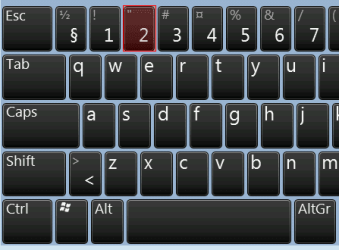
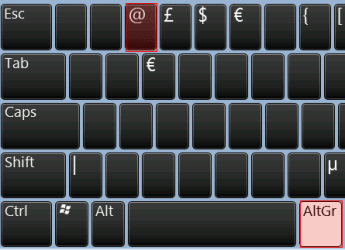
UK English keyboard layout always gives quotation mark (") with SHIFT + 2, and @-sign with ALT GR + 2:
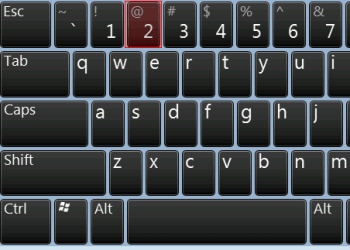
US English keyboard layout always gives @-sign with SHIFT + 2:
If both English (UK) and English (US) input languages (keyboard layouts) are installed, so called fast switching between different layouts is done with default ALT + SHIFT shortcut.
In other words what TheCoolerman above posted simply means that if the computer is only using English (US) layout, you always get the @-sign with SHIFT + 2. If the computer however has both English (US) and English (UK) layout installed, you can switch between them with ALT + SHIFT to produce either " (English (UK)) or @ (English (US)).