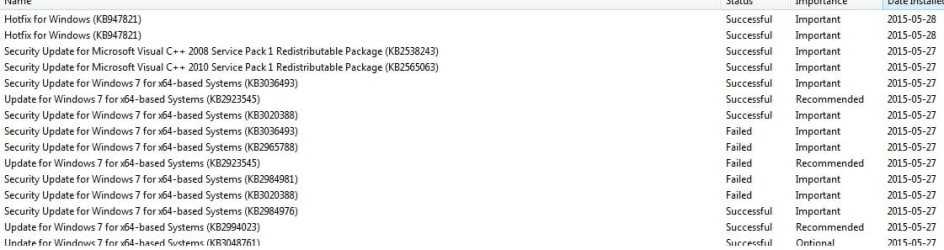
Solved Cant update KB2984981 and KB2965788

highspeed

New member
Local time
6:36 AM
Messages
4
Hi, im out of ideas please help. I cant update KB2984981 and KB2965788. Tried FixIT, renaming Softwaredistrubition folder and i dont have that regedit entry. But nothing works. I also tried to install these manually but it just says my system cant install them.

Update: followed intructions on Windows Update Posting Instructions post.

step 1. SURT installed KB947821. Reran Windows update but with no success, it doesnt find the old failed updates above.

step 2. sfc fixes something but stills says after multiple runs that unable to fix all of them.

step 3. error codes both above is: Code 80070308

CBS logs and windowsupdate logs attached.
 

My Computer My Computer

At a glance

64
Computer type
PC/Desktop
OS
64
Just a snippet of my update history
 

Attachments

  • update history.jpg
    update history.jpg
    56.7 KB · Views: 2

My Computer My Computer

At a glance

64
Computer type
PC/Desktop
OS
64
The only significant error in the SFC is this...
Code:
 Line 3580: 2015-05-28 17:42:11, Info                  CSI    00000336 [SR] Repairing 1 components
 Line 3581: 2015-05-28 17:42:11, Info                  CSI    00000337 [SR] Beginning Verify and Repair transaction
 Line 3584: 2015-05-28 17:42:11, Info                  CSI    00000339 [SR] Cannot repair member file [l:24{12}]"utc.app.json" of Microsoft-Windows-Unified-Telemetry-Client, Version = 6.1.7601.18839, pA = PROCESSOR_ARCHITECTURE_AMD64 (9), Culture neutral, VersionScope = 1 nonSxS, PublicKeyToken = {l:8 b:31bf3856ad364e35}, Type neutral, TypeName neutral, PublicKey neutral in the store, hash mismatch
 Line 3587: 2015-05-28 17:42:11, Info                  CSI    0000033b [SR] Cannot repair member file [l:66{33}]"telemetry.ASM-WindowsDefault.json" of Microsoft-Windows-Unified-Telemetry-Client, Version = 6.1.7601.18839, pA = PROCESSOR_ARCHITECTURE_AMD64 (9), Culture neutral, VersionScope = 1 nonSxS, PublicKeyToken = {l:8 b:31bf3856ad364e35}, Type neutral, TypeName neutral, PublicKey neutral in the store, hash mismatch

This is the result of the KB3022345 problem - which MS deny being a problem :(

MS have updated their advice on the SFC issue.
It seems that this is an error in the 'logic' rather than an actual problem.
There is no point in attempting to correct the apparent errors, since they will reappear as soon as another diagnostic is run (possibly without user intervention!).

Therefore, as far as these errors are concerned the current options are

  • ignore the errors, and wait for MS to release the promised update to correct the SFC detections
  • uninstall KB3022345 and hide the offered update until its either updated or replaced.
Take your pick!

There are no other errors in the SFC scan that need attention.

CheckSUR is clear

As to your problem updating...

Open an Elevated Command Prompt, and run the following commands


Code:
REG LOAD HKLM\COMPONENTS C:\Windows\System32\config\COMPONENTS[/FONT][/COLOR]
[COLOR=black][FONT=verdana]REG DELETE HKLM\COMPONENTS /V PendingRequired[/FONT][/COLOR]
[COLOR=black][FONT=verdana] [/FONT][/COLOR]
[COLOR=black][FONT=verdana].
then reboot, and try Windows Update again.
 

My Computer My Computer

At a glance

Win 7 x64 Home Premium (and x86 VirtualBox VM...i3 370M/i7 6500U8GB - finally :)/8GBit's an i3, dude!/dual Intel&nVidia
Computer type
Laptop
Computer Manufacturer/Model Number
Asus K52F or Lenovo B51-80
OS
Win 7 x64 Home Premium (and x86 VirtualBox VM)/Win10
CPU
i3 370M/i7 6500U
Motherboard
Asus/Lenovo
Memory
8GB - finally :)/8GB
Graphics Card(s)
it's an i3, dude!/dual Intel&nVidia
Sound Card
onboard
Monitor(s) Displays
15.6" built-in
Screen Resolution
1366x768/1920x1080
Hard Drives
750GB Seagate internal
Sundry external drives attached to other computers on the local network
1TB SSD on the Lenovo
PSU
n/a
Internet Speed
as much as I can get - usually on a dongle/phone, so <1MB/s
Antivirus
MSE/Defender
Browser
IE11/12/Edge/Chrome/FF(if I must)
Thanks alot for your help.

So i uninstalled KB3022345 but when i run windows update KB2984981 and KB2965788 still not show up. And i cant update them manually, it continues to say my system isnt applicable. Those 2 updates isnt crucial for my safety or?
 

My Computer My Computer

At a glance

64
Computer type
PC/Desktop
OS
64
Both those updates are relatively old - if Windows Update doesn't find them then they aren't required, either because they are already installed, or because the have been superceded, or because they are irrelevant.
 

My Computer My Computer

At a glance

Win 7 x64 Home Premium (and x86 VirtualBox VM...i3 370M/i7 6500U8GB - finally :)/8GBit's an i3, dude!/dual Intel&nVidia
Computer type
Laptop
Computer Manufacturer/Model Number
Asus K52F or Lenovo B51-80
OS
Win 7 x64 Home Premium (and x86 VirtualBox VM)/Win10
CPU
i3 370M/i7 6500U
Motherboard
Asus/Lenovo
Memory
8GB - finally :)/8GB
Graphics Card(s)
it's an i3, dude!/dual Intel&nVidia
Sound Card
onboard
Monitor(s) Displays
15.6" built-in
Screen Resolution
1366x768/1920x1080
Hard Drives
750GB Seagate internal
Sundry external drives attached to other computers on the local network
1TB SSD on the Lenovo
PSU
n/a
Internet Speed
as much as I can get - usually on a dongle/phone, so <1MB/s
Antivirus
MSE/Defender
Browser
IE11/12/Edge/Chrome/FF(if I must)
Back
Top