Windows 7 Pro 64 Bit (OEM) with Intermittent Wireless Internet

gopher22

New member
Local time
11:11 PM
Messages
41
Location
Florida
Sony Vaio VGNZ Laptop, Windows 7 Pro (64bit), 1TB HD, 4GB Mem, HDMI Video.

For the last 2 days, my wireless connection has been intermittent. I have a Westell DSL Modem/Router, 2 Wireless Extenders and an AT&T Hot Spot. The signal strength on all was at least 4 or 5 bars. Today I could not connect no matter which I tried to connect to. The Laptop would connect to my network but with no Internet at all. My other wireless devices were all OK including a Samsung Tablet, iPad, Mac Pro (Yosemite) and Dell E6400 (Vista and Linux Mint) and E6500 (Win 7) Laptops. An Ethernet connection to my Sony Vaio laptop worked fine.

I looked at my system updates via control panel with the latest showing 10/28. I looked at Restore Points with the latest dated 4 days earlier on 10/24. It was for a Critical update. Huh? Looking at the installed updates, apart from MS Security Essentials Definitions update, there was no listing for anything else since an Office 2010 update on 10/18. I do not have my updates set to automatic for a number of reasons including but not limited to GWX which they keep slipping into the availability list. I keep a list of 4 nasty KBs hanging on my wall, one of them being the extremely annoying KB3035583. There is no way I am going to Win 10.

I did a restore this morning to 10/24 which resulted in no more wireless disconnects. Problem solved for now at least.

Any comments would be appreciated. Maybe it was just one of those un-explainable glitches that Windows users suffer from now and again. Although I am finding that Apple OS updates can be as bad. :p

Peter B.
 

My Computer My Computer

At a glance

Windows 7 64 bitCentrino 2
Computer type
Laptop
Computer Manufacturer/Model Number
Sony VGNZ
OS
Windows 7 64 bit
CPU
Centrino 2
Hard Drives
1 TB
Browser
Chrome; IE.
Hey gopher22. Just a thought, make sure your modem/router does not have a set limit on the number of wireless devices which can be connected at one time.
 

My Computer My Computer

At a glance

Microsoft Windows 7 Ultimate 64-bit 7601 Mult...AMD FX(tm)-6100 Six-Core Processor4.00 GBAMD Radeon HD 6450
Computer type
PC/Desktop
Computer Manufacturer/Model Number
custom build
OS
Microsoft Windows 7 Ultimate 64-bit 7601 Multiprocessor Free Service Pack 1
CPU
AMD FX(tm)-6100 Six-Core Processor
Motherboard
ASUSTeK Computer INC. M5A78L-M LX PLUS
Memory
4.00 GB
Graphics Card(s)
AMD Radeon HD 6450
Sound Card
(1) AMD High Definition Audio Device (2) Realtek High Defi
Monitor(s) Displays
Toshiba 47ZV650U 47" LCD 240Hz
Screen Resolution
1920 x 1080 x 32 bits (4294967296 colors) @ 60 Hz
Hard Drives
(1) HDT722516DLA380 ATA Device (2) Hitachi HDS721025CLA382 ATA Device (3) ST4000VN000-1H4168 ATA Device (4) Generic STORAGE DEVICE USB Device (5) Generic STORAGE DEVICE USB Device (6) Generic STORAGE DEVICE USB Device (7) Generic STORAGE
PSU
Corsair CX430M
Case
WMI (Waste Management Incorporated)
Cooling
Yes, it's very cool.
Keyboard
Bluetooth KB & Mousepad
Internet Speed
Fios 15/5 and it sucks when Verizon is throttling it down
Antivirus
Avast, MSE and Malwarebytes
Browser
Firefox v.41.0.2 and IE 11
Other Info
2 years old and so far this rig still kicks butt
Hey gopher22. Just a thought, make sure your modem/router does not have a set limit on the number of wireless devices which can be connected at one time.

Hey there Cyclops,

If it does have a limit, is there a solution? My ISP, CenturyLink, own the modem/router. The first one from them several years ago was a ZyXEL which was a piece of junk.

Today I got an error message about 2 devices having the same IP address. Is that a clue about the number of wireless devices that can be connected? :(

Peter B
 

My Computer My Computer

At a glance

Windows 7 64 bitCentrino 2
Computer type
Laptop
Computer Manufacturer/Model Number
Sony VGNZ
OS
Windows 7 64 bit
CPU
Centrino 2
Hard Drives
1 TB
Browser
Chrome; IE.
Here is the latest bulletin.

It has started doing it again and I have changed nothing. I turned off all my devices except my Vaio laptop and my wife's Dell laptop. Hers is working fine on wireless. The only way I can connect with my Vaio is by using the Ethernet connection. That is OK on a temporary basis but I am no longer portable which is a pain to say the least.

Could an IP address conflict cause it? It is working OK again as I write, but I had just changed the wireless connection on my wife's laptop to the main router from the extender and it showed an error saying that it had an IP address conflict with another device. Hmm...Any suggestions anyone?

Peter.
 

My Computer My Computer

At a glance

Windows 7 64 bitCentrino 2
Computer type
Laptop
Computer Manufacturer/Model Number
Sony VGNZ
OS
Windows 7 64 bit
CPU
Centrino 2
Hard Drives
1 TB
Browser
Chrome; IE.
I checked all of the IP addresses and could find no duplicates. Then I wound the Op Sys back a few more days to an earlier restore point. That was about 2 hours ago, so far no more problems. Probably one of Microsoft's buggy updates. I may re-install them one at a time to see which it was. Or maybe I'll just leave well alone.

I shall monitor the situation for a few days and report back.

Peter B.
 

My Computer My Computer

At a glance

Windows 7 64 bitCentrino 2
Computer type
Laptop
Computer Manufacturer/Model Number
Sony VGNZ
OS
Windows 7 64 bit
CPU
Centrino 2
Hard Drives
1 TB
Browser
Chrome; IE.
If you are getting duplicate ip warning I would betthat one device or more is not using a DHCP ip, (auto IP assignment). Make sure all devices are set to DHCP, none should have a static IP.
 

My Computer My Computer

At a glance

Microsoft Windows 7 Ultimate 64-bit 7601 Mult...AMD FX(tm)-6100 Six-Core Processor4.00 GBAMD Radeon HD 6450
Computer type
PC/Desktop
Computer Manufacturer/Model Number
custom build
OS
Microsoft Windows 7 Ultimate 64-bit 7601 Multiprocessor Free Service Pack 1
CPU
AMD FX(tm)-6100 Six-Core Processor
Motherboard
ASUSTeK Computer INC. M5A78L-M LX PLUS
Memory
4.00 GB
Graphics Card(s)
AMD Radeon HD 6450
Sound Card
(1) AMD High Definition Audio Device (2) Realtek High Defi
Monitor(s) Displays
Toshiba 47ZV650U 47" LCD 240Hz
Screen Resolution
1920 x 1080 x 32 bits (4294967296 colors) @ 60 Hz
Hard Drives
(1) HDT722516DLA380 ATA Device (2) Hitachi HDS721025CLA382 ATA Device (3) ST4000VN000-1H4168 ATA Device (4) Generic STORAGE DEVICE USB Device (5) Generic STORAGE DEVICE USB Device (6) Generic STORAGE DEVICE USB Device (7) Generic STORAGE
PSU
Corsair CX430M
Case
WMI (Waste Management Incorporated)
Cooling
Yes, it's very cool.
Keyboard
Bluetooth KB & Mousepad
Internet Speed
Fios 15/5 and it sucks when Verizon is throttling it down
Antivirus
Avast, MSE and Malwarebytes
Browser
Firefox v.41.0.2 and IE 11
Other Info
2 years old and so far this rig still kicks butt
Hi Cyclops,

A duplicate IP address message appeared briefly on my Wife's Dell E6500. It appeared for a few seconds then disappeared. What is the easiest way to tell if a device has a fixed IP address? I cannot say it was something I knowingly did when adding a device.

I have not had any more trouble with Internet access since I wound the Vaio Op Sys back again by a few more days. Getting an internet connection is almost instant on startup and is rock steady so far. No drifting in and out either. I may go back and see which updates were reversed and install them one at a time to see if the event is repeatable. On the other hand I may just leave well alone. My network devices are well protected against malware and viruses.

Peter B.
 

My Computer My Computer

At a glance

Windows 7 64 bitCentrino 2
Computer type
Laptop
Computer Manufacturer/Model Number
Sony VGNZ
OS
Windows 7 64 bit
CPU
Centrino 2
Hard Drives
1 TB
Browser
Chrome; IE.
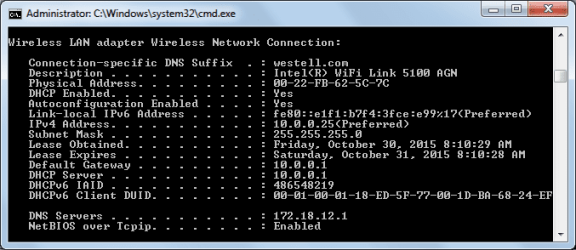
Easiest way to check if DHCP is enabled, open command prompt by click start and type cmd in the search box then hit enter. Once the cmd window is open type ipconfig /all making sure you have a space between the g and /. Hit enter and you will see this,
View attachment 374803

You should see DHCP enabled, yes, if in fact it is.
 
Last edited:

My Computer My Computer

At a glance

Microsoft Windows 7 Ultimate 64-bit 7601 Mult...AMD FX(tm)-6100 Six-Core Processor4.00 GBAMD Radeon HD 6450
Computer type
PC/Desktop
Computer Manufacturer/Model Number
custom build
OS
Microsoft Windows 7 Ultimate 64-bit 7601 Multiprocessor Free Service Pack 1
CPU
AMD FX(tm)-6100 Six-Core Processor
Motherboard
ASUSTeK Computer INC. M5A78L-M LX PLUS
Memory
4.00 GB
Graphics Card(s)
AMD Radeon HD 6450
Sound Card
(1) AMD High Definition Audio Device (2) Realtek High Defi
Monitor(s) Displays
Toshiba 47ZV650U 47" LCD 240Hz
Screen Resolution
1920 x 1080 x 32 bits (4294967296 colors) @ 60 Hz
Hard Drives
(1) HDT722516DLA380 ATA Device (2) Hitachi HDS721025CLA382 ATA Device (3) ST4000VN000-1H4168 ATA Device (4) Generic STORAGE DEVICE USB Device (5) Generic STORAGE DEVICE USB Device (6) Generic STORAGE DEVICE USB Device (7) Generic STORAGE
PSU
Corsair CX430M
Case
WMI (Waste Management Incorporated)
Cooling
Yes, it's very cool.
Keyboard
Bluetooth KB & Mousepad
Internet Speed
Fios 15/5 and it sucks when Verizon is throttling it down
Antivirus
Avast, MSE and Malwarebytes
Browser
Firefox v.41.0.2 and IE 11
Other Info
2 years old and so far this rig still kicks butt
Here it is, DCHP = Yes. Finding it should have been obvious. I have had ipconfig open a few times in recent days, but it was not obvious because I was not specifically looking for it.

Thanks.

Peter B.
 

Attachments

  • DCHP.png
    DCHP.png
    11.7 KB · Views: 12

My Computer My Computer

At a glance

Windows 7 64 bitCentrino 2
Computer type
Laptop
Computer Manufacturer/Model Number
Sony VGNZ
OS
Windows 7 64 bit
CPU
Centrino 2
Hard Drives
1 TB
Browser
Chrome; IE.
OK Peter. Now you need to check all of the devices in your network for the same thing. I am curious if part of the problem could have anything to do with having just one DNS server configured. Suggesting you check other devices on your network and make a comparison with those devices not experiencing this problem.
 

My Computer My Computer

At a glance

Microsoft Windows 7 Ultimate 64-bit 7601 Mult...AMD FX(tm)-6100 Six-Core Processor4.00 GBAMD Radeon HD 6450
Computer type
PC/Desktop
Computer Manufacturer/Model Number
custom build
OS
Microsoft Windows 7 Ultimate 64-bit 7601 Multiprocessor Free Service Pack 1
CPU
AMD FX(tm)-6100 Six-Core Processor
Motherboard
ASUSTeK Computer INC. M5A78L-M LX PLUS
Memory
4.00 GB
Graphics Card(s)
AMD Radeon HD 6450
Sound Card
(1) AMD High Definition Audio Device (2) Realtek High Defi
Monitor(s) Displays
Toshiba 47ZV650U 47" LCD 240Hz
Screen Resolution
1920 x 1080 x 32 bits (4294967296 colors) @ 60 Hz
Hard Drives
(1) HDT722516DLA380 ATA Device (2) Hitachi HDS721025CLA382 ATA Device (3) ST4000VN000-1H4168 ATA Device (4) Generic STORAGE DEVICE USB Device (5) Generic STORAGE DEVICE USB Device (6) Generic STORAGE DEVICE USB Device (7) Generic STORAGE
PSU
Corsair CX430M
Case
WMI (Waste Management Incorporated)
Cooling
Yes, it's very cool.
Keyboard
Bluetooth KB & Mousepad
Internet Speed
Fios 15/5 and it sucks when Verizon is throttling it down
Antivirus
Avast, MSE and Malwarebytes
Browser
Firefox v.41.0.2 and IE 11
Other Info
2 years old and so far this rig still kicks butt
You should be able to access the internals of the router/modem via a web browser. Open your browser and type into the address bar 10.10.10.1 hit enter and see if the login screen for the modem/router comes up. Mine looks like this,

View attachment 374812


Once in the modem/router you can view all devices connecting to it, like this


View attachment 374813
 
Last edited:

My Computer My Computer

At a glance

Microsoft Windows 7 Ultimate 64-bit 7601 Mult...AMD FX(tm)-6100 Six-Core Processor4.00 GBAMD Radeon HD 6450
Computer type
PC/Desktop
Computer Manufacturer/Model Number
custom build
OS
Microsoft Windows 7 Ultimate 64-bit 7601 Multiprocessor Free Service Pack 1
CPU
AMD FX(tm)-6100 Six-Core Processor
Motherboard
ASUSTeK Computer INC. M5A78L-M LX PLUS
Memory
4.00 GB
Graphics Card(s)
AMD Radeon HD 6450
Sound Card
(1) AMD High Definition Audio Device (2) Realtek High Defi
Monitor(s) Displays
Toshiba 47ZV650U 47" LCD 240Hz
Screen Resolution
1920 x 1080 x 32 bits (4294967296 colors) @ 60 Hz
Hard Drives
(1) HDT722516DLA380 ATA Device (2) Hitachi HDS721025CLA382 ATA Device (3) ST4000VN000-1H4168 ATA Device (4) Generic STORAGE DEVICE USB Device (5) Generic STORAGE DEVICE USB Device (6) Generic STORAGE DEVICE USB Device (7) Generic STORAGE
PSU
Corsair CX430M
Case
WMI (Waste Management Incorporated)
Cooling
Yes, it's very cool.
Keyboard
Bluetooth KB & Mousepad
Internet Speed
Fios 15/5 and it sucks when Verizon is throttling it down
Antivirus
Avast, MSE and Malwarebytes
Browser
Firefox v.41.0.2 and IE 11
Other Info
2 years old and so far this rig still kicks butt
OK Peter. Now you need to check all of the devices in your network for the same thing. I am curious if part of the problem could have anything to do with having just one DNS server configured. Suggesting you check other devices on your network and make a comparison with those devices not experiencing this problem.

Hi Cyclops,

I assume I can check them from my Vaio Laptop using ipconfig as long as they are on line. Is this a correct assumption? Generally speaking my network is something that does not get my attention very often, it just purrs away behind the scenes as it were.:D

Peter B.
 

My Computer My Computer

At a glance

Windows 7 64 bitCentrino 2
Computer type
Laptop
Computer Manufacturer/Model Number
Sony VGNZ
OS
Windows 7 64 bit
CPU
Centrino 2
Hard Drives
1 TB
Browser
Chrome; IE.
Never safe to assume. No, you cannot do ipconfig from your Sony to other devices. Have you tried to access the browser interface for the modem/router? Is this a home network?
 

My Computer My Computer

At a glance

Microsoft Windows 7 Ultimate 64-bit 7601 Mult...AMD FX(tm)-6100 Six-Core Processor4.00 GBAMD Radeon HD 6450
Computer type
PC/Desktop
Computer Manufacturer/Model Number
custom build
OS
Microsoft Windows 7 Ultimate 64-bit 7601 Multiprocessor Free Service Pack 1
CPU
AMD FX(tm)-6100 Six-Core Processor
Motherboard
ASUSTeK Computer INC. M5A78L-M LX PLUS
Memory
4.00 GB
Graphics Card(s)
AMD Radeon HD 6450
Sound Card
(1) AMD High Definition Audio Device (2) Realtek High Defi
Monitor(s) Displays
Toshiba 47ZV650U 47" LCD 240Hz
Screen Resolution
1920 x 1080 x 32 bits (4294967296 colors) @ 60 Hz
Hard Drives
(1) HDT722516DLA380 ATA Device (2) Hitachi HDS721025CLA382 ATA Device (3) ST4000VN000-1H4168 ATA Device (4) Generic STORAGE DEVICE USB Device (5) Generic STORAGE DEVICE USB Device (6) Generic STORAGE DEVICE USB Device (7) Generic STORAGE
PSU
Corsair CX430M
Case
WMI (Waste Management Incorporated)
Cooling
Yes, it's very cool.
Keyboard
Bluetooth KB & Mousepad
Internet Speed
Fios 15/5 and it sucks when Verizon is throttling it down
Antivirus
Avast, MSE and Malwarebytes
Browser
Firefox v.41.0.2 and IE 11
Other Info
2 years old and so far this rig still kicks butt
Never safe to assume. No, you cannot do ipconfig from your Sony to other devices. Have you tried to access the browser interface for the modem/router? Is this a home network?

Hi Cyclops,

I have a Westell DSL Modem/Wireless Router and I access it via Chrome at 10.0.0.1. It refreshes periodically and shows all items that are or have been connected even if they are now offline. They range from 10.0.0.6 at the low end to 10.0.0.26 at the highest. Only one does not have an IP address showing because it if not in service right now. Not all of the range is used, there are gaps like 10.0.0.11 to 10.0.0.14, with 12 and 13 not listed. I can release and renew from the first page too and rename devices etc.

I could have 13 to 14 devices on the network at the same time without issues until a few days ago, but normally only about 4 to 6 including printers. Since I did a roll back to about a week ago, everything has been behaving itself I am glad to say.

Peter B.
 

My Computer My Computer

At a glance

Windows 7 64 bitCentrino 2
Computer type
Laptop
Computer Manufacturer/Model Number
Sony VGNZ
OS
Windows 7 64 bit
CPU
Centrino 2
Hard Drives
1 TB
Browser
Chrome; IE.
Never safe to assume. No, you cannot do ipconfig from your Sony to other devices. Have you tried to access the browser interface for the modem/router? Is this a home network?
I could have 13 to 14 devices on the network at the same time without issues until a few days ago, but normally only about 4 to 6 including printers. Since I did a roll back to about a week ago, everything has been behaving itself I am glad to say.

Peter B.

It has started doing it again. If I use ncpa.cpl to check my wireless connection properties, I see that IPV4 is set to Obtain IP Address Automatically and Obtain DNS Server Address Automatically has changed to Use the Following DNS Server Addresses. I had no Internet again this morning so I checked and changed it back to Auto...there was an address listed but I did not note the address number.

Peter B.
 

My Computer My Computer

At a glance

Windows 7 64 bitCentrino 2
Computer type
Laptop
Computer Manufacturer/Model Number
Sony VGNZ
OS
Windows 7 64 bit
CPU
Centrino 2
Hard Drives
1 TB
Browser
Chrome; IE.
Turned my Sony laptop on this morning and found the follow issues:

* Quick Launch toolbar AND Language toolbar were missing and I could not find the option to turn them back on.
* I could connect to my router but there was NO internet connection.
* A Critical Update without my knowledge was installed yesterday 10/9/15 with Automatic update/install was turned off.

I did a System Restore to the only update that occurred yesterday and everything came back to normal. How can a critical update occur when automatic updating is turned OFF? This whole issue is getting to be really tiring.

Peter B.
 

My Computer My Computer

At a glance

Windows 7 64 bitCentrino 2
Computer type
Laptop
Computer Manufacturer/Model Number
Sony VGNZ
OS
Windows 7 64 bit
CPU
Centrino 2
Hard Drives
1 TB
Browser
Chrome; IE.
I have not experienced the problems so many are having due to the dreadful updates M$ is shoving down our throats. I have disabled auto in more than just the control panel settings. I have also disabled features for updates in the Local Policy Settings. You have your work cut out for you, but here we go. I am going to give you screenshots and instructions.

First, get to the update settings in control panel and match these settings exactly.
View attachment 375720

Now you need to access the group policy settings. Click on the windows logo lower left corner and in the search bar type gpedit.msc and hit enter. That opens the policy editor dialog. Now you will need to navigate from under COMPUTER CONFIGURATION select ADMINISTRATIVE TEMPLATES now look to the right side pane and double-click Windows Components Look closely at this screenshot and pay attention, you don't want to mess this up, but don't get too scared it's not the registry.

I think you may need to look at both of the next 2 screenshots to completely understand the layout.


View attachment 375727

Double-click WINDOWS COMPONENTS folder and you should see the next screen then scroll all the way to bottom folder called WINDOWS UPDATES and double click on it.

Now you need to match the settings on this screen

If some setting is not showing you need to backout and uninstall and hide update KB3035583 that will allow the missing setting to display in Policy settings.


View attachment 375721

Back over to where the long list of windows components folders and scroll up to the folder called Windows Anytime Upgrade, go into settings for that component and match these settings


View attachment 375722

OK, if you have successfully done everything, reboot and when the machine comes up you should be pretty well good to go and as a bonus that damned WINDOWS 10 logo and the annoying prompt to install WINDOWS 10 should also be gone.

I hope you will be extremely happy.
 
Last edited:

My Computer My Computer

At a glance

Microsoft Windows 7 Ultimate 64-bit 7601 Mult...AMD FX(tm)-6100 Six-Core Processor4.00 GBAMD Radeon HD 6450
Computer type
PC/Desktop
Computer Manufacturer/Model Number
custom build
OS
Microsoft Windows 7 Ultimate 64-bit 7601 Multiprocessor Free Service Pack 1
CPU
AMD FX(tm)-6100 Six-Core Processor
Motherboard
ASUSTeK Computer INC. M5A78L-M LX PLUS
Memory
4.00 GB
Graphics Card(s)
AMD Radeon HD 6450
Sound Card
(1) AMD High Definition Audio Device (2) Realtek High Defi
Monitor(s) Displays
Toshiba 47ZV650U 47" LCD 240Hz
Screen Resolution
1920 x 1080 x 32 bits (4294967296 colors) @ 60 Hz
Hard Drives
(1) HDT722516DLA380 ATA Device (2) Hitachi HDS721025CLA382 ATA Device (3) ST4000VN000-1H4168 ATA Device (4) Generic STORAGE DEVICE USB Device (5) Generic STORAGE DEVICE USB Device (6) Generic STORAGE DEVICE USB Device (7) Generic STORAGE
PSU
Corsair CX430M
Case
WMI (Waste Management Incorporated)
Cooling
Yes, it's very cool.
Keyboard
Bluetooth KB & Mousepad
Internet Speed
Fios 15/5 and it sucks when Verizon is throttling it down
Antivirus
Avast, MSE and Malwarebytes
Browser
Firefox v.41.0.2 and IE 11
Other Info
2 years old and so far this rig still kicks butt
Thanks Cyclops,

I will follow your instructions, but won't start it for a few days or so. But I will post back. I guess I should have started a new thread.

On the subject of the IP Address conflict issue, several days ago I unplugged both wireless extenders and have not had a Internet issue since. So there is a good chance that one or both of them is causing the conflict. The plot thickens, yes? I will do some experiments next week and see if I can narrow it down.

Thanks very much for your help.

Peter B.
 

My Computer My Computer

At a glance

Windows 7 64 bitCentrino 2
Computer type
Laptop
Computer Manufacturer/Model Number
Sony VGNZ
OS
Windows 7 64 bit
CPU
Centrino 2
Hard Drives
1 TB
Browser
Chrome; IE.
Thanks for the reply and good luck. I have copy of the instructions I put over to you and have passed it to a senior member here for his opinion as to if it's worth posting as a sticky thread or add it to the tutorials list. If you have read through it already, do you feel it seems a less experienced user might actually be capable of pulling it off?
 

My Computer My Computer

At a glance

Microsoft Windows 7 Ultimate 64-bit 7601 Mult...AMD FX(tm)-6100 Six-Core Processor4.00 GBAMD Radeon HD 6450
Computer type
PC/Desktop
Computer Manufacturer/Model Number
custom build
OS
Microsoft Windows 7 Ultimate 64-bit 7601 Multiprocessor Free Service Pack 1
CPU
AMD FX(tm)-6100 Six-Core Processor
Motherboard
ASUSTeK Computer INC. M5A78L-M LX PLUS
Memory
4.00 GB
Graphics Card(s)
AMD Radeon HD 6450
Sound Card
(1) AMD High Definition Audio Device (2) Realtek High Defi
Monitor(s) Displays
Toshiba 47ZV650U 47" LCD 240Hz
Screen Resolution
1920 x 1080 x 32 bits (4294967296 colors) @ 60 Hz
Hard Drives
(1) HDT722516DLA380 ATA Device (2) Hitachi HDS721025CLA382 ATA Device (3) ST4000VN000-1H4168 ATA Device (4) Generic STORAGE DEVICE USB Device (5) Generic STORAGE DEVICE USB Device (6) Generic STORAGE DEVICE USB Device (7) Generic STORAGE
PSU
Corsair CX430M
Case
WMI (Waste Management Incorporated)
Cooling
Yes, it's very cool.
Keyboard
Bluetooth KB & Mousepad
Internet Speed
Fios 15/5 and it sucks when Verizon is throttling it down
Antivirus
Avast, MSE and Malwarebytes
Browser
Firefox v.41.0.2 and IE 11
Other Info
2 years old and so far this rig still kicks butt
Hi Cyclops,

I found some time today to do the changes you said. It was not in the least difficult to do, I am reasonably experienced with Windows, though not an expert like you. I think a STICKY is a great idea. I feel that if in-experienced users follow your instructions to the letter, they will have no difficulty at all. Well done.

I had dumped that annoying KB3035583 months ago, it was getting on my nerves to be honest. I have done an evaluation of Win 10 and out of the box it really sucks. I had to employ too many tweeks and apps to make it work, it seemed pointless. So I dumped it and am evaluating Linux as an alternative. Also MS will not do a free upgrade for Win 7 users either, but that was a no never mind for me, I do not want it. The media have hyped it to death, they must be on MS's payroll.

I will get back on the IP address issue next week and will report back.

Thanks again.

Peter B.
 

My Computer My Computer

At a glance

Windows 7 64 bitCentrino 2
Computer type
Laptop
Computer Manufacturer/Model Number
Sony VGNZ
OS
Windows 7 64 bit
CPU
Centrino 2
Hard Drives
1 TB
Browser
Chrome; IE.
Back
Top