Solved Can't use native resolution with CG276 and GTX 1660 Ti

dreamphaser

New member
Local time
12:53 AM
Messages
6
So, recently i upgraded my gtx 960 to the nvidia geforce 1660 Ti OC 6G, or at least i hoped it would be an upgrade.

After years of working with both my Eizo CG276 monitor and the GTX 960 in the monitors native resolution
2560x1440 without flaw, i now can only select 1920x1080 as a max resolution with the new 1660 installed.

I uninstalled old drivers before doing so.
The drivers from retail were used, as well and the latest from the official site.
I can't change anything through windows settings.
I can't change anything through Nvidia control panel.
I was advised from the retailer to try and force the resolution, this works to an extend that everything is unsharp, so much that reading text is making me tired. It actually feels forced, even if it is at the right resolution for the screen.
Somewhere i found to try it through the device manager and update driver software for the pnp monitor, here i can find the Eizo manufacturer, but not my model, the cg276.

So far in this last bit i think lies the issue, but i cannot find anything on this.
The only thing that i changed was replacing the physical card and their drivers.

any help?
 

My Computer My Computer

At a glance

win 7 home premiumIntel Core i79700kDDR4 32GBNvidia GeForce 1660 Super
Computer type
PC/Desktop
OS
win 7 home premium
CPU
Intel Core i79700k
Motherboard
Asus Z390-Plus
Memory
DDR4 32GB
Graphics Card(s)
Nvidia GeForce 1660 Super
Hard Drives
Samsung 250GB SSD
Antivirus
Free BitDefender
Browser
Firefox
Hello dreamphaser,

I checked on the Eizo website, and the quoted resolution of 2560x1440, for your monitor, is only achievable with a Display Port connection. If you use a HDMI lead to connect the monitor to the graphics card, then you will get a native resolution of 1920 x 1080.
Does that help?
 

My Computer My Computer

At a glance

Windows 7 x64, Vista x64, 8.1 smartphoneIntel E8400 65W 64-bitDDR2 2 x 2GB, 1GB x 2XFX Radeon HD5750
Computer type
PC/Desktop
OS
Windows 7 x64, Vista x64, 8.1 smartphone
CPU
Intel E8400 65W 64-bit
Motherboard
Gigabyte EP45-UD3LR
Memory
DDR2 2 x 2GB, 1GB x 2
Graphics Card(s)
XFX Radeon HD5750
Sound Card
AMD High Definition Audio; Realtek High Definition Audio
Monitor(s) Displays
iiyama prolite X2377HDS
Screen Resolution
1920 x 1080
Hard Drives
500GB 7200 rpm Seagate ST3500413AS 16MB, 500GB 5400 rpm Toshiba MQ02ABF050H 32MB, 200GB 7200 rpm Seagate ST3200820AS 8MB, 2TB 7200 rpm Western Digital WD20EZRX 64MB
PSU
Enermax Liberty Modular
Case
Antec P193 Midi Tower
Keyboard
Mionix ZIBAL 60
Mouse
Razer USB 2.0 Diamondback Mouse or Huion Graphics Tablet
Browser
Internet Explorer, Lunascape, Firefox, Opera, Avast Safezone
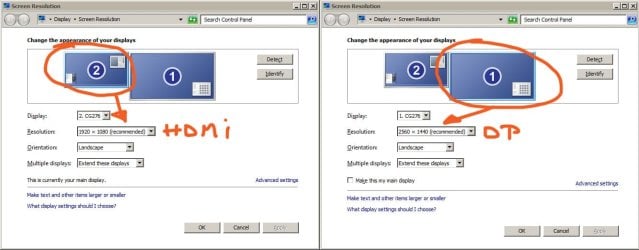
Well, in the meantime I went to the store again, and i got an explanation with something about a bottleneck. That went above my understanding, but... they had me take 2 new cables with me, one HDMI and one Display Port. It is true that on my previous card I used a DVI connection.(which also gave me the correct res) i never tried the HDMI before now.

Now what's happening is when I try the DP cable, I get a black screen and my monitor goes into powersave mode, so doesn't seem to be receiving a signal from it alone. However, when I plugged in both cables i get to choose from what appear to be 2 monitors in my windows resolution settings.(i only have one physical monitor) I don't seem to be able to switch to the DP connected monitor which claims to have the right resolution. but even if i could it would still mean that i would have an imaginary monitor on the side somewhere, which is not practical.

So i'm working on it, but i don't know what i'm doing.
Maybe there is a correct use for this DP cable that i'm not aware of ? Never used this before either.
 

Attachments

  • issue.jpg
    issue.jpg
    90.5 KB · Views: 0

My Computer My Computer

At a glance

win 7 home premiumIntel Core i79700kDDR4 32GBNvidia GeForce 1660 Super
Computer type
PC/Desktop
OS
win 7 home premium
CPU
Intel Core i79700k
Motherboard
Asus Z390-Plus
Memory
DDR4 32GB
Graphics Card(s)
Nvidia GeForce 1660 Super
Hard Drives
Samsung 250GB SSD
Antivirus
Free BitDefender
Browser
Firefox
Well, in the meantime I went to the store again, and i got an explanation with something about a bottleneck. That went above my understanding,
Never used this before either.

Maybe they mean a GPU bottleneck. If you operate a monitor at a higher resolution, it will demand a higher bandwidth to transmit all the pixels per second. But your GPU should be more than capable with that. Does the monitor support GSync or FreeSync?

Maybe there is a correct use for this DP cable that i'm not aware of ?
If you are not getting a signal from the monitor, then maybe the cable is too long. Do you use a cable splitter or a KVM switch, between the monitor and computer?
 

My Computer My Computer

At a glance

Windows 7 x64, Vista x64, 8.1 smartphoneIntel E8400 65W 64-bitDDR2 2 x 2GB, 1GB x 2XFX Radeon HD5750
Computer type
PC/Desktop
OS
Windows 7 x64, Vista x64, 8.1 smartphone
CPU
Intel E8400 65W 64-bit
Motherboard
Gigabyte EP45-UD3LR
Memory
DDR2 2 x 2GB, 1GB x 2
Graphics Card(s)
XFX Radeon HD5750
Sound Card
AMD High Definition Audio; Realtek High Definition Audio
Monitor(s) Displays
iiyama prolite X2377HDS
Screen Resolution
1920 x 1080
Hard Drives
500GB 7200 rpm Seagate ST3500413AS 16MB, 500GB 5400 rpm Toshiba MQ02ABF050H 32MB, 200GB 7200 rpm Seagate ST3200820AS 8MB, 2TB 7200 rpm Western Digital WD20EZRX 64MB
PSU
Enermax Liberty Modular
Case
Antec P193 Midi Tower
Keyboard
Mionix ZIBAL 60
Mouse
Razer USB 2.0 Diamondback Mouse or Huion Graphics Tablet
Browser
Internet Explorer, Lunascape, Firefox, Opera, Avast Safezone

My Computer My Computer

At a glance

W7 home premium 32bit/W7HP 64bit/w10 tp insid...E5300 dual core3gbNvidia Geforce 7100 Nforce 630i
Computer type
PC/Desktop
Computer Manufacturer/Model Number
medionl/Aspire 6930G/acer x55a
OS
W7 home premium 32bit/W7HP 64bit/w10 tp insider ring
CPU
E5300 dual core
Motherboard
medion MS7366
Memory
3gb
Graphics Card(s)
Nvidia Geforce 7100 Nforce 630i
Monitor(s) Displays
avixc
Internet Speed
n (isp resticted to 72)
Antivirus
mse/pands
Browser
palemoon
Other Info
Belkin Fd7050 n USB using Railink RT2870 drivers, more upto date
iko22 you were right that the screens hdmi didnt support the native res. I switched videocards to one with a dvi port.
So that issue has been resolved, i can now also use DP.

But a new issue has arrived when i changed the motherboard and cpu, now my devices arent recognized as bootable devices in the bios, so i guess my MBR is lost. But i think i'd have to start a new topic elsewhere for that.
 

My Computer My Computer

At a glance

win 7 home premiumIntel Core i79700kDDR4 32GBNvidia GeForce 1660 Super
Computer type
PC/Desktop
OS
win 7 home premium
CPU
Intel Core i79700k
Motherboard
Asus Z390-Plus
Memory
DDR4 32GB
Graphics Card(s)
Nvidia GeForce 1660 Super
Hard Drives
Samsung 250GB SSD
Antivirus
Free BitDefender
Browser
Firefox
Yes, if you want to post a new question, then feel free to start a new thread in the appropriate forum.

Glad to hear your issue has been resolved. :-)
 

My Computer My Computer

At a glance

Windows 7 x64, Vista x64, 8.1 smartphoneIntel E8400 65W 64-bitDDR2 2 x 2GB, 1GB x 2XFX Radeon HD5750
Computer type
PC/Desktop
OS
Windows 7 x64, Vista x64, 8.1 smartphone
CPU
Intel E8400 65W 64-bit
Motherboard
Gigabyte EP45-UD3LR
Memory
DDR2 2 x 2GB, 1GB x 2
Graphics Card(s)
XFX Radeon HD5750
Sound Card
AMD High Definition Audio; Realtek High Definition Audio
Monitor(s) Displays
iiyama prolite X2377HDS
Screen Resolution
1920 x 1080
Hard Drives
500GB 7200 rpm Seagate ST3500413AS 16MB, 500GB 5400 rpm Toshiba MQ02ABF050H 32MB, 200GB 7200 rpm Seagate ST3200820AS 8MB, 2TB 7200 rpm Western Digital WD20EZRX 64MB
PSU
Enermax Liberty Modular
Case
Antec P193 Midi Tower
Keyboard
Mionix ZIBAL 60
Mouse
Razer USB 2.0 Diamondback Mouse or Huion Graphics Tablet
Browser
Internet Explorer, Lunascape, Firefox, Opera, Avast Safezone
Back
Top