Can't use WAN and LAN at same time on desktop

JSBadger

New member
Local time
8:15 AM
Messages
7
Hi,

Here's the situation. In my recording studio I have my wireless adapter running over a wireless network for the internet on one router. I have a second router running the remote control for my studio equipment. They are two separate networks, but my desktop computer disables which ever adapter I am NOT using.

I need to be able to run both my wired adapter and my wireless adapter at the same time.

How do I go about achieving this? Why don't they run independently?

Thanks

Jeff Badger
 

My Computer My Computer

At a glance

Windows 7 Ultimate 64 biti7-3770K2 X 4GB Viper Extreme 1600MHzGigabyte GeForce GTX 750
Computer type
PC/Desktop
Computer Manufacturer/Model Number
Custom Built
OS
Windows 7 Ultimate 64 bit
CPU
i7-3770K
Motherboard
Gigabyte GA77X-UD3H
Memory
2 X 4GB Viper Extreme 1600MHz
Graphics Card(s)
Gigabyte GeForce GTX 750
Hard Drives
SanDisk Extreme Pro 240GB
SanDisk Ultra II 120GB
Seagate Barracuda 7200 rpm 1TB
Antivirus
None Specified for security reasons
I have a (Sonar) recording studio. I would NEVER run Wi-Fi when running Sonar. Too many known potential audio issues with Wi-Fi. Even with wired, I disable the NIC when doing a recording session.

I looked at a iPad control surface, one time, for Sonar but it used Wi-Fi and then I would have to be connected to the wireless router, which put it out of the question.

However, you would need two Ethernet controllers, one for the WAN and another for the LAN, to try and accomplish what you want.
 

My Computer My Computer

At a glance

Windows 10 64 bitIntel i7 6700K16GB Corsair DominatorIntel CPU Graphics
Computer type
PC/Desktop
Computer Manufacturer/Model Number
My Own Build
OS
Windows 10 64 bit
CPU
Intel i7 6700K
Motherboard
ASUS ROG Maximus VIII Hero
Memory
16GB Corsair Dominator
Graphics Card(s)
Intel CPU Graphics
Sound Card
RealTek
Monitor(s) Displays
27" Dell S2719dgf
Screen Resolution
2560X1440
Hard Drives
1 TB Samsung 850 EVO SSD for Win 10 Pro
500GB Samsung 850 EVO SSD for Win 10 Insider
2 TB drive for backup
PSU
EVGA Supernova 750G2
Case
BeQuiet Silent Base 600
Cooling
Deepcool Captain 120EX
Keyboard
Microsoft Wireless 2000
Mouse
Microsoft wireless
Internet Speed
100 MB/sec (Cable)
Antivirus
Microsoft Defender and Malwarebytes
Browser
Edge/Firefox
Other Info
Cakewalk (Sonar) by BandLab and Studio One 4.1 Pro recording studio software. MOTU 896Mk3 Hybrid recording interface, Frontier Tranzport wireless control unit, Behringer X-Touch Control Surface.
Five USB connected optical drives for CD Audio production using Nero BurningROM
HI Fireberd,

I do have two separate adapters. I myself run BOTH Sonar and Studio One. Having been a Sonar user since the original Cakewalk series, I was surprised to find out how much I like Studio One Professional 2.6.5 (3.0 not being so good yet, until they get the bugs out). The remote capabilties are incredible compared to Sonar (Your right about using both with Sonar. It DOES NOT LIKE dual networks), and the physical integration between my mixer and computer is seamless with S1.

There has to be a way to be able to send data over the internet over the wireless card network, and run the remote services of the system over the wired network (which is actually running N300 wireless through router to hardwired NIC). The wireless adapter card (Linksys WUSB 630) is connected to an Linksys/Cisco AC1900 Router to the internet, and the wired adaptor card (Artheros Gigabit MOBO NIC) is hardwired to an D-Link N300 Router then using the wireless for remote control.

Part of my mobile recording rig is a 10 Disk Duplicator I recently purchased. I need to be able to send the 24 channel capture files from my mixing console to the studio, at the end of the first night, so the engineer can finalize a master mix. I can then receive the file anytime the next day, and sell CD's before the end of the last night.

This is why it is important to have these two networks running independently of each other.

Thanks

J. S. Badger
 

My Computer My Computer

At a glance

Windows 7 Ultimate 64 biti7-3770K2 X 4GB Viper Extreme 1600MHzGigabyte GeForce GTX 750
Computer type
PC/Desktop
Computer Manufacturer/Model Number
Custom Built
OS
Windows 7 Ultimate 64 bit
CPU
i7-3770K
Motherboard
Gigabyte GA77X-UD3H
Memory
2 X 4GB Viper Extreme 1600MHz
Graphics Card(s)
Gigabyte GeForce GTX 750
Hard Drives
SanDisk Extreme Pro 240GB
SanDisk Ultra II 120GB
Seagate Barracuda 7200 rpm 1TB
Antivirus
None Specified for security reasons
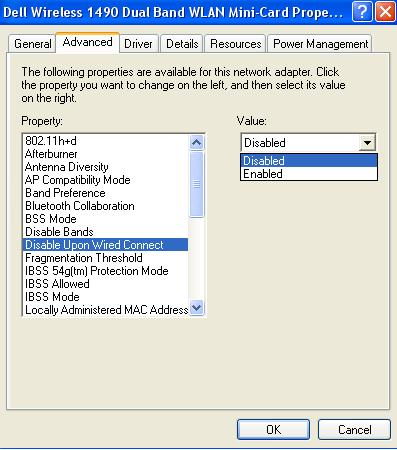
Does your wireless network adapter have this feature:

Disable Upon Wired Connect

3.jpg
 

My Computer My Computer

At a glance

W7 Pro SP1 64biti78GBIntel HD Graphics
Computer type
Laptop
Computer Manufacturer/Model Number
Employer provided Dell Latitude
OS
W7 Pro SP1 64bit
CPU
i7
Memory
8GB
Graphics Card(s)
Intel HD Graphics
Hard Drives
crappy SSD
Antivirus
Employer mandated Symantec Endpoint Protection
Browser
Pale Moon 64bit, IE11 64bit & Chrome 64bit
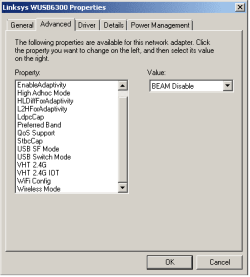
No It Doesn't have any option like that. I will include a screenshot of what I do have though. (only option above in menu is "BeamCap")

I have tried just about everything and no one seems to be able to come up with an answer for this.

I would have thought this would be simple, but I guess it's not.

Thanks
 

Attachments

  • Adaptor Properties.png
    Adaptor Properties.png
    4.5 KB · Views: 11

My Computer My Computer

At a glance

Windows 7 Ultimate 64 biti7-3770K2 X 4GB Viper Extreme 1600MHzGigabyte GeForce GTX 750
Computer type
PC/Desktop
Computer Manufacturer/Model Number
Custom Built
OS
Windows 7 Ultimate 64 bit
CPU
i7-3770K
Motherboard
Gigabyte GA77X-UD3H
Memory
2 X 4GB Viper Extreme 1600MHz
Graphics Card(s)
Gigabyte GeForce GTX 750
Hard Drives
SanDisk Extreme Pro 240GB
SanDisk Ultra II 120GB
Seagate Barracuda 7200 rpm 1TB
Antivirus
None Specified for security reasons
I think you'll probably find that your wireless connection has no gateway when connected to the wired network. I tried setting static ip's and gateways to use my wired router for LAN and wifi by each computer for internet, but never could get both to work at the same time.
 

My Computer My Computer

At a glance

Windows 7 Professional 32 bit and 64 bitAMD A-6 / Intel i74 gigs / 8 gigsRaedon HD / NVIDIA GeForce 740M (Intel HD 460...
Computer type
Laptop
Computer Manufacturer/Model Number
Toshiba L755D-S5204 (32 bit) / Toshiba L70-ABT3N22 (64 bit)
OS
Windows 7 Professional 32 bit and 64 bit
CPU
AMD A-6 / Intel i7
Memory
4 gigs / 8 gigs
Graphics Card(s)
Raedon HD / NVIDIA GeForce 740M (Intel HD 4600 onboard)
Other Info
Intel NUC5i5RYH - 16 GB RAM, 250 GB Samsung m2 SSD, 7 Pro x64, Intel HD 6000 onboard graphics, Realtek onboard audio, integrated wireless. Running this and laptops through Toshiba Dynadock for external monitor and 5.1 speakers.

IntelNUC5i3RYH added.
Back
Top