Solved CBS file and sfc

I'm sorry I thought I posted this but didn't it finished shortly after that post. Here's what I got (attached)
 

Attachments

  • Windows Update.PNG
    Windows Update.PNG
    28.3 KB · Views: 0

My Computer My Computer

At a glance

Windows 7 Home Premium 64-biti7-2600kCorsair Vengence 8GBEVGA GTX 570 HD
Computer type
PC/Desktop
OS
Windows 7 Home Premium 64-bit
CPU
i7-2600k
Motherboard
ASUS P8P67 Deluxe
Memory
Corsair Vengence 8GB
Graphics Card(s)
EVGA GTX 570 HD
Hard Drives
120 SSD
1 TB HDD
500 GB HDD
PSU
Corsair Gaming GS800
Case
HAF X
Cooling
Corsair H70
That shows that your update settings are NOT turned on, click on the
change settings option,
then select your preference, from the options.

Roy
 

My Computer My Computer

At a glance

W7 home premium 32bit/W7HP 64bit/w10 tp insid...E5300 dual core3gbNvidia Geforce 7100 Nforce 630i
Computer type
PC/Desktop
Computer Manufacturer/Model Number
medionl/Aspire 6930G/acer x55a
OS
W7 home premium 32bit/W7HP 64bit/w10 tp insider ring
CPU
E5300 dual core
Motherboard
medion MS7366
Memory
3gb
Graphics Card(s)
Nvidia Geforce 7100 Nforce 630i
Monitor(s) Displays
avixc
Internet Speed
n (isp resticted to 72)
Antivirus
mse/pands
Browser
palemoon
Other Info
Belkin Fd7050 n USB using Railink RT2870 drivers, more upto date
I do have my preference.

TY
 

Attachments

  • WU Settings.PNG
    WU Settings.PNG
    14.7 KB · Views: 0

My Computer My Computer

At a glance

Windows 7 Home Premium 64-biti7-2600kCorsair Vengence 8GBEVGA GTX 570 HD
Computer type
PC/Desktop
OS
Windows 7 Home Premium 64-bit
CPU
i7-2600k
Motherboard
ASUS P8P67 Deluxe
Memory
Corsair Vengence 8GB
Graphics Card(s)
EVGA GTX 570 HD
Hard Drives
120 SSD
1 TB HDD
500 GB HDD
PSU
Corsair Gaming GS800
Case
HAF X
Cooling
Corsair H70
forgot it was a re-install, right those settings will kick in automatic updates the next time you Reboot unless your awake at 3 o'clock in the morning.

Roy
 

My Computer My Computer

At a glance

W7 home premium 32bit/W7HP 64bit/w10 tp insid...E5300 dual core3gbNvidia Geforce 7100 Nforce 630i
Computer type
PC/Desktop
Computer Manufacturer/Model Number
medionl/Aspire 6930G/acer x55a
OS
W7 home premium 32bit/W7HP 64bit/w10 tp insider ring
CPU
E5300 dual core
Motherboard
medion MS7366
Memory
3gb
Graphics Card(s)
Nvidia Geforce 7100 Nforce 630i
Monitor(s) Displays
avixc
Internet Speed
n (isp resticted to 72)
Antivirus
mse/pands
Browser
palemoon
Other Info
Belkin Fd7050 n USB using Railink RT2870 drivers, more upto date
I am under the assumption this is a lost cause. Based on that, is there a way to know what updates are needed and install them manually? Or, should I avoid this headache and upgrade to Win 10? Is it even worth the upgrade and is an issue to have 10 install over 7 or is a clean install of 10 possible?

thx again
 

My Computer My Computer

At a glance

Windows 7 Home Premium 64-biti7-2600kCorsair Vengence 8GBEVGA GTX 570 HD
Computer type
PC/Desktop
OS
Windows 7 Home Premium 64-bit
CPU
i7-2600k
Motherboard
ASUS P8P67 Deluxe
Memory
Corsair Vengence 8GB
Graphics Card(s)
EVGA GTX 570 HD
Hard Drives
120 SSD
1 TB HDD
500 GB HDD
PSU
Corsair Gaming GS800
Case
HAF X
Cooling
Corsair H70
Yes, hadn't heard from anyone. Does that mean no one knows how to help me or is this issue suppose to be solved?

Thank you
 

My Computer My Computer

At a glance

Windows 7 Home Premium 64-biti7-2600kCorsair Vengence 8GBEVGA GTX 570 HD
Computer type
PC/Desktop
OS
Windows 7 Home Premium 64-bit
CPU
i7-2600k
Motherboard
ASUS P8P67 Deluxe
Memory
Corsair Vengence 8GB
Graphics Card(s)
EVGA GTX 570 HD
Hard Drives
120 SSD
1 TB HDD
500 GB HDD
PSU
Corsair Gaming GS800
Case
HAF X
Cooling
Corsair H70
What exactly is the issue?

Click change settings and select check for updates but let me decide to install. Search for updates and see what if finds. It should find 150+ important updates.

I am going through the same thing after I upgraded to win7 and have been installing 5-10 updates daily, I should be done in a week or so.
 

My Computer My Computer

At a glance

Windows 7 Home Premium 64Intel T6400 Core 2 Duo4GBIntel 4500MHD
Computer type
Laptop
Computer Manufacturer/Model Number
Toshiba
OS
Windows 7 Home Premium 64
CPU
Intel T6400 Core 2 Duo
Memory
4GB
Graphics Card(s)
Intel 4500MHD
It doesn't find anything, except when I go to shutdown then it has 163. This would be the 3rd time, so I don't install them, because when it installs the last one it ends up hanging, then I'm forced to reinstall. Leaving me with the same issue.

Thx :)
 

My Computer My Computer

At a glance

Windows 7 Home Premium 64-biti7-2600kCorsair Vengence 8GBEVGA GTX 570 HD
Computer type
PC/Desktop
OS
Windows 7 Home Premium 64-bit
CPU
i7-2600k
Motherboard
ASUS P8P67 Deluxe
Memory
Corsair Vengence 8GB
Graphics Card(s)
EVGA GTX 570 HD
Hard Drives
120 SSD
1 TB HDD
500 GB HDD
PSU
Corsair Gaming GS800
Case
HAF X
Cooling
Corsair H70
So much for senior members and guru's.
 

My Computer My Computer

At a glance

Windows 7 Home Premium 64-biti7-2600kCorsair Vengence 8GBEVGA GTX 570 HD
Computer type
PC/Desktop
OS
Windows 7 Home Premium 64-bit
CPU
i7-2600k
Motherboard
ASUS P8P67 Deluxe
Memory
Corsair Vengence 8GB
Graphics Card(s)
EVGA GTX 570 HD
Hard Drives
120 SSD
1 TB HDD
500 GB HDD
PSU
Corsair Gaming GS800
Case
HAF X
Cooling
Corsair H70
I don't understand. You check for updates, it searches for x hours, it ends, finds zero updates?

Then when you shut down, it starts installing 163 updates by itself and fails?
 

My Computer My Computer

At a glance

Windows 7 Home Premium 64Intel T6400 Core 2 Duo4GBIntel 4500MHD
Computer type
Laptop
Computer Manufacturer/Model Number
Toshiba
OS
Windows 7 Home Premium 64
CPU
Intel T6400 Core 2 Duo
Memory
4GB
Graphics Card(s)
Intel 4500MHD
I'm on my 4th re-install since 6/10/16. The reason being, when I closed there were 163 updates available, once it finished it would revert back and hang for 30 +. At which point I would be pretty much re-install. It has yet to show I have any updates, so here I sit. Needles to say I can't install anything.

I was trying to upgrade to 10, it won't even do that.

TYVM :)
 

My Computer My Computer

At a glance

Windows 7 Home Premium 64-biti7-2600kCorsair Vengence 8GBEVGA GTX 570 HD
Computer type
PC/Desktop
OS
Windows 7 Home Premium 64-bit
CPU
i7-2600k
Motherboard
ASUS P8P67 Deluxe
Memory
Corsair Vengence 8GB
Graphics Card(s)
EVGA GTX 570 HD
Hard Drives
120 SSD
1 TB HDD
500 GB HDD
PSU
Corsair Gaming GS800
Case
HAF X
Cooling
Corsair H70
Hi GRB,
STOP re-installing.
Otherwise we will never be able to find out why your updates are failing, one of which will be Service pack 1, which is a requirement for the W10 upgrade.....

RERUN
KB971033

Then run this
Download System Update Readiness Tool for Windows 7 for x64-based Systems (KB947821) [October 2014] from Official Microsoft Download Center

REBOOT

When they are finished please copy/post the results from the CBS logs, it will be shown as SURT.

And a copy of (1 days)
Your windowsUpdate log which should show an error code and should point us in the right direction to resolve the problem.

>> IF you want to move to W10 DIRECTLY <<
follow this link from our sister W10 site

Clean Install Windows 10 Directly without having to Upgrade First - Windows 10 Forums

What you NEVER told us is how you re-installed W7, it might be that the install media is corrupt and causing the problem.

Roy
 

My Computer My Computer

At a glance

W7 home premium 32bit/W7HP 64bit/w10 tp insid...E5300 dual core3gbNvidia Geforce 7100 Nforce 630i
Computer type
PC/Desktop
Computer Manufacturer/Model Number
medionl/Aspire 6930G/acer x55a
OS
W7 home premium 32bit/W7HP 64bit/w10 tp insider ring
CPU
E5300 dual core
Motherboard
medion MS7366
Memory
3gb
Graphics Card(s)
Nvidia Geforce 7100 Nforce 630i
Monitor(s) Displays
avixc
Internet Speed
n (isp resticted to 72)
Antivirus
mse/pands
Browser
palemoon
Other Info
Belkin Fd7050 n USB using Railink RT2870 drivers, more upto date
Here is my CBS.zip.

TYVM :)
 
Last edited:

My Computer My Computer

At a glance

Windows 7 Home Premium 64-biti7-2600kCorsair Vengence 8GBEVGA GTX 570 HD
Computer type
PC/Desktop
OS
Windows 7 Home Premium 64-bit
CPU
i7-2600k
Motherboard
ASUS P8P67 Deluxe
Memory
Corsair Vengence 8GB
Graphics Card(s)
EVGA GTX 570 HD
Hard Drives
120 SSD
1 TB HDD
500 GB HDD
PSU
Corsair Gaming GS800
Case
HAF X
Cooling
Corsair H70
Attaching again...

The WindowsUpdate log was over 1MB so I had to cut some of the logs. Hopefully you have enough to evaluate what's going on. Thanks in advance!
 

Attachments

My Computer My Computer

At a glance

Windows 7 Home Premium 64-biti7-2600kCorsair Vengence 8GBEVGA GTX 570 HD
Computer type
PC/Desktop
OS
Windows 7 Home Premium 64-bit
CPU
i7-2600k
Motherboard
ASUS P8P67 Deluxe
Memory
Corsair Vengence 8GB
Graphics Card(s)
EVGA GTX 570 HD
Hard Drives
120 SSD
1 TB HDD
500 GB HDD
PSU
Corsair Gaming GS800
Case
HAF X
Cooling
Corsair H70
Hi GRB,

IN the following order can you

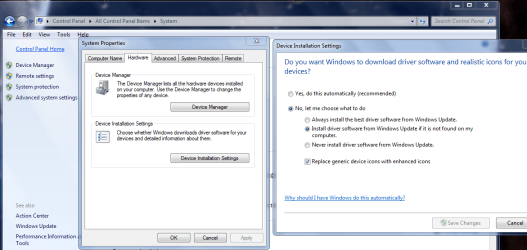
TURN OFF WU DRIVERS,
(control panel >>System>>Advanced system settings >>Hardware >>Device installation settings >>
NO >> NEVER >> THEN HIT THE SAVE OPTIONS TAB.)
see screenshot.

Run KB971033

Change your Windows update settings to >> Download but let me choose.

REBOOT

Then run this MS fixit
Troubleshoot problems with installing updates - Windows Help

Then try the oldest dated Windows Update from the downloaded list.
does it install, if so download the remaining in batches of 5-10 (leave NETframework ones till last.

Please can you tell me what AV your using, and WHERE you got your W7 install discs.

Roy
 

Attachments

  • wudoff.PNG
    wudoff.PNG
    65.5 KB · Views: 1

My Computer My Computer

At a glance

W7 home premium 32bit/W7HP 64bit/w10 tp insid...E5300 dual core3gbNvidia Geforce 7100 Nforce 630i
Computer type
PC/Desktop
Computer Manufacturer/Model Number
medionl/Aspire 6930G/acer x55a
OS
W7 home premium 32bit/W7HP 64bit/w10 tp insider ring
CPU
E5300 dual core
Motherboard
medion MS7366
Memory
3gb
Graphics Card(s)
Nvidia Geforce 7100 Nforce 630i
Monitor(s) Displays
avixc
Internet Speed
n (isp resticted to 72)
Antivirus
mse/pands
Browser
palemoon
Other Info
Belkin Fd7050 n USB using Railink RT2870 drivers, more upto date
I was playing solitaire, and all of a sudden I get a message to install updates, 185 of them. It installed all but 1, attached is the error I got. Thanks you so much for all your help and thx everyone else for their help. Does 185 updates sound like what I should have? Let me know if anything else, if not I'll mark as solved.

Thx again I appreciate it
 

Attachments

  • WindowsUpdate Error 6-23-16.JPG
    WindowsUpdate Error 6-23-16.JPG
    53.5 KB · Views: 0

My Computer My Computer

At a glance

Windows 7 Home Premium 64-biti7-2600kCorsair Vengence 8GBEVGA GTX 570 HD
Computer type
PC/Desktop
OS
Windows 7 Home Premium 64-bit
CPU
i7-2600k
Motherboard
ASUS P8P67 Deluxe
Memory
Corsair Vengence 8GB
Graphics Card(s)
EVGA GTX 570 HD
Hard Drives
120 SSD
1 TB HDD
500 GB HDD
PSU
Corsair Gaming GS800
Case
HAF X
Cooling
Corsair H70
Back
Top