Solved DISM and sfc /scannow

debodun

New member
It's been so long since I ran a scannow, I looked for instructions online. Some advice was conflicting and some suggested running a DISM first. Others reported trouble with the DISM in Windows 7. I never heard of DISM until today.

Some said just type scf /scannow in the START search window. Others say "Run as administrator" must be enabled.

Help an old lady here! :(
 

My Computer

Computer type
PC/Desktop
Computer Manufacturer/Model Number
refurb in an HP/Compaq case
OS
Windows 7 Ultimate x64
CPU
1.86 GHz Intrel Core 2
Motherboard
HP 0A60h XU1
Memory
3 GB Dual Channel DDR2 @ 3.32 MHz
Graphics Card(s)
Intel Q965/Q963 Express chipset
Monitor(s) Displays
Dell CRT
Hard Drives
977GB Samsung HD 103 SI ATA
Case
HP Compaq DC5800
Mouse
wired optical
Antivirus
Microsoft Security Essentials, MalwareBytes, Spyware Blaster
Browser
Firefox 32-bit
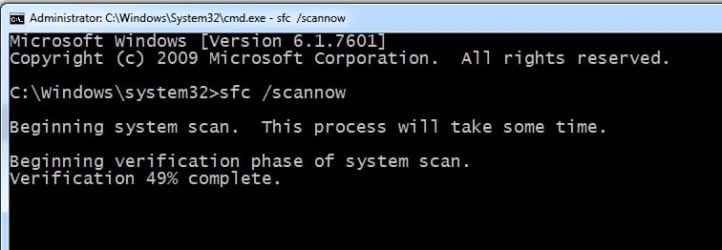
open cmd window as admin then run it

sfc-scannow.jpg
 

My Computers

System One System Two

  • Computer type
    PC/Desktop
    OS
    7 X64
    CPU
    i5 8400
    Motherboard
    gigabyte b365m ds3h
    Memory
    2x8gb 3200mhz
    Hard Drives
    various
    PSU
    pure power 11 400w cm
    Case
    Coolermaster
    Cooling
    cryorig m9i
  • Computer type
    PC/Desktop
    OS
    7x64
    CPU
    g5400
    Motherboard
    ga b365m ds3h
    Memory
    8gb ddr4 2400
    PSU
    xfx pro 450w
It's been so long since I ran a scannow, I looked for instructions online. Some advice was conflicting and some suggested running a DISM first. Others reported trouble with the DISM in Windows 7. I never heard of DISM until today.

Some said just type scf /scannow in the START search window. Others say "Run as administrator" must be enabled.

Help an old lady here! :(

Hello.

Search "Command Prompt" in your Start menu.
When you see a black icon, right click on it and click "Run as the Administrator."
Then, type "sfc /scannow" and click enter. It will automatically start up and fix issues in your system.
 

My Computers

System One System Two

  • Computer type
    PC/Desktop
    Computer Manufacturer/Model Number
    Custom Build
    OS
    Windows XP Media Center Edition 2002 SP3 32bit
    CPU
    Core 2 Quad Q9650 3.00GHz
    Motherboard
    GIGABYTE GA-P35-DS3 Rev 2.0 (Award BIOS version F14)
    Memory
    4GB DDR2
    Graphics Card(s)
    SAPPHRIE ATI HD 3870 GDDR4
    Sound Card
    Creative Sound Blaster Audigy SB0090
    Monitor(s) Displays
    Sony SDM-HS75 17'' 75Hz VGA LCD Monitor
    Screen Resolution
    1280x1024 72Hz
    Hard Drives
    36GB Western Digital WDC360ADFD Raptor 10k RPM Mechanical Hard Disk (OS DRIVE)
    1TB Western Digital WDC10EARS 5400RPM Mechanical Hard Disk
    PSU
    Be Quiet! 700W ATX PSU
    Case
    Extrema Unknown Model
    Cooling
    Scythe Samurai Z LGA775 Cooler
    Keyboard
    Microsoft Wireless Keyboard 3000
    Mouse
    Microsoft Wheel Mouse Optical USB-PS/2 Compatible (BLACK)
    Internet Speed
    200Mbit/s FTTH (COSMOTE Fiber Plan)
    Antivirus
    Common Sense
    Browser
    Firefox
    Other Info
    Additional Expansions:

    Sweex/MosChip MCS98xx ECP Parallel PCI Card
    Creative SoundBlaster Audigy SB0090 Sound Card
    MosChip MCS9865 2x RS-232 Serial PCI Card

    Disk Drives:

    Sony OptiArc AD-5240S DVD-RW (SATA)
    Sony MPF920 Floppy Diskette Drive (Manufactured Jun. 2007)
  • Computer type
    Laptop
    System Manufacturer/Model Number
    HP Compaq 6710b
    OS
    Windows XP Professional 32bit SP3
    CPU
    Intel Core 2 Duo T7500 2.20GHz
    Motherboard
    HP Stock
    Memory
    Hynix 4GB DDR2
    Graphics Card(s)
    Mobile Intel Express 965 Chipset Graphics
    Sound Card
    SoundMAX Intergrated Digital HD Audio
    Monitor(s) Displays
    HP LCD Panel
    Screen Resolution
    1280x800
    Hard Drives
    500GB CRUCIAL BX500 SSD SATA
    PSU
    HP ED465AA AC Adapter + Stock HP Battery
    Case
    Stock
    Cooling
    Stock
    Keyboard
    Aftermarket, Replaced
    Mouse
    Microsoft Optical Mouse USB (with PS/2 Adapter)
    Internet Speed
    5-50 Megabits/sec. (Wi-Fi FTTH)
    Browser
    Firefox
    Antivirus
    None
    Other Info
    With a Genuine Docking Station.
DISM wasn't designed for W7 .... use KB947821 (SURT... System Update Readiness Tool) its it predeccessor
 

My Computer

Computer type
PC/Desktop
Computer Manufacturer/Model Number
medionl/Aspire 6930G/acer x55a
OS
W7 home premium 32bit/W7HP 64bit/w10 tp insider ring
CPU
E5300 dual core
Motherboard
medion MS7366
Memory
3gb
Graphics Card(s)
Nvidia Geforce 7100 Nforce 630i
Monitor(s) Displays
avixc
Internet Speed
n (isp resticted to 72)
Antivirus
mse/pands
Browser
palemoon
Other Info
Belkin Fd7050 n USB using Railink RT2870 drivers, more upto date
Back
Top