Solved CBS Log ,corrupt files

Britton30

R.I.P. 7/09/2014
Guru
VIP
Local time
4:37 PM
Messages
22,813
Location
Mt. Crumpit/Whoville
Windows found files which cannot be repaired. Here's the CBS log. I've run sfc 3 times and rebooted between eaxh one.

Can someone tell me what is corrupted exactly?
View attachment 266636
 

My Computer

Computer type
PC/Desktop
Computer Manufacturer/Model Number
Home Built Desktop By DataTech
OS
Windows 7 Ultimate X64 SP1
CPU
Intel i5-2550K, Differing ~4.4-4.8GHz No built in GPU
Motherboard
ASUS P8Z68-V PRO/GEN3
Memory
16GB G.Skill Sniper 1866MHz @ 2133MHz 2x8GB
Graphics Card(s)
ASUS GTX650TIB-DC2OC-2GD5, (650TI Boost)
Sound Card
Onboard Realtek 5-1
Monitor(s) Displays
Samsung P2570HD
Screen Resolution
1920x1080
Hard Drives
Samsung 840 Pro 256GB SSD for OS, 500GB Seagate Constellation (Enterprise drive) for Data
PSU
Corsair HX650W
Case
Inwin Dragon Rider
Cooling
Hyper 212 EVO w/two Noctua fans, push-pull, @1300 RPM
Keyboard
E-Z Eyes, bright yellow keys with large characters
Mouse
steelseries SENSEI Laser Pro Gaming
Internet Speed
48-51Mbs Mbs down, 11 Mbs up Xfinity Cable
Antivirus
Norton Internet Security 2013
Browser
IE 10, Opera, Pale Moon if needed
Other Info
4 case fans, LG BluRay-RE, ASUS DVD-RW, Mr. Fusion power supply, 1.21 gigawatts.
Hello Garry,

It's show this file below that cannot be repaired.

explorer.exe.mui


Code:
2013-05-03 20:11:21, Info                  CSI    00000315 [SR] Cannot verify component files for 5ca82f28eb0b69ec523faf565328647a, Version = 9.4.8112.16470, pA = PROCESSOR_ARCHITECTURE_AMD64 (9), Culture neutral, VersionScope = 1 nonSxS, PublicKeyToken = {l:8 b:31bf3856ad364e35}, Type neutral, TypeName neutral, PublicKey neutral, manifest is damaged (TRUE)
 
2013-05-03 20:11:21, Info                  CSI    00000317 [SR] Cannot repair member file [l:32{16}]"[B]explorer.exe.mui[/B]" of Microsoft-Windows-explorer.Resources, Version = 6.1.7600.16385, pA = PROCESSOR_ARCHITECTURE_IA32_ON_WIN64 (10), Culture = [l:10{5}]"en-US", VersionScope = 1 nonSxS, PublicKeyToken = {l:8 b:31bf3856ad364e35}, Type neutral, TypeName neutral, PublicKey neutral in the store, hash mismatch
 
2013-05-03 20:11:21, Info                  CSI    00000319 [SR] Cannot repair member file [l:32{16}]"[B]explorer.exe.mui[/B]" of Microsoft-Windows-explorer.Resources, Version = 6.1.7600.16385, pA = PROCESSOR_ARCHITECTURE_IA32_ON_WIN64 (10), Culture = [l:10{5}]"en-US", VersionScope = 1 nonSxS, PublicKeyToken = {l:8 b:31bf3856ad364e35}, Type neutral, TypeName neutral, PublicKey neutral in the store, hash mismatch
 
2013-05-03 20:11:21, Info                  CSI    0000031a [SR] This component was referenced by [l:266{133}]"Microsoft-Windows-WindowsFoundation-LanguagePack-Package~31bf3856ad364e35~amd64~en-US~6.1.7601.17514.[B]Windows Foundation Language Pack[/B]"


If you are not having any issues, then I wouldn't worry about it.

If you are, then you could get a clean copy of this file from your installation disc using the method in the tutorial below. It'll also show you how to replace the bad one with this clean one. :)
 

My Computer

Computer type
PC/Desktop
Computer Manufacturer/Model Number
Self built custom
OS
64-bit Windows 11 Pro for Workstations
CPU
Intel i7-8700K OC'd to 5 GHz
Motherboard
ASUS ROG Maximus XI Formula Z390
Memory
64 GB (4x16GB) G.SKILL TridentZ RGB DDR4 3600 MHz
Graphics Card(s)
ASUS ROG-STRIX-GTX1080TI-O11G-GAMING
Sound Card
Integrated
Monitor(s) Displays
2 x Samsung Odyssey G7 27"
Screen Resolution
2560x1440
Hard Drives
1TB Samsung 990 PRO M.2,
4TB Samsung 990 PRO PRO M.2,
TerraMaster F8 SSD Plus NAS
PSU
Seasonic Prime Titanium 850W
Case
Thermaltake Core P3
Cooling
Corsair Hydro H115i
Keyboard
Logitech wireless K800
Mouse
Logitech MX Master 4
Internet Speed
2 Gb/s Download and 100 Mb/s Upload
Antivirus
Malwarebyte Anti-Malware Premium
Browser
Google Chrome
Other Info
Logitech Z625 speaker system,
Logitech BRIO 4K Pro webcam,
HP Color LaserJet Pro MFP M477fdn,
APC SMART-UPS RT 1000 XL - SURT1000XLI,
Galaxy S23 Plus phone
Thanks Shawn, is that one or four files?
I do have an issue that I can't download anything from Skydrive and other sites.
 

My Computer

Computer type
PC/Desktop
Computer Manufacturer/Model Number
Home Built Desktop By DataTech
OS
Windows 7 Ultimate X64 SP1
CPU
Intel i5-2550K, Differing ~4.4-4.8GHz No built in GPU
Motherboard
ASUS P8Z68-V PRO/GEN3
Memory
16GB G.Skill Sniper 1866MHz @ 2133MHz 2x8GB
Graphics Card(s)
ASUS GTX650TIB-DC2OC-2GD5, (650TI Boost)
Sound Card
Onboard Realtek 5-1
Monitor(s) Displays
Samsung P2570HD
Screen Resolution
1920x1080
Hard Drives
Samsung 840 Pro 256GB SSD for OS, 500GB Seagate Constellation (Enterprise drive) for Data
PSU
Corsair HX650W
Case
Inwin Dragon Rider
Cooling
Hyper 212 EVO w/two Noctua fans, push-pull, @1300 RPM
Keyboard
E-Z Eyes, bright yellow keys with large characters
Mouse
steelseries SENSEI Laser Pro Gaming
Internet Speed
48-51Mbs Mbs down, 11 Mbs up Xfinity Cable
Antivirus
Norton Internet Security 2013
Browser
IE 10, Opera, Pale Moon if needed
Other Info
4 case fans, LG BluRay-RE, ASUS DVD-RW, Mr. Fusion power supply, 1.21 gigawatts.

My Computer

Computer Manufacturer/Model Number
HP, Dell, Gateway, Toshiba - 4 laptops and 2 desktops
OS
Vista, Windows7, Mint Mate, Zorin, Windows 8
CPU
from 1.6GHz Duo to i7
Monitor(s) Displays
2x HP w2207
Hard Drives
5x HDD, 7x SSD, 12x Externals
Keyboard
with trackball - no mices
Mouse
Trackball mice
Internet Speed
DSL 6000
Thanks Shawn, is that one or four files?
I do have an issue that I can't download anything from Skydrive and other sites.

It's just the one file, but I'm not sure it would have anything to do with that issue though.

What AV or firewall program do you have installed?

If it's a 3rd party one, then you might temporarily disable it to see if you are able to download again. If so, then you may need to add them to the program's exception list.
 

My Computer

Computer type
PC/Desktop
Computer Manufacturer/Model Number
Self built custom
OS
64-bit Windows 11 Pro for Workstations
CPU
Intel i7-8700K OC'd to 5 GHz
Motherboard
ASUS ROG Maximus XI Formula Z390
Memory
64 GB (4x16GB) G.SKILL TridentZ RGB DDR4 3600 MHz
Graphics Card(s)
ASUS ROG-STRIX-GTX1080TI-O11G-GAMING
Sound Card
Integrated
Monitor(s) Displays
2 x Samsung Odyssey G7 27"
Screen Resolution
2560x1440
Hard Drives
1TB Samsung 990 PRO M.2,
4TB Samsung 990 PRO PRO M.2,
TerraMaster F8 SSD Plus NAS
PSU
Seasonic Prime Titanium 850W
Case
Thermaltake Core P3
Cooling
Corsair Hydro H115i
Keyboard
Logitech wireless K800
Mouse
Logitech MX Master 4
Internet Speed
2 Gb/s Download and 100 Mb/s Upload
Antivirus
Malwarebyte Anti-Malware Premium
Browser
Google Chrome
Other Info
Logitech Z625 speaker system,
Logitech BRIO 4K Pro webcam,
HP Color LaserJet Pro MFP M477fdn,
APC SMART-UPS RT 1000 XL - SURT1000XLI,
Galaxy S23 Plus phone
I'll try the Startup Repair Wolfgang.
Shawn I have Norton ( :zip: yeah, I know no one likes it) but I don't have a way to allow, say, a Skydrive link.
 

My Computer

Computer type
PC/Desktop
Computer Manufacturer/Model Number
Home Built Desktop By DataTech
OS
Windows 7 Ultimate X64 SP1
CPU
Intel i5-2550K, Differing ~4.4-4.8GHz No built in GPU
Motherboard
ASUS P8Z68-V PRO/GEN3
Memory
16GB G.Skill Sniper 1866MHz @ 2133MHz 2x8GB
Graphics Card(s)
ASUS GTX650TIB-DC2OC-2GD5, (650TI Boost)
Sound Card
Onboard Realtek 5-1
Monitor(s) Displays
Samsung P2570HD
Screen Resolution
1920x1080
Hard Drives
Samsung 840 Pro 256GB SSD for OS, 500GB Seagate Constellation (Enterprise drive) for Data
PSU
Corsair HX650W
Case
Inwin Dragon Rider
Cooling
Hyper 212 EVO w/two Noctua fans, push-pull, @1300 RPM
Keyboard
E-Z Eyes, bright yellow keys with large characters
Mouse
steelseries SENSEI Laser Pro Gaming
Internet Speed
48-51Mbs Mbs down, 11 Mbs up Xfinity Cable
Antivirus
Norton Internet Security 2013
Browser
IE 10, Opera, Pale Moon if needed
Other Info
4 case fans, LG BluRay-RE, ASUS DVD-RW, Mr. Fusion power supply, 1.21 gigawatts.
If you disable or uninstall Norton, does everything work properly?
 

My Computer

Computer type
PC/Desktop
Computer Manufacturer/Model Number
Self built custom
OS
64-bit Windows 11 Pro for Workstations
CPU
Intel i7-8700K OC'd to 5 GHz
Motherboard
ASUS ROG Maximus XI Formula Z390
Memory
64 GB (4x16GB) G.SKILL TridentZ RGB DDR4 3600 MHz
Graphics Card(s)
ASUS ROG-STRIX-GTX1080TI-O11G-GAMING
Sound Card
Integrated
Monitor(s) Displays
2 x Samsung Odyssey G7 27"
Screen Resolution
2560x1440
Hard Drives
1TB Samsung 990 PRO M.2,
4TB Samsung 990 PRO PRO M.2,
TerraMaster F8 SSD Plus NAS
PSU
Seasonic Prime Titanium 850W
Case
Thermaltake Core P3
Cooling
Corsair Hydro H115i
Keyboard
Logitech wireless K800
Mouse
Logitech MX Master 4
Internet Speed
2 Gb/s Download and 100 Mb/s Upload
Antivirus
Malwarebyte Anti-Malware Premium
Browser
Google Chrome
Other Info
Logitech Z625 speaker system,
Logitech BRIO 4K Pro webcam,
HP Color LaserJet Pro MFP M477fdn,
APC SMART-UPS RT 1000 XL - SURT1000XLI,
Galaxy S23 Plus phone
Disabling didn't help with the Skydrive. Still have to try the startup repair.
 

My Computer

Computer type
PC/Desktop
Computer Manufacturer/Model Number
Home Built Desktop By DataTech
OS
Windows 7 Ultimate X64 SP1
CPU
Intel i5-2550K, Differing ~4.4-4.8GHz No built in GPU
Motherboard
ASUS P8Z68-V PRO/GEN3
Memory
16GB G.Skill Sniper 1866MHz @ 2133MHz 2x8GB
Graphics Card(s)
ASUS GTX650TIB-DC2OC-2GD5, (650TI Boost)
Sound Card
Onboard Realtek 5-1
Monitor(s) Displays
Samsung P2570HD
Screen Resolution
1920x1080
Hard Drives
Samsung 840 Pro 256GB SSD for OS, 500GB Seagate Constellation (Enterprise drive) for Data
PSU
Corsair HX650W
Case
Inwin Dragon Rider
Cooling
Hyper 212 EVO w/two Noctua fans, push-pull, @1300 RPM
Keyboard
E-Z Eyes, bright yellow keys with large characters
Mouse
steelseries SENSEI Laser Pro Gaming
Internet Speed
48-51Mbs Mbs down, 11 Mbs up Xfinity Cable
Antivirus
Norton Internet Security 2013
Browser
IE 10, Opera, Pale Moon if needed
Other Info
4 case fans, LG BluRay-RE, ASUS DVD-RW, Mr. Fusion power supply, 1.21 gigawatts.
Hi Gary,

Looking at your CBS log, there is one corrupt file:

Code:
2013-05-03 20:11:21, Info                  CSI    00000311 [SR] Repairing 2 components
2013-05-03 20:11:21, Info                  CSI    00000312 [SR] Beginning Verify and Repair transaction
2013-05-03 20:11:21, Info                  CSI    00000313 Manifest hash  for component  [ml:280{140},l:184{92}]"amd64_5ca82f28eb0b69ec523faf565328647a_31bf3856ad364e35_9.4.8112.16470_none_570dbf43600abce5"  does not match expected value. 
 Expected:{l:32 b:41a2d58e1f53da35d2deff85318cc7a5f950e007b0c52626aa151211cb5db07c}
 Found:{l:32 b:3b449f81c553e3972dd31acc7df0ccfa308b1a290a103632c751828372f7ba3e}.
2013-05-03  20:11:21, Info                  CSI    00000314 Unable to load manifest  for component  [ml:280{140},l:184{92}]"amd64_5ca82f28eb0b69ec523faf565328647a_31bf3856ad364e35_9.4.8112.16470_none_570dbf43600abce5"
2013-05-03  20:11:21, Info                  CSI    00000315 [SR] Cannot verify  component files for 5ca82f28eb0b69ec523faf565328647a, Version =  9.4.8112.16470, pA = PROCESSOR_ARCHITECTURE_AMD64 (9), Culture neutral,  VersionScope = 1 nonSxS, PublicKeyToken = {l:8 b:31bf3856ad364e35}, Type  neutral, TypeName neutral, PublicKey neutral, manifest is damaged  (TRUE)
2013-05-03 20:11:21, Info                  CSI    00000316  Hashes for file member  \SystemRoot\WinSxS\wow64_microsoft-windows-explorer.resources_31bf3856ad364e35_6.1.7600.16385_en-us_6c3c2316c1b39396\explorer.exe.mui  do not match actual file [l:32{16}]"explorer.exe.mui" :
  Found: {l:32 b:TMUUp9mvrnY83SGTLucirkp4fJaLq5ccOx0wBEFRz+M=} Expected: {l:32 b:Dj02THUxW5qR3U7HehFKqlQgLmDKILSIheIz7uyXktA=}
2013-05-03  20:11:21, Info                  CSI    00000317 [SR] Cannot repair  member file [l:32{16}]"explorer.exe.mui" of  Microsoft-Windows-explorer.Resources, Version = 6.1.7600.16385, pA =  PROCESSOR_ARCHITECTURE_IA32_ON_WIN64 (10), Culture = [l:10{5}]"en-US",  VersionScope = 1 nonSxS, PublicKeyToken = {l:8 b:31bf3856ad364e35}, Type  neutral, TypeName neutral, PublicKey neutral in the store, hash  mismatch
2013-05-03 20:11:21, Info                  CSI    00000318  Hashes for file member  \SystemRoot\WinSxS\wow64_microsoft-windows-explorer.resources_31bf3856ad364e35_6.1.7600.16385_en-us_6c3c2316c1b39396\explorer.exe.mui  do not match actual file [l:32{16}]"explorer.exe.mui" :
  Found: {l:32 b:TMUUp9mvrnY83SGTLucirkp4fJaLq5ccOx0wBEFRz+M=} Expected: {l:32 b:Dj02THUxW5qR3U7HehFKqlQgLmDKILSIheIz7uyXktA=}
2013-05-03  20:11:21, Info                  CSI    00000319 [SR] Cannot repair  member file [l:32{16}]"explorer.exe.mui" of  Microsoft-Windows-explorer.Resources, Version = 6.1.7600.16385, pA =  PROCESSOR_ARCHITECTURE_IA32_ON_WIN64 (10), Culture = [l:10{5}]"en-US",  VersionScope = 1 nonSxS, PublicKeyToken = {l:8 b:31bf3856ad364e35}, Type  neutral, TypeName neutral, PublicKey neutral in the store, hash  mismatch
2013-05-03 20:11:21, Info                  CSI    0000031a  [SR] This component was referenced by  [l:266{133}]"Microsoft-Windows-WindowsFoundation-LanguagePack-Package~31bf3856ad364e35~amd64~en-US~6.1.7601.17514.Windows  Foundation Language Pack"

Which shows that the file: C:\Windows\en-US\explorer.exe.mui is corrupt but fortunately, the winsxs backup isn't so we can perform the repair with that file:

SFCFix Script

Warning: this fix is specific to the user in this thread. No one else should follow these instructions as it may cause more harm than good. If you are after assistance, please start a thread of your own.


  1. Download SFCFix.exe (by niemiro) and save this to your Desktop.
  2. Download the attached file, SFCFix.txt, and save this to your Desktop. Ensure that this file is named SFCFix.txt - do not rename it.
  3. Save any open documents and close all open windows.
  4. On your Desktop, you should see two files: SFCFix.exe and SFCFix.txt.
  5. Drag the file SFCFix.txt onto the file SFCFix.exe and release it.
  6. SFCFix will now process the script.
  7. Upon completion, a log should be created on your Desktop: SFCFix.txt.
  8. Copy (Ctrl + C) and Paste (Ctrl + V) the contents of this into your next post for me to analyse please - put [CODE][/CODE] tags around the log to break up the text.


Your CBS log is also showing a damaged manifest:

Code:
2013-05-03 20:11:21, Info                  CSI    00000313 Manifest hash  for component  [ml:280{140},l:184{92}]"amd64_5ca82f28eb0b69ec523faf565328647a_31bf3856ad364e35_9.4.8112.16470_none_570dbf43600abce5"  does not match expected value. 
 Expected:{l:32 b:41a2d58e1f53da35d2deff85318cc7a5f950e007b0c52626aa151211cb5db07c}
 Found:{l:32 b:3b449f81c553e3972dd31acc7df0ccfa308b1a290a103632c751828372f7ba3e}.
2013-05-03  20:11:21, Info                  CSI    00000314 Unable to load manifest  for component  [ml:280{140},l:184{92}]"amd64_5ca82f28eb0b69ec523faf565328647a_31bf3856ad364e35_9.4.8112.16470_none_570dbf43600abce5"
2013-05-03  20:11:21, Info                  CSI    00000315 [SR] Cannot verify  component files for 5ca82f28eb0b69ec523faf565328647a, Version =  9.4.8112.16470, pA = PROCESSOR_ARCHITECTURE_AMD64 (9), Culture neutral,  VersionScope = 1 nonSxS, PublicKeyToken = {l:8 b:31bf3856ad364e35}, Type  neutral, TypeName neutral, PublicKey neutral, manifest is damaged  (TRUE)

SFC wasn't able to open the manifest to find the file hashes and threw this error, so this will need repairing. Before we perform this replacement, I would just like to check everything else is in order by running the System Update Readiness Tool:

Download System Update Readiness Tool for Windows 7 for x64-based Systems (KB947821) [February 2013] from Official Microsoft Download Center

It's rare that just one manifest will be damaged but it could happen, it's better to be safe than sorry though. Post the log when it finishes :)

C:\Windows\Logs\CBS\CheckSUR.persist.log

Tom
 

Attachments

My Computer

Computer type
PC/Desktop
Computer Manufacturer/Model Number
Build #1
OS
Windows 8.1 Pro x64
CPU
Intel i7 3770K @4.5GHz
Motherboard
ASUS P8Z77-V PRO
Memory
Corsair Vengeance 2x4GB DDR3 1600MHz Low Profile (White)
Graphics Card(s)
Gigabyte Radeon HD 7850 (2GB GDDR5)
Sound Card
Integrated on motherboard
Monitor(s) Displays
23" LG LCD/LED IPS
Screen Resolution
1920*1080
Hard Drives
Samsung EVO 128GB SSD
Seagate Barracuda 2GB 7200rpm
2x Seagate FreeAgent [500gb]
PSU
Corsair TX650W V2 (80+ Bronze)
Case
NZXT Phantom 410 White
Cooling
Corsair H100 Water Cooler
Keyboard
Microsoft Desktop 2000 Wireless Keyboard
Mouse
Microsoft Desktop 2000 Wireless Mouse
Internet Speed
95 Mb/s Download 70 Mb/s Upload
Antivirus
MSE + MBAM Pro
Browser
Firefox

My Computer

Computer type
PC/Desktop
Computer Manufacturer/Model Number
Home Built Desktop By DataTech
OS
Windows 7 Ultimate X64 SP1
CPU
Intel i5-2550K, Differing ~4.4-4.8GHz No built in GPU
Motherboard
ASUS P8Z68-V PRO/GEN3
Memory
16GB G.Skill Sniper 1866MHz @ 2133MHz 2x8GB
Graphics Card(s)
ASUS GTX650TIB-DC2OC-2GD5, (650TI Boost)
Sound Card
Onboard Realtek 5-1
Monitor(s) Displays
Samsung P2570HD
Screen Resolution
1920x1080
Hard Drives
Samsung 840 Pro 256GB SSD for OS, 500GB Seagate Constellation (Enterprise drive) for Data
PSU
Corsair HX650W
Case
Inwin Dragon Rider
Cooling
Hyper 212 EVO w/two Noctua fans, push-pull, @1300 RPM
Keyboard
E-Z Eyes, bright yellow keys with large characters
Mouse
steelseries SENSEI Laser Pro Gaming
Internet Speed
48-51Mbs Mbs down, 11 Mbs up Xfinity Cable
Antivirus
Norton Internet Security 2013
Browser
IE 10, Opera, Pale Moon if needed
Other Info
4 case fans, LG BluRay-RE, ASUS DVD-RW, Mr. Fusion power supply, 1.21 gigawatts.
Hi Gary,

SFCFix has pended the file for replacement over a reboot:

Code:
SFCFix version 1.4.1.0 by niemiro.
Start time: 2013-05-04 16:28:26.674
Using .txt script file at K:\Users\GlBritton\Desktop\SFCFix.txt


PowerCopy::
Successfully took permissions for file or folder C:\Windows\en-US\explorer.exe.mui

The file \\?\C:\Windows\en-US\explorer.exe.mui is in use and must be replaced over a reboot.
Successfully pended file for replace over reboot: \\?\C:\Windows\en-US\explorer.exe.mui
PowerCopy:: directive completed successfully.


PostRebootRestorePermissions::
Successfully restored ownership for C:\Windows\en-US\explorer.exe.mui
Successfully restored permissions on C:\Windows\en-US\explorer.exe.mui
PostRebootRestorePermissions:: directive completed successfully.


Successfully processed all directives.
SFCFix version 1.4.1.0 by niemiro has completed.
Currently storing 1 datablocks.
Finish time: 2013-05-04 16:30:26.669
----------------------EOF-----------------------

Reboot, run another SFC and post your CBS log please :) With a bit of luck, it should be free from this error now.

As for the manifest error, the SURT detected the same problem as the one outlined in the CBS log, so let's go ahead with a replacement.

Code:
=================================
Checking System Update Readiness.
Binary Version 6.1.7601.21645
Package Version 18.0
2013-05-04 12:42

Checking Windows Servicing Packages

Checking Package Manifests and Catalogs

Checking Package Watchlist

Checking Component Watchlist

Checking Packages

Checking Component Store
(f)    CSI Manifest All Zeros    0x00000000    winsxs\Manifests\amd64_5ca82f28eb0b69ec523faf565328647a_31bf3856ad364e35_9.4.8112.16470_none_570dbf43600abce5.manifest    amd64_5ca82f28eb0b69ec523faf565328647a_31bf3856ad364e35_9.4.8112.16470_none_570dbf43600abce5    

Summary:
Seconds executed: 49
 Found 1 errors
  CSI Manifest All Zeros Total count: 1

Unavailable repair files:
    winsxs\manifests\amd64_5ca82f28eb0b69ec523faf565328647a_31bf3856ad364e35_9.4.8112.16470_none_570dbf43600abce5.manifest

Give me a few minutes to track down the version number :)

Tom
 

My Computer

Computer type
PC/Desktop
Computer Manufacturer/Model Number
Build #1
OS
Windows 8.1 Pro x64
CPU
Intel i7 3770K @4.5GHz
Motherboard
ASUS P8Z77-V PRO
Memory
Corsair Vengeance 2x4GB DDR3 1600MHz Low Profile (White)
Graphics Card(s)
Gigabyte Radeon HD 7850 (2GB GDDR5)
Sound Card
Integrated on motherboard
Monitor(s) Displays
23" LG LCD/LED IPS
Screen Resolution
1920*1080
Hard Drives
Samsung EVO 128GB SSD
Seagate Barracuda 2GB 7200rpm
2x Seagate FreeAgent [500gb]
PSU
Corsair TX650W V2 (80+ Bronze)
Case
NZXT Phantom 410 White
Cooling
Corsair H100 Water Cooler
Keyboard
Microsoft Desktop 2000 Wireless Keyboard
Mouse
Microsoft Desktop 2000 Wireless Mouse
Internet Speed
95 Mb/s Download 70 Mb/s Upload
Antivirus
MSE + MBAM Pro
Browser
Firefox
Hi Gary,

Got it!

Windows Update Package Replacement

Warning: this fix is specific to the user in this thread. No one else should follow these instructions as it may cause more harm than good. If you are after assistance, please start a thread of your own.


  1. Please download the attached file, Packs.zip and save this to your Desktop.
  2. Right-click on the file and select Extract All...
  3. Tick the box labelled Show extracted files when complete then click Extract
  4. A window will open showing two folders, Manifests and Packages
  5. Open the Manifests folder and copy the files into the following folder (if there are any files)

    C:\Windows\Temp\CheckSur\Winsxs\Manifests

  6. Open the Packages folder and copy the files into the following folder (if there are any files)

    C:\Windows\Temp\CheckSur\Servicing\Packages

  7. Run the System Update Readiness Tool (SURT) again
  8. When the SURT finishes installing, copy (Ctrl + C) and paste (Ctrl + V) the contents of the SURT log into your next post please:

    C:\Windows\Logs\CBS\CheckSUR.persist.log


Tom
 

Attachments

My Computer

Computer type
PC/Desktop
Computer Manufacturer/Model Number
Build #1
OS
Windows 8.1 Pro x64
CPU
Intel i7 3770K @4.5GHz
Motherboard
ASUS P8Z77-V PRO
Memory
Corsair Vengeance 2x4GB DDR3 1600MHz Low Profile (White)
Graphics Card(s)
Gigabyte Radeon HD 7850 (2GB GDDR5)
Sound Card
Integrated on motherboard
Monitor(s) Displays
23" LG LCD/LED IPS
Screen Resolution
1920*1080
Hard Drives
Samsung EVO 128GB SSD
Seagate Barracuda 2GB 7200rpm
2x Seagate FreeAgent [500gb]
PSU
Corsair TX650W V2 (80+ Bronze)
Case
NZXT Phantom 410 White
Cooling
Corsair H100 Water Cooler
Keyboard
Microsoft Desktop 2000 Wireless Keyboard
Mouse
Microsoft Desktop 2000 Wireless Mouse
Internet Speed
95 Mb/s Download 70 Mb/s Upload
Antivirus
MSE + MBAM Pro
Browser
Firefox
Here is a new CBS log before I run the Pack files. I had to zip it, the forum said it was too long. This is after a 2nd SURT run, nothing else to see if anything was fixed after a reboot..
View attachment 266832
_______________________________________________________________________________________________________
EDIT
After running the Update Package replacement tool. There was only a file in the Manifests folder in the download and pasted into the C:\Windows\Temp\CheckSur\Winsxs\Manifests folder. SFC still is showing un-fixable files.

View attachment 266837


=================================
Checking System Update Readiness.
Binary Version 6.1.7601.21645
Package Version 18.0
2013-05-05 02:47
Checking Windows Servicing Packages
Checking Package Manifests and Catalogs
Checking Package Watchlist
Checking Component Watchlist
Checking Packages
Checking Component Store
(f) CSI Manifest All Zeros 0x00000000 winsxs\Manifests\amd64_5ca82f28eb0b69ec523faf565328647a_31bf3856ad364e35_9.4.8112.16470_none_570dbf43600abce5.manifest amd64_5ca82f28eb0b69ec523faf565328647a_31bf3856ad364e35_9.4.8112.16470_none_570dbf43600abce5
(fix) CSI Manifest All Zeros CSI File Replaced File: amd64_5ca82f28eb0b69ec523faf565328647a_31bf3856ad364e35_9.4.8112.16470_none_570dbf43600abce5.manifest From: C:\Windows\CheckSur\v1.0\windows6.1-7601-x64-clientcab4.cab
Summary:
Seconds executed: 42
Found 1 errors
Fixed 1 errors
CSI Manifest All Zeros Total count: 1
Fixed: CSI Manifest All Zeros. Total count: 1

=================================
Checking System Update Readiness.
Binary Version 6.1.7601.21645
Package Version 18.0
2013-05-05 03:01
Checking Windows Servicing Packages
Checking Package Manifests and Catalogs
Checking Package Watchlist
Checking Component Watchlist
Checking Packages
Checking Component Store
Summary:
Seconds executed: 46
No errors detected
 
Last edited:

My Computer

Computer type
PC/Desktop
Computer Manufacturer/Model Number
Home Built Desktop By DataTech
OS
Windows 7 Ultimate X64 SP1
CPU
Intel i5-2550K, Differing ~4.4-4.8GHz No built in GPU
Motherboard
ASUS P8Z68-V PRO/GEN3
Memory
16GB G.Skill Sniper 1866MHz @ 2133MHz 2x8GB
Graphics Card(s)
ASUS GTX650TIB-DC2OC-2GD5, (650TI Boost)
Sound Card
Onboard Realtek 5-1
Monitor(s) Displays
Samsung P2570HD
Screen Resolution
1920x1080
Hard Drives
Samsung 840 Pro 256GB SSD for OS, 500GB Seagate Constellation (Enterprise drive) for Data
PSU
Corsair HX650W
Case
Inwin Dragon Rider
Cooling
Hyper 212 EVO w/two Noctua fans, push-pull, @1300 RPM
Keyboard
E-Z Eyes, bright yellow keys with large characters
Mouse
steelseries SENSEI Laser Pro Gaming
Internet Speed
48-51Mbs Mbs down, 11 Mbs up Xfinity Cable
Antivirus
Norton Internet Security 2013
Browser
IE 10, Opera, Pale Moon if needed
Other Info
4 case fans, LG BluRay-RE, ASUS DVD-RW, Mr. Fusion power supply, 1.21 gigawatts.
Hi Gary,

The SURT successfully replaced the corrupt manifest and the CheckSUR log is clean now; the error has also disappeared from the CBS log:

Code:
2013-05-05 01:57:46, Info                  CSI    00000317 Manifest hash for component [ml:280{140},l:184{92}]"amd64_5ca82f28eb0b69ec523faf565328647a_31bf3856ad364e35_9.4.8112.16470_none_570dbf43600abce5" does not match expected value. 
 Expected:{l:32 b:41a2d58e1f53da35d2deff85318cc7a5f950e007b0c52626aa151211cb5db07c}
 Found:{l:32 b:3b449f81c553e3972dd31acc7df0ccfa308b1a290a103632c751828372f7ba3e}.
2013-05-05 01:57:46, Info                  CSI    00000318 Unable to load manifest for component [ml:280{140},l:184{92}]"amd64_5ca82f28eb0b69ec523faf565328647a_31bf3856ad364e35_9.4.8112.16470_none_570dbf43600abce5"
2013-05-05 01:57:46, Info                  CSI    00000319 [SR] Cannot verify component files for 5ca82f28eb0b69ec523faf565328647a, Version = 9.4.8112.16470, pA = PROCESSOR_ARCHITECTURE_AMD64 (9), Culture neutral, VersionScope = 1 nonSxS, PublicKeyToken = {l:8 b:31bf3856ad364e35}, Type neutral, TypeName neutral, PublicKey neutral, manifest is damaged (TRUE)

One problem down, one to go! I'm not quite sure why the SFCFix script didn't work but we can try it another way before resorting to doing this manually:

SFCFix Script

Warning: this fix is specific to the user in this thread. No one else should follow these instructions as it may cause more harm than good. If you are after assistance, please start a thread of your own.


  1. Download SFCFix.exe (by niemiro) and save this to your Desktop.
  2. Download the file below, SFCFix.zip, and save this to your Desktop. Ensure that this file is named SFCFix.zip - do not rename it.
  3. Save any open documents and close all open windows.
  4. On your Desktop, you should see two files: SFCFix.exe and SFCFix.zip.
  5. Drag the file SFCFix.zip onto the file SFCFix.exe and release it.
  6. SFCFix will now process the script.
  7. Upon completion, a files should be created on your Desktop: SFCFix.txt.
  8. Copy (Ctrl + C) and Paste (Ctrl + V) the contents of this file into your next post for me to analyse please - put [CODE][/CODE] tags around the log to break up the text.


https://dl.dropboxusercontent.com/u/16537616/SFCFix/Scripts/Britton30/SFCFix.zip

Tom
 

My Computer

Computer type
PC/Desktop
Computer Manufacturer/Model Number
Build #1
OS
Windows 8.1 Pro x64
CPU
Intel i7 3770K @4.5GHz
Motherboard
ASUS P8Z77-V PRO
Memory
Corsair Vengeance 2x4GB DDR3 1600MHz Low Profile (White)
Graphics Card(s)
Gigabyte Radeon HD 7850 (2GB GDDR5)
Sound Card
Integrated on motherboard
Monitor(s) Displays
23" LG LCD/LED IPS
Screen Resolution
1920*1080
Hard Drives
Samsung EVO 128GB SSD
Seagate Barracuda 2GB 7200rpm
2x Seagate FreeAgent [500gb]
PSU
Corsair TX650W V2 (80+ Bronze)
Case
NZXT Phantom 410 White
Cooling
Corsair H100 Water Cooler
Keyboard
Microsoft Desktop 2000 Wireless Keyboard
Mouse
Microsoft Desktop 2000 Wireless Mouse
Internet Speed
95 Mb/s Download 70 Mb/s Upload
Antivirus
MSE + MBAM Pro
Browser
Firefox
Thanks for helping here Tom, here's the new SFCFix log.

Code:
SFCFix version 1.4.3.0 by niemiro.
Start time: 2013-05-05 14:55:36.316
Using .zip script file at K:\Users\GlBritton\Desktop\SFCFix.zip


PowerCopy::
Successfully took permissions for file or folder C:\Windows\WinSxS\wow64_microsoft-windows-explorer.resources_31bf3856ad364e35_6.1.7600.16385_en-us_6c3c2316c1b39396\explorer.exe.mui
Successfully took permissions for file or folder C:\Windows\en-US\explorer.exe.mui
 
Successfully copied file [URL="file://\\?\C:\Users\GlBritton\AppData\Local\niemiro\Archive\explorer.exe.mui"]\\?\C:\Users\GlBritton\AppData\Local\niemiro\Archive\explorer.exe.mui[/URL] to [URL="file://\\?\C:\Windows\WinSxS\wow64_microsoft-windows-explorer.resources_31bf3856ad364e35_6.1.7600.16385_en-us_6c3c2316c1b39396\explorer.exe.mui"]\\?\C:\Windows\WinSxS\wow64_microsoft-windows-explorer.resources_31bf3856ad364e35_6.1.7600.16385_en-us_6c3c2316c1b39396\explorer.exe.mui[/URL].
Successfully copied file [URL="file://\\?\C:\Users\GlBritton\AppData\Local\niemiro\Archive\explorer.exe.mui"]\\?\C:\Users\GlBritton\AppData\Local\niemiro\Archive\explorer.exe.mui[/URL] to [URL="file://\\?\C:\Windows\en-US\explorer.exe.mui"]\\?\C:\Windows\en-US\explorer.exe.mui[/URL].
 
 
Successfully restored ownership for C:\Windows\WinSxS\wow64_microsoft-windows-explorer.resources_31bf3856ad364e35_6.1.7600.16385_en-us_6c3c2316c1b39396\explorer.exe.mui
Successfully restored permissions on C:\Windows\WinSxS\wow64_microsoft-windows-explorer.resources_31bf3856ad364e35_6.1.7600.16385_en-us_6c3c2316c1b39396\explorer.exe.mui
Successfully restored ownership for C:\Windows\en-US\explorer.exe.mui
Successfully restored permissions on C:\Windows\en-US\explorer.exe.mui
PowerCopy:: directive completed successfully.


Successfully processed all directives.
SFCFix version 1.4.3.0 by niemiro has completed.
Currently storing 2 datablocks.
Finish time: 2013-05-05 14:55:36.394

_______________________________________________________________________________________________________

WOOHOO!

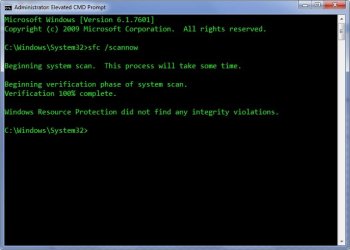
The last round of SFCFix has worked like a charm Tom! I don't know squat about how you do what you do, but I am certainly grateful for the help. Thanks to Brink and Wolfgang for their input too.
SFC.jpg

The first pint's on me buddy.

beers.jpg
 
Last edited:

My Computer

Computer type
PC/Desktop
Computer Manufacturer/Model Number
Home Built Desktop By DataTech
OS
Windows 7 Ultimate X64 SP1
CPU
Intel i5-2550K, Differing ~4.4-4.8GHz No built in GPU
Motherboard
ASUS P8Z68-V PRO/GEN3
Memory
16GB G.Skill Sniper 1866MHz @ 2133MHz 2x8GB
Graphics Card(s)
ASUS GTX650TIB-DC2OC-2GD5, (650TI Boost)
Sound Card
Onboard Realtek 5-1
Monitor(s) Displays
Samsung P2570HD
Screen Resolution
1920x1080
Hard Drives
Samsung 840 Pro 256GB SSD for OS, 500GB Seagate Constellation (Enterprise drive) for Data
PSU
Corsair HX650W
Case
Inwin Dragon Rider
Cooling
Hyper 212 EVO w/two Noctua fans, push-pull, @1300 RPM
Keyboard
E-Z Eyes, bright yellow keys with large characters
Mouse
steelseries SENSEI Laser Pro Gaming
Internet Speed
48-51Mbs Mbs down, 11 Mbs up Xfinity Cable
Antivirus
Norton Internet Security 2013
Browser
IE 10, Opera, Pale Moon if needed
Other Info
4 case fans, LG BluRay-RE, ASUS DVD-RW, Mr. Fusion power supply, 1.21 gigawatts.
Much better! :)

Run a, hopefully final, SFC scan and post the CBS log please.

Tom
 

My Computer

Computer type
PC/Desktop
Computer Manufacturer/Model Number
Build #1
OS
Windows 8.1 Pro x64
CPU
Intel i7 3770K @4.5GHz
Motherboard
ASUS P8Z77-V PRO
Memory
Corsair Vengeance 2x4GB DDR3 1600MHz Low Profile (White)
Graphics Card(s)
Gigabyte Radeon HD 7850 (2GB GDDR5)
Sound Card
Integrated on motherboard
Monitor(s) Displays
23" LG LCD/LED IPS
Screen Resolution
1920*1080
Hard Drives
Samsung EVO 128GB SSD
Seagate Barracuda 2GB 7200rpm
2x Seagate FreeAgent [500gb]
PSU
Corsair TX650W V2 (80+ Bronze)
Case
NZXT Phantom 410 White
Cooling
Corsair H100 Water Cooler
Keyboard
Microsoft Desktop 2000 Wireless Keyboard
Mouse
Microsoft Desktop 2000 Wireless Mouse
Internet Speed
95 Mb/s Download 70 Mb/s Upload
Antivirus
MSE + MBAM Pro
Browser
Firefox
Yeah, I like it mate! Here's the latest CBS.log, it's over 1MB now, so is zipped.

View attachment 266895

You and the others deserve another brewski. :D

the pub.jpg
 

My Computer

Computer type
PC/Desktop
Computer Manufacturer/Model Number
Home Built Desktop By DataTech
OS
Windows 7 Ultimate X64 SP1
CPU
Intel i5-2550K, Differing ~4.4-4.8GHz No built in GPU
Motherboard
ASUS P8Z68-V PRO/GEN3
Memory
16GB G.Skill Sniper 1866MHz @ 2133MHz 2x8GB
Graphics Card(s)
ASUS GTX650TIB-DC2OC-2GD5, (650TI Boost)
Sound Card
Onboard Realtek 5-1
Monitor(s) Displays
Samsung P2570HD
Screen Resolution
1920x1080
Hard Drives
Samsung 840 Pro 256GB SSD for OS, 500GB Seagate Constellation (Enterprise drive) for Data
PSU
Corsair HX650W
Case
Inwin Dragon Rider
Cooling
Hyper 212 EVO w/two Noctua fans, push-pull, @1300 RPM
Keyboard
E-Z Eyes, bright yellow keys with large characters
Mouse
steelseries SENSEI Laser Pro Gaming
Internet Speed
48-51Mbs Mbs down, 11 Mbs up Xfinity Cable
Antivirus
Norton Internet Security 2013
Browser
IE 10, Opera, Pale Moon if needed
Other Info
4 case fans, LG BluRay-RE, ASUS DVD-RW, Mr. Fusion power supply, 1.21 gigawatts.
Great job Tom.

:thumbsup:
 

My Computer

Computer type
PC/Desktop
Computer Manufacturer/Model Number
Self built custom
OS
64-bit Windows 11 Pro for Workstations
CPU
Intel i7-8700K OC'd to 5 GHz
Motherboard
ASUS ROG Maximus XI Formula Z390
Memory
64 GB (4x16GB) G.SKILL TridentZ RGB DDR4 3600 MHz
Graphics Card(s)
ASUS ROG-STRIX-GTX1080TI-O11G-GAMING
Sound Card
Integrated
Monitor(s) Displays
2 x Samsung Odyssey G7 27"
Screen Resolution
2560x1440
Hard Drives
1TB Samsung 990 PRO M.2,
4TB Samsung 990 PRO PRO M.2,
TerraMaster F8 SSD Plus NAS
PSU
Seasonic Prime Titanium 850W
Case
Thermaltake Core P3
Cooling
Corsair Hydro H115i
Keyboard
Logitech wireless K800
Mouse
Logitech MX Master 4
Internet Speed
2 Gb/s Download and 100 Mb/s Upload
Antivirus
Malwarebyte Anti-Malware Premium
Browser
Google Chrome
Other Info
Logitech Z625 speaker system,
Logitech BRIO 4K Pro webcam,
HP Color LaserJet Pro MFP M477fdn,
APC SMART-UPS RT 1000 XL - SURT1000XLI,
Galaxy S23 Plus phone
Thanks for helping here Tom, here's the new SFCFix log.

Code:
SFCFix version 1.4.3.0 by niemiro.
Start time: 2013-05-05 14:55:36.316
Using .zip script file at K:\Users\GlBritton\Desktop\SFCFix.zip


PowerCopy::
Successfully took permissions for file or folder C:\Windows\WinSxS\wow64_microsoft-windows-explorer.resources_31bf3856ad364e35_6.1.7600.16385_en-us_6c3c2316c1b39396\explorer.exe.mui
Successfully took permissions for file or folder C:\Windows\en-US\explorer.exe.mui
 
Successfully copied file [URL="file://\\?\C:\Users\GlBritton\AppData\Local\niemiro\Archive\explorer.exe.mui"]\\?\C:\Users\GlBritton\AppData\Local\niemiro\Archive\explorer.exe.mui[/URL] to [URL="file://\\?\C:\Windows\WinSxS\wow64_microsoft-windows-explorer.resources_31bf3856ad364e35_6.1.7600.16385_en-us_6c3c2316c1b39396\explorer.exe.mui"]\\?\C:\Windows\WinSxS\wow64_microsoft-windows-explorer.resources_31bf3856ad364e35_6.1.7600.16385_en-us_6c3c2316c1b39396\explorer.exe.mui[/URL].
Successfully copied file [URL="file://\\?\C:\Users\GlBritton\AppData\Local\niemiro\Archive\explorer.exe.mui"]\\?\C:\Users\GlBritton\AppData\Local\niemiro\Archive\explorer.exe.mui[/URL] to [URL="file://\\?\C:\Windows\en-US\explorer.exe.mui"]\\?\C:\Windows\en-US\explorer.exe.mui[/URL].
 
 
Successfully restored ownership for C:\Windows\WinSxS\wow64_microsoft-windows-explorer.resources_31bf3856ad364e35_6.1.7600.16385_en-us_6c3c2316c1b39396\explorer.exe.mui
Successfully restored permissions on C:\Windows\WinSxS\wow64_microsoft-windows-explorer.resources_31bf3856ad364e35_6.1.7600.16385_en-us_6c3c2316c1b39396\explorer.exe.mui
Successfully restored ownership for C:\Windows\en-US\explorer.exe.mui
Successfully restored permissions on C:\Windows\en-US\explorer.exe.mui
PowerCopy:: directive completed successfully.


Successfully processed all directives.
SFCFix version 1.4.3.0 by niemiro has completed.
Currently storing 2 datablocks.
Finish time: 2013-05-05 14:55:36.394
_______________________________________________________________________________________________________

WOOHOO!

The last round of SFCFix has worked like a charm Tom! I don't know squat about how you do what you do, but I am certainly grateful for the help. Thanks to Brink and Wolfgang for their input too.
View attachment 266885

The first pint's on me buddy.

View attachment 266886

No worries mate, happy to help! :) I'll get a tutorial up as soon as possible, albeit it will be for manual file replacement rather than SFCFix - it's still very much in development (stable, but not complete) so niemiro is keen to keep it restricted for the time being.

Yeah, I like it mate! Here's the latest CBS.log, it's over 1MB now, so is zipped.

View attachment 266895

You and the others deserve another brewski. :D

View attachment 266896

If you're wondering why I asked for another SFC when yours has clearly gone through without errors, I hadn't refreshed the page before posting and missed your edit :p

Great job Tom.

:thumbsup:

Thanks Shawn!
 

My Computer

Computer type
PC/Desktop
Computer Manufacturer/Model Number
Build #1
OS
Windows 8.1 Pro x64
CPU
Intel i7 3770K @4.5GHz
Motherboard
ASUS P8Z77-V PRO
Memory
Corsair Vengeance 2x4GB DDR3 1600MHz Low Profile (White)
Graphics Card(s)
Gigabyte Radeon HD 7850 (2GB GDDR5)
Sound Card
Integrated on motherboard
Monitor(s) Displays
23" LG LCD/LED IPS
Screen Resolution
1920*1080
Hard Drives
Samsung EVO 128GB SSD
Seagate Barracuda 2GB 7200rpm
2x Seagate FreeAgent [500gb]
PSU
Corsair TX650W V2 (80+ Bronze)
Case
NZXT Phantom 410 White
Cooling
Corsair H100 Water Cooler
Keyboard
Microsoft Desktop 2000 Wireless Keyboard
Mouse
Microsoft Desktop 2000 Wireless Mouse
Internet Speed
95 Mb/s Download 70 Mb/s Upload
Antivirus
MSE + MBAM Pro
Browser
Firefox
Back
Top