CCleaner ???????????

anaron

New member
Power User
Local time
6:28 PM
Messages
178
Location
Kingsland Texas
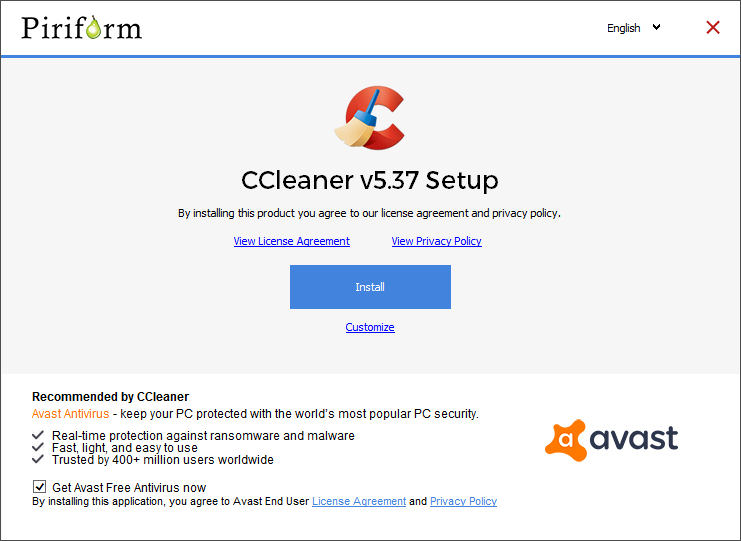
Just posted this in Windows 10 forum concerning Avast and CCleaner. First the malware issue and today, a new version 5.37.6309 has a "get avast free" notation and a check box with a very small mark in the bottom right corner of the box. Having vision issues is a real pain with normal computer operations but Avast intentional attempt to COVERTLY install Avast is a total disgrace! Never had to worry about installing ccleaner in the past, click custom, uncheck everything but auto updates and intelligent cookie scan . Unfortunately I ended up with Avast installed which I absolutely do not want - been there and done that! If I wanted Avast it would already be one my computer. May be time to start looking for something to replace Ccleaner as I do not need any programs that come from companies that find it necessary to resort to these sneaky and low life tactics. Any one know of a comparable program owned by another company?

Ron Burnes
 

My Computer

Computer type
PC/Desktop
Computer Manufacturer/Model Number
Computer by ME
OS
Windows 7 Pro 64 bit & Windows Pro 64 bit
CPU
Intel i7-2600k 3.06 GHz
Motherboard
Gigabyte H67A-UD3H-B3
Memory
16 GB GSkill F3-10666CL7Q
Graphics Card(s)
EVGA GeForce GT 1030
Sound Card
onboard for now
Monitor(s) Displays
Dual AOC 2770VH1
Screen Resolution
1920x1080
Hard Drives
3 - Samsung 850 Pro Series 256 GB SSD
2 - Samsung 840 Pro Series 128 GB SSD
2 - Muskin Chronos Deluxe 120 GB SSD
PSU
Antec EarthWatts EA750
Case
Antec Sonata Elite
Cooling
120 mm Antec System Fan & 120 Antec rear exhaust fan
Keyboard
Keys U See
Mouse
Logitech Trackball T-BC21
Internet Speed
18 mbps down / 4 mbps up
Antivirus
MSE
Browser
Firefox
Other Info
Icy Dock 4 bay x 2.5 ssd to 5.25 exterior hot swap
4-LaCie Rugged USB3 Thunderbolt Series 120GB SSD
2-Mushkin Enhanced Ventura Pro 32GB USB 3.0 Flash Drive
3-Sandisk Extreme Pro 128gb Flash Drive
Netgear Nighthawk X6 AC 3200 R8000 - WZR-1 D1800H
US Robotics USr5610C modem
Wise Care 365 has every of CCleaner's features, actually it even have more useful features than CCleaner. Wise Care 365 is safe and reliable software if you wonder, I don't use it (because I don't need), but I've tested it many times and every feature works perfectly.
 
Ditto

I understand where you are coming from. The sad part is it is more often something else is offered than not.
 

My Computer

Computer Manufacturer/Model Number
BGC (Bob's Garage Crew)
OS
win 7 X64 Ultimate SP1
CPU
I3770K
Motherboard
Asus P8Z77-V Deluxe
Memory
G Skill F3-14900CL9-4GBXL x 4
Graphics Card(s)
NVIDIA GeForce GTX670 + Intel 4000
Sound Card
Realtek HD 5.1 (MOB)
Monitor(s) Displays
Asus VW224T (1)
Screen Resolution
1920 x 1080
Hard Drives
SATA Corsair Force GT 2.5" 180GB (System) Sata 3
OCZ Vertex3 120GB
OCZ Vertex 2 120GB 2.5" SATA II
ST31000524AS 1000.2GB
WD15EARS (External)
PSU
CoolerMaster 1000 Watt
Case
CoolerMaster HAF X
Cooling
CPU -- CoolerMaster 520N
Keyboard
MS Wireless 3000 V2
Mouse
MS Wireless 3000 V2
Internet Speed
Cable
Antivirus
Norton Internet Security
Browser
IE9
Other Info
AMI Bios 1805
OC'd 3%
Thanks, will research it!
 

My Computer

Computer type
PC/Desktop
Computer Manufacturer/Model Number
Computer by ME
OS
Windows 7 Pro 64 bit & Windows Pro 64 bit
CPU
Intel i7-2600k 3.06 GHz
Motherboard
Gigabyte H67A-UD3H-B3
Memory
16 GB GSkill F3-10666CL7Q
Graphics Card(s)
EVGA GeForce GT 1030
Sound Card
onboard for now
Monitor(s) Displays
Dual AOC 2770VH1
Screen Resolution
1920x1080
Hard Drives
3 - Samsung 850 Pro Series 256 GB SSD
2 - Samsung 840 Pro Series 128 GB SSD
2 - Muskin Chronos Deluxe 120 GB SSD
PSU
Antec EarthWatts EA750
Case
Antec Sonata Elite
Cooling
120 mm Antec System Fan & 120 Antec rear exhaust fan
Keyboard
Keys U See
Mouse
Logitech Trackball T-BC21
Internet Speed
18 mbps down / 4 mbps up
Antivirus
MSE
Browser
Firefox
Other Info
Icy Dock 4 bay x 2.5 ssd to 5.25 exterior hot swap
4-LaCie Rugged USB3 Thunderbolt Series 120GB SSD
2-Mushkin Enhanced Ventura Pro 32GB USB 3.0 Flash Drive
3-Sandisk Extreme Pro 128gb Flash Drive
Netgear Nighthawk X6 AC 3200 R8000 - WZR-1 D1800H
US Robotics USr5610C modem
Just posted this in Windows 10 forum concerning Avast and CCleaner. First the malware issue and today, a new version 5.37.6309 has a "get avast free" notation and a check box with a very small mark in the bottom right corner of the box. Having vision issues is a real pain with normal computer operations but Avast intentional attempt to COVERTLY install Avast is a total disgrace! Never had to worry about installing ccleaner in the past, click custom, uncheck everything but auto updates and intelligent cookie scan . Unfortunately I ended up with Avast installed which I absolutely do not want - been there and done that! If I wanted Avast it would already be one my computer. May be time to start looking for something to replace Ccleaner as I do not need any programs that come from companies that find it necessary to resort to these sneaky and low life tactics. Any one know of a comparable program owned by another company?

Ron Burnes

As a working, professional, PC Tech, I can only make suggestions, for a PC that I cannot personally see or work on.

I have NO faith in Avast and won't use it.
For Windows 7, I'd rather just use Windows Defender. It's free and comes with Win-7. As for CCleaner, I've actually tried it twice over a several year period, and both times it rendered my PC totally UN-Bootable. I had to resort to the Restore of a Ghost Backup to restore my PC to operational status. So I don't want to let CCleaner anywhere near my PC.

If you feel like you absolutely MUST have a cleaner program, may I suggest "Windows Utilities". I tried the free trail and liked the program so much that I Bought it....and I hate buying software.;)

Good Luck, and Happy Computing!
TechnoMage :cool:
 

My Computer

Computer type
PC/Desktop
Computer Manufacturer/Model Number
Various
OS
Win 7 Pro, SP1, x86, Win-11/Pro/64
CPU
AMD
Motherboard
Various
Memory
8GB Crucial
Graphics Card(s)
Various
Sound Card
OnBoard
Monitor(s) Displays
Acer 21.5"
Hard Drives
Crucial SSD, 500 GB
PSU
OEM
Case
SFF Slim Line Case
Cooling
OEM
Keyboard
eMachines
Mouse
Logitech Wireless
Internet Speed
varies
Antivirus
Windows Defender/Super Anti-Spyware
Browser
Firefox
Absolutely agree on Avast and also use Defender. I have also used CCleaner for so many years I cannot remember when I started and absolutely endorse the program. I have never had any issues with it bit the pros or cons of the program is not the issue. The issue is the way Avast is covertly forcing a program I do not like nor want on to my computer. Granted, the option is there to untick the check box BUT individuals such as myself with up close vision issues have an extremely high probability of not seeing Avast's tiny little mark (which even with magnification, I cannot make out what the mark is). The proper way for Avast to present this option is to have the consumer check the box to install Avast, NOT the other way around. All Avast accomplished it is to make me avoid any and everything the have and are.
Ron Burnes
 

My Computer

Computer type
PC/Desktop
Computer Manufacturer/Model Number
Computer by ME
OS
Windows 7 Pro 64 bit & Windows Pro 64 bit
CPU
Intel i7-2600k 3.06 GHz
Motherboard
Gigabyte H67A-UD3H-B3
Memory
16 GB GSkill F3-10666CL7Q
Graphics Card(s)
EVGA GeForce GT 1030
Sound Card
onboard for now
Monitor(s) Displays
Dual AOC 2770VH1
Screen Resolution
1920x1080
Hard Drives
3 - Samsung 850 Pro Series 256 GB SSD
2 - Samsung 840 Pro Series 128 GB SSD
2 - Muskin Chronos Deluxe 120 GB SSD
PSU
Antec EarthWatts EA750
Case
Antec Sonata Elite
Cooling
120 mm Antec System Fan & 120 Antec rear exhaust fan
Keyboard
Keys U See
Mouse
Logitech Trackball T-BC21
Internet Speed
18 mbps down / 4 mbps up
Antivirus
MSE
Browser
Firefox
Other Info
Icy Dock 4 bay x 2.5 ssd to 5.25 exterior hot swap
4-LaCie Rugged USB3 Thunderbolt Series 120GB SSD
2-Mushkin Enhanced Ventura Pro 32GB USB 3.0 Flash Drive
3-Sandisk Extreme Pro 128gb Flash Drive
Netgear Nighthawk X6 AC 3200 R8000 - WZR-1 D1800H
US Robotics USr5610C modem
Hi, Ccleaner does not offer Avast if you are updateing, only if you are installing fresh.
I updated yesterday and I don't have Avast installed.
Perhaps my Kaspersky ate it :-)
 

My Computer

Computer type
PC/Desktop
Computer Manufacturer/Model Number
Owner Builder
OS
Windows 7 Ultimate x64 SP1 OEM
CPU
Intel i7 3930K
Motherboard
Asus X79 Deluxe
Memory
Kingston Genesis KHX2133C11D3K4/32G
Graphics Card(s)
Asus RTX 2070 Ti Turbo fan series
Sound Card
Creative Sound Blaster ZXR
Monitor(s) Displays
Samsung U32J39 UHD
Screen Resolution
3840 x 2160
Hard Drives
Samsung 860 Pro 256 GB
OCZ Vertex 4 512GB
Western Digital Black 4TB
PSU
Corsair AX850
Case
Gigabyte
Cooling
Push - Pull 120 mm Noctua PWM, Scythe Big Shuriken 2 Rev. B
Keyboard
Logitech K800 Backlit
Mouse
Logitech MX2 Master
Internet Speed
NBN 25 Mbps
Antivirus
Kaspersky Internet Security
Browser
Mozilla FireFox
Other Info
TP-Link Archer VR600v
Sennheiser TR220 WiFi Head Phones.
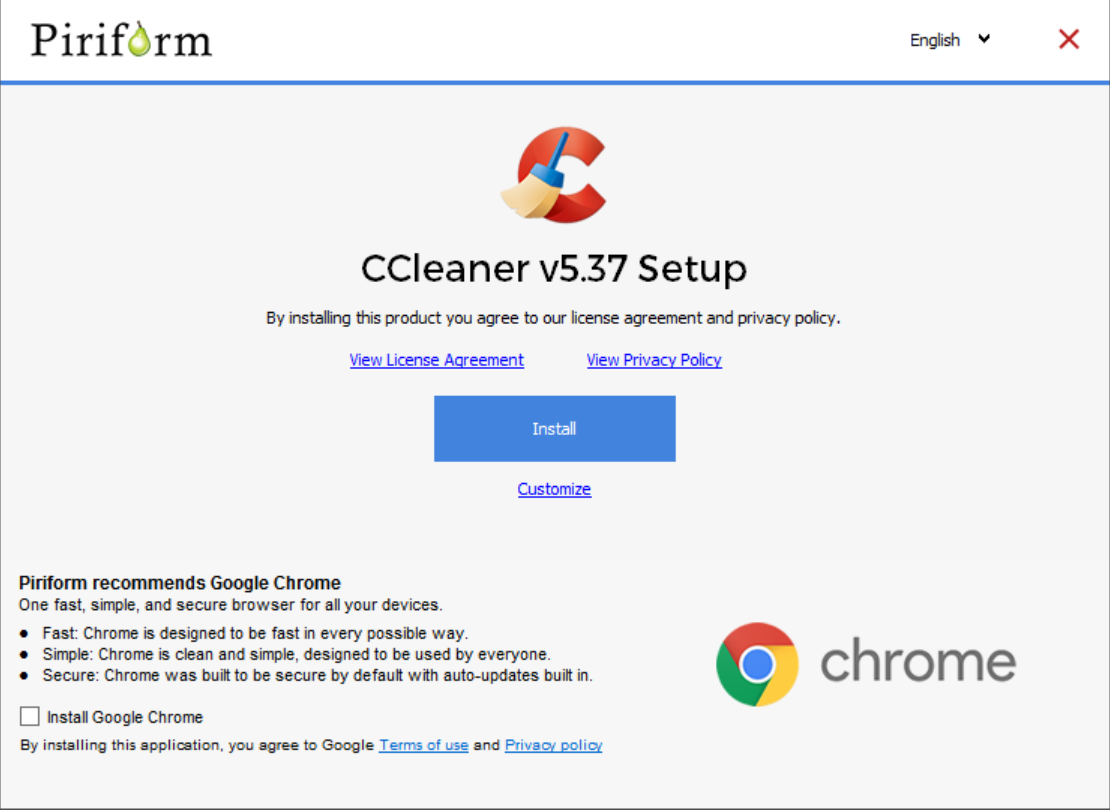
I have installed free version of CCleaner from below link there was only one check box it was for Google Chrome which i opt-out installation finish without Avast installing.

CCleaner - Free Download or try CCleaner Professional - Piriform

jKABRjs.png
 

My Computer

Computer type
PC/Desktop
Computer Manufacturer/Model Number
Custom Build
OS
Windows 10 Pro x64
CPU
Intel Core i5 6600
Motherboard
Gigabyte Technology Z170M-D3H-CF (U3E1)
Memory
Corsair Vengeance LPX 16GB 2666MHz DDR4
Graphics Card(s)
AMD Radeon R9 380 Series
Hard Drives
SSD
HDD
Antivirus
Eset Smart Security
Browser
Mozila Firefox
Hi, Ccleaner does not offer Avast if you are updateing, only if you are installing fresh.
I updated yesterday and I don't have Avast installed.
Perhaps my Kaspersky ate it :-)

I just updated CCleaner from 536 to 537 and Avast was definitely offered (and ticked by default, of course).

TOtKLQq.jpg


And, as I mentioned on Ten Forums the other day, CCleaner also now creates an update entry in Task Scheduler even if you untick "Automatically check for updates to CCleaner" during the install. And I've checked to see that the update option is unticked in Options after the install is finished (it is) but the scheduled task is still there. I've disabled and deleted it, of course.

ZxqEuDR.jpg


Looks like we're going to have to be extra careful using this program from here onwards.
 

My Computer

Computer type
PC/Desktop
Computer Manufacturer/Model Number
Custom Build
OS
Win 7 Professional 64 (Main PC)/Win 7 Home Premium 32 (Laptop)
CPU
Intel Core i3 4160 @ 3.60GHz
Motherboard
ASUSTeK COMPUTER INC. H81M-PLUS (SOCKET 1150)
Memory
8.00GB Dual-Channel DDR3 @ 799MHz
Graphics Card(s)
2047MB NVIDIA GeForce GT 610 (Gigabyte)
Monitor(s) Displays
BenQ GL2460
Screen Resolution
1920x1080
Hard Drives
232GB Samsung SSD 840 EVO 250GB ATA Device (SSD) x3
2 external spinners - 4TB and 2TB
Antivirus
MSE
Browser
Pale Moon
The check mark they put in your box does not look like mine I honestly did not see because I was looking for an actual check mark! I can click the box and a real check mark appears!
 

Attachments

  • Avast.jpg
    Avast.jpg
    31.5 KB · Views: 58
Last edited:

My Computer

Computer type
PC/Desktop
Computer Manufacturer/Model Number
Computer by ME
OS
Windows 7 Pro 64 bit & Windows Pro 64 bit
CPU
Intel i7-2600k 3.06 GHz
Motherboard
Gigabyte H67A-UD3H-B3
Memory
16 GB GSkill F3-10666CL7Q
Graphics Card(s)
EVGA GeForce GT 1030
Sound Card
onboard for now
Monitor(s) Displays
Dual AOC 2770VH1
Screen Resolution
1920x1080
Hard Drives
3 - Samsung 850 Pro Series 256 GB SSD
2 - Samsung 840 Pro Series 128 GB SSD
2 - Muskin Chronos Deluxe 120 GB SSD
PSU
Antec EarthWatts EA750
Case
Antec Sonata Elite
Cooling
120 mm Antec System Fan & 120 Antec rear exhaust fan
Keyboard
Keys U See
Mouse
Logitech Trackball T-BC21
Internet Speed
18 mbps down / 4 mbps up
Antivirus
MSE
Browser
Firefox
Other Info
Icy Dock 4 bay x 2.5 ssd to 5.25 exterior hot swap
4-LaCie Rugged USB3 Thunderbolt Series 120GB SSD
2-Mushkin Enhanced Ventura Pro 32GB USB 3.0 Flash Drive
3-Sandisk Extreme Pro 128gb Flash Drive
Netgear Nighthawk X6 AC 3200 R8000 - WZR-1 D1800H
US Robotics USr5610C modem
Before I posted my responce #7 above, I went to my Media Centre as that had not been updated and checked in the process and it Had NOTHING for Avast.
The 3 PC's here are all runing Free version.
I can't explain this one :-)

I just thought, did you go through Ccleaner to update or did you go direct to the site and download.
I also only update via Piriform, I do that by moving to the bottom of the web page and clicking Piriform and then it will download from them.
 

My Computer

Computer type
PC/Desktop
Computer Manufacturer/Model Number
Owner Builder
OS
Windows 7 Ultimate x64 SP1 OEM
CPU
Intel i7 3930K
Motherboard
Asus X79 Deluxe
Memory
Kingston Genesis KHX2133C11D3K4/32G
Graphics Card(s)
Asus RTX 2070 Ti Turbo fan series
Sound Card
Creative Sound Blaster ZXR
Monitor(s) Displays
Samsung U32J39 UHD
Screen Resolution
3840 x 2160
Hard Drives
Samsung 860 Pro 256 GB
OCZ Vertex 4 512GB
Western Digital Black 4TB
PSU
Corsair AX850
Case
Gigabyte
Cooling
Push - Pull 120 mm Noctua PWM, Scythe Big Shuriken 2 Rev. B
Keyboard
Logitech K800 Backlit
Mouse
Logitech MX2 Master
Internet Speed
NBN 25 Mbps
Antivirus
Kaspersky Internet Security
Browser
Mozilla FireFox
Other Info
TP-Link Archer VR600v
Sennheiser TR220 WiFi Head Phones.
When I open CCleaner, auto update will notify me if there is a new version and sends me to Pirform where I select the free version for the new update.
 

My Computer

Computer type
PC/Desktop
Computer Manufacturer/Model Number
Computer by ME
OS
Windows 7 Pro 64 bit & Windows Pro 64 bit
CPU
Intel i7-2600k 3.06 GHz
Motherboard
Gigabyte H67A-UD3H-B3
Memory
16 GB GSkill F3-10666CL7Q
Graphics Card(s)
EVGA GeForce GT 1030
Sound Card
onboard for now
Monitor(s) Displays
Dual AOC 2770VH1
Screen Resolution
1920x1080
Hard Drives
3 - Samsung 850 Pro Series 256 GB SSD
2 - Samsung 840 Pro Series 128 GB SSD
2 - Muskin Chronos Deluxe 120 GB SSD
PSU
Antec EarthWatts EA750
Case
Antec Sonata Elite
Cooling
120 mm Antec System Fan & 120 Antec rear exhaust fan
Keyboard
Keys U See
Mouse
Logitech Trackball T-BC21
Internet Speed
18 mbps down / 4 mbps up
Antivirus
MSE
Browser
Firefox
Other Info
Icy Dock 4 bay x 2.5 ssd to 5.25 exterior hot swap
4-LaCie Rugged USB3 Thunderbolt Series 120GB SSD
2-Mushkin Enhanced Ventura Pro 32GB USB 3.0 Flash Drive
3-Sandisk Extreme Pro 128gb Flash Drive
Netgear Nighthawk X6 AC 3200 R8000 - WZR-1 D1800H
US Robotics USr5610C modem
When I open CCleaner, auto update will notify me if there is a new version and sends me to Pirform where I select the free version for the new update.

From my understanding you download from FileHippo via that method.
That is why I have always moved to the bottom of the page clicked on Ccleaner and that brings me to Piriform download.
I have not tested however I think that this is the difference.

edit spelling
 

My Computer

Computer type
PC/Desktop
Computer Manufacturer/Model Number
Owner Builder
OS
Windows 7 Ultimate x64 SP1 OEM
CPU
Intel i7 3930K
Motherboard
Asus X79 Deluxe
Memory
Kingston Genesis KHX2133C11D3K4/32G
Graphics Card(s)
Asus RTX 2070 Ti Turbo fan series
Sound Card
Creative Sound Blaster ZXR
Monitor(s) Displays
Samsung U32J39 UHD
Screen Resolution
3840 x 2160
Hard Drives
Samsung 860 Pro 256 GB
OCZ Vertex 4 512GB
Western Digital Black 4TB
PSU
Corsair AX850
Case
Gigabyte
Cooling
Push - Pull 120 mm Noctua PWM, Scythe Big Shuriken 2 Rev. B
Keyboard
Logitech K800 Backlit
Mouse
Logitech MX2 Master
Internet Speed
NBN 25 Mbps
Antivirus
Kaspersky Internet Security
Browser
Mozilla FireFox
Other Info
TP-Link Archer VR600v
Sennheiser TR220 WiFi Head Phones.
FileHippo is correct however that has nothing to do with it. The direct download also has the Avast checkbox with the funny little mark. I did find a download that has nothing (so far) and that is CCleaner Portable.

I uninstalled ccleaner and avast using Revo uninstaller then opened regedit and took everything Avast out. I then reinstalled CCleaner 536 for now until I find something else.
Ron
 
Last edited:

My Computer

Computer type
PC/Desktop
Computer Manufacturer/Model Number
Computer by ME
OS
Windows 7 Pro 64 bit & Windows Pro 64 bit
CPU
Intel i7-2600k 3.06 GHz
Motherboard
Gigabyte H67A-UD3H-B3
Memory
16 GB GSkill F3-10666CL7Q
Graphics Card(s)
EVGA GeForce GT 1030
Sound Card
onboard for now
Monitor(s) Displays
Dual AOC 2770VH1
Screen Resolution
1920x1080
Hard Drives
3 - Samsung 850 Pro Series 256 GB SSD
2 - Samsung 840 Pro Series 128 GB SSD
2 - Muskin Chronos Deluxe 120 GB SSD
PSU
Antec EarthWatts EA750
Case
Antec Sonata Elite
Cooling
120 mm Antec System Fan & 120 Antec rear exhaust fan
Keyboard
Keys U See
Mouse
Logitech Trackball T-BC21
Internet Speed
18 mbps down / 4 mbps up
Antivirus
MSE
Browser
Firefox
Other Info
Icy Dock 4 bay x 2.5 ssd to 5.25 exterior hot swap
4-LaCie Rugged USB3 Thunderbolt Series 120GB SSD
2-Mushkin Enhanced Ventura Pro 32GB USB 3.0 Flash Drive
3-Sandisk Extreme Pro 128gb Flash Drive
Netgear Nighthawk X6 AC 3200 R8000 - WZR-1 D1800H
US Robotics USr5610C modem
Shameful

Yes it's an awful and ever increasing practise of bundling software, its all for monetisation and shows disregard for the customer. I have never had trouble from CCleaner, Although recently running it on a friends pc for the fist time I too had to dodge avast, gone are the days of rapid clicking licence screens and setup prompts. They hide bundle bloat behind drop-down menus and in the fine print if you don't pay attention.

Also I dont like how they automatically throw you on to the Premium trial. It used to be opt in, now its opt out! I dont want ccleaner for active monitoring and on boot loading.

The same applies to Malware Byte anti Malware, Have to opt out of the active monitoring trial after setup and configure it to behave as the standalone scanner its always been at heart.

Too much crossover between applications these days, AV's want to boost your system, cleaners want to monitor actively, if every move your computer makes is going to be scrutinised by multiple applications you are going to see a significant drop in performance. As yet there is no all in one tool to slay them all, so it falls to us to make sure we configure software to suit its real purpose and avoid the bloat.

Rant over!
 

My Computer

Computer type
PC/Desktop
Computer Manufacturer/Model Number
Self Build
OS
Windows 7 Ultimate x64
CPU
Intel Core2 Quad Q8300 2.5Ghz
Motherboard
Asus P5QD Turbo
Memory
Kingston HyperX 4x1GB DDR2 1066Mhz
Graphics Card(s)
Asus/Nvidia 9500GT 1GB
Sound Card
On-Board HD
Monitor(s) Displays
22" Widescreen TFT
Screen Resolution
1920x1080
Hard Drives
2x 320Gb Seagate SATAII RAID 0
2x 80Gb Seagate SATAII RAID 0
1x 1tb hybrid (8gb ssd)
PSU
650w
Case
ATX
Cooling
140mm front, 120mm Rear, 80mm Chipset + stock CPU and GPU
Keyboard
Plastic one
Mouse
Plastic one
Internet Speed
4Mbps
Other Info
Laptop: HP Elitebook 2560p
i5 @2.7Ghz 4GB DDR3
FileHippo is correct however that has nothing to do with it. The direct download also has the Avast checkbox with the funny little mark. I did find a download that has nothing (so far) and that is CCleaner Portable.

I uninstalled ccleaner and avast using Revo uninstaller then opened regedit and took everything Avast out. I then reinstalled CCleaner 536 for now until I find something else.
Ron

May seem like a bit of overkill but I've actually restored a Macrium Reflect image from November 1st where I had CCleaner 535 installed on my main PC. And, I won't be updating it from here on.

536 is probably OK but I'm a little wary since it was the first version to add the Task Scheduler update entry that I mentioned in my earlier post despite having "Automatically check for updates..." disabled in CCleaner options. The task can be disabled and deleted but I don't want to have to check every day to see if it has reappeared.

I've also checked my old W7 laptop (which I'm using at the moment) and fortunately I didn't get around to updating CCleaner past 535 so there it will also stay. I do have Macrium images for the laptop but they weren't needed in this case.

Finally, I have the 535 version safely 'archived' away for future use.
 

My Computer

Computer type
PC/Desktop
Computer Manufacturer/Model Number
Custom Build
OS
Win 7 Professional 64 (Main PC)/Win 7 Home Premium 32 (Laptop)
CPU
Intel Core i3 4160 @ 3.60GHz
Motherboard
ASUSTeK COMPUTER INC. H81M-PLUS (SOCKET 1150)
Memory
8.00GB Dual-Channel DDR3 @ 799MHz
Graphics Card(s)
2047MB NVIDIA GeForce GT 610 (Gigabyte)
Monitor(s) Displays
BenQ GL2460
Screen Resolution
1920x1080
Hard Drives
232GB Samsung SSD 840 EVO 250GB ATA Device (SSD) x3
2 external spinners - 4TB and 2TB
Antivirus
MSE
Browser
Pale Moon
536 did not put anything in the task scheduler on my computer and I also have auto update disabled! Am considering going to the portable 537 as it shows no issues and is not installed on the computer. One less program taking up room. Did same thing with Revo Uninstaller.
Ron
 

My Computer

Computer type
PC/Desktop
Computer Manufacturer/Model Number
Computer by ME
OS
Windows 7 Pro 64 bit & Windows Pro 64 bit
CPU
Intel i7-2600k 3.06 GHz
Motherboard
Gigabyte H67A-UD3H-B3
Memory
16 GB GSkill F3-10666CL7Q
Graphics Card(s)
EVGA GeForce GT 1030
Sound Card
onboard for now
Monitor(s) Displays
Dual AOC 2770VH1
Screen Resolution
1920x1080
Hard Drives
3 - Samsung 850 Pro Series 256 GB SSD
2 - Samsung 840 Pro Series 128 GB SSD
2 - Muskin Chronos Deluxe 120 GB SSD
PSU
Antec EarthWatts EA750
Case
Antec Sonata Elite
Cooling
120 mm Antec System Fan & 120 Antec rear exhaust fan
Keyboard
Keys U See
Mouse
Logitech Trackball T-BC21
Internet Speed
18 mbps down / 4 mbps up
Antivirus
MSE
Browser
Firefox
Other Info
Icy Dock 4 bay x 2.5 ssd to 5.25 exterior hot swap
4-LaCie Rugged USB3 Thunderbolt Series 120GB SSD
2-Mushkin Enhanced Ventura Pro 32GB USB 3.0 Flash Drive
3-Sandisk Extreme Pro 128gb Flash Drive
Netgear Nighthawk X6 AC 3200 R8000 - WZR-1 D1800H
US Robotics USr5610C modem
536 did not put anything in the task scheduler on my computer and I also have auto update disabled!

Very strange. It seems like installing/updating CCleaner does different things for different people.

Like where it offers Google Chrome. Over the past couple of years I've noticed when updating CCleaner sometimes Chrome was offered and sometimes it wasn't. Almost like a random thing.

The task scheduler entry (if it is there) probably just notifies the user that an update is available and doesn't download and install it without permission but I keep thinking about Google Earth where it's Task Scheduler entries actually allowed it to download and install updates without asking.

I always used to wonder why a new Google Earth icon suddenly appeared on my desktop every couple of weeks (I keep my desktop icon free) until I eventually realized Google Earth had 'silently' downloaded and installed the latest update without asking.
 

My Computer

Computer type
PC/Desktop
Computer Manufacturer/Model Number
Custom Build
OS
Win 7 Professional 64 (Main PC)/Win 7 Home Premium 32 (Laptop)
CPU
Intel Core i3 4160 @ 3.60GHz
Motherboard
ASUSTeK COMPUTER INC. H81M-PLUS (SOCKET 1150)
Memory
8.00GB Dual-Channel DDR3 @ 799MHz
Graphics Card(s)
2047MB NVIDIA GeForce GT 610 (Gigabyte)
Monitor(s) Displays
BenQ GL2460
Screen Resolution
1920x1080
Hard Drives
232GB Samsung SSD 840 EVO 250GB ATA Device (SSD) x3
2 external spinners - 4TB and 2TB
Antivirus
MSE
Browser
Pale Moon
As a working, professional, PC Tech, I can only make suggestions, for a PC that I cannot personally see or work on.
As for CCleaner, I've actually tried it twice over a several year period, and both times it rendered my PC totally UN-Bootable

It was much better if you expressed your own "opinion" (which doesn't match with the reality) and avoided the Tech part.
CCleaner like any similar software is only suitable to people who know what they are doing, for example you don't just delete everything the scan tells you but you only select the files or entries which you were looking for.
I used to use CCleaner (before the hacking) for several years and very very frequently because I often test software so I need to eliminate the remaining garbage left, I never had any problem with it.
What I understand is too many people say they are PC specialists without knowing that the PC's knowledge can be anything from hardware to software, or to simply being just able to use office related programs, that is their meaning of PC expert!
 

My Computer

Computer type
PC/Desktop
Computer Manufacturer/Model Number
Custom build
OS
Windows 7 Ultimate x64
CPU
Intel i5-6600K 3.50GHz
Motherboard
Asus Pro Z170 Gaming
Memory
Corsair DDR4 2x8GB
Graphics Card(s)
MSI GeForce GTX1070 Gaming X
Sound Card
On board Realtek
Monitor(s) Displays
Dell SP2309W
Screen Resolution
1920x1080
Hard Drives
OS Samsung 850 EVO 500GB SATA III SSD
2x Hitachi Deskstar 1GB SATA data drives
1x Western Digital Caviar Black 1TB SATA data drive
PSU
Corsair HX650W
Case
CoolerMaster CM 690 III
Cooling
Coolermaster Hyper 212 EVO 1x200mm 1x140mm 2x120mm case fan
Keyboard
Logitech usb keyboard
Mouse
Logitech G500 $27 bargain :)
Internet Speed
ADSL2
Antivirus
Microsoft Security Essential, MalwareBytes
Browser
SRWare Iron, Internet Explorer
Other Info
Very happy with this buid.
I struggled a lot to find all compatible parts since I wanted an Intel 1151 based motherboard so to be able to install Windows 7.
I chose this case because it has amazing air flow, it's sturdy and looks good.
The case included 1x 200mm front and 1x 120mm back fans, I added 1x 200mm on the top and 1x120 bottom fans and modded the panels with black stockings for women s
Everyone's experience and opinion will vary

Over many years as an IT Pro I have used the File Cleaning Cleaning options of CCleaner without any issue, I would never use any form of Registry Defragger or other tool to make changes to a system other than regedit, I have allowed some apps to produce a list of potentially bad or dangerous Settings - but then I will research the facts backup everything in such a way as I can restore the registry from a dead system or if needed restore the whole system to a point immediately prior to the change. I also work in a particular way, I never try to correct more than one perceived or potential fault at a time.

Reboot the system Before the change to any critical setting, (to ensure the system is working correctly before you change anything), Make a single change, Reboot the system to check that it still works correctly. This takes longer than the "Silver Bullet" but is less likely to ruin a system and potentially create losses of time and money
 

My Computers

System One System Two

  • Computer type
    PC/Desktop
    Computer Manufacturer/Model Number
    ChillBlast - Custom to my design
    OS
    Windows 11 Pro x64 [Latest Release and Release Preview]
    CPU
    Ryzen 9 5950X, 3.8 - 5.2 MHz
    Motherboard
    Asus Prime X570-Pro
    Memory
    64GB [2 x 32GB] DDR4 3200MHz
    Graphics Card(s)
    4GB NVIDIA GEFORCE GTX 1650 Ti
    Sound Card
    On-board SPDIF to 5.1 System + HDMI [5.1 system]
    Monitor(s) Displays
    32" UHD 32 Bit HDR Monitor + 43" UHD 4K 32Bit HDR TV
    Screen Resolution
    2 x 3840 x 2160 @60Hz
    Hard Drives
    1TB M2 SSD OS, 500GB Fast Access SSD, 2 x 8TB Data + Various Externals from 1TB to 4TB, 10TB NAS
    PSU
    NZXT C750 80 PLUS Gold 750W Modular PSU
    Case
    Workstation Case [Matt Black]
    Cooling
    NZXT Kraken X63 280mm CPU Cooler +2x Quiet Case fans
    Keyboard
    Logitech Wireless MX Keys & K400 + others
    Mouse
    Logitech Wireless MX Master 3S
    Internet Speed
    920 MB Down 50 MB Up
    Antivirus
    BitDefender Total Security Pro
    Browser
    Chrome (always run latest Non-Beta)
    Other Info
    Also run ...
    Laptop - Quad 8GB - Windows 10 Pro x64
    Nexus 7 Android tablet x2
    Samsung 10.2" tablet
    Blackview TAB 8 4G Android Tablet c/w Keyboard
    Wacom Intuos Pro Medium Pen Pad
    Wacom Intuos Pro Small Pen Pad
    Wacom Expresskeys Remote
    Loopdeck+ Graphics Controller
    Shuttle Pro v2 Control
  • Computer type
    Laptop
    System Manufacturer/Model Number
    Dell XPS 17 10750H
    OS
    Windows 11 Pro x64 Latest RP
    CPU
    Intel I7 10750H 5.0GHz
    Motherboard
    Dell XPS
    Memory
    32GB [2x16GB] DDR4 2933 MHz
    Graphics Card(s)
    nVidia GTX1650Ti 4 GB GDDR6
    Sound Card
    Stock [Realtek] 4 Speaker
    Monitor(s) Displays
    17" IPS UHD+ Infinity Edge Touchscreen
    Screen Resolution
    3840 x 2400
    Hard Drives
    2TB M2 NVMe, 4TB External + various 500GB & 1TB External NVMe (also have access to spinner HDD from
    PSU
    Stock
    Case
    Stock XPS Aluminium & Carbon Fibre
    Cooling
    Stock - Active Fan Control
    Keyboard
    Backlit + Various Logitech
    Mouse
    Stock Track Pad + Logitech MX Trackball
    Internet Speed
    72 MB Down 18MB Up
    Browser
    Chrome
    Other Info
    Also run ...
    Laptop - Quad 8GB - Windows 10 Pro x64
    Nexus 7 Android tablet x2
    10.2" tablet
    Sony Z3 Android Smartphone
    Wacom Intuos Pro Medium Pen Pad
    Wacom Intuos Pro Small Pen Pad
    Wacom Expresskeys Remote
    Loopdeck+ Graphics Controller
    Shuttle Pro v2 Control Pad
    10TB NAS
Back
Top