Solved "CD/DVD device driver missing" w/ Win7 ultimate bootable USB

db7td

New member
Local time
1:27 AM
Messages
2
Hello all,

I created a Windows 7 ultimate bootable USB using Rufus and no matter what I try, I keep getting the "CD/DVD device driver missing" error. The bootable USB is fine, a friend tried it on his PC and got to the license agreement (which is the step I can't reach). I even tried using his external cd drive to install vista, just to see what would happen, and received the same error.

The BIOS on my motherboard is missing a bunch of options that people have suggested, like turning off USB 3.0 ports and switching from Legacy AHCI to Native AHCI. This is what it looks like: Gigabyte X99-UD3P Motherboard Review, Your Budget Intel X99 Build Starts Here – Page 3 – ThePCEnthusiast

Install also failed after creating a partition formatted to NTFS per these instructions: How to Do a Clean Install of Windows 7 « How-To Geek Forums

Onto a second USB, I downloaded a USB Windows Install Utility from here: GIGABYTE - Motherboard - Socket 1151 - GA-H110M-A (rev. 1.0)
But after receiving the error and selecting Browse, I was unable to see the second USB. I even tried to put this onto the Win7 bootable USB, but still couldn't navigate to it. I know that this didn't corrupt the installer, however, because my buddy tried installing on his machine after I had done this and this is when he was able to reach the license agreement. I have tried this on every USB port I have.

Please help!
 
Last edited:

My Computer

Computer type
PC/Desktop
Computer Manufacturer/Model Number
Custom
OS
USB bootable Windows 7 Ultimate x64
CPU
Intel i3-6100
Motherboard
GA-H110M-A LGA1151
Memory
1 x 8gb DDR4-2133
Graphics Card(s)
PowerColor Radeon R9 380 2gb PCS+
Hard Drives
Crucial BX200 240gb 2.5" SSD
Antivirus
N/A
Browser
N/A
Have you tried a dvd ?

No internal dvd rom ?

Where did you get your iso file from ?
 

My Computer

Computer type
PC/Desktop
Computer Manufacturer/Model Number
Skylake Special #666
OS
Windows 10 Pro x64
CPU
Intel Core i7 6700K
Motherboard
Asus Sabertooth Z170 Mark 1
Memory
GSkill TridentZ RGB 16GB 3600 16-16-16-36
Graphics Card(s)
EVGA GTX 980 Ti SC x2
Sound Card
Realtek High Definition
Monitor(s) Displays
AOC G2460PG
Screen Resolution
1920 x 1080 144Hz
Hard Drives
Samsung 860 Pro 256GB, Seagate Barracuda 4TB x2
PSU
EVGA 1000 P2, EVGA White Custom Braided Cables
Case
Corsair Vengeance C70 Gunmetal Black
Cooling
Corsair H100i v2, Corsair ML120 x2, Thermal Grizzly Kryonaut
Keyboard
Logitech G910 Orion Spectrum
Mouse
Logitech G700s
Internet Speed
Verizon Fios Quantum Gateway 75/75
Antivirus
Windows Defender, Malwarebytes Free 3.8.3
Browser
Chrome
Other Info
Corsair SP120 x4, LG Blu-ray Drive, Durabrand HT-395 100 Watt Dolby Digital Amp, Corsair H2100 Wireless 7.1 Headset
Hi and welcome to SevenForums,
Have you tried a PS/2 mouse and keyboard the board has both ports
Not sure why you'd have to use it :/

Usually disabling fast or quick startup might help also secure boot.
As far as I've noticed it's better to install on a unallocated disk rather than a formatted one with a partition.

Post images of the options you do have in boot and security.
 

My Computer

Computer type
PC/Desktop
Computer Manufacturer/Model Number
Custom assembled by me :}
OS
Win-7-Pro64bit 7-H-Prem-64bit
CPU
i7-5930K 2nd i9-9940x both water blocked VRM's too
Motherboard
ASUS SABERTOOTH X99 2nd ASUS x299 Apex
Memory
Trident-z 3200C14 2nd Trident-z 3600C16
Graphics Card(s)
EVGA 1080ti ftw3 2nd Titan Xp both water blocked
Sound Card
Built-in Realtek
Monitor(s) Displays
1-AOC G2460PG 24"G-Sync 144Hz/ 2nd 1-ASUS VG248QE 24" 144Hz
Screen Resolution
1920 x 1080 144Hz
Hard Drives
2-Samsung M.2 Evo & Evo Plus
2-Samsung 850 EVO 500GB SSD's/ 3-2.5 W.D. Black 1tb-&3-1tb/3-3.5 WD Black 1tb hdd's
PSU
EVGA SuperNOVA 1000-P2 2nd 1200-P2
Case
2-Corsair Obsidian Series 450D Black ATX Mid Tower
Cooling
Custom water loops
Keyboard
Logitech G710+/ 2nd Logitech G910
Mouse
2-RedDragon M901 Perdition 16400 dpi Gaming mouse = wired
Internet Speed
Comcast Ping 19ms 89.31mbps download speed 6.12mbps upload
Antivirus
Malwarebytes Pro/ Superantispyware Pro
Browser
FireFox & Pale moon
Other Info
2nd ASUS X299 Apex/Intel i9-9940x with Custom water loop/7H-Prem-x64/Corsair 450D case/Ram Trident-z 3600C16 4x8gb / Samsung970Evo plus 500gb SSD/Dual ssd EZ swap evo/PSU EVGA SuperNova 1200w-P2 80+Platinum/GPU Titan Xp /8-ML-140 on push-pull on 2-280GTX rads
  • I didn't have any trouble using my wireless mouse and keyboard.
  • Quick startup was disabled by default.
  • I tried to install on the partition only after trying to do it multiple times on the blank ssd.
  • I posted a link that has images of every page in my BIOS.

Ultimately, I was able to resolve this by finding a friend with a spare optical drive and install disk. Using SATA I was able to bypass the USB nightmare. I would advise anyone trying to do a clean win7 install with a USB 2.0 flash drive and using this motherboard to try to find any other way.
 

My Computer

Computer type
PC/Desktop
Computer Manufacturer/Model Number
Custom
OS
USB bootable Windows 7 Ultimate x64
CPU
Intel i3-6100
Motherboard
GA-H110M-A LGA1151
Memory
1 x 8gb DDR4-2133
Graphics Card(s)
PowerColor Radeon R9 380 2gb PCS+
Hard Drives
Crucial BX200 240gb 2.5" SSD
Antivirus
N/A
Browser
N/A

My Computer

Computer type
PC/Desktop
Computer Manufacturer/Model Number
Custom assembled by me :}
OS
Win-7-Pro64bit 7-H-Prem-64bit
CPU
i7-5930K 2nd i9-9940x both water blocked VRM's too
Motherboard
ASUS SABERTOOTH X99 2nd ASUS x299 Apex
Memory
Trident-z 3200C14 2nd Trident-z 3600C16
Graphics Card(s)
EVGA 1080ti ftw3 2nd Titan Xp both water blocked
Sound Card
Built-in Realtek
Monitor(s) Displays
1-AOC G2460PG 24"G-Sync 144Hz/ 2nd 1-ASUS VG248QE 24" 144Hz
Screen Resolution
1920 x 1080 144Hz
Hard Drives
2-Samsung M.2 Evo & Evo Plus
2-Samsung 850 EVO 500GB SSD's/ 3-2.5 W.D. Black 1tb-&3-1tb/3-3.5 WD Black 1tb hdd's
PSU
EVGA SuperNOVA 1000-P2 2nd 1200-P2
Case
2-Corsair Obsidian Series 450D Black ATX Mid Tower
Cooling
Custom water loops
Keyboard
Logitech G710+/ 2nd Logitech G910
Mouse
2-RedDragon M901 Perdition 16400 dpi Gaming mouse = wired
Internet Speed
Comcast Ping 19ms 89.31mbps download speed 6.12mbps upload
Antivirus
Malwarebytes Pro/ Superantispyware Pro
Browser
FireFox & Pale moon
Other Info
2nd ASUS X299 Apex/Intel i9-9940x with Custom water loop/7H-Prem-x64/Corsair 450D case/Ram Trident-z 3600C16 4x8gb / Samsung970Evo plus 500gb SSD/Dual ssd EZ swap evo/PSU EVGA SuperNova 1200w-P2 80+Platinum/GPU Titan Xp /8-ML-140 on push-pull on 2-280GTX rads
(click here if you have an ASUS motherboard)

Intel Skylake Removes Support for USB based Windows 7 Installation - Major Platform Specs Confirmed

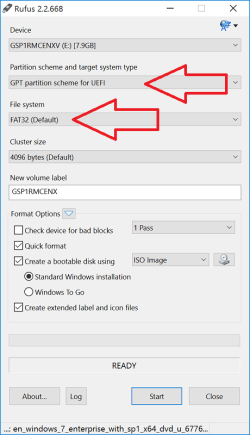
How to install Windows 7 64-bit in UEFI mode from USB flash drive if you have a GIGABYTE motherboard.

Rufus: https://rufus.akeo.ie/

In Rufus do this (select the Windows 7 64-bit ISO image by clicking the CD drive icon):

nDH8y7h.png

GIGABYTE - Support - FAQs

How to install Windows 7 when there is no USB inbox driver support?

Please follow the steps below:
  1. Click here to download Windows USB Installation Tool.
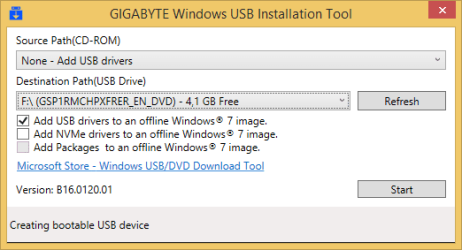
  2. Unzip the file and execute WindowsImageTool.
    • Make sure Windows 7 USB flash drive is plugged in.
    • Select [None - Add USB drivers] in Source Path.
    • Choose Windows 7 USB flash drive in Destination Path.
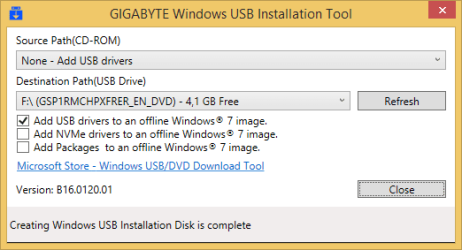
    • Click [Start] to run and [Close] when the procedure is done.
  3. Insert the Windows 7 USB flash drive to the computer you intend to install Windows 7.
  4. Turn on the computer and press [F12] during POST to enter boot menu.
  5. Select the Windows 7 USB flash drive to start installation procedure.
Click here for more details.

Make sure the "Add USB drivers to an offline Windows 7 image" option is selected.

If you have an Intel or Samsung M.2 SSD, you must also select the "Add NVMe drivers..." and "Add Packages..." options.

GIGABYTE Windows USB Installation Tool 1.png

GIGABYTE Windows USB Installation Tool 2.png

GIGABYTE Windows USB Installation Tool 3.png

Check the following option in the GIGABYTE motherboard's UEFI BIOS settings before you install Windows 7.

Windows 8/10 Features (Allows you to select the operating system to be installed)
- Other OS (Default)
- Windows 8/10
- Windows 8/10 WHQL

You must boot the installation media as a UEFI device.
- Reboot PC and enter the Boot Menu by pressing F12.
- Select the name of your USB flash drive. If you have CSM enabled in UEFI BIOS you will see it twice, but one will have a UEFI: prefix, select that.

Windows 7 64-bit USB flash drive should now boot fine in UEFI mode. The USB 3.0 driver will be loaded automatically during installation startup.

EDIT:

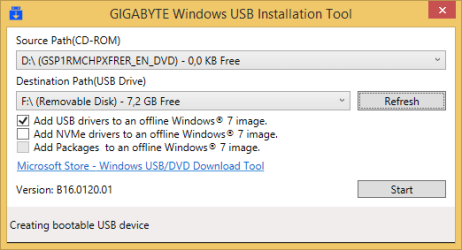
If you have a Windows 7 64-bit DVD.

GIGABYTE Windows USB Installation Tool https://youtu.be/hiTV3hJAn5s

GIGABYTE Windows USB Installation Tool.png
 
Last edited:

My Computer

Computer type
PC/Desktop
OS
Windows 7 Home Premium x64
  • I didn't have any trouble using my wireless mouse and keyboard.
  • Quick startup was disabled by default.
  • I tried to install on the partition only after trying to do it multiple times on the blank ssd.
  • I posted a link that has images of every page in my BIOS.

Ultimately, I was able to resolve this by finding a friend with a spare optical drive and install disk. Using SATA I was able to bypass the USB nightmare. I would advise anyone trying to do a clean win7 install with a USB 2.0 flash drive and using this motherboard to try to find any other way.

Yep, using a dvd is a snap :D
 

My Computer

Computer type
PC/Desktop
Computer Manufacturer/Model Number
Skylake Special #666
OS
Windows 10 Pro x64
CPU
Intel Core i7 6700K
Motherboard
Asus Sabertooth Z170 Mark 1
Memory
GSkill TridentZ RGB 16GB 3600 16-16-16-36
Graphics Card(s)
EVGA GTX 980 Ti SC x2
Sound Card
Realtek High Definition
Monitor(s) Displays
AOC G2460PG
Screen Resolution
1920 x 1080 144Hz
Hard Drives
Samsung 860 Pro 256GB, Seagate Barracuda 4TB x2
PSU
EVGA 1000 P2, EVGA White Custom Braided Cables
Case
Corsair Vengeance C70 Gunmetal Black
Cooling
Corsair H100i v2, Corsair ML120 x2, Thermal Grizzly Kryonaut
Keyboard
Logitech G910 Orion Spectrum
Mouse
Logitech G700s
Internet Speed
Verizon Fios Quantum Gateway 75/75
Antivirus
Windows Defender, Malwarebytes Free 3.8.3
Browser
Chrome
Other Info
Corsair SP120 x4, LG Blu-ray Drive, Durabrand HT-395 100 Watt Dolby Digital Amp, Corsair H2100 Wireless 7.1 Headset
Back
Top