Solved CD-DVD rw will not auto run (register seems corrupt)

Oldhead

New member
Member
Local time
3:14 AM
Messages
45
Win 7 32bit SP1 fully updated .
Search MSC > service status > running > start up type Automatic.

Regedit=
HKEY_LOCAL_MACHINE>System>Current control set>>services>Cdrom.

This is what i see ,
Default REG_SZ (Value not set)
AutoRun REG_DWORD 0x0000000(1)
Autorun always REG_Multi SZ Nec MBR_7 NEC MBR-7.4 Pioneer change
Display Name REG_SZ CD Rom Driver
Driver package ID REG_SZ cdrom.inf_x86_neutral_db87d184bc84f910
Error control REG_SZ 0x00000001(1)
Group REG_SZ scsi cdrom class
Imagepath REG_Expand_SZ system32\drivers\cdrom.sys
Start REG_DWORD 0x00000001(1)
Tag REG_DWORD 0x00000003(3)
Type REG_DWORD 0x00000001(1)


Brand new cd-dvd rw replaced 2 days ago as i thought the old one was cactus , not the case,
CD rom is recognized , just wont run or play , it shows the music files only , i used a program cd and executed program from cd file directory ,SO it works .
My initial thoughts are that the register is corrupt ,but i want touch it untill i have confirmation .
Any assistance would be great.
 

My Computer My Computer

At a glance

Windows7 home premium 32bitI5-3470 Intel4gig Corsair Vengence DDR3 1600ATi radeon HD5670 1gig
Computer type
PC/Desktop
Computer Manufacturer/Model Number
custom build
OS
Windows7 home premium 32bit
CPU
I5-3470 Intel
Motherboard
Asus P8Z77-MPro
Memory
4gig Corsair Vengence DDR3 1600
Graphics Card(s)
ATi radeon HD5670 1gig
Sound Card
on board
Monitor(s) Displays
Asus 22 inch
Hard Drives
WD 1tb Black caviar 64meg sata FAEX
Samsung EVO 840 120g
Seagate ext HD 1tb usb3
PSU
Corsair CX600 modular
Case
Antec 300
Cooling
3 Extra case fans
Antivirus
AVG internet Full vers / Malwarebytes Pro/ Superantispyware
Browser
Firefox

My Computer My Computer

At a glance

Originally Win 7 Hm Prem x64 Ver 6.1.7600 Bui...Intel i3 530 2.93GHz, 2933MHz 2 Cores 4 Logic...6GB of 1,333MHz DDR3 SDRAM32MB Intel Graphics Media Accelerator HD IGChip
Computer type
PC/Desktop
Computer Manufacturer/Model Number
Gateway DX4831-01e (Mid-Tower Desktop)
OS
Originally Win 7 Hm Prem x64 Ver 6.1.7600 Build 7601-SP1 | Upgraded to Windows 10 December 14, 2019
CPU
Intel i3 530 2.93GHz, 2933MHz 2 Cores 4 Logical Processors
Motherboard
Gateway H57M01 133 megahertz
Memory
6GB of 1,333MHz DDR3 SDRAM
Graphics Card(s)
32MB Intel Graphics Media Accelerator HD IGChip
Sound Card
Realtek High Definition Audio
Monitor(s) Displays
Gateway HX2000 20inch TFT active matrix TN
Screen Resolution
1600 x 900 x 59 hertz
Hard Drives
WDC WD10EADS-00M2B0 [HDD] (1000.20 GB) -- drive 0,
HL-DT-ST DVDRAM GH41N [CD-ROM dr]
Four card readers, and Four USB 2.0
PSU
300watts.
Case
Mid-Tower Desktop
Cooling
Stock from Gateway
Keyboard
Natural Ergonomic Keyboard 4000, see Other Info
Mouse
Orig. Gateway wore out now using Insignia USB wired optical
Internet Speed
Vz FIOS 10ms png 57.64Mbps down 65.53Mbps up Speedtest.org
Antivirus
Zamana Anti-logger with Anti-malware, MSE, Windows Firewall,
Browser
IE11.0.9600.19399-Upd ver11.0.135, Firefox 68.0.1 x64
Other Info
System Specs by Belarc.

BIOS: American Megatrends Inc. P01-A0 11/17/2009

Replaced the MS 'Natural' Standard PS/2 Enhanced 101-102 Keyboard with a new Natural Ergonomic Keyboard 4000 on August 1st 2014.

Canon Pixma MG3222 Printer.

Updated to IE11 on 12102015 | Fios Quantum Router g1100

Additional AV: SpywareBlaster, manual Mbam, SAS
Thanks for reviewing ANAK, i know terminolagy may be confusing between auto run and auto play !!
Autoplay is turned on ,check box upper L/H checked, drop down boxes are listed and window saved.
Issue is that when inserting media to the CDROM drive the files will not execute. No pop up window appears seeking verification.
I can accesss the CDROM drive only via (MY Computer) and music files ,but the files can not be read.A small WMP window appears and refuse to play files .
As stated CDROM drive is new and has been tested ,MicrosoftFixit Media player has confirmed Media player is fine Microsoft Fixit CDrom has confirmed CDrom is fine and working ?????
This is my conundrum >>>
 

My Computer My Computer

At a glance

Windows7 home premium 32bitI5-3470 Intel4gig Corsair Vengence DDR3 1600ATi radeon HD5670 1gig
Computer type
PC/Desktop
Computer Manufacturer/Model Number
custom build
OS
Windows7 home premium 32bit
CPU
I5-3470 Intel
Motherboard
Asus P8Z77-MPro
Memory
4gig Corsair Vengence DDR3 1600
Graphics Card(s)
ATi radeon HD5670 1gig
Sound Card
on board
Monitor(s) Displays
Asus 22 inch
Hard Drives
WD 1tb Black caviar 64meg sata FAEX
Samsung EVO 840 120g
Seagate ext HD 1tb usb3
PSU
Corsair CX600 modular
Case
Antec 300
Cooling
3 Extra case fans
Antivirus
AVG internet Full vers / Malwarebytes Pro/ Superantispyware
Browser
Firefox
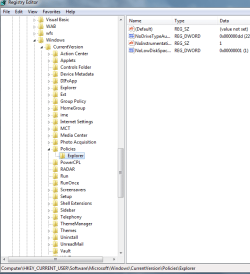
Additional info re issue . attatched is a snip of another regedit view which could be compromised creating my issue.
Could someone kindly confirm their actual snip of same reg view .
Im thinking that my value (No drive Type AV reg_DWORD 0x000000dd(221) is the issue
im thinking that my value should read (91)
Slightly cut off the No 221 in snapshot view oops.
 

Attachments

  • Regedit snapshot.PNG
    Regedit snapshot.PNG
    19.5 KB · Views: 4

My Computer My Computer

At a glance

Windows7 home premium 32bitI5-3470 Intel4gig Corsair Vengence DDR3 1600ATi radeon HD5670 1gig
Computer type
PC/Desktop
Computer Manufacturer/Model Number
custom build
OS
Windows7 home premium 32bit
CPU
I5-3470 Intel
Motherboard
Asus P8Z77-MPro
Memory
4gig Corsair Vengence DDR3 1600
Graphics Card(s)
ATi radeon HD5670 1gig
Sound Card
on board
Monitor(s) Displays
Asus 22 inch
Hard Drives
WD 1tb Black caviar 64meg sata FAEX
Samsung EVO 840 120g
Seagate ext HD 1tb usb3
PSU
Corsair CX600 modular
Case
Antec 300
Cooling
3 Extra case fans
Antivirus
AVG internet Full vers / Malwarebytes Pro/ Superantispyware
Browser
Firefox
Have you tried another music CD? Maybe the one you are trying is bad? Is this a commercial audio CD or one that has been burned? If its one that has been burned is it a CD-R or a CD-RW? If it's an RW the disc is probably trashed, RW discs have a history of losing format and/or data.
 

My Computer My Computer

At a glance

Windows 10 64 bitIntel i7 6700K16GB Corsair DominatorIntel CPU Graphics
Computer type
PC/Desktop
Computer Manufacturer/Model Number
My Own Build
OS
Windows 10 64 bit
CPU
Intel i7 6700K
Motherboard
ASUS ROG Maximus VIII Hero
Memory
16GB Corsair Dominator
Graphics Card(s)
Intel CPU Graphics
Sound Card
RealTek
Monitor(s) Displays
27" Dell S2719dgf
Screen Resolution
2560X1440
Hard Drives
1 TB Samsung 850 EVO SSD for Win 10 Pro
500GB Samsung 850 EVO SSD for Win 10 Insider
2 TB drive for backup
PSU
EVGA Supernova 750G2
Case
BeQuiet Silent Base 600
Cooling
Deepcool Captain 120EX
Keyboard
Microsoft Wireless 2000
Mouse
Microsoft wireless
Internet Speed
100 MB/sec (Cable)
Antivirus
Microsoft Defender and Malwarebytes
Browser
Edge/Firefox
Other Info
Cakewalk (Sonar) by BandLab and Studio One 4.1 Pro recording studio software. MOTU 896Mk3 Hybrid recording interface, Frontier Tranzport wireless control unit, Behringer X-Touch Control Surface.
Five USB connected optical drives for CD Audio production using Nero BurningROM
Now this is where we differ:
og1.JPG

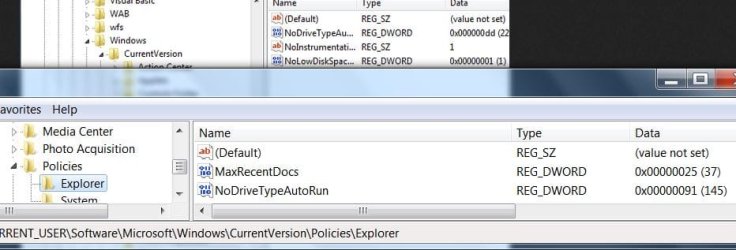
Are you working off of this? The AutoRun feature or the AutoPlay feature does not work when you insert a CD-ROM in the CD drive

To add to fireberd's reply; In order for auto run to work the inserted disk has to have the autorun/play file on it in order to auto run. If these are disks that you burned were their burning sessions closed properly?

May I ask the make/model of the CD/DVD drive and how did you install it?

I am a little leery of your working with the registry, have you made a backup of it before you started messin' around with it? http://www.sevenforums.com/tutorials/4230-registry-backup-restore.html

There are two ways of solving this by giving us more information on what may be causing this problem for you, if by trying these two methods and you receive error messages, please post those errors.

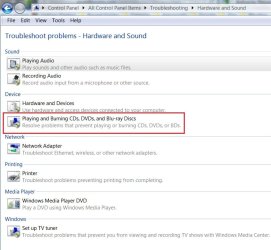
Go to Control Panel\All Control Panel Items\Troubleshooting\Hardware and Sound and use the Playing and burning troubleshooter,
og2.JPG

another way would be: http://www.sevenforums.com/tutorial...ation-conflicts-performing-clean-startup.html I mention this because some software applications, especially disc image editing programs and virtual drive utilities such as Roxio, Nero, PowerISO, MagicISO, Alcohol 120%, and even some other programs such as Rhapsody, MotoHelper, Motorola driver software, antivirus software and various VMWare virtualization products like VMWare Server and VMWare Workstation will cause conflicts with AutoPlay functionality.

If you insist it is a registry problem there is a possible Registry fix at this tutorial, Option Two: http://www.sevenforums.com/tutorials/174838-autoplay-turn-off.html

Back in the day might even been Vista, optical drives depended on high and low filters, but not 7. Check this key HKEY_LOCAL_MACHINE\SOFTWARE\Microsoft\Windows NT\CurrentVersion\DeviceDisplayObjects\SetupClassInformation\{4d36e965-e325-11ce-bfc1-08002be10318} there shouldn't be any there.

You can enter {4d36e965-e325-11ce-bfc1-08002be10318} into the find function to help find it faster.
 

My Computer My Computer

At a glance

Originally Win 7 Hm Prem x64 Ver 6.1.7600 Bui...Intel i3 530 2.93GHz, 2933MHz 2 Cores 4 Logic...6GB of 1,333MHz DDR3 SDRAM32MB Intel Graphics Media Accelerator HD IGChip
Computer type
PC/Desktop
Computer Manufacturer/Model Number
Gateway DX4831-01e (Mid-Tower Desktop)
OS
Originally Win 7 Hm Prem x64 Ver 6.1.7600 Build 7601-SP1 | Upgraded to Windows 10 December 14, 2019
CPU
Intel i3 530 2.93GHz, 2933MHz 2 Cores 4 Logical Processors
Motherboard
Gateway H57M01 133 megahertz
Memory
6GB of 1,333MHz DDR3 SDRAM
Graphics Card(s)
32MB Intel Graphics Media Accelerator HD IGChip
Sound Card
Realtek High Definition Audio
Monitor(s) Displays
Gateway HX2000 20inch TFT active matrix TN
Screen Resolution
1600 x 900 x 59 hertz
Hard Drives
WDC WD10EADS-00M2B0 [HDD] (1000.20 GB) -- drive 0,
HL-DT-ST DVDRAM GH41N [CD-ROM dr]
Four card readers, and Four USB 2.0
PSU
300watts.
Case
Mid-Tower Desktop
Cooling
Stock from Gateway
Keyboard
Natural Ergonomic Keyboard 4000, see Other Info
Mouse
Orig. Gateway wore out now using Insignia USB wired optical
Internet Speed
Vz FIOS 10ms png 57.64Mbps down 65.53Mbps up Speedtest.org
Antivirus
Zamana Anti-logger with Anti-malware, MSE, Windows Firewall,
Browser
IE11.0.9600.19399-Upd ver11.0.135, Firefox 68.0.1 x64
Other Info
System Specs by Belarc.

BIOS: American Megatrends Inc. P01-A0 11/17/2009

Replaced the MS 'Natural' Standard PS/2 Enhanced 101-102 Keyboard with a new Natural Ergonomic Keyboard 4000 on August 1st 2014.

Canon Pixma MG3222 Printer.

Updated to IE11 on 12102015 | Fios Quantum Router g1100

Additional AV: SpywareBlaster, manual Mbam, SAS
Thanks ANAK, first query (yes these disks being inserted to drive are Retail music CD,s, and even retail computer programs .No to am i working of this (microsoft instructions)
CD-DVD rw is an ASUS model DRW-24D3ST sata 24x Computer system was totally disc from power sources , anti static strap attatched to frame and self , (everthing on system was fine and has been fully operational (except for the issue above.
I have NOT at this stage made any alterations to the registry only reviewed ( before i do i would understandably make a back up) hence my queries on this forum first.
I am aware of some programs affecting Registry values etc.
Running Ccleaner Free, AVG internet security Full ,Malwarebytes Pro Full.Superantispyware Free, Acronis Back up.
Appreciate your input and will re post as soon as i have completed Trouble shoot.
I have performed a trial burn with WMP to the CD.DVD rom and it completed , ?????? This issue is starting to do my
head in .
 

My Computer My Computer

At a glance

Windows7 home premium 32bitI5-3470 Intel4gig Corsair Vengence DDR3 1600ATi radeon HD5670 1gig
Computer type
PC/Desktop
Computer Manufacturer/Model Number
custom build
OS
Windows7 home premium 32bit
CPU
I5-3470 Intel
Motherboard
Asus P8Z77-MPro
Memory
4gig Corsair Vengence DDR3 1600
Graphics Card(s)
ATi radeon HD5670 1gig
Sound Card
on board
Monitor(s) Displays
Asus 22 inch
Hard Drives
WD 1tb Black caviar 64meg sata FAEX
Samsung EVO 840 120g
Seagate ext HD 1tb usb3
PSU
Corsair CX600 modular
Case
Antec 300
Cooling
3 Extra case fans
Antivirus
AVG internet Full vers / Malwarebytes Pro/ Superantispyware
Browser
Firefox
I see your running AVG can you check this area of it? Its the only area i can think of, if you can think of others within AVG check them also.

Just to make sure AVG isn't blocking the optical drive, its under Parental Controls.
og3.JPG

AVG | Parental Controls | FAQ
 

My Computer My Computer

At a glance

Originally Win 7 Hm Prem x64 Ver 6.1.7600 Bui...Intel i3 530 2.93GHz, 2933MHz 2 Cores 4 Logic...6GB of 1,333MHz DDR3 SDRAM32MB Intel Graphics Media Accelerator HD IGChip
Computer type
PC/Desktop
Computer Manufacturer/Model Number
Gateway DX4831-01e (Mid-Tower Desktop)
OS
Originally Win 7 Hm Prem x64 Ver 6.1.7600 Build 7601-SP1 | Upgraded to Windows 10 December 14, 2019
CPU
Intel i3 530 2.93GHz, 2933MHz 2 Cores 4 Logical Processors
Motherboard
Gateway H57M01 133 megahertz
Memory
6GB of 1,333MHz DDR3 SDRAM
Graphics Card(s)
32MB Intel Graphics Media Accelerator HD IGChip
Sound Card
Realtek High Definition Audio
Monitor(s) Displays
Gateway HX2000 20inch TFT active matrix TN
Screen Resolution
1600 x 900 x 59 hertz
Hard Drives
WDC WD10EADS-00M2B0 [HDD] (1000.20 GB) -- drive 0,
HL-DT-ST DVDRAM GH41N [CD-ROM dr]
Four card readers, and Four USB 2.0
PSU
300watts.
Case
Mid-Tower Desktop
Cooling
Stock from Gateway
Keyboard
Natural Ergonomic Keyboard 4000, see Other Info
Mouse
Orig. Gateway wore out now using Insignia USB wired optical
Internet Speed
Vz FIOS 10ms png 57.64Mbps down 65.53Mbps up Speedtest.org
Antivirus
Zamana Anti-logger with Anti-malware, MSE, Windows Firewall,
Browser
IE11.0.9600.19399-Upd ver11.0.135, Firefox 68.0.1 x64
Other Info
System Specs by Belarc.

BIOS: American Megatrends Inc. P01-A0 11/17/2009

Replaced the MS 'Natural' Standard PS/2 Enhanced 101-102 Keyboard with a new Natural Ergonomic Keyboard 4000 on August 1st 2014.

Canon Pixma MG3222 Printer.

Updated to IE11 on 12102015 | Fios Quantum Router g1100

Additional AV: SpywareBlaster, manual Mbam, SAS
Trouble shooting Hardware > Problem found (D: ) is not detected > Green box ticked as fixed.
But it didnt???? Drive D will still not self start , or by MY computer > double click to D drive it only shows lists of the tracks on disc.
Control panel > Parental control > Self as admin & guest no admin.
Can not find any services tab on my AVG 2013 program?????
 

My Computer My Computer

At a glance

Windows7 home premium 32bitI5-3470 Intel4gig Corsair Vengence DDR3 1600ATi radeon HD5670 1gig
Computer type
PC/Desktop
Computer Manufacturer/Model Number
custom build
OS
Windows7 home premium 32bit
CPU
I5-3470 Intel
Motherboard
Asus P8Z77-MPro
Memory
4gig Corsair Vengence DDR3 1600
Graphics Card(s)
ATi radeon HD5670 1gig
Sound Card
on board
Monitor(s) Displays
Asus 22 inch
Hard Drives
WD 1tb Black caviar 64meg sata FAEX
Samsung EVO 840 120g
Seagate ext HD 1tb usb3
PSU
Corsair CX600 modular
Case
Antec 300
Cooling
3 Extra case fans
Antivirus
AVG internet Full vers / Malwarebytes Pro/ Superantispyware
Browser
Firefox
Can you see a Parental Control tab in AVG?
 

My Computer My Computer

At a glance

Originally Win 7 Hm Prem x64 Ver 6.1.7600 Bui...Intel i3 530 2.93GHz, 2933MHz 2 Cores 4 Logic...6GB of 1,333MHz DDR3 SDRAM32MB Intel Graphics Media Accelerator HD IGChip
Computer type
PC/Desktop
Computer Manufacturer/Model Number
Gateway DX4831-01e (Mid-Tower Desktop)
OS
Originally Win 7 Hm Prem x64 Ver 6.1.7600 Build 7601-SP1 | Upgraded to Windows 10 December 14, 2019
CPU
Intel i3 530 2.93GHz, 2933MHz 2 Cores 4 Logical Processors
Motherboard
Gateway H57M01 133 megahertz
Memory
6GB of 1,333MHz DDR3 SDRAM
Graphics Card(s)
32MB Intel Graphics Media Accelerator HD IGChip
Sound Card
Realtek High Definition Audio
Monitor(s) Displays
Gateway HX2000 20inch TFT active matrix TN
Screen Resolution
1600 x 900 x 59 hertz
Hard Drives
WDC WD10EADS-00M2B0 [HDD] (1000.20 GB) -- drive 0,
HL-DT-ST DVDRAM GH41N [CD-ROM dr]
Four card readers, and Four USB 2.0
PSU
300watts.
Case
Mid-Tower Desktop
Cooling
Stock from Gateway
Keyboard
Natural Ergonomic Keyboard 4000, see Other Info
Mouse
Orig. Gateway wore out now using Insignia USB wired optical
Internet Speed
Vz FIOS 10ms png 57.64Mbps down 65.53Mbps up Speedtest.org
Antivirus
Zamana Anti-logger with Anti-malware, MSE, Windows Firewall,
Browser
IE11.0.9600.19399-Upd ver11.0.135, Firefox 68.0.1 x64
Other Info
System Specs by Belarc.

BIOS: American Megatrends Inc. P01-A0 11/17/2009

Replaced the MS 'Natural' Standard PS/2 Enhanced 101-102 Keyboard with a new Natural Ergonomic Keyboard 4000 on August 1st 2014.

Canon Pixma MG3222 Printer.

Updated to IE11 on 12102015 | Fios Quantum Router g1100

Additional AV: SpywareBlaster, manual Mbam, SAS
Sorry no , only options tab > sub folder > nothing to do with advanced options etc.
Cant tell you how much i appreciate this assistance ,it has me stumped . Drivers for D drive are fine .
Funny though i even went as far as to do a repair install of windows , but got stopped as the oem disk i have was rejected as being a diff version to what is currently installed ( go figure ) Never used any other install ????? Also had to uninstall ATI catalyst program and drivers.
 

My Computer My Computer

At a glance

Windows7 home premium 32bitI5-3470 Intel4gig Corsair Vengence DDR3 1600ATi radeon HD5670 1gig
Computer type
PC/Desktop
Computer Manufacturer/Model Number
custom build
OS
Windows7 home premium 32bit
CPU
I5-3470 Intel
Motherboard
Asus P8Z77-MPro
Memory
4gig Corsair Vengence DDR3 1600
Graphics Card(s)
ATi radeon HD5670 1gig
Sound Card
on board
Monitor(s) Displays
Asus 22 inch
Hard Drives
WD 1tb Black caviar 64meg sata FAEX
Samsung EVO 840 120g
Seagate ext HD 1tb usb3
PSU
Corsair CX600 modular
Case
Antec 300
Cooling
3 Extra case fans
Antivirus
AVG internet Full vers / Malwarebytes Pro/ Superantispyware
Browser
Firefox
My apologies life intervened, my neighbor needed a hand.

Then the next thing to do is run that http://www.sevenforums.com/tutorial...ation-conflicts-performing-clean-startup.html

Start with Step One and try the drive as stated after #6.
6. After the computer finishes restarting, determine whether the problem is resolved.

  • Start the affected game or program to determine whether the problem is resolved.
  • If the problem does not occur after you restart, the interference is occurring because of a background program or service. In this case, go to the Determine what is causing the problem section (STEP TWO) below.
  • If the problem returns after you perform a clean startup, the interference is not occurring because of a background program or service. In this case, this tutorial cannot resolve your problem. Go to the How to return Windows to Normal startup mode section (STEP THREE) below to return your computer to the original startup mode. Then, go to the "Related Links" section at the bottom for other tutorials that may help you resolve this problem.
 

My Computer My Computer

At a glance

Originally Win 7 Hm Prem x64 Ver 6.1.7600 Bui...Intel i3 530 2.93GHz, 2933MHz 2 Cores 4 Logic...6GB of 1,333MHz DDR3 SDRAM32MB Intel Graphics Media Accelerator HD IGChip
Computer type
PC/Desktop
Computer Manufacturer/Model Number
Gateway DX4831-01e (Mid-Tower Desktop)
OS
Originally Win 7 Hm Prem x64 Ver 6.1.7600 Build 7601-SP1 | Upgraded to Windows 10 December 14, 2019
CPU
Intel i3 530 2.93GHz, 2933MHz 2 Cores 4 Logical Processors
Motherboard
Gateway H57M01 133 megahertz
Memory
6GB of 1,333MHz DDR3 SDRAM
Graphics Card(s)
32MB Intel Graphics Media Accelerator HD IGChip
Sound Card
Realtek High Definition Audio
Monitor(s) Displays
Gateway HX2000 20inch TFT active matrix TN
Screen Resolution
1600 x 900 x 59 hertz
Hard Drives
WDC WD10EADS-00M2B0 [HDD] (1000.20 GB) -- drive 0,
HL-DT-ST DVDRAM GH41N [CD-ROM dr]
Four card readers, and Four USB 2.0
PSU
300watts.
Case
Mid-Tower Desktop
Cooling
Stock from Gateway
Keyboard
Natural Ergonomic Keyboard 4000, see Other Info
Mouse
Orig. Gateway wore out now using Insignia USB wired optical
Internet Speed
Vz FIOS 10ms png 57.64Mbps down 65.53Mbps up Speedtest.org
Antivirus
Zamana Anti-logger with Anti-malware, MSE, Windows Firewall,
Browser
IE11.0.9600.19399-Upd ver11.0.135, Firefox 68.0.1 x64
Other Info
System Specs by Belarc.

BIOS: American Megatrends Inc. P01-A0 11/17/2009

Replaced the MS 'Natural' Standard PS/2 Enhanced 101-102 Keyboard with a new Natural Ergonomic Keyboard 4000 on August 1st 2014.

Canon Pixma MG3222 Printer.

Updated to IE11 on 12102015 | Fios Quantum Router g1100

Additional AV: SpywareBlaster, manual Mbam, SAS
Funny though i even went as far as to do a repair install of windows , but got stopped as the oem disk i have was rejected as being a diff version to what is currently installed ( go figure ) Never used any other install ?????

That sounds like you have SP1 installed and your disc is pre SP1.
 

My Computer My Computer

At a glance

Win 10 Pro x64Intel I5-2500K @3.3GHz16GB G.Skill Ripjaws X (4x4GB)EVGA GeForce 750 Ti SC 2GB
Computer type
PC/Desktop
Computer Manufacturer/Model Number
Self Built
OS
Win 10 Pro x64
CPU
Intel I5-2500K @3.3GHz
Motherboard
Asrock P67 Extreme4
Memory
16GB G.Skill Ripjaws X (4x4GB)
Graphics Card(s)
EVGA GeForce 750 Ti SC 2GB
Sound Card
ASUS Xonar DG 5.1 Channels 24-bit 96KHz PCI Interface Sound
Monitor(s) Displays
auria eq2367
Screen Resolution
1920 x 1080
Hard Drives
250GB Samsung 850 EVO SSD
1TB WD Blue
1TB Hitachi
PSU
SeaSonic X 650W 80 Plus Gold
Case
Corsair Obsidian 750D
Cooling
Corsair H60, Three 140mm case fans
Keyboard
Logitech Wireless Keyboard K520
Mouse
Logitech Wireless Mouse M310
Internet Speed
Wave Broadband ~ 100 dn 5 up
Antivirus
Windows Defender, Malwarebytes Premium
Browser
Edge, IE11, Chrome
Other Info
Laptop specs: HP g7-1365dx /
CPU: AMD A6-3420M APU with Radeon(tm) HD Graphics /
RAM: Crucial 8Gb (2x4Gb) /
SSD: Crucial M4-CT128M4SSD2 ATA Device/ FW 000F /
GFX: AMD Radeon HD 6520G /
OS: Windows 10 Pro x64
Funny though i even went as far as to do a repair install of windows , but got stopped as the oem disk i have was rejected as being a diff version to what is currently installed ( go figure ) Never used any other install ?????

That sounds like you have SP1 installed and your disc is pre SP1.

Yes ,looks like def right there. Just another bloody isssue. Cant repair install !
Looks like the system shop, built for me and loaded sp1 ,but gave me pre issue sp1 disk .
 

My Computer My Computer

At a glance

Windows7 home premium 32bitI5-3470 Intel4gig Corsair Vengence DDR3 1600ATi radeon HD5670 1gig
Computer type
PC/Desktop
Computer Manufacturer/Model Number
custom build
OS
Windows7 home premium 32bit
CPU
I5-3470 Intel
Motherboard
Asus P8Z77-MPro
Memory
4gig Corsair Vengence DDR3 1600
Graphics Card(s)
ATi radeon HD5670 1gig
Sound Card
on board
Monitor(s) Displays
Asus 22 inch
Hard Drives
WD 1tb Black caviar 64meg sata FAEX
Samsung EVO 840 120g
Seagate ext HD 1tb usb3
PSU
Corsair CX600 modular
Case
Antec 300
Cooling
3 Extra case fans
Antivirus
AVG internet Full vers / Malwarebytes Pro/ Superantispyware
Browser
Firefox
My apologies life intervened, my neighbor needed a hand.

Then the next thing to do is run that http://www.sevenforums.com/tutorial...ation-conflicts-performing-clean-startup.html

Start with Step One and try the drive as stated after #6.
6. After the computer finishes restarting, determine whether the problem is resolved.

  • Start the affected game or program to determine whether the problem is resolved.
  • If the problem does not occur after you restart, the interference is occurring because of a background program or service. In this case, go to the Determine what is causing the problem section (STEP TWO) below.
  • If the problem returns after you perform a clean startup, the interference is not occurring because of a background program or service. In this case, this tutorial cannot resolve your problem. Go to the How to return Windows to Normal startup mode section (STEP THREE) below to return your computer to the original startup mode. Then, go to the "Related Links" section at the bottom for other tutorials that may help you resolve this problem.
Anak the msconfig shows No interference from programs ,re booted normal.
and on we go .:confused:
 

My Computer My Computer

At a glance

Windows7 home premium 32bitI5-3470 Intel4gig Corsair Vengence DDR3 1600ATi radeon HD5670 1gig
Computer type
PC/Desktop
Computer Manufacturer/Model Number
custom build
OS
Windows7 home premium 32bit
CPU
I5-3470 Intel
Motherboard
Asus P8Z77-MPro
Memory
4gig Corsair Vengence DDR3 1600
Graphics Card(s)
ATi radeon HD5670 1gig
Sound Card
on board
Monitor(s) Displays
Asus 22 inch
Hard Drives
WD 1tb Black caviar 64meg sata FAEX
Samsung EVO 840 120g
Seagate ext HD 1tb usb3
PSU
Corsair CX600 modular
Case
Antec 300
Cooling
3 Extra case fans
Antivirus
AVG internet Full vers / Malwarebytes Pro/ Superantispyware
Browser
Firefox

My Computer My Computer

At a glance

Windows7 home premium 32bitI5-3470 Intel4gig Corsair Vengence DDR3 1600ATi radeon HD5670 1gig
Computer type
PC/Desktop
Computer Manufacturer/Model Number
custom build
OS
Windows7 home premium 32bit
CPU
I5-3470 Intel
Motherboard
Asus P8Z77-MPro
Memory
4gig Corsair Vengence DDR3 1600
Graphics Card(s)
ATi radeon HD5670 1gig
Sound Card
on board
Monitor(s) Displays
Asus 22 inch
Hard Drives
WD 1tb Black caviar 64meg sata FAEX
Samsung EVO 840 120g
Seagate ext HD 1tb usb3
PSU
Corsair CX600 modular
Case
Antec 300
Cooling
3 Extra case fans
Antivirus
AVG internet Full vers / Malwarebytes Pro/ Superantispyware
Browser
Firefox
I read the thread, and sadly am still :confused: as to the actual problem.

DATA cds all work fine?

Music CDs do not play actual music, you just see them as .CDA files instead?

What program is associated with playing them at this time?

I never use WMP for anything, so I would try another program, just to see, in case you are mad about (madly in love with) WMP, or just didn't know you had options. muhahaha! [had to work that in sorry].

Can try SFC /scannow and verify Windows 7's critical files are in order also.
 

My Computer My Computer

At a glance

Windows 7 Ultimate Retail Box (64-bit install...AMD FX-8350 CPU v1.15 (or 1.0F) BIOS was requ...8G CAS-7 G-Skill DDR3 @1333 (2 fours) [mobo n...Radeon HD 7950 [3 gigs of GDDR5] MSI Twin Fro...
Computer type
PC/Desktop
Computer Manufacturer/Model Number
Self Built Custom
OS
Windows 7 Ultimate Retail Box (64-bit installed) + Service Pack 1
CPU
AMD FX-8350 CPU v1.15 (or 1.0F) BIOS was required!
Motherboard
MSI 890FXA-GD70
Memory
8G CAS-7 G-Skill DDR3 @1333 (2 fours) [mobo nonOC max rec'd]
Graphics Card(s)
Radeon HD 7950 [3 gigs of GDDR5] MSI Twin Frozr model
Sound Card
Realtek High Definition Audio (onboard mobo, ALC-889 chip)
Monitor(s) Displays
2 WS LED Monitors: One LG One Viewsonic
Screen Resolution
1920 by 1080
Hard Drives
SSD for OS: Samsung 840 Pro
SSD for VM and utilities: Adata SX900
7200 RPM SATA HDs for the rest: Hitachi and Seagate
PSU
Corsair TX850 - 850W max, in service since August 2010.
Case
Thermaltake Armor A90
Cooling
Thermaltake Spin Q CPU Cooler, in service since August 2010
Keyboard
Logitech G11
Mouse
Logitech M310 Wireless
Internet Speed
100 Megabit broadband supposedly upgraded from 50 (Cable)
Antivirus
Bitdefender Internet Security 2014 suite
Browser
Pale Moon 64-bit main, also IceDragon, Opera, and Maxthon.
Other Info
CompTIA A+ certified (220-800 series) in July 2013.
Yes ,looks like def right there. Just another bloody isssue. Cant repair install !
Looks like the system shop, built for me and loaded sp1 ,but gave me pre issue sp1 disk .
I would go back to them and ask for the proper OS disk.

Anak the msconfig shows No interference from programs ,re booted normal. and on we go .:confused:
Okay, now we know that can be ruled out.

It's worth a shot, go for it.The values are the same as mine.

280772d1376137882t-cd-dvd-rw-will-not-auto-run-register-seems-corrupt-og1.jpg


Are you familiar with editing the registry, changing values?


I read the thread, and sadly am still :confused: as to the actual problem.

DATA cds all work fine?

Music CDs do not play actual music, you just see them as .CDA files instead?

What program is associated with playing them at this time?

I never use WMP for anything, so I would try another program, just to see, in case you are mad about (madly in love with) WMP, or just didn't know you had options. muhahaha! [had to work that in sorry].

Can try SFC /scannow and verify Windows 7's critical files are in order also.
Normally when the user inserts a disk into the optical player whether it be data, audio, video or an installation disk, a Autorun/Autoplay dialog box will appear and ask the user what he or she would like done with the inserted disk, and how autorun should proceed after that choice is made.

Oldhead's new optical drive works and he can see Folders, Files, audio and video tracks, but unfortunately the autorun dialog doesn't appear and he has to use other workarounds to get into what ever disk he has inserted at that moment.
We haven't touched on it, but I suspect it has something to do with the new optical drive's installation.

I'm not sure program association is the problem at the moment, It is a good question, and it should be looked into.

A chkdsk, and a sfc scan would be good to run after all this.
 

My Computer My Computer

At a glance

Originally Win 7 Hm Prem x64 Ver 6.1.7600 Bui...Intel i3 530 2.93GHz, 2933MHz 2 Cores 4 Logic...6GB of 1,333MHz DDR3 SDRAM32MB Intel Graphics Media Accelerator HD IGChip
Computer type
PC/Desktop
Computer Manufacturer/Model Number
Gateway DX4831-01e (Mid-Tower Desktop)
OS
Originally Win 7 Hm Prem x64 Ver 6.1.7600 Build 7601-SP1 | Upgraded to Windows 10 December 14, 2019
CPU
Intel i3 530 2.93GHz, 2933MHz 2 Cores 4 Logical Processors
Motherboard
Gateway H57M01 133 megahertz
Memory
6GB of 1,333MHz DDR3 SDRAM
Graphics Card(s)
32MB Intel Graphics Media Accelerator HD IGChip
Sound Card
Realtek High Definition Audio
Monitor(s) Displays
Gateway HX2000 20inch TFT active matrix TN
Screen Resolution
1600 x 900 x 59 hertz
Hard Drives
WDC WD10EADS-00M2B0 [HDD] (1000.20 GB) -- drive 0,
HL-DT-ST DVDRAM GH41N [CD-ROM dr]
Four card readers, and Four USB 2.0
PSU
300watts.
Case
Mid-Tower Desktop
Cooling
Stock from Gateway
Keyboard
Natural Ergonomic Keyboard 4000, see Other Info
Mouse
Orig. Gateway wore out now using Insignia USB wired optical
Internet Speed
Vz FIOS 10ms png 57.64Mbps down 65.53Mbps up Speedtest.org
Antivirus
Zamana Anti-logger with Anti-malware, MSE, Windows Firewall,
Browser
IE11.0.9600.19399-Upd ver11.0.135, Firefox 68.0.1 x64
Other Info
System Specs by Belarc.

BIOS: American Megatrends Inc. P01-A0 11/17/2009

Replaced the MS 'Natural' Standard PS/2 Enhanced 101-102 Keyboard with a new Natural Ergonomic Keyboard 4000 on August 1st 2014.

Canon Pixma MG3222 Printer.

Updated to IE11 on 12102015 | Fios Quantum Router g1100

Additional AV: SpywareBlaster, manual Mbam, SAS
Wmp works fine for my current needs, and no its not the media player,
this is the 2nd CD-dvd rom that wont work as normal.
Have already done chkdsk & sfc scan and all presented as fine.
Going to bite the bullet Anak , will do full bk up of registry and modify value (hexidecimal) as per article and also the reference to your same posted . They both seem to pinpoint a possible reason.
A few pointers as to correct proceedure woudnt hurt , never dealt that deep before.and will advise outcome for reference to other users. Cheers.
 

My Computer My Computer

At a glance

Windows7 home premium 32bitI5-3470 Intel4gig Corsair Vengence DDR3 1600ATi radeon HD5670 1gig
Computer type
PC/Desktop
Computer Manufacturer/Model Number
custom build
OS
Windows7 home premium 32bit
CPU
I5-3470 Intel
Motherboard
Asus P8Z77-MPro
Memory
4gig Corsair Vengence DDR3 1600
Graphics Card(s)
ATi radeon HD5670 1gig
Sound Card
on board
Monitor(s) Displays
Asus 22 inch
Hard Drives
WD 1tb Black caviar 64meg sata FAEX
Samsung EVO 840 120g
Seagate ext HD 1tb usb3
PSU
Corsair CX600 modular
Case
Antec 300
Cooling
3 Extra case fans
Antivirus
AVG internet Full vers / Malwarebytes Pro/ Superantispyware
Browser
Firefox
Important!
Before you do this; Make a backup of your registry also make a http://www.sevenforums.com/tutorials/697-system-restore-point-create.html


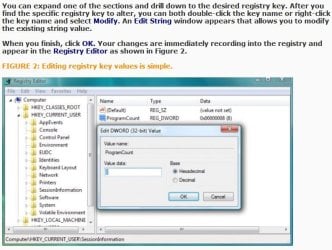
Use this tutorial as a guide: Using the Registry Editor in Windows 7

Read through it to accustom yourself to the procedures, but we will only be dealing with the part down to figure 2.

og4.JPG

You can easily access the Registry Editor by typing regedit in the Start Menu’s Search box.
You should see regedit.exe at the top listed under Programs (1). You can either click on Open or Run as Administrator, the choice is yours.
The User Account Control asks you to authorize access by clicking Continue. The Registry Editor appears with an expanded menu of the five registry key sections:


You can expand one of the sections and drill down to the desired registry key.
In your case: HKEY_CURRENT_USER\Software\Microsoft\Windows\CurrentVersion\Policies\Explorer

After you find the specific registry key to alter, you can both double-click the key name or right-click the key name and select Modify. An Edit String window appears that allows you to modify the existing string value.
In the edit string window that does appear you should see:

  • Value Name: NoDriveTypeAutoRun and,
  • "dd" highlighted in the Value Data.
  • Leave the Base, Hexadecimal selected as is.
  • Type 91, you will see the "dd" change to 91.
  • Click on OK and you will see the Data Value in the right pane change from 0x000000dd (221) to 0x00000091 (145).
  • Close the registry editor.
Some users mention that at this point you should restart your machine, I would.

Test to see if the autorun function for the optical drive is working.

Screenshot and quotes are sourced from:
Using the Registry Editor in Windows 7


Remember, I'm pulling for you. We're all in this together.
Red Green


Steve


My Computer My Computer

At a glance

Originally Win 7 Hm Prem x64 Ver 6.1.7600 Bui...Intel i3 530 2.93GHz, 2933MHz 2 Cores 4 Logic...6GB of 1,333MHz DDR3 SDRAM32MB Intel Graphics Media Accelerator HD IGChip
Computer type
PC/Desktop
Computer Manufacturer/Model Number
Gateway DX4831-01e (Mid-Tower Desktop)
OS
Originally Win 7 Hm Prem x64 Ver 6.1.7600 Build 7601-SP1 | Upgraded to Windows 10 December 14, 2019
CPU
Intel i3 530 2.93GHz, 2933MHz 2 Cores 4 Logical Processors
Motherboard
Gateway H57M01 133 megahertz
Memory
6GB of 1,333MHz DDR3 SDRAM
Graphics Card(s)
32MB Intel Graphics Media Accelerator HD IGChip
Sound Card
Realtek High Definition Audio
Monitor(s) Displays
Gateway HX2000 20inch TFT active matrix TN
Screen Resolution
1600 x 900 x 59 hertz
Hard Drives
WDC WD10EADS-00M2B0 [HDD] (1000.20 GB) -- drive 0,
HL-DT-ST DVDRAM GH41N [CD-ROM dr]
Four card readers, and Four USB 2.0
PSU
300watts.
Case
Mid-Tower Desktop
Cooling
Stock from Gateway
Keyboard
Natural Ergonomic Keyboard 4000, see Other Info
Mouse
Orig. Gateway wore out now using Insignia USB wired optical
Internet Speed
Vz FIOS 10ms png 57.64Mbps down 65.53Mbps up Speedtest.org
Antivirus
Zamana Anti-logger with Anti-malware, MSE, Windows Firewall,
Browser
IE11.0.9600.19399-Upd ver11.0.135, Firefox 68.0.1 x64
Other Info
System Specs by Belarc.

BIOS: American Megatrends Inc. P01-A0 11/17/2009

Replaced the MS 'Natural' Standard PS/2 Enhanced 101-102 Keyboard with a new Natural Ergonomic Keyboard 4000 on August 1st 2014.

Canon Pixma MG3222 Printer.

Updated to IE11 on 12102015 | Fios Quantum Router g1100

Additional AV: SpywareBlaster, manual Mbam, SAS
Back
Top