Hitman
Hi,
I didn't get any problems like that. I've used it today and a few times in the past. it's supposed to warn you if your browser has been compromised by malware or"man in the middle" attacks. As for removing it - this is the method that I used.
Stop the Hitman Pro Alert Service (Start> Run> type services.msc then press enter) or use any decent service manager that you've installed. Once the service is stopped check processes for hmpalert.exe and kill it if present.
Then try uninstalling. Personally I used IObit Uninstaller rather than add/ remove programs but that's not a recommendation - just the way that I removed it.
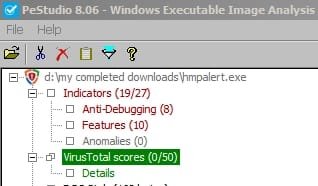
File details needed for manual removal:
http://www.shouldiremoveit.com/HitmanPro-Alert-78894-program.aspx
Just the service, executable, the uninstaller and a couple of dll's.
As it didn't run smoothly it would seem to suggest that there's a problem with IE.
Anyway after that disaster perhaps it might be an idea to uninstall IE 11 (assuming that you've upgraded to the latest version). If you want to be sure of keeping your bookmarks you should export them first.
http://www.sevenforums.com/tutorials/313358-internet-explorer-11-uninstall-windows-7-a.html
http://www.sevenforums.com/tutorials/86795-internet-explorer-import-export-favorites.html
It should roll back to IE 10 and if you temporarily disable windows updates you can test IE 10 for a while to see if you get the same problem.
You can reinstall IE 11 by re-enabling windows updates.
Hi,
I didn't get any problems like that. I've used it today and a few times in the past. it's supposed to warn you if your browser has been compromised by malware or"man in the middle" attacks. As for removing it - this is the method that I used.
Stop the Hitman Pro Alert Service (Start> Run> type services.msc then press enter) or use any decent service manager that you've installed. Once the service is stopped check processes for hmpalert.exe and kill it if present.
Then try uninstalling. Personally I used IObit Uninstaller rather than add/ remove programs but that's not a recommendation - just the way that I removed it.
File details needed for manual removal:
http://www.shouldiremoveit.com/HitmanPro-Alert-78894-program.aspx
Just the service, executable, the uninstaller and a couple of dll's.
As it didn't run smoothly it would seem to suggest that there's a problem with IE.
Anyway after that disaster perhaps it might be an idea to uninstall IE 11 (assuming that you've upgraded to the latest version). If you want to be sure of keeping your bookmarks you should export them first.
http://www.sevenforums.com/tutorials/313358-internet-explorer-11-uninstall-windows-7-a.html
http://www.sevenforums.com/tutorials/86795-internet-explorer-import-export-favorites.html
It should roll back to IE 10 and if you temporarily disable windows updates you can test IE 10 for a while to see if you get the same problem.
You can reinstall IE 11 by re-enabling windows updates.
Last edited:
My Computer
At a glance
Microsoft Windows 7 Home Premium 64-bit 7601 ...AMD C-60 APU with Radeon(tm) HD Graphics4.00 GBAMD Radeon HD 6290 Graphics
- Computer type
- Laptop
- Computer Manufacturer/Model Number
- ASUS
- OS
- Microsoft Windows 7 Home Premium 64-bit 7601 Multiprocessor Free Service Pack 1
- CPU
- AMD C-60 APU with Radeon(tm) HD Graphics
- Motherboard
- ASUSTeK COMPUTER INC. X501U
- Memory
- 4.00 GB
- Graphics Card(s)
- AMD Radeon HD 6290 Graphics
- Sound Card
- (1) AMD High Definition Audio Device (2) Realtek High Defi
- Screen Resolution
- 1366 x 768 x 32 bits (4294967296 colors) @ 60 Hz
- Hard Drives
- Hitachi HTS545050A7E380 SATA Disk Device
- Antivirus
- Comodo CIS & FW, SecureAplus App Whitelisting, Threatfire
- Browser
- Cyberfox 64bit, Opera 64bit, Airfox
- Other Info
- Spy-The-Spy, HitmanPro.Alert, Norton Connect Safe, MJRegWatcher, BitDefender TrafficLight, Voodoo Shield, Zemana AntiMalware