JavaScript is disabled. For a better experience, please enable JavaScript in your browser before proceeding.
You are using an out of date browser. It may not display this or other websites correctly.
You should upgrade or use an
alternative browser .
Change a partitions boot path
Hi!
Here's the situation;
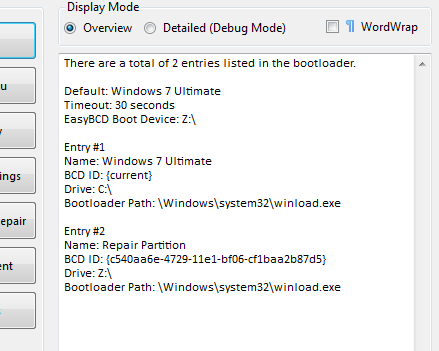
I've got 2 partitions on my hard drive, C:\ has my Windows 7 Ultimate installed and Z:\ has Windows 7 Setup files. I've added a boot entry so that Z:\ can be booted and Windows 7 can be repaired or installed.
There's one problem however, EasyBCD has added a boot entry and it's setting it to boot from Z:\Windows\System32\winload.exe but because it's setup files, it needs to boot from Z:\setup.exe
How could I change the default boot path so that it boots from \setup.exe instead of \winload.exe?
Any help would be appreciated, thanks,
James.
Computer type PC/Desktop Computer Manufacturer/Model Number HP OS Windows 7 Ultimate CPU DualCore Intel Pentium D 930, 3000 MHz (15 x 200) Motherboard Asus P5LP-LE (Emery) Memory 3x512mb 1x1GB Graphics Card(s) NVIDIA GeForce 7800 GTX Sound Card Realtek ALC882/D/M @ Intel 82801GB ICH7 Monitor(s) Displays Iiyama ProLite E2407HDS Screen Resolution 1920 x 1080 70 Hz Hard Drives 1TB WD10EARS-00Y5B1 ATA Device Keyboard Hewlett Packard Wireless Ergo Mouse Logitech USB Wheel Mouse Internet Speed 20mbps Download - 2mbps Upload Antivirus Windows Defender - Malwarebytes Anti Malware Browser Google Chrome
New member
Guru
Gold Member
VIP
msconfig
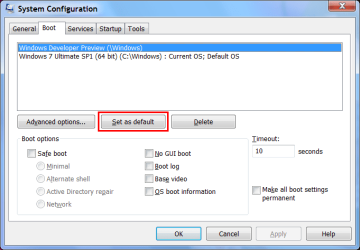
Can't you select it in msconfig?
Start "
msconfig " (type "
msconfig " in the "
Start Menu Search Box ")
Select your OS and click on the "
Set as default " button.
If that won't do it, try this tutorial:
BCDEDIT - How to Use
http://www.sevenforums.com/tutorials/2676-bcdedit-how-use.html
I'd recommend creating a backup image,
BEFORE messing around with BCDEDIT.
Last edited: Jan 24, 2012
Computer type PC/Desktop Computer Manufacturer/Model Number n/a OS W7 Ultimate SP1, LM19.2 MATE, W10 Home 1703, W10 Pro 1703 VM, #All 64 bit CPU AMD Phenom II x6 1100T, 3.3 GHz Motherboard ASUS M4A88T-M/USB3 (AM3) Memory 12GB DDR3 1333 G-Skill (4GB x 2), G-Skill (2GB x 2) Graphics Card(s) NVIDIA GeForce GTX 660 Sound Card Realtek? Monitor(s) Displays Samsung S23B350 Screen Resolution 1920x1080 Hard Drives WD Green 2TB (SATA), WD Green 3TB (SATA), WD Blue 4TB (SATA), WD Blue 6TB (SATA) PSU Cooler Master Case Antec GX300 Tower Cooling 3x Antec TRICOOL 120mm Fans Mouse Wired Optical Internet Speed DSL Antivirus Avast Browser Pale Moon (64 bit) Other Info 2018-12-27 Upgraded HDDs
Administrator
Staff member
Computer type PC/Desktop Computer Manufacturer/Model Number Self built custom OS 64-bit Windows 11 Pro for Workstations CPU Intel i7-8700K OC'd to 5 GHz Motherboard ASUS ROG Maximus XI Formula Z390 Memory 64 GB (4x16GB) G.SKILL TridentZ RGB DDR4 3600 MHz Graphics Card(s) ASUS ROG-STRIX-GTX1080TI-O11G-GAMING Sound Card Integrated Monitor(s) Displays 2 x Samsung Odyssey G7 27" Screen Resolution 2560x1440 Hard Drives 1TB Samsung 990 PRO M.2, PSU Seasonic Prime Titanium 850W Case Thermaltake Core P3 Cooling Corsair Hydro H115i Keyboard Logitech wireless K800 Mouse Logitech MX Master 4 Internet Speed 2 Gb/s Download and 100 Mb/s Upload Antivirus Malwarebyte Anti-Malware Premium Browser Google Chrome Other Info Logitech Z625 speaker system,
New member
Guru
Gold Member
VIP
I don't think he wants to change a default OS. He wants to change the program that loads when that OS is selected to boot. In the example he gave, he wants to change
Computer type PC/Desktop Computer Manufacturer/Model Number Lenovo IdeaCenter 450 OS Windows 10 Pro X64 CPU Intel Quad Core i7-4770 @ 3.4Ghz Memory 16.0GB PC3-12800 DDR3 SDRAM 1600 MHz Graphics Card(s) Intel Integrated HD Graphics Sound Card Realtek HD Audio Monitor(s) Displays HP 22" LCD Screen Resolution 1680 x 1050 Hard Drives 250GB Samsung EVO SATA-3 SSD Keyboard Dell USB Mouse Lenovo USB Internet Speed Cable via Road Runner 3MB Upload, 30MB Download Antivirus Windows Defender, MBAM Pro, MBAE Browser Seamonkey Other Info UEFI/GPT
Administrator
Staff member
That entry could be
deleted , and just creat a new one with the correct path using EasyBCD.
Computer type PC/Desktop Computer Manufacturer/Model Number Self built custom OS 64-bit Windows 11 Pro for Workstations CPU Intel i7-8700K OC'd to 5 GHz Motherboard ASUS ROG Maximus XI Formula Z390 Memory 64 GB (4x16GB) G.SKILL TridentZ RGB DDR4 3600 MHz Graphics Card(s) ASUS ROG-STRIX-GTX1080TI-O11G-GAMING Sound Card Integrated Monitor(s) Displays 2 x Samsung Odyssey G7 27" Screen Resolution 2560x1440 Hard Drives 1TB Samsung 990 PRO M.2, PSU Seasonic Prime Titanium 850W Case Thermaltake Core P3 Cooling Corsair Hydro H115i Keyboard Logitech wireless K800 Mouse Logitech MX Master 4 Internet Speed 2 Gb/s Download and 100 Mb/s Upload Antivirus Malwarebyte Anti-Malware Premium Browser Google Chrome Other Info Logitech Z625 speaker system,