Hi!
Here's the situation;
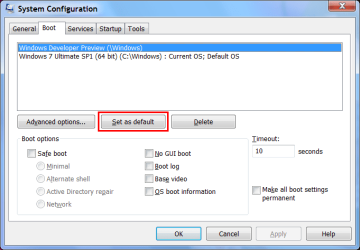
I've got 2 partitions on my hard drive, C:\ has my Windows 7 Ultimate installed and Z:\ has Windows 7 Setup files. I've added a boot entry so that Z:\ can be booted and Windows 7 can be repaired or installed.
There's one problem however, EasyBCD has added a boot entry and it's setting it to boot from Z:\Windows\System32\winload.exe but because it's setup files, it needs to boot from Z:\setup.exe
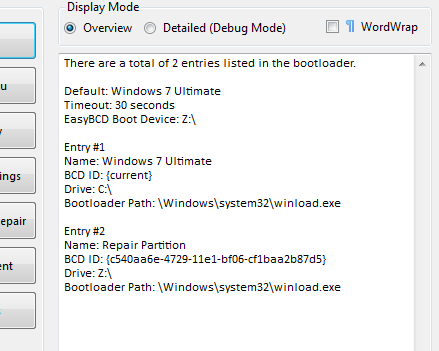
How could I change the default boot path so that it boots from \setup.exe instead of \winload.exe?
Any help would be appreciated, thanks,
James.
Here's the situation;
I've got 2 partitions on my hard drive, C:\ has my Windows 7 Ultimate installed and Z:\ has Windows 7 Setup files. I've added a boot entry so that Z:\ can be booted and Windows 7 can be repaired or installed.
There's one problem however, EasyBCD has added a boot entry and it's setting it to boot from Z:\Windows\System32\winload.exe but because it's setup files, it needs to boot from Z:\setup.exe
How could I change the default boot path so that it boots from \setup.exe instead of \winload.exe?
Any help would be appreciated, thanks,
James.
My Computer
- Computer type
- PC/Desktop
- Computer Manufacturer/Model Number
- HP
- OS
- Windows 7 Ultimate
- CPU
- DualCore Intel Pentium D 930, 3000 MHz (15 x 200)
- Motherboard
- Asus P5LP-LE (Emery)
- Memory
- 3x512mb 1x1GB
- Graphics Card(s)
- NVIDIA GeForce 7800 GTX
- Sound Card
- Realtek ALC882/D/M @ Intel 82801GB ICH7
- Monitor(s) Displays
- Iiyama ProLite E2407HDS
- Screen Resolution
- 1920 x 1080 70 Hz
- Hard Drives
- 1TB WD10EARS-00Y5B1 ATA Device
- Keyboard
- Hewlett Packard Wireless Ergo
- Mouse
- Logitech USB Wheel Mouse
- Internet Speed
- 20mbps Download - 2mbps Upload
- Antivirus
- Windows Defender - Malwarebytes Anti Malware
- Browser
- Google Chrome