Change Boot

Smokes

New member
Local time
4:54 PM
Messages
39
Location
England
Hello
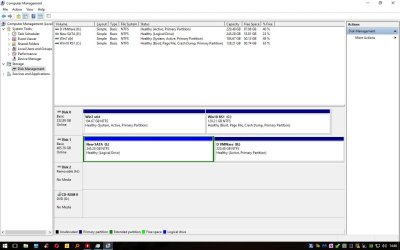
I have tried following a couple of tutorials on using system reserved partition config for dual boot these tutorials seem to point in a fresh install of windows, here is my problem.

On my desktop PC I have Windows 7 with boot on same partition & Windows 10 with its boot on same partition (like you used to get with Windows XP). Win 7 & 10 dual boot with Easy BCD now what I would like is the same setup as I have on my laptop, system reserved where Win 10 & 7 share dual boot reserved partitions. At first I was put off using system reserved but now I can see the advantages of using this.

Thank you
Smokes
 

My Computer

Computer type
PC/Desktop
OS
Win7 & Win10 both Pro x64 Dual Boot
CPU
AMD X8 FX-8350 4.0Ghz
Motherboard
ASUS M5A78L-M USB3
Memory
2x8 16GB DDR3
Graphics Card(s)
Nvidia Ge 610
Sound Card
OB
Monitor(s) Displays
Samsung 225BW
Screen Resolution
Native Recommended
Hard Drives
1x Samsung EVO 250GB

2 WD Blue Sata 500GB
PSU
Corsair 550w
Case
Cheap one :-)
Cooling
Stock AMD
Keyboard
Logitech ultra thin illuminated
Mouse
Logitech M570
Internet Speed
7Mb
Antivirus
Kaspersky Total Security
Browser
Opera & Firefox

My Computers

System One System Two

  • Computer type
    PC/Desktop
    Computer Manufacturer/Model Number
    custom build
    OS
    Windows 7 HP 64
    CPU
    i5 6600K - 800MHz to 4200MHz
    Motherboard
    GA-Z170-HD3P
    Memory
    4+4G GSkill DDR4 3000
    Graphics Card(s)
    IG - Intel 530
    Monitor(s) Displays
    Samsung 226BW
    Screen Resolution
    1680x1050
    Hard Drives
    (1) -1 SM951 – 128GB M.2 AHCI PCIe SSD drive for Windows 7 and Lubuntu
    (2) -1 WD SATA 3 - 1T for Data
    (3) -1 WD SATA 3 - 1T for backup
    PSU
    Thermaltake 450W TR2 gold
    Keyboard
    Old and good Chicony mechanical keyboard
    Mouse
    Logitech mX performance - 9 buttons (had to disable some)
    Internet Speed
    500Mb/s
    Browser
    Firefox 64
    Other Info
    TinyWall firewall
  • Computer type
    Laptop
    System Manufacturer/Model Number
    Asus Q550LF
    OS
    Windows 7 Pro
    CPU
    i7-4500U 800MHz to 3.0GHz
    Motherboard
    Asus Q550LF
    Memory
    (4+4)G DDR3 1600
    Graphics Card(s)
    IG intel 4400 + NVIDIA GeForce GT 745M
    Sound Card
    Realtek
    Monitor(s) Displays
    LG Display LP156WF4-SPH1
    Screen Resolution
    1920 x 1080
    Hard Drives
    BX500 120G SSD for Windows and programs +
    1T HDD for data
    Internet Speed
    500 Mb/s
    Browser
    Firefox
    Other Info
    TinyWall firewall
Hello
Thank you for your reply, I have attached a screen shot. Allocating space for system reserved is not a problem, knowing how to configure reserved partition is, For me! :)


Regards
Smokes
 

Attachments

  • Screen..jpg
    Screen..jpg
    127.7 KB · Views: 8

My Computer

Computer type
PC/Desktop
OS
Win7 & Win10 both Pro x64 Dual Boot
CPU
AMD X8 FX-8350 4.0Ghz
Motherboard
ASUS M5A78L-M USB3
Memory
2x8 16GB DDR3
Graphics Card(s)
Nvidia Ge 610
Sound Card
OB
Monitor(s) Displays
Samsung 225BW
Screen Resolution
Native Recommended
Hard Drives
1x Samsung EVO 250GB

2 WD Blue Sata 500GB
PSU
Corsair 550w
Case
Cheap one :-)
Cooling
Stock AMD
Keyboard
Logitech ultra thin illuminated
Mouse
Logitech M570
Internet Speed
7Mb
Antivirus
Kaspersky Total Security
Browser
Opera & Firefox
As you have a MBR - Legacy disk, you have a boot loader on C: that has two options: Boot Win 7 or boot Win 10.
I don't know what you want to do with the reserved partition but the results won't be different from what you have now.
I wouldn't change.
 

My Computers

System One System Two

  • Computer type
    PC/Desktop
    Computer Manufacturer/Model Number
    custom build
    OS
    Windows 7 HP 64
    CPU
    i5 6600K - 800MHz to 4200MHz
    Motherboard
    GA-Z170-HD3P
    Memory
    4+4G GSkill DDR4 3000
    Graphics Card(s)
    IG - Intel 530
    Monitor(s) Displays
    Samsung 226BW
    Screen Resolution
    1680x1050
    Hard Drives
    (1) -1 SM951 – 128GB M.2 AHCI PCIe SSD drive for Windows 7 and Lubuntu
    (2) -1 WD SATA 3 - 1T for Data
    (3) -1 WD SATA 3 - 1T for backup
    PSU
    Thermaltake 450W TR2 gold
    Keyboard
    Old and good Chicony mechanical keyboard
    Mouse
    Logitech mX performance - 9 buttons (had to disable some)
    Internet Speed
    500Mb/s
    Browser
    Firefox 64
    Other Info
    TinyWall firewall
  • Computer type
    Laptop
    System Manufacturer/Model Number
    Asus Q550LF
    OS
    Windows 7 Pro
    CPU
    i7-4500U 800MHz to 3.0GHz
    Motherboard
    Asus Q550LF
    Memory
    (4+4)G DDR3 1600
    Graphics Card(s)
    IG intel 4400 + NVIDIA GeForce GT 745M
    Sound Card
    Realtek
    Monitor(s) Displays
    LG Display LP156WF4-SPH1
    Screen Resolution
    1920 x 1080
    Hard Drives
    BX500 120G SSD for Windows and programs +
    1T HDD for data
    Internet Speed
    500 Mb/s
    Browser
    Firefox
    Other Info
    TinyWall firewall
Hello
The reason why I wanted to use reserved partition between Win 10 & 7 is that i find it far easier to restore a backup without having to mess around with boot. I chop and change things on computer quite often and knowing that the boot partition is ok gives me a little peace of mind. Hope this makes a little sense?


Regards
Smokes
 

My Computer

Computer type
PC/Desktop
OS
Win7 & Win10 both Pro x64 Dual Boot
CPU
AMD X8 FX-8350 4.0Ghz
Motherboard
ASUS M5A78L-M USB3
Memory
2x8 16GB DDR3
Graphics Card(s)
Nvidia Ge 610
Sound Card
OB
Monitor(s) Displays
Samsung 225BW
Screen Resolution
Native Recommended
Hard Drives
1x Samsung EVO 250GB

2 WD Blue Sata 500GB
PSU
Corsair 550w
Case
Cheap one :-)
Cooling
Stock AMD
Keyboard
Logitech ultra thin illuminated
Mouse
Logitech M570
Internet Speed
7Mb
Antivirus
Kaspersky Total Security
Browser
Opera & Firefox
You should have put 10 on its own drive.
 

My Computer

Computer type
PC/Desktop
Computer Manufacturer/Model Number
Skylake Special #666
OS
Windows 10 Pro x64
CPU
Intel Core i7 6700K
Motherboard
Asus Sabertooth Z170 Mark 1
Memory
GSkill TridentZ RGB 16GB 3600 16-16-16-36
Graphics Card(s)
EVGA GTX 980 Ti SC x2
Sound Card
Realtek High Definition
Monitor(s) Displays
AOC G2460PG
Screen Resolution
1920 x 1080 144Hz
Hard Drives
Samsung 860 Pro 256GB, Seagate Barracuda 4TB x2
PSU
EVGA 1000 P2, EVGA White Custom Braided Cables
Case
Corsair Vengeance C70 Gunmetal Black
Cooling
Corsair H100i v2, Corsair ML120 x2, Thermal Grizzly Kryonaut
Keyboard
Logitech G910 Orion Spectrum
Mouse
Logitech G700s
Internet Speed
Verizon Fios Quantum Gateway 75/75
Antivirus
Windows Defender, Malwarebytes Free 3.8.3
Browser
Chrome
Other Info
Corsair SP120 x4, LG Blu-ray Drive, Durabrand HT-395 100 Watt Dolby Digital Amp, Corsair H2100 Wireless 7.1 Headset
Cant justify the cost for another SSD just to have win 10 on its own drive.

Thanks for the reply.

Smokes
 

My Computer

Computer type
PC/Desktop
OS
Win7 & Win10 both Pro x64 Dual Boot
CPU
AMD X8 FX-8350 4.0Ghz
Motherboard
ASUS M5A78L-M USB3
Memory
2x8 16GB DDR3
Graphics Card(s)
Nvidia Ge 610
Sound Card
OB
Monitor(s) Displays
Samsung 225BW
Screen Resolution
Native Recommended
Hard Drives
1x Samsung EVO 250GB

2 WD Blue Sata 500GB
PSU
Corsair 550w
Case
Cheap one :-)
Cooling
Stock AMD
Keyboard
Logitech ultra thin illuminated
Mouse
Logitech M570
Internet Speed
7Mb
Antivirus
Kaspersky Total Security
Browser
Opera & Firefox
Back
Top