Hello
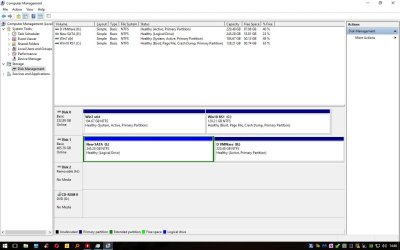
I have tried following a couple of tutorials on using system reserved partition config for dual boot these tutorials seem to point in a fresh install of windows, here is my problem.
On my desktop PC I have Windows 7 with boot on same partition & Windows 10 with its boot on same partition (like you used to get with Windows XP). Win 7 & 10 dual boot with Easy BCD now what I would like is the same setup as I have on my laptop, system reserved where Win 10 & 7 share dual boot reserved partitions. At first I was put off using system reserved but now I can see the advantages of using this.
Thank you
Smokes
I have tried following a couple of tutorials on using system reserved partition config for dual boot these tutorials seem to point in a fresh install of windows, here is my problem.
On my desktop PC I have Windows 7 with boot on same partition & Windows 10 with its boot on same partition (like you used to get with Windows XP). Win 7 & 10 dual boot with Easy BCD now what I would like is the same setup as I have on my laptop, system reserved where Win 10 & 7 share dual boot reserved partitions. At first I was put off using system reserved but now I can see the advantages of using this.
Thank you
Smokes
My Computer
- Computer type
- PC/Desktop
- OS
- Win7 & Win10 both Pro x64 Dual Boot
- CPU
- AMD X8 FX-8350 4.0Ghz
- Motherboard
- ASUS M5A78L-M USB3
- Memory
- 2x8 16GB DDR3
- Graphics Card(s)
- Nvidia Ge 610
- Sound Card
- OB
- Monitor(s) Displays
- Samsung 225BW
- Screen Resolution
- Native Recommended
- Hard Drives
- 1x Samsung EVO 250GB
2 WD Blue Sata 500GB
- PSU
- Corsair 550w
- Case
- Cheap one :-)
- Cooling
- Stock AMD
- Keyboard
- Logitech ultra thin illuminated
- Mouse
- Logitech M570
- Internet Speed
- 7Mb
- Antivirus
- Kaspersky Total Security
- Browser
- Opera & Firefox