Solved change context menu font color when highlighted in WSB

bluedragon14

New member
Member
Local time
12:33 PM
Messages
26
Location
Ohio
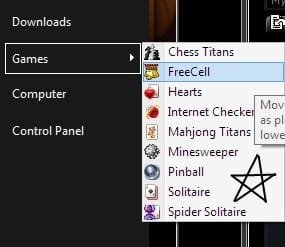
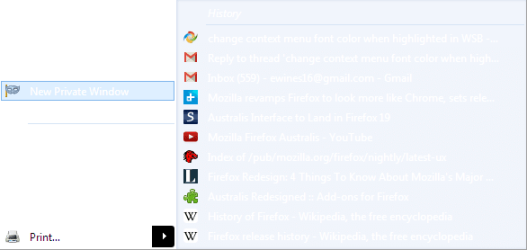
I'm trying to change the color of text whenever I hover the cursor over text in context menus. (please see attached picture to see what I'm talking about) I've tried adding a "HOTTRACKING:COLOR" property in WSB, in addition to a "TEXTCOLOR:COLOR" property in WSB, and I was able to change the color of the text when not highlighted, but whenever it is highlighted, the color remains black.

What I'm wondering is if I can change the highlight color just for context menus, or if it's something that applies across all elements of Windows Explorer. I was able to change the text highlight color in the start menu by changing the hot tracking color, but it's not working for context menus.
 

Attachments

  • hilight text.jpg
    hilight text.jpg
    8.7 KB · Views: 31

My Computer My Computer

At a glance

Windows 7 Home Premium x64
Computer type
PC/Desktop
Computer Manufacturer/Model Number
Acer
OS
Windows 7 Home Premium x64
Internet Speed
20 Mbps
Browser
Firefox
Go to Lists, Menus & Tabs > Menu > PopUpItem > Hot > TEXTCOLOR:COLOR and change the text color.

Jerry
 

My Computer My Computer

At a glance

Win 7 Pro x64 / Win 10 ProIntel(R) Core(TM) i7-3630QM CPU @ 2.40GHz12 GB(1) Intel(R) HD Graphics 4000 (2) NVIDIA GeFo...
Computer type
Laptop
Computer Manufacturer/Model Number
Sager NP9170
OS
Win 7 Pro x64 / Win 10 Pro
CPU
Intel(R) Core(TM) i7-3630QM CPU @ 2.40GHz
Motherboard
CLEVO P170EM
Memory
12 GB
Graphics Card(s)
(1) Intel(R) HD Graphics 4000 (2) NVIDIA GeForce GTX 675M
Sound Card
(1) Realtek High Definition Audio (2) Intel(R) Display Aud
Monitor(s) Displays
17.3
Screen Resolution
1920x1080
Hard Drives
(1) Samsung 860 EVO 500GB(OS) (1) Samsung 860 EVO 500GB(Data)
Keyboard
Backlite
Antivirus
MSE, Malwarebytes Pro
Browser
Firefox
Other Info
DESKTOP: Custom-built.
OS: Win 10 Pro x64.
CASE: Rosewill R5.
CPU: Intel I5 4670K CPU @ 3.40GHz.
CPU COOLER: Cool Master Hyper 212 EVO.
MOTHERBOARD: Asus Z87-A.
MEMORY: Kingston HyperX 2x4 GB.
GPU: Nvidia Geforce 650 TI.
PSU: Corsair TX750.
DRIVES: (1) Samsung 840 120 GB SSD (2) Western Digital blue 500 GB 7200 RPM.
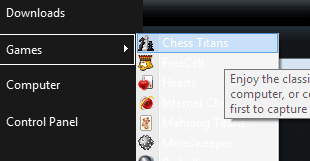
Thank you so much for your help and time. That did the trick, except a few programs still have black text in the context menus (one program I use a lot that does this is Mozilla Firefox). It seems that other menus, specifically ones that appear from the start menu (please see attached pic), are unaffected. Is there another location I have to change the "TEXTCOLOR:COLOR" property or add to change the menus from the start menu (and perhaps for other programs)?
 

Attachments

  • start menu context..menu.jpg
    start menu context..menu.jpg
    11.3 KB · Views: 50

My Computer My Computer

At a glance

Windows 7 Home Premium x64
Computer type
PC/Desktop
Computer Manufacturer/Model Number
Acer
OS
Windows 7 Home Premium x64
Internet Speed
20 Mbps
Browser
Firefox
For the start menu you have in your image above you can change the text color at Start Menu > Menus > Basic > Toolbar > TEXTCOLOR:COLOR but there is no way to change that text color for hot/hover over the text.

If you are using a custom theme for Firefox then that theme will override Windows theme.

Tell me what other programs you are having that trouble with.

Jerry
 

My Computer My Computer

At a glance

Win 7 Pro x64 / Win 10 ProIntel(R) Core(TM) i7-3630QM CPU @ 2.40GHz12 GB(1) Intel(R) HD Graphics 4000 (2) NVIDIA GeFo...
Computer type
Laptop
Computer Manufacturer/Model Number
Sager NP9170
OS
Win 7 Pro x64 / Win 10 Pro
CPU
Intel(R) Core(TM) i7-3630QM CPU @ 2.40GHz
Motherboard
CLEVO P170EM
Memory
12 GB
Graphics Card(s)
(1) Intel(R) HD Graphics 4000 (2) NVIDIA GeForce GTX 675M
Sound Card
(1) Realtek High Definition Audio (2) Intel(R) Display Aud
Monitor(s) Displays
17.3
Screen Resolution
1920x1080
Hard Drives
(1) Samsung 860 EVO 500GB(OS) (1) Samsung 860 EVO 500GB(Data)
Keyboard
Backlite
Antivirus
MSE, Malwarebytes Pro
Browser
Firefox
Other Info
DESKTOP: Custom-built.
OS: Win 10 Pro x64.
CASE: Rosewill R5.
CPU: Intel I5 4670K CPU @ 3.40GHz.
CPU COOLER: Cool Master Hyper 212 EVO.
MOTHERBOARD: Asus Z87-A.
MEMORY: Kingston HyperX 2x4 GB.
GPU: Nvidia Geforce 650 TI.
PSU: Corsair TX750.
DRIVES: (1) Samsung 840 120 GB SSD (2) Western Digital blue 500 GB 7200 RPM.
I was able to change the text color when highlighted (under the mouse) for the start menu toolbar. I simply added a property under "<default>" > Hot

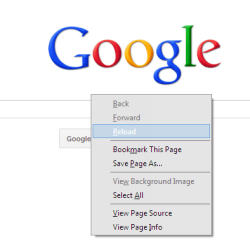
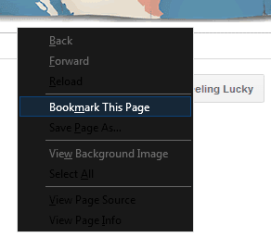
Well, I tried most of my programs with the next context menu colors. Google Chrome's font colors in all context menus changed to white. I'm guessing that it is Firefox that is preventing the change. Oddly enough, the font does change to white when it's hot, but not when it's normal. I am using the default theme for Firefox, and the latest version. I also don't have any extensions that (I'd imagine) wouldn't change the context menus. I only have adblock plus, omnibar and adobe flash enabled in firefox. Is it just firefox? this is the only program that does this (other programs used Windows context menu or their own).
 

Attachments

  • it works.png
    it works.png
    4.1 KB · Views: 44
  • firefox context menu.png
    firefox context menu.png
    10 KB · Views: 26

My Computer My Computer

At a glance

Windows 7 Home Premium x64
Computer type
PC/Desktop
Computer Manufacturer/Model Number
Acer
OS
Windows 7 Home Premium x64
Internet Speed
20 Mbps
Browser
Firefox
I was able to change the text color when highlighted (under the mouse) for the start menu toolbar. I simply added a property under "<default>" > Hot
I'm glad you were able to do that, and I learned something new from you thank you.

I'm guessing that it is Firefox that is preventing the change. Oddly enough, the font does change to white when it's hot, but not when it's normal. I am using the default theme for Firefox, and the latest version. Is it just firefox? this is the only program that does this (other programs used Windows context menu or their own).
Can you explain this a little better about Firefox, do you want white text for hot and normal?

Jerry
 

My Computer My Computer

At a glance

Win 7 Pro x64 / Win 10 ProIntel(R) Core(TM) i7-3630QM CPU @ 2.40GHz12 GB(1) Intel(R) HD Graphics 4000 (2) NVIDIA GeFo...
Computer type
Laptop
Computer Manufacturer/Model Number
Sager NP9170
OS
Win 7 Pro x64 / Win 10 Pro
CPU
Intel(R) Core(TM) i7-3630QM CPU @ 2.40GHz
Motherboard
CLEVO P170EM
Memory
12 GB
Graphics Card(s)
(1) Intel(R) HD Graphics 4000 (2) NVIDIA GeForce GTX 675M
Sound Card
(1) Realtek High Definition Audio (2) Intel(R) Display Aud
Monitor(s) Displays
17.3
Screen Resolution
1920x1080
Hard Drives
(1) Samsung 860 EVO 500GB(OS) (1) Samsung 860 EVO 500GB(Data)
Keyboard
Backlite
Antivirus
MSE, Malwarebytes Pro
Browser
Firefox
Other Info
DESKTOP: Custom-built.
OS: Win 10 Pro x64.
CASE: Rosewill R5.
CPU: Intel I5 4670K CPU @ 3.40GHz.
CPU COOLER: Cool Master Hyper 212 EVO.
MOTHERBOARD: Asus Z87-A.
MEMORY: Kingston HyperX 2x4 GB.
GPU: Nvidia Geforce 650 TI.
PSU: Corsair TX750.
DRIVES: (1) Samsung 840 120 GB SSD (2) Western Digital blue 500 GB 7200 RPM.
Yes, I'm trying to have white text for both hot and normal.
 

My Computer My Computer

At a glance

Windows 7 Home Premium x64
Computer type
PC/Desktop
Computer Manufacturer/Model Number
Acer
OS
Windows 7 Home Premium x64
Internet Speed
20 Mbps
Browser
Firefox
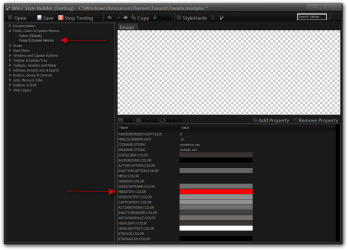
OK I changed the text color at Fonts, Colors & System Metrics > Fonts & System Metrics > MENUTEXT:COLOR and it changed the firefox normal menu test color.

Jerry
 

My Computer My Computer

At a glance

Win 7 Pro x64 / Win 10 ProIntel(R) Core(TM) i7-3630QM CPU @ 2.40GHz12 GB(1) Intel(R) HD Graphics 4000 (2) NVIDIA GeFo...
Computer type
Laptop
Computer Manufacturer/Model Number
Sager NP9170
OS
Win 7 Pro x64 / Win 10 Pro
CPU
Intel(R) Core(TM) i7-3630QM CPU @ 2.40GHz
Motherboard
CLEVO P170EM
Memory
12 GB
Graphics Card(s)
(1) Intel(R) HD Graphics 4000 (2) NVIDIA GeForce GTX 675M
Sound Card
(1) Realtek High Definition Audio (2) Intel(R) Display Aud
Monitor(s) Displays
17.3
Screen Resolution
1920x1080
Hard Drives
(1) Samsung 860 EVO 500GB(OS) (1) Samsung 860 EVO 500GB(Data)
Keyboard
Backlite
Antivirus
MSE, Malwarebytes Pro
Browser
Firefox
Other Info
DESKTOP: Custom-built.
OS: Win 10 Pro x64.
CASE: Rosewill R5.
CPU: Intel I5 4670K CPU @ 3.40GHz.
CPU COOLER: Cool Master Hyper 212 EVO.
MOTHERBOARD: Asus Z87-A.
MEMORY: Kingston HyperX 2x4 GB.
GPU: Nvidia Geforce 650 TI.
PSU: Corsair TX750.
DRIVES: (1) Samsung 840 120 GB SSD (2) Western Digital blue 500 GB 7200 RPM.
weird. I changed the exact color on that property, and the context menus didn't change. I changed the background, border, separator and highlighted text color, but the normal text color still didn't change. I also restarted Firefox w/ all add-ons disabled (safe mode), and the context menus remained the same. Perhaps I need to reinstall it?
 

Attachments

  • firefox context menu.png
    firefox context menu.png
    3.8 KB · Views: 35

My Computer My Computer

At a glance

Windows 7 Home Premium x64
Computer type
PC/Desktop
Computer Manufacturer/Model Number
Acer
OS
Windows 7 Home Premium x64
Internet Speed
20 Mbps
Browser
Firefox
I not sure why it's not working for you. Where do you get WSB at?

It did for me.

Jerry
Win7 Style Builder (Testing) - CWindowsResourcesThemesTavarisTavaris.msstyles.png

change context menu font color when highlighted in WSB - Windows 7 Help Forums.png
 

My Computer My Computer

At a glance

Win 7 Pro x64 / Win 10 ProIntel(R) Core(TM) i7-3630QM CPU @ 2.40GHz12 GB(1) Intel(R) HD Graphics 4000 (2) NVIDIA GeFo...
Computer type
Laptop
Computer Manufacturer/Model Number
Sager NP9170
OS
Win 7 Pro x64 / Win 10 Pro
CPU
Intel(R) Core(TM) i7-3630QM CPU @ 2.40GHz
Motherboard
CLEVO P170EM
Memory
12 GB
Graphics Card(s)
(1) Intel(R) HD Graphics 4000 (2) NVIDIA GeForce GTX 675M
Sound Card
(1) Realtek High Definition Audio (2) Intel(R) Display Aud
Monitor(s) Displays
17.3
Screen Resolution
1920x1080
Hard Drives
(1) Samsung 860 EVO 500GB(OS) (1) Samsung 860 EVO 500GB(Data)
Keyboard
Backlite
Antivirus
MSE, Malwarebytes Pro
Browser
Firefox
Other Info
DESKTOP: Custom-built.
OS: Win 10 Pro x64.
CASE: Rosewill R5.
CPU: Intel I5 4670K CPU @ 3.40GHz.
CPU COOLER: Cool Master Hyper 212 EVO.
MOTHERBOARD: Asus Z87-A.
MEMORY: Kingston HyperX 2x4 GB.
GPU: Nvidia Geforce 650 TI.
PSU: Corsair TX750.
DRIVES: (1) Samsung 840 120 GB SSD (2) Western Digital blue 500 GB 7200 RPM.
I just added some "code" to my userChrome.css file to change all menu text to white and background colors to black. It did the trick, although disabled items in the context menu are also the same color as enabled ones. I don't really mind. The only thing is the "firefox menu". I don't know how to change the background color, but I might have to go onto another forum to figure out how. Thanks for all your help and time again!
 

Attachments

  • Untitled.png
    Untitled.png
    15.8 KB · Views: 6

My Computer My Computer

At a glance

Windows 7 Home Premium x64
Computer type
PC/Desktop
Computer Manufacturer/Model Number
Acer
OS
Windows 7 Home Premium x64
Internet Speed
20 Mbps
Browser
Firefox
You're Welcome
 

My Computer My Computer

At a glance

Win 7 Pro x64 / Win 10 ProIntel(R) Core(TM) i7-3630QM CPU @ 2.40GHz12 GB(1) Intel(R) HD Graphics 4000 (2) NVIDIA GeFo...
Computer type
Laptop
Computer Manufacturer/Model Number
Sager NP9170
OS
Win 7 Pro x64 / Win 10 Pro
CPU
Intel(R) Core(TM) i7-3630QM CPU @ 2.40GHz
Motherboard
CLEVO P170EM
Memory
12 GB
Graphics Card(s)
(1) Intel(R) HD Graphics 4000 (2) NVIDIA GeForce GTX 675M
Sound Card
(1) Realtek High Definition Audio (2) Intel(R) Display Aud
Monitor(s) Displays
17.3
Screen Resolution
1920x1080
Hard Drives
(1) Samsung 860 EVO 500GB(OS) (1) Samsung 860 EVO 500GB(Data)
Keyboard
Backlite
Antivirus
MSE, Malwarebytes Pro
Browser
Firefox
Other Info
DESKTOP: Custom-built.
OS: Win 10 Pro x64.
CASE: Rosewill R5.
CPU: Intel I5 4670K CPU @ 3.40GHz.
CPU COOLER: Cool Master Hyper 212 EVO.
MOTHERBOARD: Asus Z87-A.
MEMORY: Kingston HyperX 2x4 GB.
GPU: Nvidia Geforce 650 TI.
PSU: Corsair TX750.
DRIVES: (1) Samsung 840 120 GB SSD (2) Western Digital blue 500 GB 7200 RPM.
Back
Top