Change default download location

frodi

New member
Member
VIP
Local time
9:12 AM
Messages
199
I have a small ssd and would like to change the download location to the D drive. However there is no option to do so.

Windows 7 Home Premium
RAM 16GB
OS 64bit
 

My Computer

Computer type
PC/Desktop
Computer Manufacturer/Model Number
Custom Built
OS
Windows 7 Home Premium 64 bit
CPU
3.20 gigahertz Intel Core i7-3930K
Motherboard
Board: ASUS P9X79 PRO Rev 1.xx
Memory
16.0 GB
Graphics Card(s)
NVIDIA GeForce GTX 680 2GB
Sound Card
NVIDIA High Definition Audio
Monitor(s) Displays
CMO CMC 22 W
Screen Resolution
1680x1050
Hard Drives
ATA SanDisk SDSSDX12 SCSI Disk Device (120.03 GB)
ATA ST2000DM001-1CH1 SCSI Disk Device (2000.40 GB)
Case
Coolermaster HAF XM Case with Window
Cooling
Coolermaster Hyper 212 EVO CPU Cooler
Keyboard
Microsoft
Mouse
Microsoft

My Computer

Computer type
PC/Desktop
Computer Manufacturer/Model Number
Self built custom
OS
64-bit Windows 11 Pro for Workstations
CPU
Intel i7-8700K OC'd to 5 GHz
Motherboard
ASUS ROG Maximus XI Formula Z390
Memory
64 GB (4x16GB) G.SKILL TridentZ RGB DDR4 3600 MHz
Graphics Card(s)
ASUS ROG-STRIX-GTX1080TI-O11G-GAMING
Sound Card
Integrated
Monitor(s) Displays
2 x Samsung Odyssey G7 27"
Screen Resolution
2560x1440
Hard Drives
1TB Samsung 990 PRO M.2,
4TB Samsung 990 PRO PRO M.2,
TerraMaster F8 SSD Plus NAS
PSU
Seasonic Prime Titanium 850W
Case
Thermaltake Core P3
Cooling
Corsair Hydro H115i
Keyboard
Logitech wireless K800
Mouse
Logitech MX Master 4
Internet Speed
2 Gb/s Download and 100 Mb/s Upload
Antivirus
Malwarebyte Anti-Malware Premium
Browser
Google Chrome
Other Info
Logitech Z625 speaker system,
Logitech BRIO 4K Pro webcam,
HP Color LaserJet Pro MFP M477fdn,
APC SMART-UPS RT 1000 XL - SURT1000XLI,
Galaxy S23 Plus phone
Hi Brink, I am afraid I wasn't very clear about this. I am trying to download an application to the D drive. It doesn't give the option to choose a different location. The app itself is 146 MB, so not terribly big, but it has a lot of files.
 

My Computer

Computer type
PC/Desktop
Computer Manufacturer/Model Number
Custom Built
OS
Windows 7 Home Premium 64 bit
CPU
3.20 gigahertz Intel Core i7-3930K
Motherboard
Board: ASUS P9X79 PRO Rev 1.xx
Memory
16.0 GB
Graphics Card(s)
NVIDIA GeForce GTX 680 2GB
Sound Card
NVIDIA High Definition Audio
Monitor(s) Displays
CMO CMC 22 W
Screen Resolution
1680x1050
Hard Drives
ATA SanDisk SDSSDX12 SCSI Disk Device (120.03 GB)
ATA ST2000DM001-1CH1 SCSI Disk Device (2000.40 GB)
Case
Coolermaster HAF XM Case with Window
Cooling
Coolermaster Hyper 212 EVO CPU Cooler
Keyboard
Microsoft
Mouse
Microsoft
That's ok. Are you trying to download it from a website in a browser, or ??
 

My Computer

Computer type
PC/Desktop
Computer Manufacturer/Model Number
Self built custom
OS
64-bit Windows 11 Pro for Workstations
CPU
Intel i7-8700K OC'd to 5 GHz
Motherboard
ASUS ROG Maximus XI Formula Z390
Memory
64 GB (4x16GB) G.SKILL TridentZ RGB DDR4 3600 MHz
Graphics Card(s)
ASUS ROG-STRIX-GTX1080TI-O11G-GAMING
Sound Card
Integrated
Monitor(s) Displays
2 x Samsung Odyssey G7 27"
Screen Resolution
2560x1440
Hard Drives
1TB Samsung 990 PRO M.2,
4TB Samsung 990 PRO PRO M.2,
TerraMaster F8 SSD Plus NAS
PSU
Seasonic Prime Titanium 850W
Case
Thermaltake Core P3
Cooling
Corsair Hydro H115i
Keyboard
Logitech wireless K800
Mouse
Logitech MX Master 4
Internet Speed
2 Gb/s Download and 100 Mb/s Upload
Antivirus
Malwarebyte Anti-Malware Premium
Browser
Google Chrome
Other Info
Logitech Z625 speaker system,
Logitech BRIO 4K Pro webcam,
HP Color LaserJet Pro MFP M477fdn,
APC SMART-UPS RT 1000 XL - SURT1000XLI,
Galaxy S23 Plus phone
From a website. It is an accounting program from MYOB.
 

My Computer

Computer type
PC/Desktop
Computer Manufacturer/Model Number
Custom Built
OS
Windows 7 Home Premium 64 bit
CPU
3.20 gigahertz Intel Core i7-3930K
Motherboard
Board: ASUS P9X79 PRO Rev 1.xx
Memory
16.0 GB
Graphics Card(s)
NVIDIA GeForce GTX 680 2GB
Sound Card
NVIDIA High Definition Audio
Monitor(s) Displays
CMO CMC 22 W
Screen Resolution
1680x1050
Hard Drives
ATA SanDisk SDSSDX12 SCSI Disk Device (120.03 GB)
ATA ST2000DM001-1CH1 SCSI Disk Device (2000.40 GB)
Case
Coolermaster HAF XM Case with Window
Cooling
Coolermaster Hyper 212 EVO CPU Cooler
Keyboard
Microsoft
Mouse
Microsoft
What browser are you using, and what options do you see when trying to download the file from the website?
 

My Computer

Computer type
PC/Desktop
Computer Manufacturer/Model Number
Self built custom
OS
64-bit Windows 11 Pro for Workstations
CPU
Intel i7-8700K OC'd to 5 GHz
Motherboard
ASUS ROG Maximus XI Formula Z390
Memory
64 GB (4x16GB) G.SKILL TridentZ RGB DDR4 3600 MHz
Graphics Card(s)
ASUS ROG-STRIX-GTX1080TI-O11G-GAMING
Sound Card
Integrated
Monitor(s) Displays
2 x Samsung Odyssey G7 27"
Screen Resolution
2560x1440
Hard Drives
1TB Samsung 990 PRO M.2,
4TB Samsung 990 PRO PRO M.2,
TerraMaster F8 SSD Plus NAS
PSU
Seasonic Prime Titanium 850W
Case
Thermaltake Core P3
Cooling
Corsair Hydro H115i
Keyboard
Logitech wireless K800
Mouse
Logitech MX Master 4
Internet Speed
2 Gb/s Download and 100 Mb/s Upload
Antivirus
Malwarebyte Anti-Malware Premium
Browser
Google Chrome
Other Info
Logitech Z625 speaker system,
Logitech BRIO 4K Pro webcam,
HP Color LaserJet Pro MFP M477fdn,
APC SMART-UPS RT 1000 XL - SURT1000XLI,
Galaxy S23 Plus phone
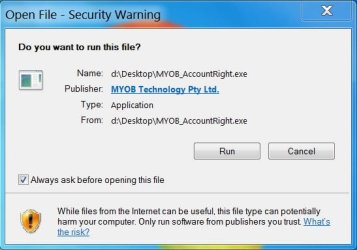
IE11. There are no options, it just downloads. When I click 'run' it starts to install.
 

Attachments

  • Capture myob.JPG
    Capture myob.JPG
    45.7 KB · Views: 24

My Computer

Computer type
PC/Desktop
Computer Manufacturer/Model Number
Custom Built
OS
Windows 7 Home Premium 64 bit
CPU
3.20 gigahertz Intel Core i7-3930K
Motherboard
Board: ASUS P9X79 PRO Rev 1.xx
Memory
16.0 GB
Graphics Card(s)
NVIDIA GeForce GTX 680 2GB
Sound Card
NVIDIA High Definition Audio
Monitor(s) Displays
CMO CMC 22 W
Screen Resolution
1680x1050
Hard Drives
ATA SanDisk SDSSDX12 SCSI Disk Device (120.03 GB)
ATA ST2000DM001-1CH1 SCSI Disk Device (2000.40 GB)
Case
Coolermaster HAF XM Case with Window
Cooling
Coolermaster Hyper 212 EVO CPU Cooler
Keyboard
Microsoft
Mouse
Microsoft
Odd. I suppose you may have to manually move the .exe to where you wanted after it has downloaded.

However, the path in your screenshot does show the downloaded .exe file in the "D:\Desktop" folder on your D drive.
 

My Computer

Computer type
PC/Desktop
Computer Manufacturer/Model Number
Self built custom
OS
64-bit Windows 11 Pro for Workstations
CPU
Intel i7-8700K OC'd to 5 GHz
Motherboard
ASUS ROG Maximus XI Formula Z390
Memory
64 GB (4x16GB) G.SKILL TridentZ RGB DDR4 3600 MHz
Graphics Card(s)
ASUS ROG-STRIX-GTX1080TI-O11G-GAMING
Sound Card
Integrated
Monitor(s) Displays
2 x Samsung Odyssey G7 27"
Screen Resolution
2560x1440
Hard Drives
1TB Samsung 990 PRO M.2,
4TB Samsung 990 PRO PRO M.2,
TerraMaster F8 SSD Plus NAS
PSU
Seasonic Prime Titanium 850W
Case
Thermaltake Core P3
Cooling
Corsair Hydro H115i
Keyboard
Logitech wireless K800
Mouse
Logitech MX Master 4
Internet Speed
2 Gb/s Download and 100 Mb/s Upload
Antivirus
Malwarebyte Anti-Malware Premium
Browser
Google Chrome
Other Info
Logitech Z625 speaker system,
Logitech BRIO 4K Pro webcam,
HP Color LaserJet Pro MFP M477fdn,
APC SMART-UPS RT 1000 XL - SURT1000XLI,
Galaxy S23 Plus phone
That's right, but the installer always goes to the C drive. The problem is that if I cannot get the app to install to the D drive, and it installs to C, then it is hard to remove the app as a lot gets installed to the registry. Perhaps I should give it a miss.

(How do you like windows 10?)
 

My Computer

Computer type
PC/Desktop
Computer Manufacturer/Model Number
Custom Built
OS
Windows 7 Home Premium 64 bit
CPU
3.20 gigahertz Intel Core i7-3930K
Motherboard
Board: ASUS P9X79 PRO Rev 1.xx
Memory
16.0 GB
Graphics Card(s)
NVIDIA GeForce GTX 680 2GB
Sound Card
NVIDIA High Definition Audio
Monitor(s) Displays
CMO CMC 22 W
Screen Resolution
1680x1050
Hard Drives
ATA SanDisk SDSSDX12 SCSI Disk Device (120.03 GB)
ATA ST2000DM001-1CH1 SCSI Disk Device (2000.40 GB)
Case
Coolermaster HAF XM Case with Window
Cooling
Coolermaster Hyper 212 EVO CPU Cooler
Keyboard
Microsoft
Mouse
Microsoft
Ah, so you don't want to change the download location, but where the app installs to instead.

I'm afraid that's up to the app developer for that. :(

So far, I think Windows 10 is pretty great.
 

My Computer

Computer type
PC/Desktop
Computer Manufacturer/Model Number
Self built custom
OS
64-bit Windows 11 Pro for Workstations
CPU
Intel i7-8700K OC'd to 5 GHz
Motherboard
ASUS ROG Maximus XI Formula Z390
Memory
64 GB (4x16GB) G.SKILL TridentZ RGB DDR4 3600 MHz
Graphics Card(s)
ASUS ROG-STRIX-GTX1080TI-O11G-GAMING
Sound Card
Integrated
Monitor(s) Displays
2 x Samsung Odyssey G7 27"
Screen Resolution
2560x1440
Hard Drives
1TB Samsung 990 PRO M.2,
4TB Samsung 990 PRO PRO M.2,
TerraMaster F8 SSD Plus NAS
PSU
Seasonic Prime Titanium 850W
Case
Thermaltake Core P3
Cooling
Corsair Hydro H115i
Keyboard
Logitech wireless K800
Mouse
Logitech MX Master 4
Internet Speed
2 Gb/s Download and 100 Mb/s Upload
Antivirus
Malwarebyte Anti-Malware Premium
Browser
Google Chrome
Other Info
Logitech Z625 speaker system,
Logitech BRIO 4K Pro webcam,
HP Color LaserJet Pro MFP M477fdn,
APC SMART-UPS RT 1000 XL - SURT1000XLI,
Galaxy S23 Plus phone
I am thinking of putting windows 10 on a laptop. This laptop has a problem with windows updates and has just come back from the computer technician, who unfortunately could not repair it. So I was just going to let it sit there and do it's own thing. It has Kaspersky Internet Security on it, that might have to be reinstalled if I put windows 10 in.
Any problems with installing? I have the GMX Control installed, obviously I have to set it to allow windows 10 and then remove it.
 

My Computer

Computer type
PC/Desktop
Computer Manufacturer/Model Number
Custom Built
OS
Windows 7 Home Premium 64 bit
CPU
3.20 gigahertz Intel Core i7-3930K
Motherboard
Board: ASUS P9X79 PRO Rev 1.xx
Memory
16.0 GB
Graphics Card(s)
NVIDIA GeForce GTX 680 2GB
Sound Card
NVIDIA High Definition Audio
Monitor(s) Displays
CMO CMC 22 W
Screen Resolution
1680x1050
Hard Drives
ATA SanDisk SDSSDX12 SCSI Disk Device (120.03 GB)
ATA ST2000DM001-1CH1 SCSI Disk Device (2000.40 GB)
Case
Coolermaster HAF XM Case with Window
Cooling
Coolermaster Hyper 212 EVO CPU Cooler
Keyboard
Microsoft
Mouse
Microsoft

My Computer

Computer type
PC/Desktop
Computer Manufacturer/Model Number
Self built custom
OS
64-bit Windows 11 Pro for Workstations
CPU
Intel i7-8700K OC'd to 5 GHz
Motherboard
ASUS ROG Maximus XI Formula Z390
Memory
64 GB (4x16GB) G.SKILL TridentZ RGB DDR4 3600 MHz
Graphics Card(s)
ASUS ROG-STRIX-GTX1080TI-O11G-GAMING
Sound Card
Integrated
Monitor(s) Displays
2 x Samsung Odyssey G7 27"
Screen Resolution
2560x1440
Hard Drives
1TB Samsung 990 PRO M.2,
4TB Samsung 990 PRO PRO M.2,
TerraMaster F8 SSD Plus NAS
PSU
Seasonic Prime Titanium 850W
Case
Thermaltake Core P3
Cooling
Corsair Hydro H115i
Keyboard
Logitech wireless K800
Mouse
Logitech MX Master 4
Internet Speed
2 Gb/s Download and 100 Mb/s Upload
Antivirus
Malwarebyte Anti-Malware Premium
Browser
Google Chrome
Other Info
Logitech Z625 speaker system,
Logitech BRIO 4K Pro webcam,
HP Color LaserJet Pro MFP M477fdn,
APC SMART-UPS RT 1000 XL - SURT1000XLI,
Galaxy S23 Plus phone
Thanks for that info Brink.
 

My Computer

Computer type
PC/Desktop
Computer Manufacturer/Model Number
Custom Built
OS
Windows 7 Home Premium 64 bit
CPU
3.20 gigahertz Intel Core i7-3930K
Motherboard
Board: ASUS P9X79 PRO Rev 1.xx
Memory
16.0 GB
Graphics Card(s)
NVIDIA GeForce GTX 680 2GB
Sound Card
NVIDIA High Definition Audio
Monitor(s) Displays
CMO CMC 22 W
Screen Resolution
1680x1050
Hard Drives
ATA SanDisk SDSSDX12 SCSI Disk Device (120.03 GB)
ATA ST2000DM001-1CH1 SCSI Disk Device (2000.40 GB)
Case
Coolermaster HAF XM Case with Window
Cooling
Coolermaster Hyper 212 EVO CPU Cooler
Keyboard
Microsoft
Mouse
Microsoft
It has to ask you where you want to install it, you must be missing it, every program I`ve ever installed always asks where you want to install it.

Just let the file download to your downloads folder, then just copy and paste it to your D drive, then just delete it from your downloads folder.
 

My Computer

Computer type
PC/Desktop
Computer Manufacturer/Model Number
Skylake Special #666
OS
Windows 10 Pro x64
CPU
Intel Core i7 6700K
Motherboard
Asus Sabertooth Z170 Mark 1
Memory
GSkill TridentZ RGB 16GB 3600 16-16-16-36
Graphics Card(s)
EVGA GTX 980 Ti SC x2
Sound Card
Realtek High Definition
Monitor(s) Displays
AOC G2460PG
Screen Resolution
1920 x 1080 144Hz
Hard Drives
Samsung 860 Pro 256GB, Seagate Barracuda 4TB x2
PSU
EVGA 1000 P2, EVGA White Custom Braided Cables
Case
Corsair Vengeance C70 Gunmetal Black
Cooling
Corsair H100i v2, Corsair ML120 x2, Thermal Grizzly Kryonaut
Keyboard
Logitech G910 Orion Spectrum
Mouse
Logitech G700s
Internet Speed
Verizon Fios Quantum Gateway 75/75
Antivirus
Windows Defender, Malwarebytes Free 3.8.3
Browser
Chrome
Other Info
Corsair SP120 x4, LG Blu-ray Drive, Durabrand HT-395 100 Watt Dolby Digital Amp, Corsair H2100 Wireless 7.1 Headset
Well, no Addram, Kaspersky Internet Security doesn't. It goes to the C drive.
 

My Computer

Computer type
PC/Desktop
Computer Manufacturer/Model Number
Custom Built
OS
Windows 7 Home Premium 64 bit
CPU
3.20 gigahertz Intel Core i7-3930K
Motherboard
Board: ASUS P9X79 PRO Rev 1.xx
Memory
16.0 GB
Graphics Card(s)
NVIDIA GeForce GTX 680 2GB
Sound Card
NVIDIA High Definition Audio
Monitor(s) Displays
CMO CMC 22 W
Screen Resolution
1680x1050
Hard Drives
ATA SanDisk SDSSDX12 SCSI Disk Device (120.03 GB)
ATA ST2000DM001-1CH1 SCSI Disk Device (2000.40 GB)
Case
Coolermaster HAF XM Case with Window
Cooling
Coolermaster Hyper 212 EVO CPU Cooler
Keyboard
Microsoft
Mouse
Microsoft
Well, no Addram, Kaspersky Internet Security doesn't. It goes to the C drive.

And that`s exactly where you want it.

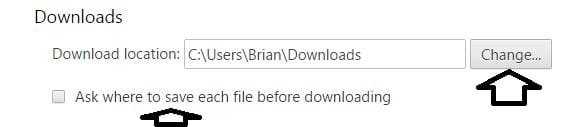
But back to changing your downloads location, just use Chrome to to your downloading and change the download location as Brink told you.

But 1st you have to create a folder named Downloads on your D drive.

Then open Chrome`s settings and go down to and click Advanced Settings and find Downloads, Click change, then just choose D:\Downloads
 

Attachments

  • Capture.JPG
    Capture.JPG
    23.7 KB · Views: 11

My Computer

Computer type
PC/Desktop
Computer Manufacturer/Model Number
Skylake Special #666
OS
Windows 10 Pro x64
CPU
Intel Core i7 6700K
Motherboard
Asus Sabertooth Z170 Mark 1
Memory
GSkill TridentZ RGB 16GB 3600 16-16-16-36
Graphics Card(s)
EVGA GTX 980 Ti SC x2
Sound Card
Realtek High Definition
Monitor(s) Displays
AOC G2460PG
Screen Resolution
1920 x 1080 144Hz
Hard Drives
Samsung 860 Pro 256GB, Seagate Barracuda 4TB x2
PSU
EVGA 1000 P2, EVGA White Custom Braided Cables
Case
Corsair Vengeance C70 Gunmetal Black
Cooling
Corsair H100i v2, Corsair ML120 x2, Thermal Grizzly Kryonaut
Keyboard
Logitech G910 Orion Spectrum
Mouse
Logitech G700s
Internet Speed
Verizon Fios Quantum Gateway 75/75
Antivirus
Windows Defender, Malwarebytes Free 3.8.3
Browser
Chrome
Other Info
Corsair SP120 x4, LG Blu-ray Drive, Durabrand HT-395 100 Watt Dolby Digital Amp, Corsair H2100 Wireless 7.1 Headset
I do have D:\Downloads on my pc. (don't use Chrome) I like to download everything there. But the app has to allow to choose where to download, and this particular app only points to the C drive. I suppose I could download it to C, and put the files on D. Meantime I have put it on a laptop, which doesn't have a ssd. I would like to put it on my desktop too, but it is now not essential. Thank you for the suggestions though.

edit: missed the copy and paste idea, that should work.
 

My Computer

Computer type
PC/Desktop
Computer Manufacturer/Model Number
Custom Built
OS
Windows 7 Home Premium 64 bit
CPU
3.20 gigahertz Intel Core i7-3930K
Motherboard
Board: ASUS P9X79 PRO Rev 1.xx
Memory
16.0 GB
Graphics Card(s)
NVIDIA GeForce GTX 680 2GB
Sound Card
NVIDIA High Definition Audio
Monitor(s) Displays
CMO CMC 22 W
Screen Resolution
1680x1050
Hard Drives
ATA SanDisk SDSSDX12 SCSI Disk Device (120.03 GB)
ATA ST2000DM001-1CH1 SCSI Disk Device (2000.40 GB)
Case
Coolermaster HAF XM Case with Window
Cooling
Coolermaster Hyper 212 EVO CPU Cooler
Keyboard
Microsoft
Mouse
Microsoft
And it will not let you change the C to a D ?
 

My Computer

Computer type
PC/Desktop
Computer Manufacturer/Model Number
Skylake Special #666
OS
Windows 10 Pro x64
CPU
Intel Core i7 6700K
Motherboard
Asus Sabertooth Z170 Mark 1
Memory
GSkill TridentZ RGB 16GB 3600 16-16-16-36
Graphics Card(s)
EVGA GTX 980 Ti SC x2
Sound Card
Realtek High Definition
Monitor(s) Displays
AOC G2460PG
Screen Resolution
1920 x 1080 144Hz
Hard Drives
Samsung 860 Pro 256GB, Seagate Barracuda 4TB x2
PSU
EVGA 1000 P2, EVGA White Custom Braided Cables
Case
Corsair Vengeance C70 Gunmetal Black
Cooling
Corsair H100i v2, Corsair ML120 x2, Thermal Grizzly Kryonaut
Keyboard
Logitech G910 Orion Spectrum
Mouse
Logitech G700s
Internet Speed
Verizon Fios Quantum Gateway 75/75
Antivirus
Windows Defender, Malwarebytes Free 3.8.3
Browser
Chrome
Other Info
Corsair SP120 x4, LG Blu-ray Drive, Durabrand HT-395 100 Watt Dolby Digital Amp, Corsair H2100 Wireless 7.1 Headset
Hi Brink, I am afraid I wasn't very clear about this. I am trying to download an application to the D drive. It doesn't give the option to choose a different location. The app itself is 146 MB, so not terribly big, but it has a lot of files.

I`m still a bit confused here, are you trying to download the app/program to the D drive or are you trying to install it on D ?

As that is not a good idea, all programs should be installed on C, although games can be installed on another drive from C because games take up massive amounts of data the further you move along in the game.
 

My Computer

Computer type
PC/Desktop
Computer Manufacturer/Model Number
Skylake Special #666
OS
Windows 10 Pro x64
CPU
Intel Core i7 6700K
Motherboard
Asus Sabertooth Z170 Mark 1
Memory
GSkill TridentZ RGB 16GB 3600 16-16-16-36
Graphics Card(s)
EVGA GTX 980 Ti SC x2
Sound Card
Realtek High Definition
Monitor(s) Displays
AOC G2460PG
Screen Resolution
1920 x 1080 144Hz
Hard Drives
Samsung 860 Pro 256GB, Seagate Barracuda 4TB x2
PSU
EVGA 1000 P2, EVGA White Custom Braided Cables
Case
Corsair Vengeance C70 Gunmetal Black
Cooling
Corsair H100i v2, Corsair ML120 x2, Thermal Grizzly Kryonaut
Keyboard
Logitech G910 Orion Spectrum
Mouse
Logitech G700s
Internet Speed
Verizon Fios Quantum Gateway 75/75
Antivirus
Windows Defender, Malwarebytes Free 3.8.3
Browser
Chrome
Other Info
Corsair SP120 x4, LG Blu-ray Drive, Durabrand HT-395 100 Watt Dolby Digital Amp, Corsair H2100 Wireless 7.1 Headset
Yes, I was trying to download and install the app to D, so the best way is then to download to C, and put the files on D?
 

My Computer

Computer type
PC/Desktop
Computer Manufacturer/Model Number
Custom Built
OS
Windows 7 Home Premium 64 bit
CPU
3.20 gigahertz Intel Core i7-3930K
Motherboard
Board: ASUS P9X79 PRO Rev 1.xx
Memory
16.0 GB
Graphics Card(s)
NVIDIA GeForce GTX 680 2GB
Sound Card
NVIDIA High Definition Audio
Monitor(s) Displays
CMO CMC 22 W
Screen Resolution
1680x1050
Hard Drives
ATA SanDisk SDSSDX12 SCSI Disk Device (120.03 GB)
ATA ST2000DM001-1CH1 SCSI Disk Device (2000.40 GB)
Case
Coolermaster HAF XM Case with Window
Cooling
Coolermaster Hyper 212 EVO CPU Cooler
Keyboard
Microsoft
Mouse
Microsoft
Back
Top