Change default program for .html

kenw232

New member
Local time
9:33 AM
Messages
31
I need .html files when I click them in explorer to open in Firefox. Win7 64bit.

If I turn on "check to make sure firefox is default browser" it will check and ask and I can set it. Problem solved.

But I need to make firefox open with "-profile whatever" when I double click a .html file in explorer. How can I modify the firefox association/program/whatever to append the profile on the command line. I have no idea where to do this.

Thanks.
 

My Computer

Computer Manufacturer/Model Number
N/A
OS
Windows 7 64bit
CPU
N/A
Motherboard
N/A
Memory
N/A
Graphics Card(s)
N/A
Sound Card
N/A
Monitor(s) Displays
N/A
Hard Drives
N/A
PSU
N/A
Case
N/A
Cooling
N/A

My Computer

Computer Manufacturer/Model Number
HP Pavilion Elite 495UK
OS
Windows 7 Ultimate SP1 64-Bit
CPU
Intel Core i7 870 @ 2.93GHz
Motherboard
MSI 2A9C (CPU1)
Memory
8Gb Dual-Channel DDR3 @ 664MHz
Graphics Card(s)
nVidia GeForce GTX 460 1024MB dedicated RAM
Sound Card
Realtek HD Audio
Monitor(s) Displays
HP2310i
Screen Resolution
1920 x 1080
Hard Drives
1x1954GB Hitachi HDS22020ALA 330 (RAID), 1x1954GB Hitachi External for backup and storage
PSU
460W
Case
HP Elite
Cooling
Air cooled
Keyboard
Logitech K750 solar-powered keyboard
Mouse
Logitech Wireless M180 mouse
Internet Speed
2Mb
Other Info
Pure Avanti Flow Internet Radio with iPod Dock, 64Gb iPod, HP USB Speakers, Sony MDR-V500 Headphones, Sony Vaio F-Series Laptop
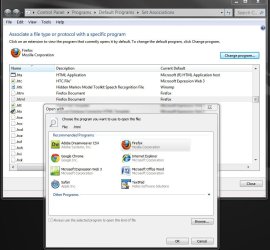
yes, I see that. "Firefox" is there and I can select it. But I need to change Firefox to add a "-profile whatever" so when it runs it runs properly. Right now "Firefox" is just firefox.exe probably. How can I append a switch to it? I see no where I can actually change what "Firefox" is actually executing. I can only select it.
 

Attachments

  • eg.jpg
    eg.jpg
    143 KB · Views: 13

My Computer

Computer Manufacturer/Model Number
N/A
OS
Windows 7 64bit
CPU
N/A
Motherboard
N/A
Memory
N/A
Graphics Card(s)
N/A
Sound Card
N/A
Monitor(s) Displays
N/A
Hard Drives
N/A
PSU
N/A
Case
N/A
Cooling
N/A
seavixen32, that won't allow him to specify which user to automatically connect with, no way to add -P profilename.

I don't know of any way to do this? I always get the Profile Manager screen with my default preselected but I still need to click OK for it to continue.

Edit: I wonder if you could select a batch file then have the batch file start Firefox with the -P info and the web site to open?

Edit#2: Nope, that doesn't work, just tried it.
 

My Computer

Computer type
PC/Desktop
Computer Manufacturer/Model Number
Lenovo IdeaCenter 450
OS
Windows 10 Pro X64
CPU
Intel Quad Core i7-4770 @ 3.4Ghz
Memory
16.0GB PC3-12800 DDR3 SDRAM 1600 MHz
Graphics Card(s)
Intel Integrated HD Graphics
Sound Card
Realtek HD Audio
Monitor(s) Displays
HP 22" LCD
Screen Resolution
1680 x 1050
Hard Drives
250GB Samsung EVO SATA-3 SSD
2TB Seagate ST2000DM001 SATA-2
1.5TB Seagate ST3150041AS SATA
Keyboard
Dell USB
Mouse
Lenovo USB
Internet Speed
Cable via Road Runner 3MB Upload, 30MB Download
Antivirus
Windows Defender, MBAM Pro, MBAE
Browser
Seamonkey
Other Info
UEFI/GPT
PLDS DVD-RW DH16AERSH
I could probably do a batch file thing, but thats ugly. I can't believe I can't just add a switch to the program's command line. Anyone know where exactly in the registry this command line can be found for .html?
 

My Computer

Computer Manufacturer/Model Number
N/A
OS
Windows 7 64bit
CPU
N/A
Motherboard
N/A
Memory
N/A
Graphics Card(s)
N/A
Sound Card
N/A
Monitor(s) Displays
N/A
Hard Drives
N/A
PSU
N/A
Case
N/A
Cooling
N/A
HKEY_CLASSES_ROOT\.html but the info there point to a CSID, not a program name and there is no way to add a parameter.
 

My Computer

Computer type
PC/Desktop
Computer Manufacturer/Model Number
Lenovo IdeaCenter 450
OS
Windows 10 Pro X64
CPU
Intel Quad Core i7-4770 @ 3.4Ghz
Memory
16.0GB PC3-12800 DDR3 SDRAM 1600 MHz
Graphics Card(s)
Intel Integrated HD Graphics
Sound Card
Realtek HD Audio
Monitor(s) Displays
HP 22" LCD
Screen Resolution
1680 x 1050
Hard Drives
250GB Samsung EVO SATA-3 SSD
2TB Seagate ST2000DM001 SATA-2
1.5TB Seagate ST3150041AS SATA
Keyboard
Dell USB
Mouse
Lenovo USB
Internet Speed
Cable via Road Runner 3MB Upload, 30MB Download
Antivirus
Windows Defender, MBAM Pro, MBAE
Browser
Seamonkey
Other Info
UEFI/GPT
PLDS DVD-RW DH16AERSH
I found where it is.
HKEY_CLASSES_ROOT\FirefoxHTML\shell\open\command

But when I try to add -profile c:\users\whatever it doesn't like it. It only wants a path to an exe for some reason. I tried all kinds of various double quote attempts.
 

My Computer

Computer Manufacturer/Model Number
N/A
OS
Windows 7 64bit
CPU
N/A
Motherboard
N/A
Memory
N/A
Graphics Card(s)
N/A
Sound Card
N/A
Monitor(s) Displays
N/A
Hard Drives
N/A
PSU
N/A
Case
N/A
Cooling
N/A
You found the right registry key. On my system it looks like this:
Code:
Windows Registry Editor Version 5.00

[HKEY_CURRENT_USER\Software\Classes\FirefoxHTML\shell\open\command]
@="\"C:\\Program Files\\Mozilla Firefox\\firefox.exe\" -requestPending -osint -url \"%1\""
If you change the line at the end to read
-requestPending -osint -profile \"full path to your profile here\" -url \"%1\""
it should work correctly, once you save this as a .reg file and merge it in.

If you want to make the edit yourself using regedit, simply insert -profile "full path to your profile here" between the -osint and -url parameters.
Note that in this case, the quote marks do not have preceding backslashes.

EDIT: I just realized there are two occurrences of the FirefoxHTML key, one under HKEY_CURRENT_USER\Software\Classes and one under HKEY_CLASSES_ROOT. You can choose to edit both simultaneously, or try just one and see if it's the one that sticks.


My Computer

Computer type
PC/Desktop
Computer Manufacturer/Model Number
Custom-built
OS
Windows 7 Professional SP1 32-bit
CPU
Intel Core 2 Duo E6600 2.4GHz
Motherboard
Asus PL5D2
Memory
4GB DDR2-667 (4x1GB in dual-channel config)
Graphics Card(s)
nVidia GeForce 9800 GT
Sound Card
Creative X-Fi XtremeMusic
Monitor(s) Displays
Acer P236H
Screen Resolution
1920x1200 (DVI)
Hard Drives
OCZ SSD Vertex Plus 60GB SATA (Firmware 3.55), 64MB cache
Hitachi HD321KJ SATA, 320GB, 7200rpm, 16MB cache
PSU
Antec TruePower 2.0
Case
Cooler Master Centurion
Cooling
Too many fans
Keyboard
Standard
Mouse
Microsoft wireless optical mouse
Internet Speed
AT&T U-verse (18mbit/sec)
Antivirus
Microsoft Security Essentials
Browser
Firefox
Other Info
Other devices:
Compaq CQ-60 laptop
Google Nexus 7 (2012) tablet
Nvidia SHIELD tablet (US/LTE)
Hardkernel ODROID-XU single-board computer (Samsung Exynos 5420)
I tried this, it didn't work. Can you copy/paste your REG_SZ value for HKEY_CLASSES_ROOT\FirefoxHTML\shell\open\command ?

I didn't use regedit to import. I'm trying to edit the registry directly.
 

My Computer

Computer Manufacturer/Model Number
N/A
OS
Windows 7 64bit
CPU
N/A
Motherboard
N/A
Memory
N/A
Graphics Card(s)
N/A
Sound Card
N/A
Monitor(s) Displays
N/A
Hard Drives
N/A
PSU
N/A
Case
N/A
Cooling
N/A
Won't this cause a problem if someone else is using the computer? They double click on a html file and your Firefox profile starts.
 

My Computer

Computer type
PC/Desktop
Computer Manufacturer/Model Number
Lenovo IdeaCenter 450
OS
Windows 10 Pro X64
CPU
Intel Quad Core i7-4770 @ 3.4Ghz
Memory
16.0GB PC3-12800 DDR3 SDRAM 1600 MHz
Graphics Card(s)
Intel Integrated HD Graphics
Sound Card
Realtek HD Audio
Monitor(s) Displays
HP 22" LCD
Screen Resolution
1680 x 1050
Hard Drives
250GB Samsung EVO SATA-3 SSD
2TB Seagate ST2000DM001 SATA-2
1.5TB Seagate ST3150041AS SATA
Keyboard
Dell USB
Mouse
Lenovo USB
Internet Speed
Cable via Road Runner 3MB Upload, 30MB Download
Antivirus
Windows Defender, MBAM Pro, MBAE
Browser
Seamonkey
Other Info
UEFI/GPT
PLDS DVD-RW DH16AERSH
Please elaborate on what you mean by "it didn't work." Exactly how did you proceed?


The REG_SZ string as it appears in my Registry reads as follows (I did a direct copy/paste from regedit):

"C:\Program Files\Mozilla Firefox\firefox.exe" -requestPending -osint -url "%1"

You should change this as follows:

"C:\Program Files\Mozilla Firefox\firefox.exe" -requestPending -osint -profile "full path to your profile here" -url "%1"

for example, if your profile is in C:\Users\Me\Some\Path, the string would read:

"C:\Program Files\Mozilla Firefox\firefox.exe" -requestPending -osint -profile "C:\Users\Me\Some\Path" -url "%1"


My Computer

Computer type
PC/Desktop
Computer Manufacturer/Model Number
Custom-built
OS
Windows 7 Professional SP1 32-bit
CPU
Intel Core 2 Duo E6600 2.4GHz
Motherboard
Asus PL5D2
Memory
4GB DDR2-667 (4x1GB in dual-channel config)
Graphics Card(s)
nVidia GeForce 9800 GT
Sound Card
Creative X-Fi XtremeMusic
Monitor(s) Displays
Acer P236H
Screen Resolution
1920x1200 (DVI)
Hard Drives
OCZ SSD Vertex Plus 60GB SATA (Firmware 3.55), 64MB cache
Hitachi HD321KJ SATA, 320GB, 7200rpm, 16MB cache
PSU
Antec TruePower 2.0
Case
Cooler Master Centurion
Cooling
Too many fans
Keyboard
Standard
Mouse
Microsoft wireless optical mouse
Internet Speed
AT&T U-verse (18mbit/sec)
Antivirus
Microsoft Security Essentials
Browser
Firefox
Other Info
Other devices:
Compaq CQ-60 laptop
Google Nexus 7 (2012) tablet
Nvidia SHIELD tablet (US/LTE)
Hardkernel ODROID-XU single-board computer (Samsung Exynos 5420)
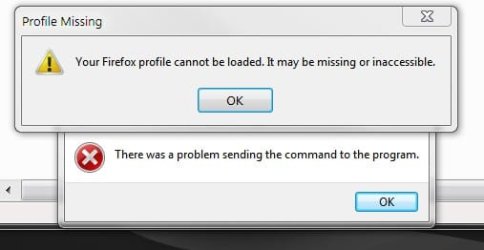
I've attached the errors I get when I click a .url file. I was actually working with FirefoxURL. THe path to the profile is fine, I use it in shortcuts now.
 

Attachments

  • error.jpg
    error.jpg
    26.1 KB · Views: 9

My Computer

Computer Manufacturer/Model Number
N/A
OS
Windows 7 64bit
CPU
N/A
Motherboard
N/A
Memory
N/A
Graphics Card(s)
N/A
Sound Card
N/A
Monitor(s) Displays
N/A
Hard Drives
N/A
PSU
N/A
Case
N/A
Cooling
N/A
Could you show me the exact string you put into your Registry for the FirefoxHTML-etc. key?
 

My Computer

Computer type
PC/Desktop
Computer Manufacturer/Model Number
Custom-built
OS
Windows 7 Professional SP1 32-bit
CPU
Intel Core 2 Duo E6600 2.4GHz
Motherboard
Asus PL5D2
Memory
4GB DDR2-667 (4x1GB in dual-channel config)
Graphics Card(s)
nVidia GeForce 9800 GT
Sound Card
Creative X-Fi XtremeMusic
Monitor(s) Displays
Acer P236H
Screen Resolution
1920x1200 (DVI)
Hard Drives
OCZ SSD Vertex Plus 60GB SATA (Firmware 3.55), 64MB cache
Hitachi HD321KJ SATA, 320GB, 7200rpm, 16MB cache
PSU
Antec TruePower 2.0
Case
Cooler Master Centurion
Cooling
Too many fans
Keyboard
Standard
Mouse
Microsoft wireless optical mouse
Internet Speed
AT&T U-verse (18mbit/sec)
Antivirus
Microsoft Security Essentials
Browser
Firefox
Other Info
Other devices:
Compaq CQ-60 laptop
Google Nexus 7 (2012) tablet
Nvidia SHIELD tablet (US/LTE)
Hardkernel ODROID-XU single-board computer (Samsung Exynos 5420)
"C:\Program Files (x86)\Mozilla Firefox 7\firefox.exe" -requestPending -osint -profile "C:\Users\MyName\AppData\Roaming\Mozilla\Firefox\Profiles\ya51kf7t.default" -url "%1"
 

My Computer

Computer Manufacturer/Model Number
N/A
OS
Windows 7 64bit
CPU
N/A
Motherboard
N/A
Memory
N/A
Graphics Card(s)
N/A
Sound Card
N/A
Monitor(s) Displays
N/A
Hard Drives
N/A
PSU
N/A
Case
N/A
Cooling
N/A
OK, the registry key is perfect. That's not the problem. Somehow Firefox just won't load your profile using this method; I don't know why - perhaps you can ask on Mozilla's forums and get an answer there.

There is another option according to this page:
Command - Result - Example

profile "<path>" - Starts with profile located at the given path - firefox.exe -profile "E:\myprofile"

P "<profile name>"
- Starts with a given profile name (case sensitive) - firefox.exe -P "Joel User"
Try using the -P option instead of -profile. Does that work?

I wonder what the -requestPending and -osint switches do, I can't find any info about them. Perhaps they conflict somehow.
 
Last edited:

My Computer

Computer type
PC/Desktop
Computer Manufacturer/Model Number
Custom-built
OS
Windows 7 Professional SP1 32-bit
CPU
Intel Core 2 Duo E6600 2.4GHz
Motherboard
Asus PL5D2
Memory
4GB DDR2-667 (4x1GB in dual-channel config)
Graphics Card(s)
nVidia GeForce 9800 GT
Sound Card
Creative X-Fi XtremeMusic
Monitor(s) Displays
Acer P236H
Screen Resolution
1920x1200 (DVI)
Hard Drives
OCZ SSD Vertex Plus 60GB SATA (Firmware 3.55), 64MB cache
Hitachi HD321KJ SATA, 320GB, 7200rpm, 16MB cache
PSU
Antec TruePower 2.0
Case
Cooler Master Centurion
Cooling
Too many fans
Keyboard
Standard
Mouse
Microsoft wireless optical mouse
Internet Speed
AT&T U-verse (18mbit/sec)
Antivirus
Microsoft Security Essentials
Browser
Firefox
Other Info
Other devices:
Compaq CQ-60 laptop
Google Nexus 7 (2012) tablet
Nvidia SHIELD tablet (US/LTE)
Hardkernel ODROID-XU single-board computer (Samsung Exynos 5420)
I gave up and made the files open in IE instead. Thanks for your help anyway.
 

My Computer

Computer Manufacturer/Model Number
N/A
OS
Windows 7 64bit
CPU
N/A
Motherboard
N/A
Memory
N/A
Graphics Card(s)
N/A
Sound Card
N/A
Monitor(s) Displays
N/A
Hard Drives
N/A
PSU
N/A
Case
N/A
Cooling
N/A
Solved

I realize this is a ridiculously old thread, but I did a decent amount of searching on two different occasions and this is the only place I could find that mentioned the specific issue I was dealing with.

Now that I finally determined a solution, I figured I would post it here for anyone else who finds this thread:

All I had to do was change the order of the profiles as listed in the profiles.ini...

So you navigate to:

C:\Users\MyName\AppData\Roaming\Mozilla\Firefox


And there should be a "profiles.ini"

Just open that in Notepad and swap the info of the current profile that opens HTML files with the info of the profile that you want.

Code:
[General]
StartWithLastProfile=1

[Profile0]
Name=default
IsRelative=1
Path=Profiles/lkweHj43.default
Default=1

[Profile1]
Name=MyCustomProfile
IsRelative=1
Path=Profiles/kjwudkfm.MyCustomProfile
With this configuration, the default profile handles HTML files.
Just swap the relevant info and put the profile you want under "[Profile0]" and above "Default=1"...

Code:
[General]
StartWithLastProfile=1

[Profile0]
Name=MyCustomProfile
IsRelative=1
Path=Profiles/kjwudkfm.MyCustomProfile
Default=1

[Profile1]
Name=default
IsRelative=1
Path=Profiles/lkweHj43.default
Now "MyCustomProfile" will open HTML files.
 

My Computer

Computer type
PC/Desktop
OS
Windows 7 Ultimate x64
Back
Top