- Local time
- 7:25 PM
- Messages
- 396
Anyone know how to do this in command prompt?
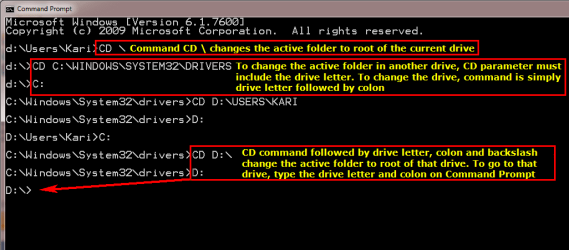
I type "cd .." a few times to get to to C:\
Then when I type "cd e:\" I see E:\ below the command line but I'm still in C:\.
Can anyone help?
Edit: Nevermind, manage to get it working. Just had to type "E:" instead of using CD beforehand. So used to linux.
I type "cd .." a few times to get to to C:\
Then when I type "cd e:\" I see E:\ below the command line but I'm still in C:\.
Can anyone help?
Edit: Nevermind, manage to get it working. Just had to type "E:" instead of using CD beforehand. So used to linux.
My Computer
- Computer Manufacturer/Model Number
- Desktop
- OS
- Windows 7 Professional x64
- CPU
- Intel i5-2500k @ 3.3Ghz
- Motherboard
- Gigabyte GA-Z77X-UD5H
- Memory
- 4GB DDR3
- Graphics Card(s)
- Nvidia GTS250 1GB
- Monitor(s) Displays
- Sony SDM S95A
- Screen Resolution
- 1280x1024
- Hard Drives
- 1x 1TB, 2x 250GB HDDs
- PSU
- Corsair HX850W
- Case
- Cooler Master 690 II
- Cooling
- Thermalright True Spirit 140mm & 3x 120mm & 3x 140mm Fans
- Keyboard
- Logitech Media Keyboard
- Mouse
- Microsoft Intellimouse
- Internet Speed
- 8MB


 ) of either the current drive or another drive. If you use CD command to change active folder in another drive than where you currently are, the change can be seen next time you change the active drive.