
Change Effect

ilyabyk83

New member
Member
Local time
3:49 PM
Messages
80
Location
NE of US (Northeast of Pennsylvania)
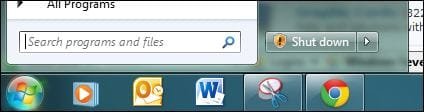
Hi folks. I want to change "Shut Down" that you see in the picture.

When I right-click on the start orb and chose "Properties" and change the "Power Button Action" setting to ANY selection and press "Apply" after, this doesn't change. Please advise how to change the button action, to "Suspend" or "Hibernate"?? Thank you
 

Attachments
  • Suspened Button Change.JPG
    Suspened Button Change.JPG
    16.5 KB · Views: 5
Last edited by a moderator:

My Computer

Computer type
PC/Desktop
Computer Manufacturer/Model Number
*MY* production
OS
Microsoft Windows 7 Ultimate 64Bit
CPU
Intel(R) i7(TM) @ 3.50GHz
Motherboard
ASUS P34
Memory
32GB
Graphics Card(s)
NVIDIA GeForce 9500 GT 1GB
Sound Card
some onboard sound
Monitor(s) Displays
Dell E228WFP
Screen Resolution
1680x1050 pixs
Hard Drives
Western Digital Caviar 2TB

Western Digital Passport 320GB
(portable drive)

OCZ Vector 256GB SSD
PSU
Antec 750W
Case
Coolermaster Storm Scout
Cooling
ZALMAN 120mm 2 Ball Cooling Fan x 4
Keyboard
A4Tech
Mouse
A4Tech NB-75D (Battery Free)
Internet Speed
Comcast Cable Internet
Browser
Google Chrome
Other Info
Second machine I built
Hello Ilya,

This is actually Install Updates and Shut Down you are seeing instead. When enabled as it is by defautl, it will override and display as the default option in the Shut Down Windows dialog box and Start Menu power button (alert shield on Shut Down button) when important or critical Windows Updates are available.

Basically it's temporarily overriding what you have set for the power button until the Windows Updates are installed. If you like, you can use the tutorial below to disable Install Updates and Shut Down to always have the power button action you selected instead.

http://www.sevenforums.com/tutorial...enable-disable-install-updates-shut-down.html

Hope this helps,
Shawn
 

My Computer

Computer type
PC/Desktop
Computer Manufacturer/Model Number
Self built custom
OS
64-bit Windows 11 Pro for Workstations
CPU
Intel i7-8700K OC'd to 5 GHz
Motherboard
ASUS ROG Maximus XI Formula Z390
Memory
64 GB (4x16GB) G.SKILL TridentZ RGB DDR4 3600 MHz
Graphics Card(s)
ASUS ROG-STRIX-GTX1080TI-O11G-GAMING
Sound Card
Integrated
Monitor(s) Displays
2 x Samsung Odyssey G7 27"
Screen Resolution
2560x1440
Hard Drives
1TB Samsung 990 PRO M.2,
4TB Samsung 990 PRO PRO M.2,
TerraMaster F8 SSD Plus NAS
PSU
Seasonic Prime Titanium 850W
Case
Thermaltake Core P3
Cooling
Corsair Hydro H115i
Keyboard
Logitech wireless K800
Mouse
Logitech MX Master 4
Internet Speed
2 Gb/s Download and 100 Mb/s Upload
Antivirus
Malwarebyte Anti-Malware Premium
Browser
Google Chrome
Other Info
Logitech Z625 speaker system,
Logitech BRIO 4K Pro webcam,
HP Color LaserJet Pro MFP M477fdn,
APC SMART-UPS RT 1000 XL - SURT1000XLI,
Galaxy S23 Plus phone
Hello Ilya,

This is actually Install Updates and Shut Down you are seeing instead. When enabled as it is by defautl, it will override and display as the default option in the Shut Down Windows dialog box and Start Menu power button (alert shield on Shut Down button) when important or critical Windows Updates are available.

Basically it's temporarily overriding what you have set for the power button until the Windows Updates are installed. If you like, you can use the tutorial below to disable Install Updates and Shut Down to always have the power button action you selected instead.

http://www.sevenforums.com/tutorial...enable-disable-install-updates-shut-down.html

Hope this helps,
Shawn
Thank You. But how come Windows is not prompting me to install any?? How do I fix this?? Thanx!!!
 

My Computer

Computer type
PC/Desktop
Computer Manufacturer/Model Number
*MY* production
OS
Microsoft Windows 7 Ultimate 64Bit
CPU
Intel(R) i7(TM) @ 3.50GHz
Motherboard
ASUS P34
Memory
32GB
Graphics Card(s)
NVIDIA GeForce 9500 GT 1GB
Sound Card
some onboard sound
Monitor(s) Displays
Dell E228WFP
Screen Resolution
1680x1050 pixs
Hard Drives
Western Digital Caviar 2TB

Western Digital Passport 320GB
(portable drive)

OCZ Vector 256GB SSD
PSU
Antec 750W
Case
Coolermaster Storm Scout
Cooling
ZALMAN 120mm 2 Ball Cooling Fan x 4
Keyboard
A4Tech
Mouse
A4Tech NB-75D (Battery Free)
Internet Speed
Comcast Cable Internet
Browser
Google Chrome
Other Info
Second machine I built
It doesn't prompt you to. When you click on the power button with "Shut down" and the little shield icon on it, Windows will just automatically start installing the updates first, then shut down the computer when finished. If you like, you could use the tutorial to disable this.
 

My Computer

Computer type
PC/Desktop
Computer Manufacturer/Model Number
Self built custom
OS
64-bit Windows 11 Pro for Workstations
CPU
Intel i7-8700K OC'd to 5 GHz
Motherboard
ASUS ROG Maximus XI Formula Z390
Memory
64 GB (4x16GB) G.SKILL TridentZ RGB DDR4 3600 MHz
Graphics Card(s)
ASUS ROG-STRIX-GTX1080TI-O11G-GAMING
Sound Card
Integrated
Monitor(s) Displays
2 x Samsung Odyssey G7 27"
Screen Resolution
2560x1440
Hard Drives
1TB Samsung 990 PRO M.2,
4TB Samsung 990 PRO PRO M.2,
TerraMaster F8 SSD Plus NAS
PSU
Seasonic Prime Titanium 850W
Case
Thermaltake Core P3
Cooling
Corsair Hydro H115i
Keyboard
Logitech wireless K800
Mouse
Logitech MX Master 4
Internet Speed
2 Gb/s Download and 100 Mb/s Upload
Antivirus
Malwarebyte Anti-Malware Premium
Browser
Google Chrome
Other Info
Logitech Z625 speaker system,
Logitech BRIO 4K Pro webcam,
HP Color LaserJet Pro MFP M477fdn,
APC SMART-UPS RT 1000 XL - SURT1000XLI,
Galaxy S23 Plus phone
I know exactly what you are saying. I just don't understand what I have to do with it? And why wasn't I able to change the effect of the button? Because of some update that doesn't install automatically with all others that DO?? My Windows updates on his own, it only asks for my permission to restart, afterwards.
It doesn't prompt you to. When you click on the power button with "Shut down" and the little shield icon on it, Windows will just automatically start installing the updates first, then shut down the computer when finished. If you like, you could use the tutorial to disable this.
 

My Computer

Computer type
PC/Desktop
Computer Manufacturer/Model Number
*MY* production
OS
Microsoft Windows 7 Ultimate 64Bit
CPU
Intel(R) i7(TM) @ 3.50GHz
Motherboard
ASUS P34
Memory
32GB
Graphics Card(s)
NVIDIA GeForce 9500 GT 1GB
Sound Card
some onboard sound
Monitor(s) Displays
Dell E228WFP
Screen Resolution
1680x1050 pixs
Hard Drives
Western Digital Caviar 2TB

Western Digital Passport 320GB
(portable drive)

OCZ Vector 256GB SSD
PSU
Antec 750W
Case
Coolermaster Storm Scout
Cooling
ZALMAN 120mm 2 Ball Cooling Fan x 4
Keyboard
A4Tech
Mouse
A4Tech NB-75D (Battery Free)
Internet Speed
Comcast Cable Internet
Browser
Google Chrome
Other Info
Second machine I built
The information in the tutorial above can give you more details about this and it's purpose to help.

When you have Windows Update set to install automatically, it only installs them at the time you have set in Windows Update settings. By default 3AM. If you have updates available to install until this scheduled time occurs, then this would be why you have this power button taken over like this. The power button will not go back to what you had it's action (ex: suspend, hibernate, etc...) set for until after these updates are installed either using the "Shut down" power button or through Windows Update. If you use the "Shut down" button, then you told it to install the updates and shut down the computer afterwards. This is why it doesn't ask for your permission first since you just gave it by clicking on "Shut down".
 

My Computer

Computer type
PC/Desktop
Computer Manufacturer/Model Number
Self built custom
OS
64-bit Windows 11 Pro for Workstations
CPU
Intel i7-8700K OC'd to 5 GHz
Motherboard
ASUS ROG Maximus XI Formula Z390
Memory
64 GB (4x16GB) G.SKILL TridentZ RGB DDR4 3600 MHz
Graphics Card(s)
ASUS ROG-STRIX-GTX1080TI-O11G-GAMING
Sound Card
Integrated
Monitor(s) Displays
2 x Samsung Odyssey G7 27"
Screen Resolution
2560x1440
Hard Drives
1TB Samsung 990 PRO M.2,
4TB Samsung 990 PRO PRO M.2,
TerraMaster F8 SSD Plus NAS
PSU
Seasonic Prime Titanium 850W
Case
Thermaltake Core P3
Cooling
Corsair Hydro H115i
Keyboard
Logitech wireless K800
Mouse
Logitech MX Master 4
Internet Speed
2 Gb/s Download and 100 Mb/s Upload
Antivirus
Malwarebyte Anti-Malware Premium
Browser
Google Chrome
Other Info
Logitech Z625 speaker system,
Logitech BRIO 4K Pro webcam,
HP Color LaserJet Pro MFP M477fdn,
APC SMART-UPS RT 1000 XL - SURT1000XLI,
Galaxy S23 Plus phone
Back
Top