

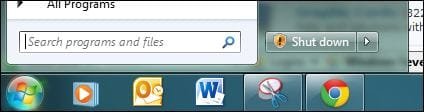
Hi folks. I want to change "Shut Down" that you see in the picture.
When I right-click on the start orb and chose "Properties" and change the "Power Button Action" setting to ANY selection and press "Apply" after, this doesn't change. Please advise how to change the button action, to "Suspend" or "Hibernate"?? Thank you
When I right-click on the start orb and chose "Properties" and change the "Power Button Action" setting to ANY selection and press "Apply" after, this doesn't change. Please advise how to change the button action, to "Suspend" or "Hibernate"?? Thank you
Attachments
Last edited by a moderator:
My Computer
- Computer type
- PC/Desktop
- Computer Manufacturer/Model Number
- *MY* production
- OS
- Microsoft Windows 7 Ultimate 64Bit
- CPU
- Intel(R) i7(TM) @ 3.50GHz
- Motherboard
- ASUS P34
- Memory
- 32GB
- Graphics Card(s)
- NVIDIA GeForce 9500 GT 1GB
- Sound Card
- some onboard sound
- Monitor(s) Displays
- Dell E228WFP
- Screen Resolution
- 1680x1050 pixs
- Hard Drives
- Western Digital Caviar 2TB
Western Digital Passport 320GB
(portable drive)
OCZ Vector 256GB SSD
- PSU
- Antec 750W
- Case
- Coolermaster Storm Scout
- Cooling
- ZALMAN 120mm 2 Ball Cooling Fan x 4
- Keyboard
- A4Tech
- Mouse
- A4Tech NB-75D (Battery Free)
- Internet Speed
- Comcast Cable Internet
- Browser
- Google Chrome
- Other Info
- Second machine I built
