
coolman007
New member
Hello,
I have a small problem with a button in control panel that doesn't seem to work!
When i go to the Clock, language and region>Change display language, and go to the keyboards and Languages tab, and press the Change keyboards button.... Nothing seems to happen!
I have no idea how to fix it, but i really need it to change my default language.
Can you please help?
Thanks for reading!
The picture:
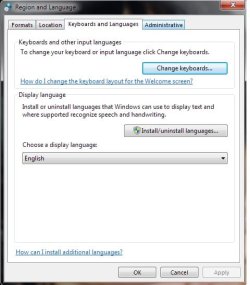
I have a small problem with a button in control panel that doesn't seem to work!
When i go to the Clock, language and region>Change display language, and go to the keyboards and Languages tab, and press the Change keyboards button.... Nothing seems to happen!
I have no idea how to fix it, but i really need it to change my default language.
Can you please help?
Thanks for reading!
The picture:
My Computer
- Computer type
- PC/Desktop
- Computer Manufacturer/Model Number
- Custom
- OS
- Windows 7 Ultimate x64
- CPU
- Intel i3 2100 @ 3.1GHz
- Motherboard
- MSI H61M-P21 (MS-7680)
- Memory
- Kingston DDR3 4GB
- Graphics Card(s)
- Nvidia geforce gt 440
- Hard Drives
- I don't know
- Antivirus
- avast
- Browser
- Google Chrome


