Change margin when using magnifying tool and panning around

Machariel

New member
Local time
4:10 PM
Messages
34
Hello everybody.


I use the windows 7 magnifying tool ("WIN-key" + "+") because a certain chess-related software displays the chess board in a too small of a format.


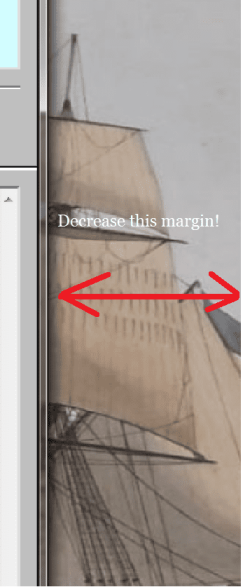
So, I magnify and by moving the mouse pointer to the edges of the visible screen (viewport), the screen pans. So if one moves the pointer to the left edge, the entire viewport pans to the left. But the margins are too big. See screenshot; is there a way to decrease this margin with some advanced registry setting or something?


Take care everybody!
 

Attachments
  • margin.png
    margin.png
    184.1 KB · Views: 1

My Computers

System One System Two

  • Computer type
    Laptop
    Computer Manufacturer/Model Number
    BTO Notebooks (bto.eu) V-Book 17CL23
    OS
    Windows 7 Pro x64 OEM
    CPU
    I3 6100H
    Motherboard
    ?
    Memory
    8 GB DDRL (1866 Mhz) Crucial Performance
    Graphics Card(s)
    on chip
    Sound Card
    Realtek PRo
    Hard Drives
    INSSD-GM M.2 128GB Solid State
    Internet Speed
    100MB/s down+ 100 MB/s up
    Browser
    Firefox
    Other Info
    Custom built laptop by BTO, model from July 2016/
  • Computer type
    PC/Desktop
    System Manufacturer/Model Number
    Home Built
    OS
    Win 10 UK FPP
    CPU
    Ryzen 7 2700X
    Motherboard
    MSI X570 Gaming Edge WIFI
    Memory
    Corsair 16 GB DDR4-3200 Kit
    Graphics Card(s)
    MSI GeForce GTX 1660 Ti GAMING X 6G
    PSU
    Corsair TX850M
    Case
    Cooler Master HAF 932
    Cooling
    be quiet! Dark Rock 4
    Browser
    Firefox
Hello Machariel

I am thinking that you are requesting to adjust the size (width) of the Window?

You should be able to adjust the width of the Window by hovering the mouse pointer over the margin border, and dragging the border with the mouse.

The mouse cursor will change to a bi-directional arrow, when you have found the right location on the Window border.

When the bi-directional arrow mouse pointer appears, just hold mouse button down and drag the boarder to where you want it to be.

This tip should work with the magnifying glass turned on or off.

Hope that helps.
 

My Computer

Computer type
PC/Desktop
OS
Windows 7 x64, Vista x64, 8.1 smartphone
CPU
Intel E8400 65W 64-bit
Motherboard
Gigabyte EP45-UD3LR
Memory
DDR2 2 x 2GB, 1GB x 2
Graphics Card(s)
XFX Radeon HD5750
Sound Card
AMD High Definition Audio; Realtek High Definition Audio
Monitor(s) Displays
iiyama prolite X2377HDS
Screen Resolution
1920 x 1080
Hard Drives
500GB 7200 rpm Seagate ST3500413AS 16MB, 500GB 5400 rpm Toshiba MQ02ABF050H 32MB, 200GB 7200 rpm Seagate ST3200820AS 8MB, 2TB 7200 rpm Western Digital WD20EZRX 64MB
PSU
Enermax Liberty Modular
Case
Antec P193 Midi Tower
Keyboard
Mionix ZIBAL 60
Mouse
Razer USB 2.0 Diamondback Mouse or Huion Graphics Tablet
Browser
Internet Explorer, Lunascape, Firefox, Opera, Avast Safezone
Hi Iko22. No, that's not the question. Just run the magnifying glass and then move your mousepointer to the border. You'll see your viewport will go to where you mouse is. Just try it. And from there you'll understand my question.


Cheers mate!
 

My Computers

System One System Two

  • Computer type
    Laptop
    Computer Manufacturer/Model Number
    BTO Notebooks (bto.eu) V-Book 17CL23
    OS
    Windows 7 Pro x64 OEM
    CPU
    I3 6100H
    Motherboard
    ?
    Memory
    8 GB DDRL (1866 Mhz) Crucial Performance
    Graphics Card(s)
    on chip
    Sound Card
    Realtek PRo
    Hard Drives
    INSSD-GM M.2 128GB Solid State
    Internet Speed
    100MB/s down+ 100 MB/s up
    Browser
    Firefox
    Other Info
    Custom built laptop by BTO, model from July 2016/
  • Computer type
    PC/Desktop
    System Manufacturer/Model Number
    Home Built
    OS
    Win 10 UK FPP
    CPU
    Ryzen 7 2700X
    Motherboard
    MSI X570 Gaming Edge WIFI
    Memory
    Corsair 16 GB DDR4-3200 Kit
    Graphics Card(s)
    MSI GeForce GTX 1660 Ti GAMING X 6G
    PSU
    Corsair TX850M
    Case
    Cooler Master HAF 932
    Cooling
    be quiet! Dark Rock 4
    Browser
    Firefox
Hello

Yes, if I turn on magnifier (Win key + "+") on my computer, I get a viewport that is a 200% magnification of the screen.

If I move the mouse left or right, then the viewport changes to show the area of the desktop or an area of any open window or the task bar , all zoomed in at 200%.

If I press Win key + "+" again, I get a viewport that now shows the screen (desktop + open windows + taskbar) zoomed in at 300%.

The size of the mouse pointer also changes size proportional to the size of the magnification.

Now I look at your screenshot. It shows an area of the desktop and an area of an open window. You have added two arrrows indicating a "margin".

Regradless of the Viewport magnification, I am suggesting that you can narrow the "margin" that you have drawn by increasing the width of the visible window. Increasing the width of the visible window can be acheived by selecting the window's border and then dragging the border outwards with the mouse pointer.

Please tell me if your own thinking is different to mine and where there is problem.
 

My Computer

Computer type
PC/Desktop
OS
Windows 7 x64, Vista x64, 8.1 smartphone
CPU
Intel E8400 65W 64-bit
Motherboard
Gigabyte EP45-UD3LR
Memory
DDR2 2 x 2GB, 1GB x 2
Graphics Card(s)
XFX Radeon HD5750
Sound Card
AMD High Definition Audio; Realtek High Definition Audio
Monitor(s) Displays
iiyama prolite X2377HDS
Screen Resolution
1920 x 1080
Hard Drives
500GB 7200 rpm Seagate ST3500413AS 16MB, 500GB 5400 rpm Toshiba MQ02ABF050H 32MB, 200GB 7200 rpm Seagate ST3200820AS 8MB, 2TB 7200 rpm Western Digital WD20EZRX 64MB
PSU
Enermax Liberty Modular
Case
Antec P193 Midi Tower
Keyboard
Mionix ZIBAL 60
Mouse
Razer USB 2.0 Diamondback Mouse or Huion Graphics Tablet
Browser
Internet Explorer, Lunascape, Firefox, Opera, Avast Safezone
Ah I see. The problem is that I cannot increase this window as it is cheapo-programmed software. It's size is fixed and does not depend on the screen resolution! So now the side mouseborder - to name it like that - has become a nuisance as I need to move the mouse a lot (it's a chess tactics trainer) and I often accidentally come too close to the border, shifting the viewport annoyingly.


So I was hoping the registry or something has this border set somewhere.
But normally you'd be right. I would just have to increase the window I magnified.


But I magnified it in this case because it's fixed and too small. An option is to lower the resolution temporary but meh.
 

My Computers

System One System Two

  • Computer type
    Laptop
    Computer Manufacturer/Model Number
    BTO Notebooks (bto.eu) V-Book 17CL23
    OS
    Windows 7 Pro x64 OEM
    CPU
    I3 6100H
    Motherboard
    ?
    Memory
    8 GB DDRL (1866 Mhz) Crucial Performance
    Graphics Card(s)
    on chip
    Sound Card
    Realtek PRo
    Hard Drives
    INSSD-GM M.2 128GB Solid State
    Internet Speed
    100MB/s down+ 100 MB/s up
    Browser
    Firefox
    Other Info
    Custom built laptop by BTO, model from July 2016/
  • Computer type
    PC/Desktop
    System Manufacturer/Model Number
    Home Built
    OS
    Win 10 UK FPP
    CPU
    Ryzen 7 2700X
    Motherboard
    MSI X570 Gaming Edge WIFI
    Memory
    Corsair 16 GB DDR4-3200 Kit
    Graphics Card(s)
    MSI GeForce GTX 1660 Ti GAMING X 6G
    PSU
    Corsair TX850M
    Case
    Cooler Master HAF 932
    Cooling
    be quiet! Dark Rock 4
    Browser
    Firefox
Ah okay, I understand now! So you cannot change the size of the window to the chess program because it is fixed size? And - should the mouse pointer reach close to the edge of the desktop, then the magnifier viewport annoyingly moves out of scope?

1) Well, one of the Magnifier options is to turn ON/OFF "follow the mouse pointer". See if setting "follow mouse pointer" to OFF (un-check tick box), provides some comfort.

To turn OFF "follow the mouse pointer"
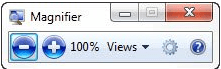
Focus on the Magnifier window (see picture)
Magnifier Window.PNG
Select the symbol that looks like a "gear" or a "cog". This is the settings for the magnifier.
When the Magnifier Options window appears, under the heading "Tracking", un-check the tick box next to "follow the mouse pointer".​

2) Change type of Magnifier
From the Magnifier Window again, next to the "cog" symbol is a tab called "Views (see Picture), where you can also change the magnifier mode from full-screen mode to Docked Mode.

3) Use lower DPI settings
If Magnifier does not do what you want it to, and you cannot change the Window size, then you may prefer to adjust the DPI settings. See tutorial DPI Display Size Settings - Change

Registry Settings
Alas, as far as I am aware, if the program cannot change the size of its window then I would very much doubt that there is a registry setting, for this window size. Where registry settings exist, all references to program's window are adjustable at the GUI by the mouse.

Hope that helps!
 

My Computer

Computer type
PC/Desktop
OS
Windows 7 x64, Vista x64, 8.1 smartphone
CPU
Intel E8400 65W 64-bit
Motherboard
Gigabyte EP45-UD3LR
Memory
DDR2 2 x 2GB, 1GB x 2
Graphics Card(s)
XFX Radeon HD5750
Sound Card
AMD High Definition Audio; Realtek High Definition Audio
Monitor(s) Displays
iiyama prolite X2377HDS
Screen Resolution
1920 x 1080
Hard Drives
500GB 7200 rpm Seagate ST3500413AS 16MB, 500GB 5400 rpm Toshiba MQ02ABF050H 32MB, 200GB 7200 rpm Seagate ST3200820AS 8MB, 2TB 7200 rpm Western Digital WD20EZRX 64MB
PSU
Enermax Liberty Modular
Case
Antec P193 Midi Tower
Keyboard
Mionix ZIBAL 60
Mouse
Razer USB 2.0 Diamondback Mouse or Huion Graphics Tablet
Browser
Internet Explorer, Lunascape, Firefox, Opera, Avast Safezone
Hey thanks for your help, though it's not the window size that needs to be changed, only the initial border margins where the mouse would hit to move the viewport.


But it's OK, one can't have it all. Appreciate your patient help. Have a great weekend!
 

My Computers

System One System Two

  • Computer type
    Laptop
    Computer Manufacturer/Model Number
    BTO Notebooks (bto.eu) V-Book 17CL23
    OS
    Windows 7 Pro x64 OEM
    CPU
    I3 6100H
    Motherboard
    ?
    Memory
    8 GB DDRL (1866 Mhz) Crucial Performance
    Graphics Card(s)
    on chip
    Sound Card
    Realtek PRo
    Hard Drives
    INSSD-GM M.2 128GB Solid State
    Internet Speed
    100MB/s down+ 100 MB/s up
    Browser
    Firefox
    Other Info
    Custom built laptop by BTO, model from July 2016/
  • Computer type
    PC/Desktop
    System Manufacturer/Model Number
    Home Built
    OS
    Win 10 UK FPP
    CPU
    Ryzen 7 2700X
    Motherboard
    MSI X570 Gaming Edge WIFI
    Memory
    Corsair 16 GB DDR4-3200 Kit
    Graphics Card(s)
    MSI GeForce GTX 1660 Ti GAMING X 6G
    PSU
    Corsair TX850M
    Case
    Cooler Master HAF 932
    Cooling
    be quiet! Dark Rock 4
    Browser
    Firefox
Try the Turn OFF follow the mouse pointer option, when you next get a chance.
 

My Computer

Computer type
PC/Desktop
OS
Windows 7 x64, Vista x64, 8.1 smartphone
CPU
Intel E8400 65W 64-bit
Motherboard
Gigabyte EP45-UD3LR
Memory
DDR2 2 x 2GB, 1GB x 2
Graphics Card(s)
XFX Radeon HD5750
Sound Card
AMD High Definition Audio; Realtek High Definition Audio
Monitor(s) Displays
iiyama prolite X2377HDS
Screen Resolution
1920 x 1080
Hard Drives
500GB 7200 rpm Seagate ST3500413AS 16MB, 500GB 5400 rpm Toshiba MQ02ABF050H 32MB, 200GB 7200 rpm Seagate ST3200820AS 8MB, 2TB 7200 rpm Western Digital WD20EZRX 64MB
PSU
Enermax Liberty Modular
Case
Antec P193 Midi Tower
Keyboard
Mionix ZIBAL 60
Mouse
Razer USB 2.0 Diamondback Mouse or Huion Graphics Tablet
Browser
Internet Explorer, Lunascape, Firefox, Opera, Avast Safezone
Nah, you have to keep one option enabled; the checkboxes is a convention-error. They should've been radio buttons. So anyway, one has to keep one option enabled and that causes other annoyances.
 

My Computers

System One System Two

  • Computer type
    Laptop
    Computer Manufacturer/Model Number
    BTO Notebooks (bto.eu) V-Book 17CL23
    OS
    Windows 7 Pro x64 OEM
    CPU
    I3 6100H
    Motherboard
    ?
    Memory
    8 GB DDRL (1866 Mhz) Crucial Performance
    Graphics Card(s)
    on chip
    Sound Card
    Realtek PRo
    Hard Drives
    INSSD-GM M.2 128GB Solid State
    Internet Speed
    100MB/s down+ 100 MB/s up
    Browser
    Firefox
    Other Info
    Custom built laptop by BTO, model from July 2016/
  • Computer type
    PC/Desktop
    System Manufacturer/Model Number
    Home Built
    OS
    Win 10 UK FPP
    CPU
    Ryzen 7 2700X
    Motherboard
    MSI X570 Gaming Edge WIFI
    Memory
    Corsair 16 GB DDR4-3200 Kit
    Graphics Card(s)
    MSI GeForce GTX 1660 Ti GAMING X 6G
    PSU
    Corsair TX850M
    Case
    Cooler Master HAF 932
    Cooling
    be quiet! Dark Rock 4
    Browser
    Firefox
Back
Top