Machariel
New member
- Local time
- 9:37 AM
- Messages
- 34
Hello everybody.
I use the windows 7 magnifying tool ("WIN-key" + "+") because a certain chess-related software displays the chess board in a too small of a format.
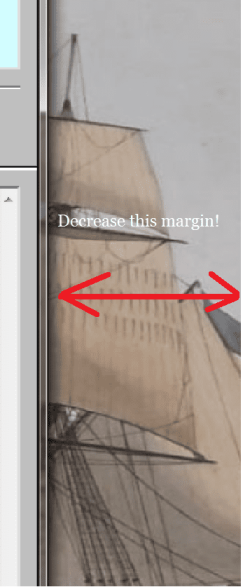
So, I magnify and by moving the mouse pointer to the edges of the visible screen (viewport), the screen pans. So if one moves the pointer to the left edge, the entire viewport pans to the left. But the margins are too big. See screenshot; is there a way to decrease this margin with some advanced registry setting or something?
Take care everybody!
I use the windows 7 magnifying tool ("WIN-key" + "+") because a certain chess-related software displays the chess board in a too small of a format.
So, I magnify and by moving the mouse pointer to the edges of the visible screen (viewport), the screen pans. So if one moves the pointer to the left edge, the entire viewport pans to the left. But the margins are too big. See screenshot; is there a way to decrease this margin with some advanced registry setting or something?
Take care everybody!
Attachments
My Computers
-
At a glance
Windows 7 Pro x64 OEMI3 6100H8 GB DDRL (1866 Mhz) Crucial Performanceon chip- Computer type
- Laptop
- Computer Manufacturer/Model Number
- BTO Notebooks (bto.eu) V-Book 17CL23
- OS
- Windows 7 Pro x64 OEM
- CPU
- I3 6100H
- Motherboard
- ?
- Memory
- 8 GB DDRL (1866 Mhz) Crucial Performance
- Graphics Card(s)
- on chip
- Sound Card
- Realtek PRo
- Hard Drives
- INSSD-GM M.2 128GB Solid State
- Internet Speed
- 100MB/s down+ 100 MB/s up
- Browser
- Firefox
- Other Info
- Custom built laptop by BTO, model from July 2016/
-
At a glance
Win 10 UK FPPRyzen 7 2700XCorsair 16 GB DDR4-3200 KitMSI GeForce GTX 1660 Ti GAMING X 6G- Computer type
- PC/Desktop
- System Manufacturer/Model Number
- Home Built
- OS
- Win 10 UK FPP
- CPU
- Ryzen 7 2700X
- Motherboard
- MSI X570 Gaming Edge WIFI
- Memory
- Corsair 16 GB DDR4-3200 Kit
- Graphics Card(s)
- MSI GeForce GTX 1660 Ti GAMING X 6G
- PSU
- Corsair TX850M
- Case
- Cooler Master HAF 932
- Cooling
- be quiet! Dark Rock 4
- Browser
- Firefox