Change maximized window title font color

Strakele

New member
Local time
10:57 AM
Messages
13
I'm going for a fairly Vista-esque theme in which the taskbar and windows are black. In Vista, the title of an open window in the upper left would be white so it's very easy to read on the black background.

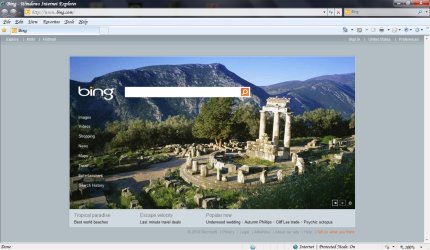
I'd like to do the same thing with W7. I've gone to Advanced Appearance Settings and changed both Active and Inactive Title Bar font to white. When I click apply, it seems to have worked, since the title of most windows become white. However, say for a browser window, when it's not maximized, the title will be white like it should be, but once I maximize the window as it would normally be, the font goes back to black.

Is there a different setting for this?
 

My Computer My Computer

OS
Windows 7 Professional x64
CPU
Intel Core i7 920
Motherboard
Asus P6T Deluxe V2
Memory
12GB G.Skill DDR3
Graphics Card(s)
BFG Tech GTX 280 OCX
I know this post is quite old but I found the theme I've attached. It's called Max Opaque. I would credit the author except I don't remember where I got this from so if the original creator of this theme sees this, sorry for not crediting you.

Regardless, it's not exactly like Vista as it's not completely black but it's as close as I've found and I can tolerate it within Windows 7 considering this was one of the reasons I was holding back from upgrading to Windows 7. The other was WMP 12's interface but the fact that it accelerates pretty much any video files via hardware sold me on the player as a whole even though I still do not like its interface. Alas, here's the theme, let me know how you like it.

Essentially, when you maximize a window, it will make the window color as opaque as Windows 7 allows and have the text on the title bar change from black to white, like in Vista. Tested it on Windows 7 Ultimate, Professional, and Home Premium 32 and 64-bit, works great. You will need to have unsigned themes enabled and then just dump the contents of the ZIP file in C:\Windows\Resources\Themes.

I've also included a screenshot of what it looks like in case you'd like to see it. (Note: I changed the fonts on my PC, the theme itself uses the standard Windows 7 fonts.)
 

Attachments

  • max opaque.zip
    max opaque.zip
    888 KB · Views: 304
  • IE Opaque Theme.jpg
    IE Opaque Theme.jpg
    150.1 KB · Views: 351

My Computer My Computer

OS
Windows 7 Ultimate x64 SP1
CPU
Intel Core i3 530 2.93 Ghz Clarkdale
Motherboard
ASRock P55 PRO/USB3 LGA 1156
Memory
4 GB OCZ DDR3 1600 (PC12800) Low Voltage Desktop Memory
Graphics Card(s)
Nvidia GeForce GTX 550 Ti with 1 GB of RAM
Sound Card
Realtek HD ALC892
Monitor(s) Displays
20'' eMachines E202HDbmd Glare Panel Widescreen
Screen Resolution
1600 x 900
Hard Drives
Western Digital 1 TB Caviar Black Edition (7200 RPM) SATA
Hitachi Deskstar 500 GB (7200 RPM) SATA
Samsung SpinPoint 400 GB (7200 RPM) SATA
PSU
Rosewill Xtreme Series RX750-D-B ATX12V v2.2 & EPS12V (750W)
Case
Cooler Master Centurion 534 RC-534-KKN2-GP Mid-Tower
Cooling
Standard Case Fans and Stock CPU Heatsink
Keyboard
Microsoft Wireless Optical Desktop Elite
Mouse
Microsoft Wireless Optical Desktop Elite
Internet Speed
7.1 Mbps Verizon DSL
Back
Top